
The newer RX 6500 XT is generally slower than the older RX 5500 XT, especially on PCIe 3.0 motherboards, so the RX 5500 XT (ideally the 8 GB version) is the better budget pick for most buyers. The RX 6500 XT only makes sense on a PCIe 4.0 system when it is clearly cheaper, when you want lower power draw, or when you need DirectX 12 Ultimate feature support.
Both cards are old, low-end options in 2026. AMD’s current lineup is the Radeon RX 9000 series, and Intel’s Arc B570 and B580 cover the new-card budget tier. Still, both the RX 5500 XT and RX 6500 XT circulate widely on the used market and in prebuilt office-to-gaming conversions, so the comparison remains relevant for very tight budgets.

ASRock RX 5500 XT Challenger D 4G OC, RDNA, 1845MHz Boost, 4GB GDDR6 128-bit, PCIe 4.0 Graphics Card
Included for 'RX 5500 XT vs RX 6500 XT: Which Graphics Card Should You Buy?' because the listing specifies RDNA and 1845MHz Boost, details this guide uses to compare options.
View on Amazon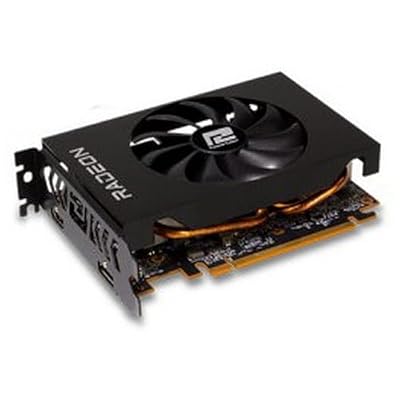
PowerColor AMD Radeon RX 6500 XT ITX Gaming Graphics Card with 4GB GDDR6 Memory
Included for 'RX 5500 XT vs RX 6500 XT: Which Graphics Card Should You Buy?' as a relevant option in this category; details come from the product listing.
View on Amazon
ASRock Radeon RX 6500 XT Phantom Gaming D 4GB OC Graphics Card, 2820 MHz Boost Clock, AMD RDNA 2 Architecture, GDDR6, Dual Fan Cooling, DisplayPort 1.4, HDMI 2.1
Included for 'RX 5500 XT vs RX 6500 XT: Which Graphics Card Should You Buy?' because the listing specifies 2820 MHz Boost Clock and AMD RDNA 2 Architecture, details this guide uses to compare options.
View on AmazonQuick answer: Our top pick in 2026 is the Architecture — our #1 rated choice. See the full ranked comparison, alternatives and buying advice below.
Why the Newer Card Falls Behind
The RX 6500 XT uses a tiny chip originally designed for laptops, where it would pair with a CPU over a short, fast link. On the desktop, AMD cut it down to a 64-bit memory bus and only four PCIe lanes. That works on PCIe 4.0 but halves the available bandwidth on PCIe 3.0, which is what many budget and older systems still use.
| Spec | Radeon RX 5500 XT | Radeon RX 6500 XT |
|---|---|---|
| Architecture | RDNA 1, 7 nm | RDNA 2.0, 6 nm |
| Release date | 12 December 2019 | 19 January 2022 |
| Launch MSRP | $169 (base model) | $199 |
| Stream processors | 1,408 | 1,024 |
| Boost clock | 1,845 MHz | 2,815 MHz |
| Max VRAM | 8 GB GDDR6 | 8 GB GDDR6 |
| Memory bus | 128-bit | 64-bit |
| Memory bandwidth | 224.0 GB/s | 143.9 GB/s |
| Cache | 2 MB L2 | 1 MB L2 + 16 MB L3 Infinity Cache |
| TDP | 130 W | 107 W |
| PCIe interface | PCIe 4.0 x8 | PCIe 4.0 x4 |
| Power connector | 1x 8-pin | 1x 6-pin |
| Reference length / width | 180 mm, 2-slot | Varies by partner, 2-slot |
| Display outputs | 1x HDMI 2.0b, 3x DisplayPort 1.4a | 1x HDMI 2.1, 1x DisplayPort 1.4a |
Both cards were sold in 4 GB and 8 GB versions. The 4 GB versions are far more common on the used market, and the memory size matters a lot for how each card behaves.
Benchmark Results From Major Reviews
On PCIe 4.0
Tom’s Hardware’s launch review found the RX 6500 XT slower than the RX 5500 XT 8 GB and roughly tied with the RX 5500 XT 4 GB that it was meant to replace. So even in the best case, the newer card is not an upgrade.
On PCIe 3.0
TechPowerUp’s PCIe scaling test measured an average 13% performance loss when the RX 6500 XT ran on PCIe 3.0 instead of 4.0, with large swings between games. TechSpot (Hardware Unboxed) saw extreme cases at launch: Far Cry 6 lost 53% of its average frame rate on PCIe 3.0, and Horizon Zero Dawn ran 36% faster on PCIe 4.0.
In newer games
TechSpot’s later revisit of the RX 6500 XT using a 13-game suite averaged about 49 FPS for the RX 6500 XT on PCIe 4.0 and about 42 FPS on PCIe 3.0, compared with about 57 FPS for the RX 5500 XT. In the worst titles on PCIe 3.0, the RX 5500 XT was close to 60% faster in The Last of Us Part I, 48% faster in Ratchet & Clank and 38% faster in Starfield. In light esports games such as Counter-Strike 2, the two were about equal.
Put together, the RX 5500 XT is roughly 15-35% faster on average depending on platform, and much more in VRAM-heavy games. At 1080p low to medium settings, expect the RX 5500 XT around 50-70 FPS in many modern titles and the RX 6500 XT lower, with actual results depending heavily on settings, CPU, PCIe generation and game patch.
Features: Mostly a Wash, With Real Losses
What the RX 6500 XT adds
- DirectX 12 Ultimate support and hardware ray tracing units, though the card is far too slow for ray tracing to be playable.
- AMD Fluid Motion Frames (driver-level frame generation), which is limited to RX 6000 and newer.
- HDMI 2.1 output.
- Lower power draw: 107 W versus 130 W.
What the RX 6500 XT removes
- No hardware video encoder, so no GPU-accelerated streaming or recording with AMD’s encoder.
- Only two display outputs versus four on the RX 5500 XT, which matters for multi-monitor setups.
- Half the memory bus width and half the PCIe lanes.
Both cards support FSR upscaling and FSR 3 frame generation in games that include it, as well as Intel XeSS. FSR 4 is officially limited to RX 9000 hardware, so neither gets it. For low-end cards, upscaling is often the difference between playable and unplayable in new games, and both have equal access.
One subtle point: some 2025-2026 games require ray tracing hardware to start. The RX 6500 XT technically supports the feature, but those games usually list far stronger cards with 8 GB or more as their minimum, so a 4 GB RX 6500 XT is still a poor fit for them.
VRAM Reality at the Low End
- 4 GB: workable only at 1080p low to medium in newer games; frequent stutter in demanding titles. The RX 6500 XT suffers more here because its narrow PCIe link slows down memory spillover into system RAM.
- 8 GB: much more comfortable at 1080p medium to high. An 8 GB RX 5500 XT is the strongest configuration in this comparison.
Power, PSU and Small Builds
Both cards are easy on power supplies. GPU TDP + CPU + about 150 W of headroom, with a 65 W budget CPU:
- RX 5500 XT: 130 + 65 + 150 = 345 W.
- RX 6500 XT: 107 + 65 + 150 = 322 W.
A quality 400-450 W unit covers either. The real difference is the connector: the RX 5500 XT needs an 8-pin PCIe plug and the RX 6500 XT a 6-pin. Many office prebuilts converted to gaming have no PCIe power cable at all, so check before buying either card. The RX 5500 XT reference length is 180 mm, and many RX 6500 XT partner cards are similarly short, so both fit most compact cases.
Cost per Frame
Using TechSpot’s revisit averages with the RX 5500 XT at 100, the RX 6500 XT sits at about 86 on PCIe 4.0 and about 74 on PCIe 3.0.
- RX 5500 XT: $169 / 100 = about $1.69 per performance point.
- RX 6500 XT on PCIe 4.0: $199 / 86 = about $2.31 per point.
- RX 6500 XT on PCIe 3.0: $199 / 74 = about $2.69 per point.
At launch MSRP the RX 5500 XT was clearly the better value. Used, an RX 5500 XT often sells for around $50-$90 and an RX 6500 XT for around $80-$130, so the older card usually still wins per frame. Also check used RX 6600 prices; that card is a far bigger step up and is often only modestly more expensive.
Pick X If / Pick Y If
| Situation | Better pick |
|---|---|
| PCIe 3.0 motherboard (most older Intel and AMD B450/A320 boards) | RX 5500 XT |
| PCIe 4.0 board, similar price | RX 5500 XT, especially 8 GB |
| PCIe 4.0 board, RX 6500 XT clearly cheaper | RX 6500 XT acceptable |
| Streaming or recording with GPU encoding | RX 5500 XT |
| Three or four monitors | RX 5500 XT |
| PSU with only a 6-pin PCIe cable | RX 6500 XT |
| Want driver-level frame generation (AFMF) | RX 6500 XT |
Verdict
This is one of the rare cases where the newer card is the step backward. The RX 5500 XT has more shaders, twice the memory bus, twice the PCIe lanes, a hardware encoder and more display outputs, and it is faster in most games, especially on PCIe 3.0. The RX 6500 XT’s lower power draw, newer feature set and smaller connector are real but minor. For a cheap 1080p gaming card, an 8 GB RX 5500 XT is the safer pick, and a used RX 6600 or a new Arc B570 is worth checking if the budget can stretch.
Frequently Asked Questions
Is the RX 6500 XT better than the RX 5500 XT?
No, in most games it is slower. Tom’s Hardware found it behind the RX 5500 XT 8 GB and only tied with the 4 GB version on PCIe 4.0. On PCIe 3.0 systems the RX 6500 XT falls further behind.
How much does PCIe 3.0 hurt the RX 6500 XT?
TechPowerUp measured an average loss of about 13%, but individual games vary widely. TechSpot saw losses above 50% in Far Cry 6 at launch. The narrow x4 link is the cause, and Smart Access Memory does not fix it.
Can the RX 6500 XT stream with hardware encoding?
No, the RX 6500 XT has no hardware video encoder. Streaming or recording must use CPU encoding, which costs performance on budget processors. The RX 5500 XT includes AMD’s hardware encoder.
What PSU do I need for either card?
A quality 400-450 W power supply is enough for either card with a budget CPU. The RX 5500 XT needs an 8-pin PCIe connector and the RX 6500 XT a 6-pin. Check that your PSU actually has a PCIe power cable before buying.
What is a better budget alternative to both?
A used RX 6600 is considerably faster than both cards and often costs only a little more. New options such as the Intel Arc B570 offer much better performance, more VRAM and a warranty. Both are better long-term choices if the budget allows.
Ready to decide? Our #1 pick for 2026 is the Architecture.
Live price & availability on Amazon.









