
Affiliate disclosure: As an Amazon Associate we earn from qualifying purchases. This post contains affiliate links — we may earn a small commission at no extra cost to you. This never affects our picks. Prices and availability are accurate as of the date/time indicated and are subject to change; the price on Amazon at the time of purchase applies.
Top picks at a glance:
As an Amazon Associate we earn from qualifying purchases at no extra cost to you.




If you’ve landed on this article, you’re probably already tilting toward building a PC and you want someone to either back that lean or talk you down from it. We’re going to back it, and we’ll do it by treating the console-versus-PC question the way we treat every other parts decision on this site: from the seat of someone planning a build with a multi-year horizon, a finite budget, and a priority list that runs deeper than framerate alone. The builder’s lens on this debate differs from the casual buyer’s lens, and once you put it on, the answer comes into focus within a few rounds.
Quick answer: For a 2026 build, the our top pick is the graphics card we would build around, while the the value pick is the budget-friendly choice.
This article is for the person standing at the start of a build, deciding whether to drop a thousand dollars on parts arriving in three boxes from three vendors or spend five-to-seven hundred at a big-box store and walk out with a sealed unit. We’ll work through eight rounds the same way we’d work through GPU-versus-GPU or RAM-kit-versus-RAM-kit, and we’ll land on the builder’s verdict at the end. Spoiler: the PC wins on builder-relevant criteria nearly across the board, but the reasons are more interesting than the conclusion.
🛒 Best Price Today on Amazon
Prime members get fast, free shipping on everything above, plus member-only deals. New members get a 30-day free trial — cancel anytime.
Start 30-Day Prime Free Trial →See Today’s Amazon DealsThe Builder’s Comparison Table
| Builder Criterion | Console (PS5 Pro / Xbox Series X) | $1000 Self-Built PC | Builder Pick |
|---|---|---|---|
| Hardware sticker price | Roughly $500-$700 | Around $1000-$1100 | Console on raw price |
| Library breadth and ownership | Closed ecosystem | Steam, GOG, mods, emulation | PC |
| Frame rate envelope | 60-120 FPS locked | Uncapped, 144-240 FPS in esports | PC |
| Customization headroom | None | Full hardware and software access | PC, decisively |
| Recurring online cost | $80-230/year subscription | Free for nearly all titles | PC |
| Component-level upgrade path | None, sealed unit | GPU/CPU/RAM/storage swappable | PC |
| Productivity and multi-use | Gaming only | Full general-purpose computer | PC |
| Five-year total cost of ownership | Higher with subs, lower upfront | Lower lifetime spend | PC |
Round-by-Round From a Builder’s Bench
Round 1: Upfront Hardware Cost and What That Buys
When you’re choosing a part for your build, the first thing you ask is what the dollar buys in silicon. The Xbox Series X brings a custom AMD Zen 2 CPU paired with an RDNA 2 GPU roughly equivalent to an RX 6700 XT in raw compute, plus 16GB of shared GDDR6 memory and a fast custom NVMe drive, all for around $500. The PlayStation 5 Pro adds Sony’s PSSR upscaling, a faster custom GPU closer to RDNA 3 levels, and slightly higher memory bandwidth, for around $700. Both consoles ship hardware that’d be hard to assemble piece-by-piece at the same price, because Sony and Microsoft sell at razor-thin or negative margins and recoup on software and subscriptions.
A $1000 PC build in 2026 buys you a Ryzen 7 7700 or 7800X3D class CPU, a discrete GPU in the RTX 5060 Ti or RX 9060 XT range, 32GB of DDR5-6400, a 2TB NVMe drive, a quality 750W power supply with an 80 Plus Gold rating, and a mid-tower case with good airflow. That’s roughly two-to-two-and-a-half times the GPU compute of the Xbox Series X, plus separable components you can upgrade individually over the next five-to-eight years. The console wins this round on absolute upfront entry price. The PC wins on dollars-per-FLOP-with-upgrade-path. From a builder’s chair, the latter counts for more. Builder pick: PC, narrowly.
Round 2: Library, Software Ecosystem, and Game Ownership
The console software ecosystem is curated, sealed, and optimized. Every game on the platform has cleared certification, runs at advertised performance, and works with the standard controller out of the box. That curation is genuinely valuable for someone who wants their gaming to just work, and we won’t pretend it’s worthless. But from a builder’s seat, the constraints are also frustrations: you can’t install software the platform holder didn’t bless, you can’t run emulators for older systems you already own, you can’t run mods that change the game in ways the developers didn’t sanction, and you can’t move your library to a different platform if the company changes the terms.
The PC ecosystem opens the entire history of digital gaming to you. Steam alone holds a library north of seventy thousand titles. GOG preserves classics as DRM-free downloads. The Epic Games Store gives away two titles a week. itch.io hosts the indie scene. Emulators cover every console up through the Wii U and PS3. Mod communities for Skyrim, Minecraft, Cities Skylines, Stardew Valley, and dozens of other titles produce entire alternate games of free content. For a builder who values open systems and longevity, the PC ecosystem is on a different planet from the console one. Builder pick: PC.
Round 3: Frame Rate Headroom and the Refresh-Rate Match
When you’re picking a part for your build, you match the GPU to the monitor and the monitor to the genre you actually play. The console boxes you into a 4K-60 or 4K-120 envelope with no way to push past it. The PC matches you to whatever envelope your build can deliver, with 1440p-144 the current sweet spot and 1440p-240 or 4K-120 the high-end target depending on GPU tier. Competitive shooter players, sim racers, and rhythm-game players all live in the high-refresh tier consoles can’t reach.
The frame rate ceiling matters more for builders specifically because builders tend to upgrade monitors as part of the same hobby. A typical PC builder owns one or two monitors during the lifetime of the build, and those monitors are often high-refresh panels that benefit from frame rates the console hardware cannot produce. Pair the PC with a 1440p-144 or 1440p-240 panel and you are using the full envelope of both pieces of hardware. Pair the console with the same panel and you are leaving frames on the table. For more on monitor pairing, see our gaming monitors buyer’s guide. Builder pick: PC.
Round 4: Customization, Upgrade Headroom, and Compatibility Planning
This is the round where a builder cares most and where the console has no structural answer. The console is a sealed unit. You buy it once, you accept what’s inside, and the platform holder controls the configuration. You can’t swap the GPU for one with more VRAM, you can’t move to a faster CPU when the games get more demanding, you can’t add more system memory, and you can’t replace the storage with a faster drive when a new NVMe generation lands at attractive prices. Every meaningful hardware decision is locked the moment the unit leaves the factory.
The PC builder controls everything. You pick the case for the airflow and aesthetic you want. You pick the motherboard for the chipset features and PCIe topology you need. You pick the CPU and GPU for the performance tier you target. You pick the RAM kit for the speed and capacity you need. You pick the cooler for the noise floor you’ll tolerate. You pick the storage for the capacity and speed you want. You pick the power supply for the headroom you want to leave for future upgrades. Every one of those calls is yours, and every one is reversible.
The upgrade headroom reaches past the initial build. A well-planned build today on a current-gen socket and a current-gen PCIe slot can host two or three generations of CPU and GPU upgrades over the next eight years without replacing the case, power supply, motherboard, or storage. The compatibility planning matters: pick a motherboard with the right socket longevity, leave PCIe lanes free for future expansion cards, leave drive bays free for additional storage, and pick a power supply with enough headroom for a future high-tier GPU. That structural upgradeability is what builders mean by platform longevity. A console offers none of it, because the platform itself is the unit and the platform holder decides when you upgrade by releasing the next generation. Builder pick: PC, decisively, and this is the single most important round for builders specifically.
Round 5: Recurring Online and Subscription Costs
The recurring-cost question quietly tips the long-run math against the console. PlayStation Plus Essential is $80 a year just to play online. The Premium tier reaches $160 a year if you want the larger library perks. Xbox Game Pass Ultimate sits around $230 a year for full library access. None of those are technically mandatory for offline single-player play, but online multiplayer requires the subscription on both major consoles, and the cost compounds across years of ownership. Over a five-year window you’re looking at $400-$1150 in subscription expense depending on tier and platform.
The PC equivalent is zero. Steam takes no cut from you for matchmaking. Most PC multiplayer games host their own servers or dedicated server networks. Voice chat happens on Discord, which is free. Optional services like Xbox PC Game Pass exist but they’re opt-in entertainment, not a platform tax. From a builder’s seat, the avoided subscription cost over five years is enough to fund a meaningful mid-cycle GPU upgrade on the PC, which compounds the platform’s advantage further. Builder pick: PC.
Round 6: Component-Level Upgrade Path and Future-Proofing
Builders think about upgrade paths the way investors think about portfolio diversification. The console upgrade path is binary and externally controlled: you wait until the platform holder ships a new generation, you sell your old console for whatever the secondhand market will pay, and you buy the new one. There’s no in-between. There’s no choosing which subsystem to upgrade first. There’s no extending the build’s life by replacing the bottleneck component.
The PC upgrade path is component-by-component and entirely under your control. You build a thousand-dollar machine in 2026. In 2028 the GPU starts to feel slow on new releases. You drop a $400 RTX 6060 Ti into the same case with the same power supply and you have reclaimed three years of headroom. In 2031 the CPU starts to bottleneck the new GPU. You upgrade the CPU and motherboard together for another five hundred dollars and reclaim another three years. The case, the storage, the power supply, the cooler, the peripherals all stay. Total spend over six years is roughly $1900 versus two full console purchases at $700 each plus subscriptions, which adds up to substantially more. See our prebuilt vs DIY breakdown for the related question of skipping the assembly step. Builder pick: PC, by a wide margin.
Round 7: Productivity, Streaming, and the General-Purpose Argument
A console plays games. That’s its entire scope. For someone with a separate work laptop, that single-purpose focus is a feature. For most builders, who tend to run the same machine across multiple workloads, the single-purpose limitation is a frustration. The PC handles your work, your school, your photo and video editing, your streaming, your home server, your Discord life, your spreadsheet life, and your gaming, all on the same hardware. From a budget angle, the PC absorbs the cost of equipment you’d otherwise buy separately.
Streaming in particular is a builder-relevant consideration. Setting up OBS on a PC with scene transitions, multiple capture sources, custom overlays, and chat integration is a one-evening project that produces broadcast-quality output. Console-native streaming is feature-limited and usually routes through a separate PC for OBS anyway, so even console streamers end up with a PC in the workflow. If you stream at all or plan to, the PC settles the question on its own. Builder pick: PC.
Round 8: Five-Year Total Cost of Ownership and Resale
The math round is the closing argument and it’s decisive. Console buyer over five years: $700 PS5 Pro plus $500 in PlayStation Plus subscriptions plus ten new full-price games at $70 each plus the expected replacement of the unit with the next generation in year five. Total roughly $700 + $500 + $700 + $700 = $2600, ending with the new console worth $700 and the old one worth maybe $150 on the secondhand market.
PC builder over five years: $1000 initial build plus $0 in mandatory subscriptions plus ten Steam-sale games at $40 each plus a $400 GPU refresh in year three. Total roughly $1000 + $0 + $400 + $400 = $1800, ending with a current-generation-equivalent machine worth roughly $700-$900 on the secondhand market. The PC builder spends eight hundred dollars less over five years and ends with substantially more retained value. For a builder, the TCO math is structurally tilted toward the PC. Builder pick: PC.
Use-Case Recommendations From a Builder’s Perspective
Build the PC if: You play any mix of single-player and competitive multiplayer titles, you own or want a 1440p or 4K high-refresh monitor, you do any kind of computer-based work or schoolwork, you have a four-to-eight year horizon for the build, or you simply enjoy selecting parts and assembling a system. That describes the median reader of a build-focused site, and the PC suits them well in 2026.
Skip the build and buy the console if: Your gaming is purely couch-and-controller with AAA single-player titles, you already own a separate work laptop, your household setup rules out a dedicated gaming room or desk, and you actively want to avoid tinkering. There’s no shame in this. The console exists because it serves this use case well, and we won’t pretend the build is the right tool for every job.
Build the PC and add the console as a second platform if: Your budget supports both, you mainly build for productivity and competitive multiplayer but also want couch access to specific Sony exclusives, and your household has room for both setups. Plenty of our regular readers run this hybrid and it works well. The PC handles ninety percent of gaming time and all productivity; the console handles couch-AAA blockbusters and family pass-and-play.
Hold off on either if: You’re about to enter a major life transition (new job, move, relationship change) that’ll reshape your gaming time and setup over the next six months. Both platforms will still be here, both will be a little cheaper, and you’ll have a clearer picture of what your gaming life actually looks like. Patience pays in this hobby.
Builder FAQ
What case and power supply should I plan for if I am building the PC version of this comparison?
For a thousand-dollar build, look at mid-tower cases with at least one 140mm front intake and a 120mm rear exhaust, and a 650-750W 80 Plus Gold power supply from a reputable manufacturer. Both leave headroom for a future GPU upgrade to a higher-tier card without needing to replace the chassis or PSU. Pair with our CPU coolers buyer’s guide for cooler picks that match this airflow envelope.
How much RAM should I budget if I plan to upgrade in three years?
32GB of DDR5-6000 or DDR5-6400 is the right starting point in 2026 and will remain sufficient through at least one GPU upgrade cycle. Going to 64GB is over-provisioning for pure gaming and only worth it if you also do video editing, virtual machines, or heavy productivity work alongside gaming. See our gaming RAM buyer’s guide for specific kit picks.
Do I need to plan for a prebuilt option if I do not want to build myself?
A quality prebuilt at the thousand-dollar tier gives you most of the PC’s advantages over a console with none of the assembly work. You give up some component-level customization and you usually pay a small premium for the labor, but you still get the upgrade path and the open ecosystem. See our prebuilt versus DIY breakdown for the math, and our $1500 prebuilt versus DIY breakdown for the next-tier-down option.
Is it worth waiting for the next console generation if I am leaning console?
If you can wait twelve to eighteen months, the next generation might land with better value at launch. If you want to play now and you have a four-year horizon, the current PS5 Pro or Xbox Series X is fully mature, well-supported, and priced fairly. Waiting purely for waiting’s sake isn’t a great strategy unless you have specific reasons to hold off.
Builder’s Final Verdict
For a builder, the PC wins outright. The console takes one round on raw upfront hardware price and effectively ties on living-room convenience, but loses every other builder-relevant round: library, frame rate, customization, online cost, upgrade path, productivity, and five-year total cost of ownership. From the seat of someone planning a build with a multi-year horizon and a priority list deeper than framerate, the PC is the structurally better choice.
The thousand-dollar build hits a sweet spot for entry-to-mid-tier PC gaming in 2026, delivering two-to-two-and-a-half times the console’s GPU compute, full library access, high-refresh capability, free online play, modular upgradeability, and general-purpose productivity all in one package. The total-cost-of-ownership edge over a five-year window runs roughly eight hundred dollars in the PC’s favor before you even credit the value of avoided subscriptions and the productivity headroom. Factor in resale value at the end of the five-year window and the avoided cost of a separate productivity laptop, and the gap widens further.
If you’re still weighing which tier of build fits your needs, look at the $1000 entry tier for a competent 1440p machine, the $1500 tier for a more headroom-rich build with better-quality components and a longer upgrade window, or the $2000 tier for a build that hits 4K-60 or 1440p-240 performance and stretches comfortably through three GPU upgrade cycles. Build the PC. Overall builder pick: PC.
For complementary build planning, see our companion guides: graphics cards buyer’s guide for the GPU at the heart of any build, gaming CPUs buyer’s guide for the chip selection, gaming keyboards for desk peripherals, gaming mice for the pointer, and streaming microphones if streaming is part of your plan.
Related Guides
Related Articles
Want more on this topic? Browse the hand-picked guides below — each one runs on the same scoring rubric used in this review.
Frequently Asked Questions
Is PC or console gaming cheaper overall?
Consoles have a lower upfront cost and predictable pricing, while a comparable gaming PC costs more initially. However, PC games are frequently cheaper through sales and storefront competition, and there are no paid online subscription requirements for many games, which can offset the higher hardware cost over time. Total cost depends on how much you game and buy.
Does PC gaming offer better performance than consoles?
A well-specced PC can exceed console performance with higher frame rates, resolutions, and settings, plus support for high-refresh monitors and ray tracing. Consoles offer strong, optimized performance for their fixed hardware at a lower price. If you want maximum frame rates, graphical fidelity, and flexibility, PC leads; consoles deliver excellent value within their fixed capabilities.
What are the main advantages of console gaming?
Consoles offer simplicity, affordability, and consistency. You buy one box, everything is optimized for that fixed hardware, and games are guaranteed to run without configuration. There’s no worrying about drivers, settings, or upgrades. Consoles also have strong exclusive titles and easy couch play. For plug-and-play convenience and a lower entry price, consoles are hard to beat.
What are the main advantages of PC gaming?
PCs offer flexibility, upgradability, and power. You get higher frame rates, better graphics, mod support, a huge game library across storefronts, and use for productivity and content creation. You can upgrade individual parts over time rather than replacing everything. High-refresh monitors, keyboard and mouse precision, and extensive customization make PC appealing for enthusiasts and competitive players.
Can I use console controllers and play console games on PC?
You can use most console controllers on PC easily via wired or wireless connections, and many players do. However, console-exclusive games generally don’t run on PC, though some formerly exclusive titles get PC ports over time. PC also runs launchers and storefronts consoles lack. If exclusives matter to you, check which platform has the games you most want to play.
Ready to decide? Our #1 pick for 2026 is the Hardware sticker price.
Live price & availability on Amazon.
Top picks from this guide
 sueverysuevery Gaming PC Desktop Computer Ryzen 5,16GB DDR4 512G SSD,…$532 \xc2\xb7 98/100
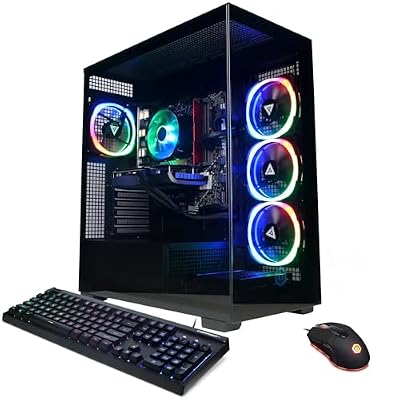 CyberpowerPCCyberpowerPC Gamer Xtreme VR Gaming PC, Intel Core Ultra 5…$1,509 \xc2\xb7 98/100
 TisukisuPrebuilt Gaming PC Desktop,Intel Core i5 Business Office Tower Computers…$350 \xc2\xb7 98/100
 CyberpowerPCCyberPowerPC Gaming PC, Intel Core i5-14400F, GeForce RTX 5060 8GB…$1,268 \xc2\xb7 97/100








