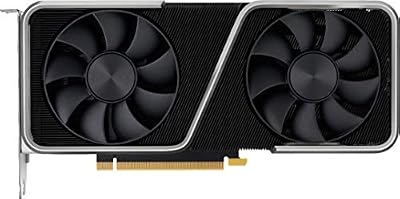
Affiliate disclosure: As an Amazon Associate we earn from qualifying purchases. This post contains affiliate links — we may earn a small commission at no extra cost to you. This never affects our picks. Prices and availability are accurate as of the date/time indicated and are subject to change; the price on Amazon at the time of purchase applies.
Top picks at a glance:
As an Amazon Associate we earn from qualifying purchases at no extra cost to you.




When you’re choosing a part for your build, the GPU is usually the single most consequential decision you’ll make. It takes the biggest bite of the budget, it dictates how the rest of the system has to be specced, and it sets what kind of gaming and creative work you’ll actually be able to do for the next several years. That makes the Nvidia vs AMD question in 2026 a lot more than a benchmarks debate. It’s a build-planning question, and the right answer depends on what else you’re fitting in the rig and what role this GPU has to play.
Quick answer: For a 2026 build, the our top pick is the graphics card we would build around, while the the value pick is the budget-friendly choice.
Our take after planning hundreds of builds this year and walking through the trade-offs with builders at every budget tier: there’s no universally correct answer, but there is a clearly correct one for a builder who wants a one-stop-shop GPU that handles gaming, AI workloads, streaming, and content creation under a single coherent ecosystem. That answer is Nvidia. Not because AMD is bad (it isn’t, and the RX 9070 XT is genuinely the best mid-tier value of the generation), but because builders who want everything in one card are buying a feature set, and Nvidia’s feature set in 2026 is broader and more cohesive than AMD’s.
This guide works through the GPU decision from a builder’s perspective. Platform compatibility, PSU sizing, case clearance, upgrade path, total build value, and the question every builder eventually asks: what happens to this card three years from now when you’re deciding whether to upgrade or keep it. We’ll cover both brands honestly and pick a winner for the specific builder profile this site serves. Let’s get into it.
🛒 Best Price Today on Amazon
Prime members get fast, free shipping on everything above, plus member-only deals. New members get a 30-day free trial — cancel anytime.
Start 30-Day Prime Free Trial →See Today’s Amazon DealsTL;DR At-A-Glance for Builders
| Build Factor | Nvidia GeForce RTX 50 | AMD Radeon RX 9000 | Builder’s Winner |
|---|---|---|---|
| One-Stop GPU (Gaming + AI + Stream) | CUDA + DLSS 4 + NVENC AV1 | Strong gaming, weak AI ecosystem | Nvidia |
| Mid-Tier Pure Gaming Value | RTX 5070 Ti competitive | RX 9070 XT excellent value | AMD |
| PSU Sizing (High End) | RTX 5090 needs 1000W class | RX 9070 XT 750-850W fine | AMD (easier PSU) |
| Case Clearance / Form Factor | Some 5090 cards are massive | 9070 XT mostly reasonable size | AMD (easier fit) |
| Ray Tracing for Future Games | Strong RT hardware | Improved but still trailing | Nvidia |
| AI Productivity (Stable Diffusion, LLMs) | CUDA universal default | ROCm narrower support | Nvidia (huge) |
| Upgrade Path in 2028-2029 | RT/AI focus aligns with industry | Raster longevity via FineWine | Mixed (split) |
| Driver Stability for First-Time Builders | Smoother day-one experience | Strong recent track record | Slight Nvidia edge |
| Streaming Build Encoder Quality | NVENC AV1 + ecosystem maturity | VCN 5 AV1 equally capable | Tie (slight Nvidia ecosystem) |
| Builder’s Overall Pick (One-Stop) | Best feature breadth | Best mid-tier pure gaming value | Nvidia (one-stop), AMD (pure gaming) |
Round-By-Round From a Builder’s Bench
Round 1: Platform Compatibility and PSU Sizing
Start with the practical reality of fitting these cards in a build. The RTX 5090 is a beast in every sense. Power-draw spikes that demand a quality 1000W+ PSU with quality 12V-2×6 connectors, board sizes from AIB partners that stretch past 350mm and weigh several kilograms, and thermal output that demands serious case airflow. Building around a 5090 means planning the whole rig around the GPU, not the other way around.
The RTX 5080 is more reasonable, comfortable in 850W PSU territory and sensible case sizes. The 5070 Ti and 5070 are well-behaved mid-tier cards that fit nearly anywhere on 750W PSUs. AMD’s RX 9070 XT lands in roughly the same ballpark as the 5070 Ti for PSU and physical sizing, with most AIB designs at reasonable lengths and the reference card being particularly compact. The RX 9060 family is tiny by comparison and works great for SFF.
For builders working with a smaller chassis, an existing PSU you don’t want to replace, or a constrained airflow situation, AMD’s mid-tier is generally easier to slot in than Nvidia’s. For full-tower builds with a fresh build budget, both work fine. Round winner from a builder’s perspective: AMD at mid tier for easier physical and electrical integration, Nvidia by default at high tier because there’s no equivalent AMD card. Cross-reference with our GPU buyers guide for actual sizing data.
Cable management deserves a specific mention. The 12V-2×6 connector on Nvidia high-end cards has matured a lot since the early 12VHPWR concerns of 2022-2023. Quality PSUs now ship with native 12V-2×6 cables, the latch design has improved, and following basic seating and bend-radius guidance avoids the failure modes that made the early headlines. Builders shouldn’t fear the connector but should respect it by using a quality native cable rather than a generic adapter and by making sure the plug is fully seated with the latch engaged. AMD’s mid-tier cards use traditional 8-pin connectors that are simpler to route but need multiple cables, which can clutter a tight build. Both approaches have trade-offs and neither is a blocker for a careful builder.
Round 2: Raster Performance and the Per-Frame Build Math
When you’re splitting dollars across a build, every dollar saved on the GPU is a dollar that can go into CPU, RAM, or storage. AMD’s RX 9070 XT delivers raster performance that competes with the RTX 5070 Ti at a meaningfully lower price, which in builder math means you can either pocket the savings or redirect them. That’s a real advantage and it shouldn’t be brushed aside.
For a pure gaming build where you want maximum raster frames per total dollar, AMD wins this round at the mid tier. The 9070 XT paired with a current-gen mid-tier CPU and a quality 1440p high-refresh monitor is one of the best-value gaming rigs you can build in 2026. The 9070 (non-XT) and 9060 XT carry that value story down across more affordable build tiers.
Where the math flips is when you start needing features beyond raster, and that’s the entire builder’s question this article is wrestling with. Round winner: AMD on pure raster build math. See our CPU buyers guide for CPU pairings that maximize the savings.
Round 3: Ray Tracing and the Future of Game Engines
Modern AAA game engines increasingly treat ray tracing as a default rendering technique rather than an optional toggle. Unreal Engine 5 with hardware Lumen, Frostbite RT, the latest id Tech, and a long list of studio-built engines all assume RT hardware is present and increasingly default RT effects on. That means a GPU’s ray tracing capability isn’t just about whether you flip the toggle, it’s about whether the GPU runs modern engines well at the settings developers actually targeted.
Nvidia’s RTX 50 series remains the stronger RT performer by significant margins in heavy and path-traced workloads. RDNA 4 made real progress and the RX 9070 XT handles light and moderate RT acceptably, but in heavy RT or path tracing the gap is wide enough to matter. For a builder thinking about the next 3-5 years of gaming and where engines are heading, RT capability becomes a future-proofing question, not just a feature-toggle one.
This is where the one-stop builder case starts taking shape. If you want a GPU that runs whatever ships in 2027-2029 the way the developer intended, Nvidia leaves you more headroom. Round winner: Nvidia, with future-proofing implications.
Round 4: Upscaling and the High-Refresh Build Strategy
Plenty of builders in 2026 are targeting high-refresh 4K or ultrawide gaming, which needs upscaling and frame generation to hit framerates that justify a $700+ display. DLSS 4 with multi-frame generation is the best-in-class tool for this right now. It delivers high framerates with motion clarity that holds up well, and it’s supported across a wide library of titles.
FSR 4 brought AMD into the AI-upscaling era and is genuinely competitive. The image-quality gap with DLSS 4 has narrowed dramatically and FSR 4 is now a fully usable tool. The multi-frame generation flagship of DLSS 4, however, stays an Nvidia exclusive at the same quality tier, and for builders specifically planning around high-refresh 4K targets, that feature carries weight.
For a 1440p build where 100-144 FPS is the target, FSR 4 is plenty and AMD is in play. For a 4K 120-240 FPS build where multi-frame gen would meaningfully improve the experience, Nvidia is the better fit. Round winner: Nvidia for high-refresh 4K builds; tie for 1440p. See our monitors buyers guide for display pairings.
Round 5: AI Workloads and the Multi-Purpose Build
This is where the builder’s argument tilts hardest toward Nvidia. Many builders in 2026 aren’t building pure gaming rigs. They want a system that can game well at the weekend, run Stable Diffusion for hobby image work, run a local LLM for coding assistance or experimentation, and handle GPU-accelerated tasks in DaVinci Resolve, Premiere, Blender, or Topaz Labs tools. That’s the multi-purpose builder profile, and it’s increasingly common.
For that builder, the GPU choice is binary. Nvidia or compromise. CUDA is the universal default for AI work — every framework assumes it, every tutorial uses it, every model release lands on CUDA first. ROCm has made progress but the support matrix is narrower and configuration is more painful. If you want to spend your weekend creating instead of debugging, you want a GeForce.
The RTX 5090’s VRAM pool also makes it uniquely capable for running large local LLMs, which is a serious draw for the AI-curious builder cohort. No AMD consumer card matches that capability in 2026. Round winner: Nvidia, decisively, for any multi-purpose builder profile.
A builder anecdote worth sharing. We’ve walked through plenty of builds where the customer initially planned to use the GPU for pure gaming, then a year later wanted to dip into Stable Diffusion or run a coding-assistant LLM locally, and ended up wishing they’d bought Nvidia. The pattern shows up often enough that we now ask every builder during planning whether AI work is plausibly in their future. If the answer is anything other than a firm no, we steer toward Nvidia, because the cost of being wrong (either replacing the GPU or living with a worse AI experience) is high. If the answer is a firm no and the builder is confident, AMD stays in play and saves them money. The forward-looking question matters more than the today-only one.
Round 6: Driver Maturity and First-Time Builder Risk
For a first-time builder, driver stability and day-one game support matter more than they do for veterans who can troubleshoot through edge cases. Nvidia’s day-one game support is generally smoother, with more titles working at launch without an immediate driver hotfix scramble. That cuts builder anxiety and makes the first-time build experience more enjoyable.
AMD’s recent driver track record has been strong and most of the old horror stories no longer apply. The 2025-2026 driver releases have been notably stable. But on average across a basket of new game launches, Nvidia still wins the smoothness contest by a small margin. For a returning builder who knows how to read release notes and apply hotfixes, the gap is minor. For a first-time builder, it’s worth a small premium to dodge the friction.
For long-term ownership, AMD’s FineWine effect remains real, and a card you buy today will likely gain measurable performance through driver work over the next several years. Round winner: Slight Nvidia edge short term, slight AMD edge long term.
Round 7: Streaming and Content Creation Build
For builders putting together a streaming or content-creation rig, the encoder question matters. Both Nvidia’s NVENC AV1 (on the RTX 5000 series) and AMD’s VCN 5 AV1 are excellent and produce high-quality streams fit for Twitch and YouTube. Pure encode quality is effectively tied in our analysis. The difference comes down to ecosystem.
OBS plugin support, streaming-software guides, integration with broadcast tools like StreamLabs and Lightstream, and the broader streaming community’s hardware bias all tilt toward Nvidia. That doesn’t make AMD a bad streaming choice. It does mean you’ll find more tutorials, more troubleshooting threads, and more out-of-the-box compatibility on Nvidia. For a content creator who wants to spend time creating instead of configuring, Nvidia is the easier path.
For pure quality of the encoded stream though, AMD holds its own. Round winner: Slight Nvidia edge for ecosystem; tie on pure encode quality. See our streaming microphones buyers guide for completing a streaming build.
Round 8: Upgrade Path and Total Cost of Ownership
The smart builder thinks not just about the cost of this GPU today but the cost of the next GPU 3-4 years out. Buying a card with strong future-proofing for the features games are moving toward (RT, AI upscaling, frame gen) means you can probably skip the very next generation and stretch this card further. Buying a card with weaker future-proofing means you may need to upgrade sooner to keep pace with new game requirements.
Nvidia’s RT and AI feature lead positions it better for where the industry is heading, which means a 5070 Ti or 5080 bought today is likely to stay capable longer in upcoming titles than an equivalent AMD card. That extra year or two of useful life partly offsets Nvidia’s higher initial cost when you amortize it.
AMD’s FineWine driver maturation works in the opposite direction, giving Radeon cards stronger relative performance over time even if their feature support stays constant. Both arguments are valid. For a builder optimizing for total cost of ownership over a 4-5 year window, the verdict is roughly a wash with Nvidia having a slight edge for feature-aligned future-proofing. Round winner: Slight Nvidia edge. Compare with our prebuilt vs DIY analysis for total-build cost context.
Resale value is the underappreciated dimension of total cost of ownership. Nvidia cards historically hold value better on the used market, which means when you do upgrade in 3-4 years you’ll recoup more of your original spend selling the old card. AMD cards depreciate more steeply on the used market despite their solid performance, which is a real cost that doesn’t show up in the initial purchase price. For builders who actively recycle hardware (sell old, buy new every couple of generations), the Nvidia premium is partly offset by stronger resale. For builders who buy and keep until the card dies, this doesn’t matter and AMD’s lower initial cost wins outright. Know which kind of buyer you are before picking a brand.
Use-Case Recommendations for Builders
Build it with Nvidia GeForce if you…
- Want a one-stop GPU for gaming, AI, streaming, and creative work all under one ecosystem
- Are targeting high-refresh 4K gaming with frame generation
- Plan to use Stable Diffusion, local LLMs, or any AI-accelerated tools
- Are building a streaming or content creation rig where ecosystem matters
- Want a halo build (RTX 5080 or 5090) with no compromises
- Are a first-time builder who values driver smoothness during the learning curve
Build it with AMD Radeon if you…
- Are building a pure mid-tier gaming rig and want best raster value
- Have a tight total build budget where saving $200-400 on the GPU unlocks better CPU, RAM, or storage
- Are doing a small form factor build where lower power and smaller cards help
- Don’t use AI tools and don’t plan to start
- Plan to keep this card 4-5+ years and want FineWine maturation
- Have an existing 750W PSU you don’t want to upgrade
For our most-recommended one-stop builder profile in 2026 (gaming + occasional AI + streaming, mid-high to high tier), we land on RTX 5070 Ti or RTX 5080 depending on budget. For our pure-gaming mid-tier builder profile, we land on RX 9070 XT as the value champion. For the halo builder who wants the absolute best, RTX 5090 is the only answer because AMD doesn’t compete at that tier. See our gaming keyboards guide, gaming mice guide, and gaming RAM guide for completing whichever build you land on.
FAQ for Builders
Q: What PSU should I plan for an RTX 5090 build?
A quality 1000W unit with 12V-2×6 connector support is the safe planning baseline. If you’re pairing it with a high-end CPU and lots of storage, plan for 1200W to leave headroom. Don’t skimp on the PSU with a 5090.
Q: Will an RX 9070 XT fit in a small form factor case?
Most AIB designs are a reasonable length and reference designs are especially compact. Always check the exact card against your case clearance spec, but as a rule the 9070 XT is friendlier to SFF than equivalent-tier Nvidia cards.
Q: Can I do AI work on AMD or do I really need Nvidia?
You can manage some AI work on AMD through ROCm, but the support matrix is far narrower and you’ll burn more time configuring and less time creating. If AI work matters to you, Nvidia is the practical pick in 2026.
Q: Should I worry about the 12V-2×6 connector on Nvidia high-end cards?
Use a quality PSU with native 12V-2×6 cables (not third-party adapters), seat the connector fully, route the cable with a reasonable bend radius, and you’ll be fine. The horror stories of past years have largely been resolved by improved connector designs and cable handling.
Builder’s Final Verdict: Nvidia for the One-Stop Build
Our builder’s verdict in 2026 lands on Nvidia for the most common one-stop builder profile we serve. If you want a GPU that handles gaming at every quality tier, runs AI workloads under the universal CUDA ecosystem, streams with a polished encoder pipeline, and positions you well for where game engines are heading, GeForce is the answer. The RTX 5070 Ti for mid-high tier builds, RTX 5080 for high-end, and RTX 5090 for halo are our most-recommended picks for builders who want everything in one card.
For the pure-gaming mid-tier builder who has no use for AI workloads and is chasing total build value, the RX 9070 XT is genuinely excellent and we recommend it without hesitation. It’s this generation’s value champion, and paired with a quality mid-tier CPU it builds a great gaming rig at a meaningfully lower total cost. AMD has earned its mid-tier crown.
Two valid verdicts for two different builder profiles, but for the one-stop builder this site primarily serves, Nvidia wins the 2026 GPU question. See our CPU coolers guide for completing thermal planning around either choice, and our GPU bestsellers guide for current market availability across both brands.
Related Guides
Related Articles
Want to dig deeper? The hand-picked guides below each run through the same scoring rubric we used in this review.
Frequently Asked Questions
Is NVIDIA or AMD better for gaming in 2026?
Both make excellent GPUs, and the best choice depends on priorities. NVIDIA leads in ray tracing, DLSS image quality, and features like frame generation. AMD often delivers stronger rasterization value per dollar and more VRAM at a given price. For pure ray tracing and features, lean NVIDIA; for raw performance-per-dollar, AMD is frequently more compelling.
How do DLSS and FSR compare?
DLSS, NVIDIA’s upscaler, generally produces cleaner image quality and better stability, aided by dedicated hardware. AMD’s FSR is more broadly compatible, working across many GPUs including NVIDIA’s, but has historically trailed slightly in quality. Both technologies keep improving rapidly. If upscaling quality is a priority for you, NVIDIA’s DLSS currently holds an edge in most titles.
Does AMD or NVIDIA offer more VRAM for the money?
AMD has traditionally offered more VRAM at comparable price points, which benefits high-resolution gaming and future-proofing. NVIDIA has sometimes been more conservative with VRAM on mid-range cards. If you play at high resolutions with maxed textures or want longevity, compare VRAM carefully, as running short causes stutters regardless of how fast the GPU core is.
Which brand is better for content creation and productivity?
NVIDIA generally leads in creative and professional workloads due to strong CUDA support, which many applications optimize for, plus solid encoding and AI acceleration. AMD has improved but CUDA’s software ecosystem remains dominant in rendering, video, and AI tools. If you create content alongside gaming, NVIDIA’s broader software compatibility is often the safer choice.
Does driver quality differ between NVIDIA and AMD?
Both have mature, regularly updated drivers, and the old reputation of AMD driver instability is largely outdated. Each occasionally ships problematic updates. NVIDIA’s control panel is dated but stable, while AMD’s Adrenalin software is feature-rich and modern. Driver experience is close enough today that it should rarely be the deciding factor between the two brands.
Ready to decide? Our #1 pick for 2026 is the One-Stop GPU (Gaming + AI + Stream).
Live price & availability on Amazon.