
Upgrading from an RX 6800 to an RX 7900 XTX is worth it for 4K and high-refresh 1440p gamers: the XTX is roughly 60-85% faster in rasterized games, close to twice as fast with ray tracing, adds 8 GB of VRAM for 24 GB total and already supports FSR 4.1. For 1080p or 60 Hz 1440p players, the RX 6800 is still capable enough that the upgrade is hard to justify, and anyone shopping in 2026 should also weigh the RX 9070 XT, which costs less, draws less power and has stronger ray tracing, though with 16 GB and somewhat lower raster performance.
Quick answer: Our top pick in 2026 is the Architecture — our #1 rated choice. See the full ranked comparison, alternatives and buying advice below.
From Upper Midrange to Flagship
The RX 6800 launched in October 2020 at $579 as the entry point to AMD’s RDNA 2 high end, and its 16 GB of VRAM has kept it relevant far longer than many rivals of its era. The RX 7900 XTX arrived in November 2022 at $999 as AMD’s RDNA 3 flagship, using a chiplet design with a 5 nm graphics die. Both are previous-generation cards now that the RX 9000 series is current, but the XTX remains AMD’s fastest raster card for many games and a popular high-end choice on the used market.

GIGABYTE AORUS Radeon RX 6800 Master 16G Graphics Card, MAX-Covered Cooling, 16GB 256-bit GDDR6, GV-R68AORUS M-16GD Video Card
Included for 'RX 6800 vs RX 7900 XTX: Is the Upgrade Worth It?' because the listing specifies MAX-Covered Cooling and 16GB 256-bit GDDR6, details this guide uses to compare options.
View on Amazon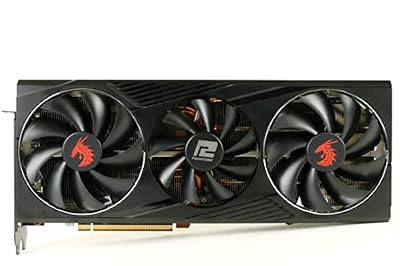
PowerColor Red Dragon AMD Radeon RX 6800 Gaming Graphics Card with 16GB GDDR6 Memory, Powered by AMD RDNA 2, Raytracing, PCI Express 4.0, HDMI 2.1, AMD Infinity Cache (Renewed)
Included for 'RX 6800 vs RX 7900 XTX: Is the Upgrade Worth It?' because the listing specifies Powered by AMD RDNA 2 and Raytracing, details this guide uses to compare options.
View on Amazon
ASRock Radeon RX 7900 XTX Phantom Gaming 24GB OC Graphics Card, 2615 MHz Boost Clock, 24GB GDDR6, DisplayPort 2.1, HDMI 2.1, Triple Fan Cooling
Included for 'RX 6800 vs RX 7900 XTX: Is the Upgrade Worth It?' because the listing specifies 2615 MHz Boost Clock and 24GB GDDR6, details this guide uses to compare options.
View on AmazonSpec Comparison
| Specification | RX 6800 | RX 7900 XTX |
|---|---|---|
| Architecture | RDNA 2.0 | RDNA 3.0 |
| Release date | 28 October 2020 | 3 November 2022 |
| Launch MSRP | $579 | $999 |
| Stream processors | 3840 | 6144 |
| Boost clock | 2105 MHz | 2498 MHz |
| Process | 7 nm | 5 nm |
| TDP | 250 W | 355 W |
| Memory | 16 GB GDDR6 | 24 GB GDDR6 |
| Memory bus | 256-bit | 384-bit |
| Bandwidth | 512.0 GB/s | 960.0 GB/s |
| Cache | 4 MB L2 + 128 MB Infinity Cache | 6 MB L2 + 96 MB Infinity Cache |
| Interface | PCIe 4.0 x16 | PCIe 4.0 x16 |
| Power connectors | 2x 8-pin | 2x 8-pin (reference) |
| Length (reference) | 267 mm | 287 mm |
| Width | 2-slot | 2-slot |
| Display outputs | 1x HDMI, 2x DisplayPort, 1x USB Type-C | 1x HDMI 2.1a, 2x DisplayPort 2.1, 1x USB Type-C |
The XTX nearly doubles memory bandwidth, adds 60% more stream processors running at higher clocks, and moves to a 384-bit bus with 24 GB. Its Infinity Cache is smaller than the RX 6800’s, but the far wider bus more than compensates.
Raster Performance: How Big Is the Jump?
TechPowerUp’s RX 7900 XTX launch review measured it about 47% faster than the RX 6900 XT in raster at 4K. TechPowerUp’s RX 6800 data puts the RX 6800 XT about 13-15% ahead of the RX 6800, and the RX 6900 XT sits another step above that. Chaining those figures places the XTX roughly 75-85% ahead of the RX 6800 at 4K. At 1440p, CPU limits trim the lead in some games, so a realistic overall range is about 60-85%, largest at 4K.
In practical terms, a demanding AAA game that runs in the mid-40s at 4K high settings on an RX 6800 will often reach the high 70s or low 80s on the XTX, though settings, CPU and game patches all shift those numbers. At 1440p, a title sitting around 90 fps on the RX 6800 may land somewhere around 140-150 fps on the XTX, which matters most for high-refresh monitors.
Ray Tracing and Upscaling
Ray tracing
TechPowerUp measured the XTX about 56% faster than the RX 6900 XT with ray tracing enabled, a larger jump than in raster, thanks to RDNA 3’s improved ray accelerators. Against the RX 6800, that suggests close to double the ray-traced performance. The XTX still trails Nvidia’s RTX 4080 by about 15% in RT according to TechPowerUp, and it falls further behind in path-traced games, but it turns moderate ray tracing at 1440p from a struggle into something playable.
FSR 4.1 and frame generation
This is a meaningful difference in 2026. AMD’s June 2026 driver brought official FSR 4.1, its machine-learning upscaler, to RX 7000 cards including the XTX, with AMD stating image quality matches the RX 9000 version. RX 6000 cards are slated to receive FSR 4.1 in early 2027, and community testing of the INT8 model suggests a heavier performance cost on RDNA 2. Both cards support FSR 3.1 frame generation and AMD Fluid Motion Frames at the driver level.
Media and display
The XTX adds hardware AV1 encoding for streaming and recording, and DisplayPort 2.1 for very high refresh 4K displays. The RX 6800 can decode AV1 but not encode it.
VRAM: 16 GB to 24 GB
The RX 6800’s 16 GB is still enough for 1440p at ultra settings in almost every 2026 game, so the extra memory is not the main reason to upgrade at that resolution. At 4K with ultra textures, ray tracing and frame generation, demand can approach or exceed 16 GB in the heaviest titles, and 24 GB removes that concern entirely. The extra capacity also helps with local AI tools and heavy modding.
Power Supply, Connectors and Case Fit
TDP jumps from 250 W to 355 W. Using GPU TDP plus CPU plus about 150 W headroom with a 125 W CPU:
- RX 6800: 250 + 125 + 150 = about 525 W, so a quality 650 W unit.
- RX 7900 XTX: 355 + 125 + 150 = about 630 W, so a quality 750 W unit at minimum and 850 W for comfortable margin against transient power spikes and factory-overclocked models.
The reference XTX uses two 8-pin connectors, the same as the RX 6800, but many partner XTX cards require three 8-pin connectors, so check both the card and the power supply’s available cables. Use separate cables rather than daisy-chained pigtails at this power level.
The reference XTX is 287 mm long versus 267 mm for the RX 6800, and both are listed as 2-slot designs. Partner XTX models are often well over 300 mm and closer to 3 slots, so measure the case before buying. More than 100 W of extra heat also means case airflow deserves attention.
Upgrade Economics
Setting the RX 6800 at 100 performance points and the RX 7900 XTX at about 175:
- Launch MSRP: RX 6800 at $579 / 100 = about $5.79 per point; RX 7900 XTX at $999 / 175 = about $5.71 per point.
- Used market: an RX 6800 usually sells for roughly $250-$320 and an RX 7900 XTX for roughly $600-$750. Selling the old card brings the net upgrade cost to around $300-$500.
That net spend buys about 75% more performance, FSR 4.1 today and 24 GB of VRAM. Add a possible power supply upgrade and the total climbs. The RX 9070 XT is the main alternative: it typically lands somewhat below the XTX in raster, has stronger ray tracing, native FSR 4 support and lower power draw, and costs less new than a used XTX in many markets.
Upgrade Decision by Resolution
| Resolution / goal | Is the XTX worth it over an RX 6800? |
|---|---|
| 1080p, any refresh rate | No; the CPU limits the gain and the RX 6800 is plenty |
| 1440p at 60-100 Hz | Marginal; the RX 6800 already handles this well |
| 1440p at 144 Hz or higher | Yes, a large and noticeable gain |
| 4K gaming | Yes, the clearest beneficiary |
| Ray tracing focus | Better, but RX 9070 XT or RTX 50 cards handle RT better per dollar |
| PSU under 750 W | Budget for a new PSU or consider the RX 9070 |
Frequently Asked Questions
How much faster is the RX 7900 XTX than the RX 6800?
Based on TechPowerUp’s review data, the XTX is roughly 75-85% faster at 4K in rasterized games, and about 60-85% faster overall depending on resolution. With ray tracing, the gap is close to double. Lower resolutions show smaller gains due to CPU limits.
What PSU does the RX 7900 XTX need?
A quality 750 W power supply is a realistic minimum for a typical gaming system, with 850 W recommended for margin. The card is rated at 355 W and can spike above that briefly. Many partner models need three 8-pin connectors.
Does the RX 7900 XTX support FSR 4?
Yes. AMD’s June 2026 driver added official FSR 4.1 support for RX 7000 cards, including the XTX. The RX 6800 is slated to receive FSR 4.1 in early 2027.
Is the RX 9070 XT a better upgrade than the RX 7900 XTX?
It depends on priorities. The RX 9070 XT has stronger ray tracing, native FSR 4 and lower power draw, while the XTX has more raster performance and 24 GB of VRAM. For 4K raster and memory headroom the XTX leads; for ray tracing and efficiency the RX 9070 XT is the safer pick.
Will the RX 7900 XTX fit in my case?
The reference card is 287 mm long and listed as a 2-slot design. Many partner models are longer than 300 mm and thicker. Measure GPU clearance and check slot space before buying.
Ready to decide? Our #1 pick for 2026 is the Architecture.
Live price & availability on Amazon.


