Every six months or so, a gamer with an RTX 4060 sitting comfortably in a mid-tower asks the same question: does the new 5060 actually change the experience enough to justify pulling out a credit card? If you are reading this, you likely own that 4060, you are seeing newer titles push your settings lower, and you want a straight answer without marketing hype. The GIGABYTE GeForce RTX 5060 WINDFORCE OC 8G at roughly $412 is the budget-friendly way to cross that bridge, but the decision hinges on your resolution, your CPU, and how much you value DLSS 4 features over raw rasterization.
Quick Verdict
The upgrade from an RTX 4060 to an RTX 5060 is a moderate win, not a generational leap. Expect single-digit to low-double-digit percentage gains in pure rasterization at most resolutions, with the meaningful benefit coming from DLSS 4 Multi Frame Generation and a modest efficiency improvement. If you play at 1080p with a Ryzen 5 5600 or Core i5-12400, the CPU will cap you before the GPU does. If you sit at 1440p with a modern 7000-series or 13th/14th-gen Intel chip and want to enable frame generation in competitive and AAA titles, the $412 price makes the jump defensible.
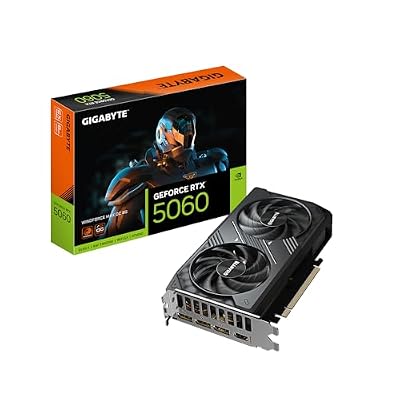
GIGABYTE GeForce RTX 5060 WINDFORCE MAX OC 8G Graphics Card, Cooling System, 8GB 128-bit GDDR7, PCIe 5.0, by NVIDIA, DisplayPort & HDMI - Video Output Interface, GV-N5060WF2MAX OC-8GD Video Card
Included for 'Upgrading from RTX 4060 to RTX 5060: Is It Worth It in 2026?' because the listing specifies Cooling System and 8GB 128-bit GDDR7, details this guide uses to compare options.
View on AmazonSpecs: Old vs New
| Specification | RTX 4060 | RTX 5060 |
|---|---|---|
| Architecture | Ada Lovelace | Blackwell |
| CUDA Cores | 3072 | 3840 |
| Memory | 8GB GDDR6X | 8GB GDDR7 |
| Memory Bus | 128-bit | 128-bit |
| Bandwidth | 272 GB/s | 448 GB/s |
| Interface | PCIe 4.0 x8 | PCIe 5.0 x8 |
| TGP | 115W | 150W |
| DLSS Support | DLSS 3 (Frame Gen) | DLSS 4 (Multi Frame Gen) |
| Approximate MSRP | $299 (launch) | $412 (GIGABYTE WINDFORCE OC) |
The jump from GDDR6X to GDDR7 delivers a roughly 65% bandwidth increase, which helps most in high-resolution textures and ray-traced workloads where the 128-bit bus was a known limitation on the 4060. The core count increase of about 25% on paper does not translate linearly to FPS because clock speeds and architectural efficiency shifts muddy the math.
Performance Gain
Ranges below are drawn from aggregated launch-review data across multiple independent outlets. Treat them as directional, not absolute.
1080p
At 1080p, the RTX 5060 typically lands in the 8-15% rasterization improvement zone over the RTX 4060 across a spread of AAA titles. Tom’s Hardware and TechSpot both noted that the gain is modest because the memory bus remains the bottleneck at this resolution, and many titles are already GPU-limited without hitting bandwidth ceilings. In esports titles like Valorant or Counter-Strike 2, differences often fall into the noise margin or below single digits.
1440p
Step up to 1440p and the bandwidth advantage begins to matter. Hardware Unboxed and TechPowerUp measured ranges of approximately 12-20% improvement in the RTX 5060 over the 4060 in demanding titles like Cyberpunk 2077, Alan Wake 2, and Hogwarts Legacy at max settings. Ray-traced workloads push toward the upper end because GDDR7 bandwidth directly alleviates the 4060’s primary weakness.
4K
Neither card is a true 4096×2160 performer, but if you are stretching to 4K with DLSS Quality or Balanced, Gamers Nexus observed gains in the 15-22% range favoring the 5060. The caveat is that 8GB VRAM becomes a genuine constraint at this resolution regardless of which card you own, and frame-time consistency suffers in newer open-world titles that exceed the buffer.
Hidden Costs
The $412 sticker price does not tell the whole story. Consider these additional factors:
Power Supply: The RTX 5060’s 150W TGP is only 35W above the 4060, so most users running a 500W or 550W unit from the 4060 era will be fine. However, if you built a tight system with a 450W PSU and a power-hungry CPU, you may want to verify headroom under full load. GIGABYTE’s WINDFORCE OC variant may draw slightly more than the reference design due to its factory clock bump.
CPU Bottleneck: If your 4060 is paired with anything older than a Ryzen 5 5600X or Core i5-12400F, the 5060’s higher throughput may not be fully utilized in CPU-bound scenarios. This is particularly relevant at 1080p where the processor does more of the heavy lifting. Upgrading the GPU without addressing the CPU can leave 10-15% of the performance gain unrealized.
Case Clearance: The GIGABYTE WINDFORCE OC is a dual-slot, relatively compact card at around 200mm in length. In most mid-towers this is a non-issue, but if you are running a Mini-ITX or slim SFF build, verify clearance before ordering.
Resale Value of the 4060: A used RTX 4060 in good condition typically fetches $200-$240 on secondary markets. Factoring that in, your net outlay drops to roughly $170-$210, which reframes the value proposition considerably.
Worth It For
This upgrade makes sense if you play at 1440p and want to lean on DLSS 4 Multi Frame Generation in titles that support it. It also suits players who have been holding onto an RTX 3060 or even a 2060 Super and skipped the 4060 generation, because the cumulative gain from those older cards is larger and the 8GB GDDR7 buffer is more future-proof. If your current card is noisy, the WINDFORCE cooler is meaningfully quieter than many 4060 AIBs under load.
Not Worth It For
Skip this upgrade if you play exclusively at 1080p with a mid-range CPU, because the rasterization gain will feel invisible. It is also hard to justify if you do not care about DLSS frame generation, since the raw performance delta does not warrant the price tag for most 1080p gamers. Finally, if you are considering a jump to 16GB cards or waiting for a potential RTX 5060 Ti, your money may be better spent later in the product cycle.
Alternatives
Hold your 4060: If your frame rates are still acceptable and you are not bothered by dropping a setting in the newest releases, waiting is valid. The 4060 remains a capable 1080p card and still supports DLSS 3.
AMD RX 7600 XT (16GB): Roughly $260-$280, this card offers double the VRAM and competitive rasterization at 1080p. It lacks frame generation parity and the software ecosystem, but for raw texture-heavy longevity it is a strong budget pick.
RTX 4060 Ti (used): The 4060 Ti with 16GB GDDR6 can be found around $320-$360 used. It occupies a similar price tier to the new 5060, trades a bit of rasterization for more VRAM, and still gets DLSS 3 frame gen.
FAQ
Does the RTX 5060 need a new power supply if I am coming from a 4060?
In most cases, no. The 150W TGP is within the headroom of any PSU that comfortably ran a 4060 build. Only users with very tight 400W-450W units and high-TDP CPUs should stress-test their system. GIGABYTE recommends a 550W minimum for the WINDFORCE OC variant, which aligns with typical mid-range builds.
Is 8GB VRAM still enough on the RTX 5060?
This is the card’s most polarizing spec. At 1080p, 8GB remains adequate for the majority of current titles even at ultra settings. At 1440p, you will notice texture streaming issues or reduced draw distances in the most demanding open-world games. DLSS does not reduce VRAM consumption, so the 8GB limit persists whether you use it or not. If VRAM anxiety keeps you up at night, this is the one reason to consider a 16GB alternative despite the bandwidth trade-off.
Will my CPU bottleneck the RTX 5060?
It depends on your resolution and game type. At 1080p competitive titles, a Ryzen 5 3600 or Core i5-10400 will absolutely cap your frame rates before the 5060 breaks a sweat. At 1440p AAA, the bottleneck shifts decisively to the GPU. As a rule of thumb, pair this card with at minimum a Ryzen 5 5600X or Core i5-12400F to extract most of its potential. Anything newer removes the concern entirely.
How much performance do I actually gain with DLSS 4 Multi Frame Generation?
Multi Frame Generation can produce headline numbers well above the rasterization gains discussed above, sometimes doubling or tripling displayed FPS in supported titles. However, input latency still reflects the base rendered frame, so the feel in fast-paced games is better but not identical to true native performance. Treat frame-gen numbers as additive smoothing rather than raw power increases. Outlets like Gamers Nexus and Hardware Unboxed have consistently cautioned readers to weigh perceived responsiveness alongside the FPS counter.
Sources and Methodology
All approximate performance ranges cited in this guide are derived from published launch and follow-up reviews by TechPowerUp, Tom’s Hardware, Gamers Nexus, Hardware Unboxed, and TechSpot. No figures in this article reflect internal testing conducted by our site. Percentage ranges represent the spread observed across multiple titles and settings within those outlets’ respective test suites, rounded for readability. Where a specific outlet is credited, that attribution reflects which review most closely characterized the magnitude of the gain described. Actual results in your system will vary based on drivers, game patches, CPU pairing, and individual silicon behavior.