
The best monitor for dark room gaming should preserve deep blacks, reveal shadow detail, and keep bright objects from washing out the surrounding scene. OLED is the strongest starting point when pixel-level contrast matters most, while a good VA Mini LED monitor offers an alternative for buyers who prefer LCD. These six models suit different resolutions, gaming styles, and desk arrangements, with their important limitations explained.
- Quick verdict: Start with contrast, then choose your format
- Quick comparison table
- How we selected these monitors
- MSI MPG 321URX QD-OLED: A flat 4K starting point
- Alienware AW2725DF: A competitive 1440p option
- LG 27GS95QE-B: A compact WOLED alternative
- ASUS ROG Swift OLED PG32UCDM: A feature-rich 4K alternative
- AOC Q27G3XMN: A 1440p Mini LED alternative
- Samsung Odyssey Neo G7 S32BG75: A curved 4K LCD option
- How to choose the best monitor for dark room gaming
- Setting up your monitor for nighttime gaming
- Frequently asked questions
- Final verdict: Choose the compromises you can live with
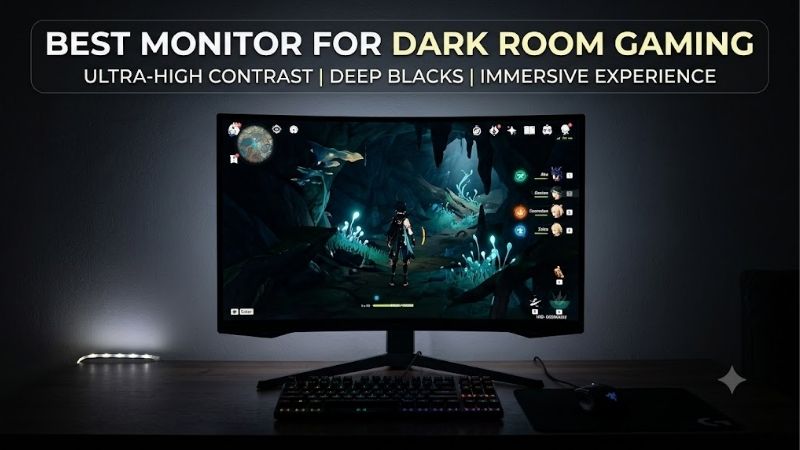
Quick answer: For most people in 2026, the best monitor for dark room gaming is the MSI MPG 321URX QD-OLED — our #1 rated choice. See the full ranked comparison, alternatives and buying advice below.
Quick verdict: Start with contrast, then choose your format
For a flat 32-inch 4K setup, the MSI MPG 321URX QD-OLED is a strong candidate. It combines OLED contrast with a 240Hz refresh ceiling and useful connectivity. The ASUS ROG Swift OLED PG32UCDM serves a similar purpose, with Dolby Vision support available through updated firmware.
For competitive PC gaming at 1440p, consider the Alienware AW2725DF. Its 360Hz refresh rate gives it a different role from the larger 4K models, although DisplayPort is essential for reaching that maximum.
The LG 27GS95QE-B provides a 27-inch 1440p WOLED alternative at 240Hz. It is worth considering if you also use some room lighting and prefer its particular screen treatment.
If you want LCD, consider the AOC Q27G3XMN for a compact 1440p Mini LED setup or the Samsung Odyssey Neo G7 S32BG75 for curved 32-inch 4K gaming.
These are use-case recommendations, not a live-price ranking. Several are established models with newer alternatives, so compare the exact version and current offer before purchasing.
Quick comparison table
| Monitor | Recommended use | Panel and resolution | Refresh ceiling | Dark-room advantage | Important limitation |
|---|---|---|---|---|---|
| MSI MPG 321URX QD-OLED | Flat 32-inch 4K gaming and a shared desk | 31.5-inch QD-OLED, 3840 × 2160 | 240Hz | Pixel-level blacks without backlight blooming | Burn-in risk; newer 322URX exists |
| Alienware AW2725DF | High-refresh competitive PC gaming | 27-inch-class QD-OLED, 2560 × 1440 | 360Hz through DisplayPort | Deep blacks with very fast pixel response | HDMI is limited to 144Hz at native resolution |
| LG 27GS95QE-B | Compact 1440p OLED gaming | 27-inch WOLED, 2560 × 1440 | 240Hz | Black pixels remain dark without local-dimming halos | VRR flicker and text-clarity compromises |
| ASUS ROG Swift OLED PG32UCDM | Flat 4K gaming with additional HDR flexibility | 31.5-inch QD-OLED, 3840 × 2160 | 240Hz | Deep blacks and vivid HDR color | Confirm firmware and original versus Gen3 model |
| AOC Q27G3XMN | 1440p HDR gaming on LCD | 27-inch VA Mini LED, 2560 × 1440 | 180Hz through DisplayPort | High native contrast plus 336 dimming zones | Some dark smearing, blooming, and VRR flicker |
| Samsung Odyssey Neo G7 S32BG75 | Curved 4K gaming on LCD | 32-inch VA Mini LED, 3840 × 2160 | 165Hz | Local dimming strengthens dark-scene contrast | Pronounced 1000R curve; motion compromises |
Maximum refresh rates require a compatible source and connection. They describe supported display operation, not guaranteed game frame rates.
How we selected these monitors
Dark-room suitability was the first filter. A high-refresh monitor with weak black levels can look impressive in a brightly lit store yet disappoint during nighttime horror games, space simulations, or cinematic adventures.
Manufacturer documentation establishes each model’s panel, resolution, refresh capability, and relevant inputs. Published testing from RTINGS supplies evidence about actual dark-scene presentation, motion handling, and limitations that specifications alone cannot establish.
This guide is based on research rather than personal detailed research. It does not invent frame rates, measured brightness figures, or long-term ownership results.
The shortlist includes two display approaches. OLED controls light at the pixel level. The featured Mini LED monitors remain LCDs, using VA panels and independently controlled backlight zones to improve contrast.
No universal price ceiling was supplied, and comparable current US checkout prices were not verified across the shortlist. Consequently, the recommendations distinguish features and suitability rather than claiming a cheapest model or guaranteed value winner.
MSI MPG 321URX QD-OLED: A flat 4K starting point
The MSI MPG 321URX QD-OLED combines a flat 31.5-inch panel, 3840 × 2160 resolution, and a 240Hz refresh rate. Its appeal is detailed imagery alongside OLED’s ability to show black areas without backlight halos.
RTINGS reports deep blacks, crisp motion, and vivid colors in dark-room use. That combination suits atmospheric games where a bright flashlight, distant star, or illuminated doorway shares the screen with a dark background.
Its USB-C connection supplies up to 90W, and a KVM switch helps share peripherals between compatible computers. Those features give it a practical role beyond gaming, although prolonged static desktop use still carries OLED burn-in risk.
Ambient light can raise its apparent black level, so avoid directing a lamp at the panel.
Buy if: You want a large, flat 4K OLED with useful desk connectivity.
Skip if: You mainly display fixed applications or cannot justify 4K rendering demands.
Compare the newer MPG 322URX before paying a premium for remaining stock.
Alienware AW2725DF: A competitive 1440p option
The Alienware AW2725DF pairs a 27-inch-class QD-OLED panel with 2560 × 1440 resolution and a 360Hz maximum refresh rate. It suits players who want OLED contrast while prioritizing competitive PC gaming over a larger 4K workspace.
RTINGS finds exceptionally crisp motion and deep blacks in dark rooms. However, it also identifies noticeable VRR flicker when frame rates fluctuate.
Connectivity is a decisive limitation. DisplayPort supports the headline 360Hz mode, while HDMI supports up to 144Hz at native resolution. An HDMI 2.1 label should not be interpreted as full HDMI 2.1 bandwidth.
Its USB-C port is also not a DisplayPort Alt Mode video input. Laptop users should plan the video connection separately.
Buy if: You play fast PC games and have a suitable DisplayPort output.
Skip if: HDMI-only operation, native 4K, or USB-C video is essential.
The LG below is an alternative when 240Hz meets your needs and HDMI connectivity matters more.
LG 27GS95QE-B: A compact WOLED alternative
The LG 27GS95QE-B offers a 27-inch WOLED panel, 2560 × 1440 resolution, and a 240Hz refresh rate. Its pixel-level light control makes it appropriate for dark scenes without backlight blooming.
RTINGS reports excellent dark-room contrast and very fast response, while also noting VRR flicker and text-clarity limitations. Those drawbacks matter if your evening includes both gaming and long sessions reading desktop text.
HDMI 2.1 bandwidth and DisplayPort 1.4 provide useful connection options. Its handling of ambient light also makes it worth considering when the room is dim rather than completely dark.
Choose the exact 27GS95QE-B. The older 27GR95QE-B is a different model, and similar names do not establish identical performance.
Buy if: You want a compact OLED for varied gaming and do not need 4K.
Skip if: Static productivity dominates your usage or fine text is your main priority.
Compare it with Alienware according to connection needs and attainable frame rates.
ASUS ROG Swift OLED PG32UCDM: A feature-rich 4K alternative
The original ASUS ROG Swift OLED PG32UCDM uses a flat 31.5-inch 4K QD-OLED panel with a 240Hz refresh ceiling. It competes directly with the MSI as a large desktop OLED.
RTINGS reports deep blacks, vivid colors, and sharp motion. Its additional features include USB-C power delivery up to 90W, a KVM switch, and Dolby Vision support through a firmware update.
Dolby Vision adds format flexibility; it does not guarantee that every game supports it or that every HDR implementation will look better. Confirm firmware and supported source content before treating it as a deciding feature.
VRR flicker and raised black levels under ambient light remain limitations. OLED care features also reduce risk rather than eliminating burn-in.
Buy if: You want flat 4K OLED gaming and will use the additional connectivity or HDR features.
Skip if: Those extras add cost without helping your setup.
Check whether the listing is the original model or the newer PG32UCDM Gen3.
AOC Q27G3XMN: A 1440p Mini LED alternative
The AOC Q27G3XMN combines a 27-inch VA panel, 2560 × 1440 resolution, and Mini LED backlighting with 336 local-dimming zones. Its refresh ceiling is 180Hz through DisplayPort, with HDMI limited to 144Hz.
Unlike OLED, it uses a backlight. Its advantage is the combination of strong native contrast and local dimming, which helps dark regions remain dark while highlights stay visible.
RTINGS finds effective dark-room performance but notes some black smearing and distracting VRR flicker. Bright objects can also reveal the limitations of zone-based lighting.
This model is worth comparing when you prefer LCD for a desk that displays static applications extensively. However, its historical budget positioning does not guarantee a favorable current price.
Buy if: You want 1440p HDR and deeper blacks without choosing OLED.
Skip if: Blooming or dark-motion trails are deal breakers.
Prefer OLED when tiny bright objects against black backgrounds are central to your viewing priorities.
Samsung Odyssey Neo G7 S32BG75: A curved 4K LCD option
The Samsung Odyssey Neo G7 S32BG75 is a 32-inch 4K VA Mini LED monitor with a 165Hz refresh rate and a pronounced 1000R curve. The relevant US model is LS32BG752NNXGO.
Its local dimming helps create dark backgrounds around bright highlights. RTINGS identifies useful HDR performance but also reports blooming, VRR flicker, and more inverse ghosting at lower refresh rates.
The curve is a purchasing consideration, not an automatic benefit. It may suit centered, immersive gaming, while users who prefer flat documents or frequently view the screen from the side may dislike it.
Samsung uses similar G7 names for substantially different monitors. Confirm the complete model rather than buying from the family name alone.
Buy if: You want curved 32-inch 4K gaming and prefer LCD.
Skip if: You need a flat panel or prioritize consistently clean motion across changing frame rates.
Compare the MSI when OLED’s pixel-level contrast outweighs static-content concerns.
How to choose the best monitor for dark room gaming
Distinguish deep blacks from hidden shadow detail
A monitor can display impressive black yet lose important information just above black. Dark clothing, wall textures, and objects in a dim corridor should remain distinguishable when the game intends them to be visible.
Before buying, look for evidence about near-black behavior rather than relying on a contrast specification alone. After setup, use the game’s brightness calibration and examine familiar scenes.
Avoid turning black equalization all the way up simply to reveal everything. That may lift the entire dark image, reducing the atmosphere and contrast you bought the monitor to preserve.
There is no single ideal setting for every title. Competitive visibility and faithful cinematic presentation are different goals, so save separate profiles when the monitor allows it.
Understand OLED versus Mini LED
OLED is the direct choice when you want bright objects beside black pixels without backlight blooming. This is particularly relevant for stars, subtitles, crosshairs, and small lights in otherwise dark scenes.
Mini LED controls larger backlight regions rather than individual pixels. A region containing both a bright object and dark background requires a compromise, potentially producing a halo or reducing the object’s brightness.
A Mini LED zone count helps describe the hardware but does not establish the quality of its dimming algorithm. Panel contrast, processing, and the scene itself also matter.
Choose OLED when pixel-level contrast leads your priorities. Choose a well-tested Mini LED LCD when static-content usage or other LCD preferences outweigh that advantage.
Do not buy for peak brightness alone
A dark room rarely requires maximum brightness for ordinary desktop use. A screen that looks striking during a short demonstration may feel overpowering through an entire evening.
HDR highlights are different from an SDR desktop brightness setting. A small, intense light in a game can be desirable without making every menu or white webpage equally bright.
Compare how a monitor handles different scenes, not merely its highest advertised number. OLED brightness can change with the proportion of bright content, while Mini LED behavior depends partly on local dimming.
For practical purchasing, prioritize contrast, comfortable adjustment, and predictable image behavior. Extra peak brightness is useful only when the rest of the display suits your needs.
Take VRR flicker seriously
Variable refresh rate can reduce tearing as game frame rates change. However, fluctuating frame delivery can also cause visible brightness changes on some OLED and VA displays, especially in dark scenes.
A specification saying “flicker-free” should not be interpreted as proof that VRR flicker is absent. Different flicker mechanisms require different evaluation.
Test your actual games, including loading transitions and demanding areas. A stable frame-rate cap or reduced graphics settings may help by improving consistency, but neither is a universal fix.
Temporarily disabling VRR is a useful diagnostic step. If flicker disappears, compare that benefit with any tearing or stutter introduced. The most usable setting may vary by game.
Match resolution to your graphics performance
The two 1440p OLEDs and the AOC offer a manageable starting point when you want high refresh without the rendering load of native 4K. They also fit desks where a 32-inch display would feel too large.
The 4K options make more sense when detailed scenery, a larger workspace, and sharper text matter. They require substantially more rendering work than 1440p at otherwise comparable settings.
A 240Hz 4K monitor can still be useful when demanding games run far below 240 frames per second. Its refresh ceiling is available headroom, not a minimum performance requirement.
However, do not spend primarily for a number your system cannot exploit. Choose resolution and size first, then decide how much refresh capability serves your games.
Consider your daytime usage before choosing OLED
A monitor purchased for nighttime gaming may also display spreadsheets, browser tabs, editing timelines, or a fixed taskbar throughout the day. That usage should influence the decision.
OLED burn-in risk relates to cumulative wear, particularly repeated static elements. Protection features and varied content help manage exposure but do not establish that permanent wear is impossible.
Keep manufacturer care routines enabled, allow prescribed maintenance to run, and avoid leaving an unused desktop displayed for hours. Confirm current regional warranty terms for the exact product.
If your usage is overwhelmingly static work, a Mini LED LCD may be the more comfortable ownership choice. You can still obtain meaningful dark-scene improvements without using OLED.
Setting up your monitor for nighttime gaming
Start with an accurate standard or sRGB mode for SDR content when available. Reduce brightness until ordinary menus and white windows feel comfortable in your actual room.
Then enable HDR for supported games and follow their calibration instructions. Use the display’s current firmware and avoid copying another monitor’s peak-brightness values without checking your own mode.
For Mini LED, compare local-dimming settings in several real scenes. Watch both bright-object halos and whether dark textures disappear. The strongest setting is not automatically the most faithful.
For OLED, retain the manufacturer’s care features. Let the monitor complete required maintenance rather than repeatedly interrupting it.
Also check the complete signal path:
- Select native resolution and the intended refresh rate.
- Confirm the chosen input supports that mode.
- Test VRR separately from basic video operation.
- Match source and display signal-range settings.
- Compare a familiar dark scene before changing shadow controls.
If you use a background light, keep it subtle and prevent it from shining onto the screen. Test the monitor during its return window under the same conditions in which you will actually play.
Frequently asked questions
Is OLED always the best choice for a dark room?
OLED is the strongest starting point for pixel-level blacks and freedom from backlight blooming. That does not make it the right purchase for every owner.
VRR flicker, static-content exposure, screen size, connection requirements, and price still matter. A well-tested Mini LED LCD can be preferable when those considerations outweigh OLED’s contrast advantage.
Is VA better than IPS for dark-room gaming?
VA commonly offers higher native contrast, which helps black areas look darker. However, the complete monitor matters more than the panel label.
A poorly implemented VA model may show distracting dark smearing. An IPS monitor with effective local dimming can also outperform a basic LCD in mixed bright-and-dark scenes. Evaluate the exact model.
Will OLED reveal enemies in dark areas more easily?
Not automatically. Deep black and visible shadow detail are separate properties, and the game’s rendering and brightness settings affect what you can see.
Use the game’s calibration first. If competitive visibility matters, adjust shadow enhancement carefully. Excessive enhancement can flatten the image and undermine the contrast advantage that makes OLED appealing.
Do more Mini LED zones eliminate blooming?
No. More zones can improve spatial control, but they do not replace individual-pixel light control.
The dimming algorithm, panel contrast, viewing angle, and size of bright objects all affect the result. Look for testing of difficult scenes rather than assuming a larger zone count guarantees better performance.
Should I turn HDR on for every game?
Use HDR when the game and display handle it well. Native HDR quality varies, and converted SDR content may produce a different appearance from the original.
Compare the same scene, follow calibration guidance, and choose the presentation that preserves detail and looks convincing. An HDR badge does not require you to prefer HDR everywhere.
Final verdict: Choose the compromises you can live with
For a flat 4K OLED, start by comparing the MSI MPG 321URX and original ASUS PG32UCDM against their newer alternatives and current offers. For compact high-refresh gaming, compare the Alienware AW2725DF and LG 27GS95QE-B according to connection needs and achievable frame rates.
Choose the AOC Q27G3XMN or Samsung Neo G7 S32BG75 when you prefer LCD, accepting zone-based dimming and their documented motion limitations.
The right purchase preserves dark-scene detail while fitting your games, desk, and daily usage. Deep blacks matter, but comfortable brightness, stable presentation, and practical compatibility complete the experience.
Ready to decide? Our #1 pick for 2026 is the MSI MPG 321URX QD-OLED.
Live price & availability on Amazon.









