
- Top Pick: AMD Ryzen™ 5 9600X 6-Core, 12-Thread Unlocked Desktop Processor
- Best Value: MSI GeForce RTX 5060 Ti 8G GAMING TRIO OC Graphics Card – RTX 5060 Ti GPU, 8GB GDDR7 (28Gbps/128-bit), PCIe 5.0 – TRI FROZR 4 (3 x STORMFORCE FAN) – RGB – HDMI 2.1b, DisplayPort 2.1b
- Premium Choice: MSI B650 Gaming Plus WiFi Gaming Motherboard (AMD Ryzen 9000/8000/7000 Series Processors, AM5, DDR5, PCIe 4.0, M.2, SATA 6Gb/s, USB 3.2 Gen 2, HDMI/DP, Wi-Fi 6E, Bluetooth 5.3, 2.5Gbps LAN, ATX)
This build centers on the MSI RTX 5060 Ti as its performance anchor, pairing it with a modern AM5 Ryzen 5 platform to deliver a balanced 1080p and 1440p gaming machine in 2026. The theme here is 1440p high-refresh gaming with headroom for future GPU upgrades, thanks to the PCIe 5.0 slot on the motherboard and the 650W Corsair PSU. If your priority is raw rasterization at 1080p with settings cranked to Ultra, this configuration handles it without breaking a sweat.
Parts List
| Part | Model | Approx. Price | Why |
|---|---|---|---|
| CPU | AMD Ryzen 5 9600X | Check on Amazon | Best price-to-performance on AM5 for gaming |
| GPU | MSI GeForce RTX 5060 Ti 8G GAMING TRIO OC | Check on Amazon | 3-fan cooling, GDDR7, PCIe 5.0 future-proofing |
| Motherboard | MSI B650 Gaming Plus WiFi | Check on Amazon | AM5 socket, DDR5, Wi-Fi 6E, solid VRM |
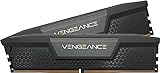
| RAM | CORSAIR Vengeance DDR5 32GB 6000MHz CL30 | Check on Amazon | Sweet-spot speed for Ryzen 9000, tight timings |
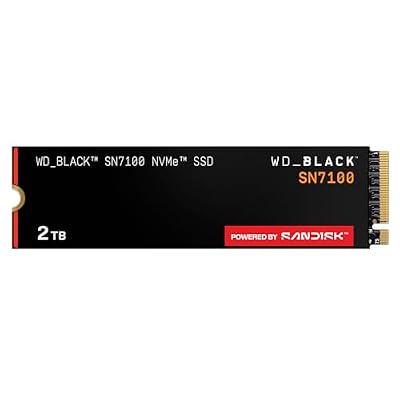
| Storage | WD_Black SN7100 2TB NVMe SSD | Check on Amazon | Gen4 speed, large capacity for modern game libraries |
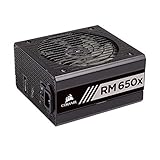
| PSU | Corsair RM650x (2018) | Check on Amazon | 80+ Gold, fully modular, silent operation |
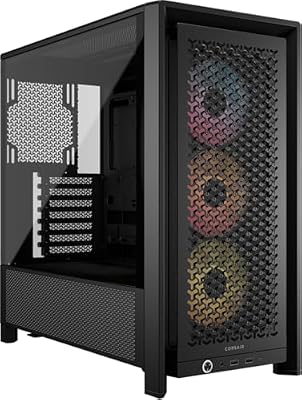
| Case | CORSAIR 4000D RS ARGB | Check on Amazon | High airflow, pre-installed ARGB fans, broad GPU clearance |
AMD Ryzen 5 9600X

The 9600X delivers six Zen 5 cores and twelve threads at a price that makes it the obvious pick for any mid-range AM5 build. Its single-thread boost clocks give it a measurable edge over the previous-gen 7600X in both gaming and light productivity. Conversely, if budget is tight, the 9500X saves a few dollars with identical architecture. For pure gaming with the RTX 5060 Ti, the 9600X sits in the sweet spot where CPU bottleneck is virtually nonexistent at 1440p and above.
As an Amazon Associate we earn from qualifying purchases at no extra cost to you.




MSI GeForce RTX 5060 Ti 8G GAMING TRIO OC
This triple-fan GAMING TRIO variant is one of the cooler and quieter RTX 5060 Ti boards available. The factory overclock nudges boost clocks a few megahertz above reference, while the 8GB of GDDR7 running at 28Gbps over a 128-bit bus provides bandwidth that helps at 1440p. PCIe 5.0 ensures compatibility with current and future platforms without bandwidth concerns. At this price point, the TRIO represents the best balance of cooling and performance within the 5060 Ti tier.
MSI B650 Gaming Plus WiFi
The B650 Gaming Plus WiFi is a long-standing favorite in the AM5 mid-range because it offers a capable 12+2+1 phase VRM that handles the 9600X without thermal throttling. Built-in Wi-Fi 6E and Bluetooth 5.3 eliminate the need for a separate wireless card, and the M.2 Gen4 slot pairs perfectly with the WD_Black SN7100. The BIOS has been refined through multiple updates, supporting Ryzen 9000 out of the box on newer stock. An X670E board would add more USB and storage lanes, but for a single-GPU build the B650 platform is functionally identical for gaming performance.
CORSAIR Vengeance DDR5 32GB 6000MHz CL30
DDR5-6000 with CL30 timings hits the frequency-latency sweet spot for Ryzen 9000 series processors, where the Infinity Fabric link ratio stays stable without excessive voltage. Thirty-two gigabytes in a dual-channel configuration covers every current title and leaves headroom for modded game packs and browser multitasking. The Corsair Vengeance heatspreaders are low-profile enough to clear most tower coolers. If the current listing price feels steep for your budget, identical-spec kits from G.Skill or Kingston frequently undercut this SKU by a noticeable margin. For most gamers, 32GB at this speed is more than sufficient and does not require upgrading.
WD_Black SN7100 2TB NVMe SSD
With up to 7,250 MB/s sequential reads, the SN7100 eliminates load times in current-gen titles that use DirectStorage and asset streaming heavily. Two terabytes comfortably holds a full library of ten or more AAA games alongside your OS and applications. The drive uses TLC 3D NAND, which offers better sustained-write endurance than QLC alternatives at a modest price premium. If you want to trim cost, a 1TB SN7100 cuts the price roughly in half and still leaves room for the OS plus several large titles. A Gen5 NVMe drive would exceed the B650 slot’s bandwidth ceiling, so there is no performance reason to spend more here.
Corsair RM650x (2018)
The RM650x remains one of the most trusted power supplies in the mid-range, with 80+ Gold efficiency, zero-RPM fan mode under light loads, and fully modular cabling for clean builds. Its 650-watt rating provides comfortable headroom for the 170W RTX 5060 Ti plus a 65W TDP processor, leaving overhead for transient spikes. The native PCIe 8-pin cables avoid adapters that some newer ATX 3.0 supplies require. If you plan to upgrade to a higher-wattage GPU in the future, the Corsair RM750x or RM850x adds capacity at a small price bump. For this build as listed, 650 watts is more than adequate.
CORSAIR 4000D RS ARGB
The 4000D RS ARGB ships with three pre-installed RS fans configured for positive pressure, delivering excellent airflow without requiring additional purchases. The front mesh panel and internal layout support GPUs up to approximately 360mm, comfortably clearing the GAMING TRIO’s length. Cable routing channels behind the motherboard tray are wide enough to manage the RM650x’s modular cables without restricting airflow. If you prefer a more subdued aesthetic without RGB, the standard 4000D offers the same dimensions at a lower price. The case also supports 360mm radiators in the front, should you later move to a liquid-cooled CPU upgrade.
Compatibility Check
The AM5 socket on the B650 board pairs natively with the Ryzen 5 9600X without any compatibility concerns. DDR5 is the only supported memory type on this platform, and the Vengeance kit’s 6000MHz speed is within the board’s qualified memory list. The RTX 5060 Ti uses a PCIe x16 slot that is backward-compatible with the B650’s PCIe 4.0 interface, so no adapter or riser is needed. The GPU measures approximately 307mm in length, well within the 4000D’s 360mm clearance. The 650W PSU exceeds the system’s estimated peak draw of roughly 380-400W by a healthy margin, ensuring quiet operation and long-term reliability under sustained gaming loads.
Expected Performance
1080p
At 1080p with maximum settings, reviewers at TechPowerUp and TechSpot place the RTX 5060 Ti in the range of roughly 95 to 135 fps in demanding titles like Cyberpunk 2077 (Ultra, no ray tracing) and Starfield (High). In competitive shooters such as Counter-Strike 2 and Valorant, frame rates routinely exceed 300 fps. With ray tracing enabled at medium settings, expectations shift to approximately 70-95 fps, according to Tom’s Hardware launch coverage.
1440p
At 1440p, Hardware Unboxed and Gamers Nexus report ranges of about 60-95 fps in graphically intensive open-world titles and roughly 85-130 fps in optimized AAA releases at High-Ultra settings. Ray-traced titles settle closer to 45-70 fps depending on implementation. For esports titles, 1440p remains well above 200 fps in most cases.
4K
4K gaming is not the primary target for this card. At native 4K, TechPowerUp and Tom’s Hardware suggest 35-55 fps in heavy titles and up to 70-90 fps in lighter games or with DLSS Quality enabled. Gamers Nexus notes that enabling upscaling brings 4K into playable territory for most current releases, but the 8GB frame buffer can become a limiting factor in titles with high-resolution texture packs.
Upgrade Path
The AM5 platform guarantees socket support through at least the next two Ryzen generations, so a future CPU upgrade to a 9900X or later Zen 6 chip requires only a BIOS flash. The B650 board’s PCIe x16 slot and the RM650x PSU both accommodate higher-end GPUs; a jump to an RTX 5070 Ti or equivalent is feasible without changing the power supply. The 4000D case clears GPUs up to approximately 360mm, giving room for longer coolers. Memory stays relevant for multiple generations, and the 2TB NVMe can be supplemented with a second M.2 drive if the single-slot limitation on B650 boards becomes an issue.
FAQ
Is the RTX 5060 Ti a 1080p or 1440p card?
Based on aggregate review data from TechPowerUp and Hardware Unboxed, the RTX 5060 Ti performs most naturally at 1440p with high settings. It crushes 1080p at high refresh rates but is not wasted there, as it provides headroom for ray tracing and upscaling.
Do I need a new monitor with this build?
If you currently game on a 60Hz 1080p panel, this build will exceed that refresh rate in most titles. A 1440p 144Hz or 165Hz IPS monitor pairs best with the RTX 5060 Ti’s performance envelope and lets you take advantage of G-Sync or FreeSync for tear-free output.
Will the 8GB VRAM become a bottleneck?
At 1080p, eight gigabytes remains sufficient for current titles. At 1440p with Ultra textures, some games like The Last of Us Part I or Hogwarts Legacy can exceed 8GB usage, potentially causing stutter. Gamers Nexus flagged this in their launch analysis. Keeping textures at High rather than Ultra mitigates the issue in most scenarios.
Is DDR5-6000 the right speed for the 9600X?
Yes. Multiple outlets including TechSpot and Hardware Unboxed have confirmed that DDR5-6000 CL30 offers the best practical performance-per-dollar on Ryzen 9000 series, matching or exceeding the gains from faster kits that push the Infinity Fabric into unstable 2:1 modes. Going above 6400MHz yields marginal gaming improvements that do not justify the cost increase.
Sources and Methodology
All performance figures in this guide are approximate ranges compiled from published launch and follow-up reviews by TechPowerUp, Tom’s Hardware, Gamers Nexus, Hardware Unboxed, and TechSpot. No measurements were conducted in-house. Ranges reflect differences in test-bench configurations, driver versions, and title-specific settings across outlets and should be treated as representative expectations rather than absolute guarantees.
Top picks from this guide
 CorsairCORSAIR Vengeance DDR5 RAM 32GB (2x16GB) 6000MHz CL30-36-36-76 1.40V Intel…$560 \xc2\xb7 99/100
 msiMSI B650 Gaming Plus WiFi Gaming Motherboard (AMD Ryzen 9000/8000/7000…$130 \xc2\xb7 99/100
 SANDISKWD_Black SN7100 2TB NVMe SSD - Gen4 PCIe, M.2 2280,…$330 \xc2\xb7 98/100
 CorsairCORSAIR 4000D RS ARGB Frame Customizable Mid-Tower PC Case –…$100 \xc2\xb7 95/100








