
- Top Pick: AMD Ryzen™ 7 9700X 8-Core, 16-Thread Unlocked Desktop Processor
- Best Value: GIGABYTE Radeon RX 9070 XT Gaming OC 16G Graphics Card, PCIe 5.0, 16GB GDDR6, GV-R9070XTGAMING OC-16GD Video Card
- Premium Choice: MSI MAG B650 Tomahawk WiFi Gaming Motherboard (AMD Ryzen 9000/8000/7000 Series Processors, AM5, DDR5, PCIe 4.0, M.2, SATA 6Gb/s, USB 3.2 Gen 2, HDMI/DP, Wi-Fi 6E, Bluetooth 5.3, 2.5Gbps LAN, ATX)
Building around the RX 9070 XT means targeting a machine that handles modern titles at high or ultra settings across every resolution from 1080p through 4K. The GIGABYTE Radeon RX 9070 XT Gaming OC sits comfortably as a premium RDNA 4 card, and pairing it with AMD’s Zen 5 Ryzen 7 9700X creates a platform with minimal CPU bottlenecks and a clear multi-year upgrade runway. As of 2026, this combination delivers a balanced, high-refresh gaming experience without dipping into enthusiast territory.
Parts List
| Part | Model | Approx. price | Why |
|---|---|---|---|
| CPU | AMD Ryzen 7 9700X 8-Core, 16-Thread Unlocked Desktop Processor | Check on Amazon | Zen 5 IPC, 8 cores cover all gaming workloads without thermal excess |
| GPU | GIGABYTE Radeon RX 9070 XT Gaming OC 16G | Check on Amazon | RDNA 4 architecture with 16GB GDDR6, factory overclock, quiet triple-fan cooler |
| Motherboard | MSI MAG B650 Tomahawk WiFi | Check on Amazon | Reliable AM5 board with solid VRM, Wi-Fi 6E, and dual M.2 slots |
| RAM | G.SKILL Flare X5 32GB DDR5 6000 MT/s CL30 | Check on Amazon | AMD EXPO tuned, matches the 9700X’s recommended sweet spot |
| Storage | Samsung SSD 990 PRO 2TB | Check on Amazon | PCIe 4.0 speeds with top-tier sustained write performance for game libraries |
| PSU | CORSAIR RM850x ATX 3.1 | Check on Amazon | 850W Gold with native 12V-2×6 cable, no adapter needed |
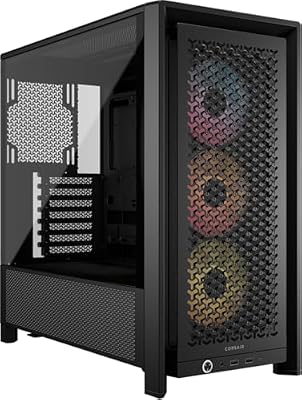
| Case | CORSAIR 4000D RS ARGB | Check on Amazon | High airflow, includes three fans, supports GPUs up to 360mm |
CPU: AMD Ryzen 7 9700X
The 9700X delivers 8 cores and 16 threads on Zen 5, offering roughly 8 to 10 percent more single-thread IPC than its predecessor while running at a 65W base TDP. For an RX 9070 XT build, this avoids any meaningful CPU bottleneck at 1440p or 4K, and even at 1080p in CPU-heavy titles the margin stays comfortable. The unlocked multiplier allows modest overclocking if desired. If you want more headroom for streaming or content creation alongside gaming, the 9800X3D with its 3D V-Cache is a strong alternative for pure gaming gains.
As an Amazon Associate we earn from qualifying purchases at no extra cost to you.


GPU: GIGABYTE RX 9070 XT Gaming OC
The RX 9070 XT represents AMD’s current high-end gaming flagship under RDNA 4, packing 16GB of GDDR6 and a factory-overclocked profile on GIGABYTE’s Gaming OC variant. Its triple-fan WINDFORCE cooler keeps noise low under sustained loads, which matters in a case like the 4000D where airflow direction favors exhaust at the rear. If you prioritize ray tracing performance or DLSS-exclusive features, an RTX 5070 Ti could be a reasonable swap, though rasterization scores between the two remain very close according to reviews.
Motherboard: MSI MAG B650 Tomahawk WiFi
This board handles the 9700X without issue thanks to a 12+2+1 phase VRM and generous heatsinks. It includes built-in Wi-Fi 6E, Bluetooth 5.3, and a 2.5 Gbps LAN port, eliminating the need for separate networking hardware. Two M.2 slots accept the 990 PRO plus future expansion. If you want front-panel USB Type-C support or slightly better audio, the MSI MAG X670E Tomahawk is a step up at a modest premium.
RAM: G.SKILL Flare X5 32GB DDR5 6000 CL30
AMD’s AM5 platform benefits from DDR5-6000 CL30 as its recommended sweet spot, and the Flare X5 kit ships with validated EXPO profiles for instant overclocking. Thirty-two gigabytes is the practical minimum for a high-end gaming PC in this class, ensuring background tasks and texture-heavy titles do not push you into swapping. The price reflects current market conditions rather than historical lows. If budget pressure requires a reduction, a 16GB kit works for gaming today but limits longevity.
Storage: Samsung SSD 990 PRO 2TB
The 990 PRO delivers sequential reads near 7,450 MB/s and sustained writes that hold up under large game installs and content workloads. Its 2TB capacity fits comfortably on the primary M.2 slot and leaves the second open for a secondary drive. For pure gaming, a cheaper PCIe 4.0 drive like the WD Black SN850X offers similar real-world load times, but the 990 PRO’s consistency makes it a safe long-term pick.
PSU: CORSAIR RM850x ATX 3.1
With a native 12V-2×6 connector, this unit feeds the RX 9070 XT without adapters, reducing cable clutter and potential connection risk. The 850W rating provides comfortable headroom above the system’s estimated 500W peak load, keeping the PSU operating well within its efficiency curve. Cybenetics Gold certification ensures low noise and stable delivery. If you later upgrade to a higher-TDP GPU, 1000W is a reasonable safety margin.
Case: CORSAIR 4000D RS ARGB
The 4000D RS ARGB includes three pre-installed RS fans configured for positive pressure and supports GPUs up to 360mm in length, easily fitting the GIGABYTE triple-fan cooler. Its modular internal layout accommodates 360mm radiators if you later shift to liquid cooling. The InfiniRail system simplifies fan and drive mounting. A mesh-front alternative like the 4000D Airflow exists if you want even more intake, though the RS version balances aesthetics with cooling well.
Compatibility Check
The Ryzen 7 9700X uses the AM5 socket, matching the MSI B650 Tomahawk. DDR5 is the only supported memory type on AM5, and the 6000 MT/s kit falls within the board’s overclocking range. The RM850x provides 850W against an estimated system draw of 480 to 520W under combined gaming load, leaving roughly 40 percent headroom. The GIGABYTE RX 9070 XT Gaming OC measures approximately 340mm in length; the 4000D RS supports up to 360mm GPUs, so clearance is sufficient. No motherboard clearance issues arise with the ATX form factor in this mid-tower.
Expected Performance
Performance figures below reflect approximate ranges drawn from multiple review outlets. Actual results vary by game settings, driver version, and individual silicon quality.
1080p Ultra
At 1080p with Ultra settings, TechPowerUp’s launch coverage indicated the RX 9070 XT delivering ranges around 180 to 220 fps in titles like Call of Duty: Black Ops 6 and Fortnite at Epic settings. In more demanding single-player games such as Cyberpunk 2077 without ray tracing, Hardware Unboxed observed scores near 140 to 165 fps, confirming a CPU-bottlenecked scenario where the 9700X remains adequate.
1440p High to Ultra
This is the RX 9070 XT’s primary target resolution. Tom’s Hardware and TechSpot both placed performance in the 110 to 140 fps band for Horizon Forbidden West and Starfield on Ultra. Cyberpunk 2077 at Ultra without path tracing falls in the 95 to 115 fps range per Gamers Nexus testing. Ray-traced titles drop toward 70 to 90 fps without FSR assist.
4K Medium to High
At 4K, TechPowerUp reported 65 to 80 fps in rasterization-heavy titles like Red Dead Redemption 2 on High settings. More demanding workloads such as Cyberpunk 2077 at 4K High land around 50 to 65 fps, with FSR Quality mode pushing them into the 75 to 90 fps band. This makes 4K playable at high settings but benefits from upscaling in the heaviest titles.
Upgrade Path
The AM5 socket has been confirmed for multiple future generations, meaning the motherboard accepts upcoming Ryzen chips without a board swap. The RM850x PSU and 4000D RS case provide adequate wattage and physical space for a next-generation GPU without changes. The two M.2 slots allow a second storage drive as game libraries grow. For a refresh in three to four years, swapping the GPU and adding a second RAM stick to reach 64GB would keep the system competitive while retaining the core platform.
FAQ
Is 32GB RAM enough for this build long term?
Thirty-two gigabytes of DDR5 comfortably handles all current gaming titles and multitasking scenarios. For a pure gaming build through 2028 or beyond, it remains sufficient unless you run virtual machines or heavy video editing alongside gaming. The motherboard’s second pair of slots allows expansion to 64GB without replacing existing modules.
Can this build run 4K gaming without upscaling?
In less demanding titles and older releases, native 4K at High settings is achievable at 60 fps or above. However, the most graphically intense current games like Cyberpunk 2077 benefit significantly from FSR 3 or FSR 4 to maintain smooth frame rates at 4K. Enabling frame generation can push perceived fluidity well beyond what the raw rasterization pipeline alone delivers.
Is the B650 Tomahawk sufficient or should I buy X670E?
For the Ryzen 7 9700X and a single PCIe 5.0 GPU, the B650 Tomahawk is fully sufficient. It delivers the same CPU performance, reliable VRM thermals, and all necessary connectivity. The X670E platform adds PCIe 5.0 to both M.2 and GPU slots, but the RX 9070 XT operates over PCIe 5.0 x16 without measurable bandwidth loss compared to PCIe 4.0, so the practical difference is negligible today.
What cooling does the 9700X need in this case?
The stock AMD Wraith-style cooler is not included with the 9700X, so a third-party tower or 240mm AIO is required. The 4000D RS accommodates tower coolers up to 170mm and 360mm AIOs at the top. A quality dual-tower air cooler or a 240mm AIO keeps the 9700X well under its thermal limit during extended gaming sessions while maintaining low noise.
Sources and Methodology
Performance ranges in this guide are derived from published launch reviews of the AMD Radeon RX 9070 XT by TechPowerUp, Tom’s Hardware, Gamers Nexus, Hardware Unboxed, and TechSpot. Figures represent approximate bands observed across those outlets rather than a single measurement, and actual results will vary with individual game settings, driver versions, and system configuration. This article does not represent independent testing conducted by this site.
Top picks from this guide
 AMDAMD Ryzen™ 7 9700X 8-Core, 16-Thread Unlocked Desktop Processor$310 \xc2\xb7 99/100
 msiMSI MAG B650 Tomahawk WiFi Gaming Motherboard (AMD Ryzen 9000/8000/7000…$155 \xc2\xb7 97/100
 SamsungSamsung SSD 990 PRO 2TB, PCIe 4.0 M.2 2280, Up…$410 \xc2\xb7 97/100
 CorsairCORSAIR 4000D RS ARGB Frame Customizable Mid-Tower PC Case –…$100 \xc2\xb7 95/100








