
An RTX 5070 gaming PC build sits in a compelling sweet spot for enthusiasts who want high-refresh gameplay without reaching into flagship territory. This particular configuration pairs the new Blackwell GPU with AMD’s Ryzen 7 9700X and a platform that leaves genuine headroom for future upgrades. Below is the full parts list, compatibility analysis, and performance expectations for this build as assembled in 2026.
Updated October 2026 – parts, compatibility and price tiers rechecked against maker documentation.
Quick answer: a good pc rtx 5070 build pairs the GPU with a Ryzen 7 9700X, an AM5 B850 board, 32GB of DDR5-6000, a 2TB NVMe drive, an 850W ATX 3.1 power supply and a separate air cooler. That combination covers what parts to pair with a rtx 5070 gpu without bottlenecks.
Parts List
| Part | Model | Approx. Price | Why |
|---|---|---|---|
| CPU | AMD Ryzen™ 7 9700X 8-Core, 16-Thread Unlocked Desktop Processor | Varies | Strong single-core performance for gaming, Zen 5 efficiency |
| CPU cooler | Thermalright Peerless Assassin 120 SE dual-tower air cooler | Varies | The 9700X ships without a cooler; this keeps it cool and quiet |
| GPU | ASUS TUF Gaming GeForce RTX 5070 12GB GDDR7 OC Edition Gaming Graphics Card | Check on Amazon | Blackwell architecture, DLSS 4, solid 1440p performance |
| Motherboard | MSI MAG B850 Tomahawk MAX WiFi Motherboard | Check on Amazon | PCIe 5.0, Wi-Fi 7, robust VRM for future chips |
| RAM | CORSAIR Vengeance DDR5 32GB (2 x 16GB) Up to 6000MHz AMD Intel RAM | Check on Amazon | Matches Infinity Fabric sweet spot on AM5 |
| Storage | Samsung SSD 990 PRO 2TB, PCIe 4.0 M.2 2280 | Check on Amazon | Proven reliability, fast load times |
| PSU | CORSAIR RM850x ATX 3.1 PCIe 5.1 Ready Fully Modular 850W Power Supply | Check on Amazon | Native 12V-2×6 connector, ample headroom |
| Case | Lian Li LANCOOL 216 Case-Black | Check on Amazon | Excellent airflow, fits ATX boards and long GPUs |
CPU: AMD Ryzen 7 9700X
The 9700X delivers eight Zen 5 cores that handle every current game without becoming a bottleneck at high refresh rates. Tom’s Hardware noted in their launch review that the chip trades blows with previous-gen flagships in gaming while drawing significantly less power. The unlocked multiplier means you can push boost clocks further with a decent cooler. If you wanted to save a few dollars, the Ryzen 5 9600X would still keep up in most titles, though you would give up two cores for heavier multitasking or creative workloads. Note that it ships without a cooler, so the build adds a separate air cooler below.

AMD Ryzen™ 7 9700X 8-Core, 16-Thread Unlocked Desktop Processor
Included for 'RTX 5070 Gaming PC Build in 2026: Full Parts List and Expected FPS' because the listing specifies 16-Thread Unlocked Desktop Processor, details this guide uses to compare options.
View on Amazon
ASUS TUF Gaming GeForce RTX 5070 12GB GDDR7 OC EditionGaming Graphics Card | PCIe 5.0, HDMI/DP 2.1, 3.125-slot, Military-grade Components, Protective PCB Coating, Axial-tech Fans
Included for 'RTX 5070 Gaming PC Build in 2026: Full Parts List and Expected FPS' because the listing specifies PCIe 5.0 and HDMI/DP 2.1, details this guide uses to compare options.
View on Amazon
MSI MAG B850 Tomahawk MAX WiFi Motherboard, ATX - Supports AMD Ryzen 9000/8000 / 7000 Processors, AM5-80A SPS VRM, DDR5 Memory Boost 8400+ MT/s (OC), PCIe 5.0 x16, M.2 Gen5, Wi-Fi 7, 5G LAN
Included for 'RTX 5070 Gaming PC Build in 2026: Full Parts List and Expected FPS' because the listing specifies ATX and Supports AMD Ryzen 9000/8000 / 7000 Processors, details this guide uses to compare options.
View on Amazon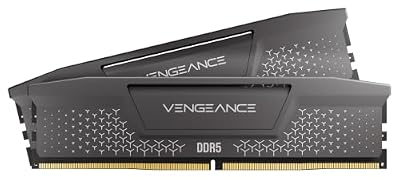
CORSAIR Vengeance RS DDR5 32GB (2 x 16GB) Up to 6000MHz AMD Intel RAM | Desktop Gaming Memory, AMD EXPO & Intel XMP 3.0 Compatible, CL38, Gray, CML32GX5M2D6000Z38
Included for 'RTX 5070 Gaming PC Build in 2026: Full Parts List and Expected FPS' because the listing specifies Desktop Gaming Memory and AMD EXPO & Intel XMP 3.0 Compatible, details this guide uses to compare options.
View on Amazon
Samsung SSD 990 PRO 2TB, PCIe 4.0 M.2 2280, Up to 7,450 MB/s | NVMe Internal Solid State Hard Drive for High End Computing, Gaming, and Heavy Duty Workstations, (MZ-V9P2T0B/AM)
Included for 'RTX 5070 Gaming PC Build in 2026: Full Parts List and Expected FPS' because the listing specifies PCIe 4.0 M.2 2280 and Up to 7, details this guide uses to compare options.
View on Amazon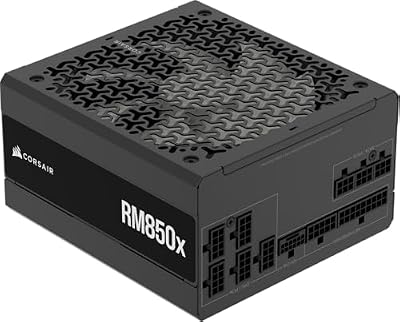
CORSAIR RM850x ATX 3.1 PCIe 5.1 Ready Fully Modular 850W Power Supply – Low-Noise, Cybenetics Gold Efficiency, Native 12V-2x6 Connector – Black
Included for 'RTX 5070 Gaming PC Build in 2026: Full Parts List and Expected FPS' because the listing specifies Low-Noise and Cybenetics Gold Efficiency, details this guide uses to compare options.
View on Amazon
LIAN LI LANCOOL 216 RGB Black ATX Mid-Tower Case, 2x160mm ARGB Fans | Airflow mesh case includes two 160mm ARGB front fans and one 140mm rear fan, with 392mm GPU and 360mm radiator support.
Included for 'RTX 5070 Gaming PC Build in 2026: Full Parts List and Expected FPS' because the listing specifies 2x160mm ARGB Fans and with 392mm GPU and 360mm radiator support., details this guide uses to compare options.
View on AmazonGPU: ASUS TUF Gaming GeForce RTX 5070 12GB
This OC Edition sits among the more robust aftermarket designs of the RTX 5070 lineup, featuring a large 3.125-slot heatsink and Axial-tech fans. TechPowerUp’s review of the RTX 5070 reference design showed the GPU performing within the neighborhood of the previous 4070 Ti SUPER while adding DLSS 4 multi-frame generation. The 12GB of GDDR7 handles 1440p textures comfortably and stretches into 4K at medium settings.
CPU Cooler: Thermalright Peerless Assassin 120 SE

Thermalright Peerless Assassin 120 SE CPU Cooler, 6 Heat Pipes AGHP Technology, Dual 120mm PWM Fans, 1550RPM Speed, for AMD:AM4 AM5/Intel LGA 1700/1150/1151/1200/1851,PC Cooler
Included for 'RTX 5070 Gaming PC Build in 2026: Full Parts List and Expected FPS' because the listing specifies 6 Heat Pipes AGHP Technology and Dual 120mm PWM Fans, details this guide uses to compare options.
View on AmazonRyzen 7 9000-series chips such as the 9700X do not include a cooler in the box, so this build adds the Thermalright Peerless Assassin 120 SE. It is a dual-tower air cooler that keeps the 9700X cool and quiet without the cost or leak risk of a liquid loop.
- Dual-tower heatsink with six heat pipes
- Two 120mm PWM fans, rated 1550 RPM
- Supports AMD AM5 and AM4 mounting
Pros: excellent value, quiet at gaming loads, simple installation.
Cons: a tall dual-tower shape, so check memory and case clearance; no RGB on this version.
Skip it if you prefer a 240mm or 360mm AIO for looks or you plan to overclock heavily.
Motherboard: MSI MAG B850 Tomahawk MAX WiFi
The B850 chipset supports Ryzen 9000, 8000, and 7000 series chips on AM5, which means a future Zen 6 drop-in remains possible on this board. Hardware Unboxed highlighted its 80A SPS VRM as more than sufficient for even a Ryzen 9 9950X. You get PCIe 5.0 x16 for the GPU slot, a Gen5 M.2 slot, Wi-Fi 7, and 5G LAN.
RAM: CORSAIR Vengeance DDR5 6000MHz 32GB Kit
Six thousand MT/s (DDR5-6000) represents the commonly cited Infinity Fabric sweet spot on AM5, balancing latency and bandwidth without requiring aggressive overclocking. Gamers Nexus found that DDR5-6000 CL30 kits deliver negligible gaming differences versus faster, pricier options in their platform reviews. The 32GB capacity covers current AAA titles and browser-heavy multitasking. Upgrading to 64GB is worthwhile only if you stream while gaming or run memory-hungry productivity applications; for pure play, this kit is the sensible choice.
Storage: Samsung 990 PRO 2TB
Despite the board offering a Gen5 slot, the 990 PRO’s sequential read speeds up to 7,450 MB/s already exceed what games can saturate during load. Samsung’s Magician software provides firmware management and thermal monitoring that make this drive easy to maintain over years of use. TechSpot’s SSD testing consistently places the 990 PRO among the most reliable NVMe options with low failure rates.
Power Supply: CORSAIR RM850x ATX 3.1
The native 12V-2×6 connector eliminates the adapter dongle that plagued earlier RTX 40-series builds, and 850W provides comfortable headroom above the RTX 5070’s 250W TDP combined with the 9700X’s 65W envelope. Cybenetics Gold certification keeps noise and heat manageable. This is a fully modular unit, so cable management in the LANCOOL 216 stays clean. If you plan to upgrade to an RTX 5080 or higher later, moving to 1000W would be prudent, but for this build 850W is correct.
Case: Lian Li LANCOOL 216
The front mesh and included two 160mm intake fans give this case some of the best out-of-box airflow in its price bracket. GPU clearance supports cards up to 392mm long, which covers the TUF RTX 5070 with room to spare. The top panel supports 280mm radiators for future AIO expansion. Lian Li’s build quality and tool-free drive bays make assembly straightforward. If you prefer tempered glass aesthetics over airflow, the O11 Dynamic is a swap but runs hotter without additional fans.
What Parts to Pair With an RTX 5070
The RTX 5070 needs a modern platform, but it does not need the most expensive one. These tiers show how the rest of the build changes around the same GPU.
| Tier | CPU | Memory and storage | PSU |
|---|---|---|---|
| Budget 1440p | Ryzen 5 9600X | 32GB DDR5-6000 · 1TB NVMe | 750W 80+ Gold |
| Balanced (this build) | Ryzen 7 9700X | 32GB DDR5-6000 · 2TB NVMe | 850W ATX 3.1 |
| Maximum gaming speed | Ryzen 7 9800X3D | 32GB DDR5-6000 · 2TB NVMe | 850W ATX 3.1 |
At 1440p the RTX 5070 is usually the limit, so a faster CPU mostly helps high-refresh competitive games and 1080p play. If you mainly play at 1440p, put extra money into storage or a better monitor first.
RTX 5070 Ti Build Cost: What Changes?
The 850W PSU and LANCOOL 216 already handle it. In return you get 16GB of VRAM and better 1440p ultra and 4K performance.
RTX 5070 ROG Strix Build Notes
An ASUS ROG Strix RTX 5070 is a larger, pricier alternative to the TUF in this list. It works in the LANCOOL 216 as long as the card length stays under the case’s 392mm GPU clearance, but check the exact length and thickness on the maker’s page, and confirm the 16-pin power cable reaches comfortably.
Can an RTX 5070 Work on an Older Platform?
An RTX 5070 is a PCIe 5.0 card that also works in PCIe 4.0 and 3.0 slots, but graphics cards do not depend on RAM type. Very old platforms with DDR3 memory are the problem: their CPUs and slower PCIe 2.0 or 3.0 bandwidth will bottleneck the card, and many lack a suitable power supply for a 12V-2×6 connector. For an RTX 5070, start from an AM5 or recent Intel platform with DDR5.
Compatibility Check
The AM5 socket on the MSI B850 board is confirmed compatible with the Ryzen 7 9700X out of the box without a BIOS update for current stock. DDR5 is the only supported memory type on this platform. The 850W PSU is rated well above the estimated 350 to 450W total system load under gaming stress, so the unit runs around half load, where efficiency is typically best. The TUF RTX 5070 is a long, thick card (check the maker’s listed length, roughly 300mm) and fits the LANCOOL 216’s 392mm GPU clearance with a comfortable margin. The ATX motherboard fits the case without restriction.
Expected Performance
The figures below reflect ranges reported by major review outlets at the RTX 5070’s launch window and represent high or ultra settings with DLSS disabled unless noted.
1080p Gaming
At 1080p, TechPowerUp and TechSpot reported the RTX 5070 maintaining between approximately 130 and 180 fps in Cyberpunk 2077 on Ultra, 160 to 220 fps in Counter-Strike 2 on High, and 120 to 160 fps in Hogwarts Legacy on Ultra. This is a domain where the CPU matters, and the 9700X keeps frame-time variance low.
1440p Gaming
This is the target resolution for the build. Hardware Unboxed and Tom’s Hardware observed ranges of roughly 80 to 120 fps in Cyberpunk 2077 Ultra, 140 to 200 fps in Counter-Strike 2, 90 to 130 fps in Hogwarts Legacy Ultra, and 100 to 150 fps in Forza Horizon 5 at Extreme.
4K Gaming
At 4K, Gamers Nexus noted the RTX 5070 lands approximately 45 to 70 fps in demanding titles like Cyberpunk 2077 on High-Ultra and Hogwarts Legacy on Ultra. Competitive titles like Counter-Strike 2 remain above 150 fps. DLSS 4 multi-frame generation, when enabled, can push these ranges meaningfully higher, though at the cost of some latency.
Upgrade Path
The AM5 socket has been confirmed by AMD as extending beyond the current generation, meaning a Zen 6 CPU drop-in remains possible on this board without replacing it. The B850 chipset’s PCIe 5.0 x16 slot will handle any GPU upgrade without bandwidth concerns. The 850W PSU supports step-up to an RTX 5080-class card; anything beyond that should prompt a PSU swap. The LANCOOL 216’s top 280mm radiator mount allows adding an AIO if a future CPU demands more cooling. DDR5 capacity is the simplest early upgrade: two more DIMMs bring you to 64GB without replacing existing sticks.
FAQ
Is the RTX 5070 good enough for 4K gaming?
It handles 4K at medium-to-high settings in most current titles, often in the 45 to 70 fps range without upscaling. DLSS 4 makes it viable at higher settings if you accept frame generation’s latency tradeoff. For consistent 60 fps Ultra at 4K, an RTX 5080 or higher remains a better fit.
Does 12GB of VRAM limit this card long-term?
For 1440p gaming today, 12GB is sufficient across the current library. Several review outlets have noted that some titles at 4K Ultra with high-resolution texture packs are already approaching that ceiling. As a standalone 4K gaming card, this is a risk; as a 1440p card, it remains comfortable for the next couple of years.
Do I need a separate cooler for the 9700X?
Yes. The Ryzen 7 9700X is sold without a cooler, so you must buy one.
Is the B850 board a compromise versus X870?
For gaming, no meaningful performance difference exists. X870 adds USB4 and typically better rear I/O connectivity. The B850 Tomahawk MAX already includes Wi-Fi 7, 5G LAN, and a PCIe 5.0 GPU slot. Unless you specifically need USB4 for external storage or docks, the money saved is better spent on storage or peripherals.
Is the Ryzen 7 9700X better than the Ryzen 7 9800X3D for an RTX 5070?
The 9800X3D is faster in games, but at 1440p with an RTX 5070 the GPU is usually the limit. The 9700X gives most of the experience at a lower price; choose the 9800X3D for high-refresh esports play.
How much power supply do I need for an RTX 5070?
Nvidia suggests a 650W power supply for the RTX 5070. This build uses an 850W ATX 3.1 unit for headroom, a native 12V-2×6 cable and room for a future RTX 5070 Ti or 5080.
Is an RTX 5070 compatible with DDR3 or older boards?
Physically it fits any PCIe x16 slot, but DDR3-era platforms will bottleneck it badly and may lack the power connectors. Use a DDR5 AM5 or recent Intel platform.
Which monitor suits this build?
A 1440p monitor with a 144Hz to 240Hz refresh rate matches the RTX 5070 best. A 4K monitor works too, with DLSS 4 and medium-to-high settings.
Sources and Methodology
Performance ranges cited in this guide are drawn from launch-window reviews published by TechPowerUp, Tom’s Hardware, Gamers Nexus, Hardware Unboxed, and TechSpot. Figures represent observed minimum-to-maximum spans across multiple tested titles and settings rather than single point measurements. This site did not independently test the components in this build. Actual results will vary based on driver version, background processes, ambient temperature, and in-game settings choices.









