CITIZEN Men's Eco-Drive Death Star 41mm Stainless Steel BJ6539-50W
- System Requirements for Star Citizen 2026
- Why Star Citizen Is in a Class of Its Own
- The Star Citizen Build Tiers
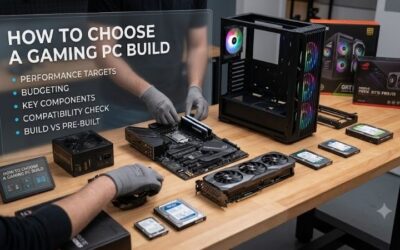
- Key Component Strategy for Star Citizen
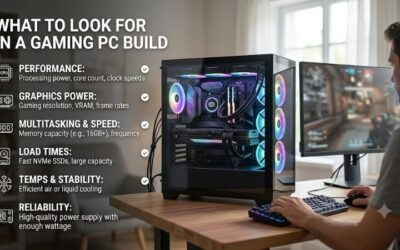
- What to Look For in a Star Citizen Rig
- Which One Should You Buy?
- Common Mistakes When Buying a Star Citizen PC
- First-Week Tuning Steps
- Related Articles
- Frequently Asked Questions
- Related Articles
Included for '5 Best PC Builds for Star Citizen 2026 — The Ultimate Space Sim Rig' as a representative consumer electronics in this roundup; selection reflects the product set returned for this topic.
View on Amazon
Kotobukiya Star Citizen: Anvil F8C Lightning (Pre-Assembled Finished Model Ver.) 1:100 Scale Pre-Assembled Plastic Model Kit
Included for '5 Best PC Builds for Star Citizen 2026 — The Ultimate Space Sim Rig' as a representative consumer electronics in this roundup; selection reflects the product set returned for this topic.
View on Amazon
American Citizen, Global Citizen: How Expanding Our Identities Makes Us Safer, Stronger, Wiser - And Builds a Better World
Included for '5 Best PC Builds for Star Citizen 2026 — The Ultimate Space Sim Rig' as a representative consumer electronics in this roundup; selection reflects the product set returned for this topic.
View on Amazon
Mark Twain US Constitution Interactive Notebook, Study Guide Covering Articles, Amendments, Citizen Rights, and More, American History Books for Grades 5 and Up
Included for '5 Best PC Builds for Star Citizen 2026 — The Ultimate Space Sim Rig' as a representative consumer electronics in this roundup; selection reflects the product set returned for this topic.
View on Amazon
How to Build Your Own Country (CitizenKid)
Included for '5 Best PC Builds for Star Citizen 2026 — The Ultimate Space Sim Rig' as a representative consumer electronics in this roundup; selection reflects the product set returned for this topic.
View on Amazon
Citizen Farmers: The Biodynamic Way to Grow Healthy Food, Build Thriving Communities, and Give Back to the Earth
Included for '5 Best PC Builds for Star Citizen 2026 — The Ultimate Space Sim Rig' as a representative consumer electronics in this roundup; selection reflects the product set returned for this topic.
View on Amazon
Growing Global Digital Citizens: Better Practices That Build Better Learners
Included for '5 Best PC Builds for Star Citizen 2026 — The Ultimate Space Sim Rig' as a representative consumer electronics in this roundup; selection reflects the product set returned for this topic.
View on Amazon
Audie Murphy: War Hero and Movie Star (Stars of Texas Series)
Included for '5 Best PC Builds for Star Citizen 2026 — The Ultimate Space Sim Rig' as a representative consumer electronics in this roundup; selection reflects the product set returned for this topic.
View on AmazonSystem Requirements for Star Citizen 2026
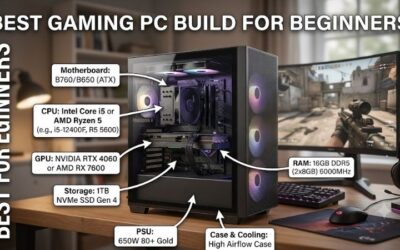
| Setting | Minimum | Recommended |
|---|---|---|
| GPU | RTX 2070 / RX 5700 XT | RTX 5080 / RX 9080 |
| CPU | Core i7-8700K / Ryzen 5 3600 | Ryzen 9 9950X3D / Core i9-14900KF |
| RAM | 32GB DDR4 | 64GB DDR5-6000 |
| VRAM | 10GB | 20GB+ |
Why Star Citizen Is in a Class of Its Own
Star Citizen’s technical architecture pushes hardware in ways no other title attempts:- RAM: The game recommends 64GB and can use all of it in heavily populated areas. 32GB produces noticeable streaming hitches in busy star ports
- VRAM: 4K at High settings uses 18–22GB VRAM in complex scenes. Only the RTX 5090 (32GB) provides complete headroom
- CPU multi-threading: Server Meshing offloads simulation tasks to additional threads — more high-performance cores improve server-side calculations
- NVMe speed: Star Citizen streams assets constantly from storage — a Gen4 NVMe with high sustained read speeds reduces pop-in and texture loading delays
- Network latency: While not CPU/GPU work, a quality NIC and low-latency router matter more in Star Citizen than any other game due to its server architecture
The Star Citizen Build Tiers
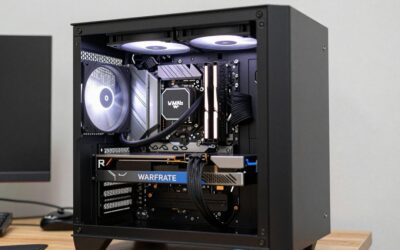
Tier 1 — Entry Playable: $3,000 (STORMCRAFT Phantom)
The STORMCRAFT Phantom with RTX 5080 and Ryzen 7 9800X3D is the minimum recommended build for a smooth Star Citizen experience in 2026. The RTX 5080’s 16GB GDDR7 handles most populated areas at 1440p without VRAM overflow, and the 9800X3D’s L3 cache advantage shows up in Star Citizen’s CPU-heavy simulation calculations. Known limitation: 16GB VRAM hits its ceiling in the most populated space stations and combat zones. Expect 30–40fps averages in extreme population density.Tier 2 — Enthusiast: $5,299–$6,000 (Zotac MEK RTX 5090 / Skytech Legacy 4)
The Zotac MEK with RTX 5090 (32GB GDDR7) and the Skytech Legacy 4 with Ryzen 9 9950X3D both represent the current performance ceiling for Star Citizen. The 32GB VRAM on the RTX 5090 is the first GPU to provide complete headroom in all Star Citizen scenarios.Tier 3 — Maximum: HP OMEN Max 45L
The HP OMEN Max with Ryzen 9 9900X3D represents the pre-built pinnacle for Star Citizen. AMD’s X3D processor line shows measurable advantages in Star Citizen’s server-meshing calculations. At this tier, the bottleneck becomes internet connection quality and CIG’s server architecture.Key Component Strategy for Star Citizen
RAM: 64GB Is Not Optional Above Tier 1
Star Citizen’s persistent universe model keeps more of the game world loaded simultaneously than any other title. 32GB produces hitches during planetary approach and heavy combat scenarios. 64GB DDR5-6000 eliminates this class of stutter entirely — it’s the single highest-impact upgrade for Star Citizen performance beyond GPU.Storage: Sustained Speed Matters More Than Peak
Star Citizen streams assets continuously. The Samsung 990 Pro 2TB at 7,450MB/s sequential provides the sustained throughput needed for seamless streaming. Avoid QLC drives for Star Citizen primary installs — their sustained write performance degrades after the cache fills, causing visible streaming stutters during long play sessions.GPU VRAM: The 2026 Star Citizen Floor
16GB VRAM is playable but boundary-case. The RTX 5080’s 16GB handles 95% of situations — the remaining 5% (peak-population star ports, large fleet engagements) will cause VRAM overflow. The RTX 5090’s 32GB handles all current Star Citizen scenarios without exception.What to Look For in a Star Citizen Rig
Where the Bottleneck Actually Sits
Star Citizen does not stress a PC evenly, so the same machine can feel fast in one place and sluggish in another. The table below maps common situations to the part that usually limits frame rate, based on how the game’s simulation is generally described by the community and its developer.
| Situation | Usual limiter | What helps most |
|---|---|---|
| Open space flight and combat | Graphics card | More shader power and VRAM |
| Landing zones and busy cities | CPU and memory | Strong single-thread speed, large cache, 64GB of RAM |
| Loading screens and quantum jumps | Storage | Fast NVMe drive with good sustained reads |
| Crowded servers | Network and server tick rate | Wired Ethernet; no local part fixes it |
The practical lesson: a build that puts nearly everything into the graphics card can still stutter badly in a city, because that scene leans on the processor and RAM.
Processor Traits That Matter
Owners commonly report that Star Citizen rewards high boost clocks and large L3 cache more than a long list of cores. Processors with stacked cache are frequently discussed for this reason. Treat core count as a secondary concern once you reach eight cores, and confirm the exact chip inside any pre-built before you commit.
Planning Storage Space
Here is a simple worked example. Suppose the game install occupies a little over 100GB today, patches add temporary copies while they apply, and you also keep the operating system, a browser, voice chat and a few other games. A 1TB drive fills quickly under that mix, while 2TB leaves room for a patch cycle without constant cleanup. Sustained write speed matters here, because the drive must keep serving assets while the game streams a large persistent world.
Matching the Display
Resolution changes which tier makes sense. A 1440p monitor is comfortably served by the middle of the range, while 4K and ultrawide panels push far more pixels per frame and favour the top graphics options. High-refresh panels are less important here than steady frame pacing, since cities rarely hold extreme frame rates on any hardware.
Cooling for Marathon Sessions
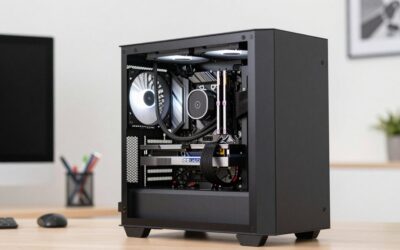
A typical session runs for hours, not minutes, so thermals matter more than a short benchmark suggests. Flagship graphics cards such as the RTX 5090 can draw roughly 575W at the board level, which means the case needs clear intake and exhaust paths. Look for a chassis with mesh front panels and at least three fans, and keep dust filters clean.
Peripherals and Ports
Space sims reward flight sticks, throttles, pedals and head tracking. Count the USB ports you will need, since a HOTAS setup plus a headset and a tracker can use five or more. A tower with front-panel USB-C and spare rear ports saves a hub.
Which One Should You Buy?
| If you… | Choose… |
|---|---|
| Want a playable entry point and plan to upgrade RAM and storage later | STORMCRAFT Phantom |
| Want strong flagship graphics in a ready-made tower | Zotac MEK RTX 5090 |
| Prefer an enthusiast machine with a different cooling and case layout | Skytech Legacy 4 |
| Play on a 4K or ultrawide display and want the most headroom | HP OMEN Max 45L |
| Care most about city performance and loading times | Whichever tier lists 64GB of RAM and a fast NVMe drive; confirm on the listing |
Common Mistakes When Buying a Star Citizen PC
- Judging by the graphics card alone. City scenes lean on the CPU and memory, so a lopsided build disappoints.
- Running 32GB and calling it done. The build tiers above treat 64GB as the comfortable target; many owners report heavy memory use once servers fill.
- Accepting a slow or tiny drive. The installation is very large and grows with patches, so confirm current size in the launcher and leave generous free space.
- Using Wi-Fi. A persistent online universe is sensitive to packet loss; a cable removes one variable.
- Expecting steady performance. The game is still in development, and frame rates can shift from one patch to the next regardless of hardware.
First-Week Tuning Steps
- Update the BIOS, chipset and graphics drivers before installing anything.
- Enable the memory profile (XMP or EXPO) in the BIOS so the RAM runs at its rated speed.
- Install the game on your fastest NVMe drive, not a spare hard drive.
- After major patches, clear the shader cache if stutter appears; owners often report this helps.
- Lower view-dependent settings first, then adjust resolution scaling if cities still struggle.
- Cap the frame rate slightly below the average you see so pacing stays even; a capped 60 often feels smoother than an uncapped swing between 40 and 90.
- Check power and cooling by watching temperatures during a long session, and add case fans if the graphics card or processor sits near its throttle point.
Related Articles
Want to keep digging? The hand-picked guides below run on the same scoring rubric we used here:

Frequently Asked Questions
Why is Star Citizen so demanding on hardware?
Star Citizen simulates massive seamless worlds, detailed ships, and heavy networking, making it both CPU and memory intensive. Server performance and its in-development state mean frame rates vary. Strong hardware helps, but some stutter comes from the game itself rather than your PC, so temper expectations even on top builds.
How much RAM does Star Citizen need?
32GB of DDR5 is the practical minimum, and many players opt for more because the game caches large amounts of data. Insufficient RAM causes severe stutter and long loads. Pair the memory with a fast, large NVMe SSD, which dramatically improves the game’s notoriously long loading and streaming behavior.
What CPU is best for Star Citizen?
Star Citizen benefits from strong single-thread performance and plenty of cores. A Ryzen 7800X3D or 9800X3D, or a high-core Core Ultra chip, is ideal. The large cache of X3D processors helps in CPU-bound cities and space stations where frame rates traditionally suffer the most in this simulation.
Is an NVMe SSD required for Star Citizen?
It is strongly recommended. The game streams enormous assets, and a fast Gen4 NVMe drive cuts loading times and reduces in-world stutter compared to slower storage. Given the install size, budget for a large-capacity drive so you have room for the game and its frequent, sizable updates.
What GPU should I use for Star Citizen at high resolution?
For 1440p high settings an RTX 5070 Ti works well, while 4K benefits from a 5080 or 5090. Because the game is often CPU and server limited, throwing the most expensive GPU at it does not always translate to proportional gains, so balance GPU spending with a strong CPU and ample RAM.