
An RTX 5070 Ti gaming PC build sits in a compelling sweet spot for enthusiasts who want high-refresh 1440p performance and capable 4K output without the pricing of a flagship card. This build pairs NVIDIA’s Blackwell architecture with AMD’s Zen 5 platform, delivering a balanced configuration that handles current AAA titles comfortably and leaves room for competitive esports at extreme framerates.
Updated October 2026 – parts re-checked against current listings.
RTX 5070 Ti PC Build: Quick Answer and Cost
The graphics card is the largest single cost, so expect it to take about 40 percent of the budget.
How Much Does a 5070 Ti PC Cost to Build?
- Value route: a Ryzen 5 7600-class CPU, 32GB of DDR5, a 1TB SSD and a budget B650 board, keeping the 5070 Ti and a 750W PSU.
- This guide’s balanced route: Ryzen 7 9700X, B650 Tomahawk, 32GB DDR5-6000, 2TB 990 PRO and an RM850x.
- Performance route: a Ryzen 7 9800X3D or 7800X3D for maximum game frame rates, plus a better case and a quieter cooler.
GPU pricing moves more than any other part, so check current listings before you commit.
This guide is research-based. Performance ranges come from published launch reviews, and we did not run our own benchmarks.
Parts List
| Part | Model | Approx. Price | Why |
|---|---|---|---|
| CPU | AMD Ryzen 7 9700X | Mid-range price tier | Strong gaming clocks, efficient, AM5 longevity |
| GPU | GIGABYTE GeForce RTX 5070 Ti Gaming OC 16G | Check on Amazon | 16GB GDDR7, excellent 1440p/4K performance |
| Motherboard | MSI MAG B650 Tomahawk WiFi | Check on Amazon | Reliable VRM, Wi-Fi 6E, full M.2 support |
| RAM | CORSAIR Vengeance DDR5 32GB 6000MHz CL30 | Check on Amazon | Optimal sweet spot for Zen 5 Infinity Fabric |
| Storage | Samsung 990 PRO 2TB | Check on Amazon | Fast PCIe 4.0, high endurance, game loading |
| PSU | CORSAIR RM850x ATX 3.1 | Check on Amazon | Native 12V-2×6, quiet, Gold efficiency |
| Case | CORSAIR 4000D RS ARGB | Check on Amazon | High airflow, GPU clearance, clean build |
AMD Ryzen 7 9700X
The 9700X delivers eight Zen 5 cores at up to 5.5 GHz boost, making it a natural gaming partner for the RTX 5070 Ti. Launch reviews generally found the 9700X to be efficient and cool-running, but the 9800X3D is clearly faster in games thanks to its stacked cache, and it costs noticeably more. If you prioritize pure gaming FPS and cache-heavy titles, swapping to the 9800X3D is the single most impactful CPU upgrade on this platform. For general productivity and gaming, the 9700X remains the value leader.

AMD Ryzen™ 7 9700X 8-Core, 16-Thread Unlocked Desktop Processor
Included for 'RTX 5070 TI Gaming PC Build in 2026: Full Parts List and Expected FPS' because the listing specifies 16-Thread Unlocked Desktop Processor, details this guide uses to compare options.
View on Amazon
GIGABYTE GeForce RTX 5070 Ti Gaming OC 16G Graphics Card, 16GB 256-bit GDDR7, PCIe 5.0, WINDFORCE Cooling System, GV-N507TGAMING OC-16GD Video Card
Included for 'RTX 5070 TI Gaming PC Build in 2026: Full Parts List and Expected FPS' because the listing specifies 16GB 256-bit GDDR7 and PCIe 5.0, details this guide uses to compare options.
View on Amazon
MSI MAG B650 Tomahawk WiFi Gaming Motherboard (AMD Ryzen 9000/8000/7000 Series Processors, AM5, DDR5, PCIe 4.0, M.2, SATA 6Gb/s, USB 3.2 Gen 2, HDMI/DP, Wi-Fi 6E, Bluetooth 5.3, 2.5Gbps LAN, ATX)
Included for 'RTX 5070 TI Gaming PC Build in 2026: Full Parts List and Expected FPS' because the listing specifies AM5 and DDR5, details this guide uses to compare options.
View on Amazon
CORSAIR Vengeance DDR5 RAM 32GB (2x16GB) 6000MHz CL30-36-36-76 1.40V Intel XMP Desktop Computer Memory - Black (CMK32GX5M2B6000C30)
Included for 'RTX 5070 TI Gaming PC Build in 2026: Full Parts List and Expected FPS' because the listing specifies Black (CMK32GX5M2B6000C30), details this guide uses to compare options.
View on Amazon
Samsung SSD 990 PRO 2TB, PCIe 4.0 M.2 2280, Up to 7,450 MB/s | NVMe Internal Solid State Hard Drive for High End Computing, Gaming, and Heavy Duty Workstations, (MZ-V9P2T0B/AM)
Included for 'RTX 5070 TI Gaming PC Build in 2026: Full Parts List and Expected FPS' because the listing specifies PCIe 4.0 M.2 2280 and Up to 7, details this guide uses to compare options.
View on Amazon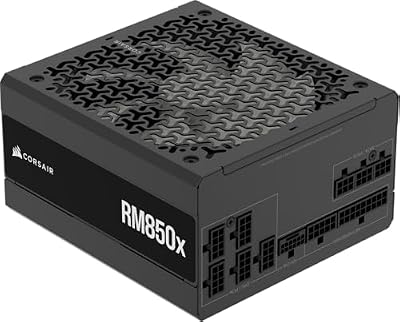
CORSAIR RM850x ATX 3.1 PCIe 5.1 Ready Fully Modular 850W Power Supply – Low-Noise, Cybenetics Gold Efficiency, Native 12V-2x6 Connector – Black
Included for 'RTX 5070 TI Gaming PC Build in 2026: Full Parts List and Expected FPS' because the listing specifies Low-Noise and Cybenetics Gold Efficiency, details this guide uses to compare options.
View on Amazon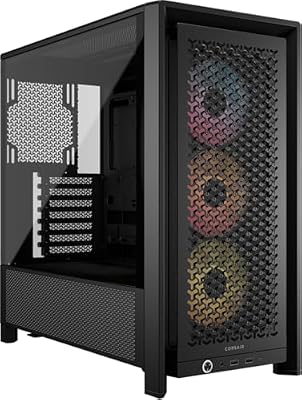
CORSAIR 4000D RS ARGB Frame Customizable Mid-Tower PC Case – Black | 3x Pre-Installed Fans, High Airflow, Fully Modular, Easy InfiniRail Fan Mounting, GPU Anti-Sag, Reverse Motherboard Support
Included for 'RTX 5070 TI Gaming PC Build in 2026: Full Parts List and Expected FPS' because the listing specifies Black and 3x Pre-Installed Fans, details this guide uses to compare options.
View on AmazonGIGABYTE GeForce RTX 5070 Ti Gaming OC 16G
The RTX 5070 Ti represents the performance tier most enthusiasts will find ideal in 2026. Launch reviews generally placed it in the same performance class as the RTX 4080 Super in rasterization while drawing less power than the older card. GIGABYTE’s Gaming OC variant adds a factory overclock and a triple-fan WINDFORCE cooler that keeps temperatures well under thermal limits. The 16GB GDDR7 framebuffer ensures longevity as texture resolutions climb in newer titles.
MSI MAG B650 Tomahawk WiFi
B650 remains the practical choice for a single-GPU build at this price point. The Tomahawk’s 14+2+1 power stage design handles the 9700X without throttling, and the integrated Wi-Fi 6E module eliminates a separate card. TechPowerUp highlighted its balanced I/O layout as a strength for users who value front-panel USB-C and multiple M.2 slots. If you anticipate needing PCIe 5.0 storage bandwidth or USB4 connectivity, stepping up to a B850 or X670E board is worthwhile. For this build’s needs, the Tomahawk covers every requirement without premium pricing.
CORSAIR Vengeance DDR5 32GB 6000MHz CL30
AMD’s Zen 5 architecture reaches its Infinity Fabric sweet spot at 6000MHz with tight timings. This kit’s CL30-36-36-76 profile delivers the latency profile that Gamers Nexus demonstrated as optimal for gaming workloads on AM5. Thirty-two gigabytes handles multitasking and memory-hungry titles without concern. If you regularly run large virtual machines, video editing timelines, or compile massive codebases, doubling to 64GB is a straightforward swap using the same slot configuration. For pure gaming, 32GB at this speed remains the performance-per-dollar leader.
Samsung 990 PRO 2TB
While PCIe 5.0 drives exist, the 990 PRO’s sequential read speeds of up to 7,450 MB/s far exceed what current games saturate during load scenarios. TechSpot’s storage testing showed negligible difference between PCIe 4.0 and 5.0 NVMe drives in game launch times. Two terabytes provides ample space for a large library alongside operating system and creative work files. If you want to add capacity later, the Tomahawk board’s secondary M.2 slot accommodates a second drive without moving the primary. A 4TB 990 PRO is the logical capacity upgrade if needed.
CORSAIR RM850x ATX 3.1
Eight hundred fifty watts provides comfortable headroom for the RTX 5070 Ti and 9700X combination, which together draw well under 500 watts under sustained load. The native 12V-2×6 connector eliminates the adapter dongle that plagued earlier RTX 40-series launches. CORSAIR’s Cybenetics Gold certification confirms efficiency in the 90 percent-plus range at typical gaming loads. The fully modular design keeps cable management clean inside the 4000D. If you plan a future RTX 5080 or 5090 upgrade, a 1000W unit would provide additional margin, but 850W is sufficient and quieter at this tier.
CORSAIR 4000D RS ARGB
The 4000D RS ARGB ships with three pre-installed RS fans configured for airflow-first cooling. Its mesh front panel and spacious interior accommodate the GIGABYTE’s triple-fan RTX 5070 Ti without clearance issues. The InfiniRail mounting system simplifies cable routing behind the motherboard tray, and support for ASUS BTF and MSI Zero connector standards means this case stays relevant if you adopt a hidden-connector GPU later. For a more compact footprint, the CORSAIR 3000D or a mesh-front micro-ATX case are options, though they reduce upgrade flexibility.
Thermalright Peerless Assassin 120 SE – CPU Cooler (Missing From the Original List)

Thermalright Peerless Assassin 120 SE CPU Cooler, 6 Heat Pipes AGHP Technology, Dual 120mm PWM Fans, 1550RPM Speed, for AMD:AM4 AM5/Intel LGA 1700/1150/1151/1200/1851,PC Cooler
Included for 'RTX 5070 TI Gaming PC Build in 2026: Full Parts List and Expected FPS' because the listing specifies 6 Heat Pipes AGHP Technology and Dual 120mm PWM Fans, details this guide uses to compare options.
View on AmazonThe Ryzen 7 9700X is sold without a cooler, so this build needs one. The Peerless Assassin 120 SE is a widely used budget dual-tower air cooler that suits the 65W 9700X well. The listing shows:
- Six heat pipes with a dual-tower design
- Two 120mm PWM fans at up to 1550RPM
- Compatible with AMD AM5 mounting
Pros: low cost, quiet at moderate load, enough capacity for a 65W CPU. Cons: tall, so confirm clearance with the case side panel, and the fans are not RGB. Skip it if you want a liquid cooler or a small-form-factor case.
GIGABYTE RTX 5070 Ti Gaming OC: What Mounting Hardware and Support Bracket Come With It?
Box contents differ between regions and revisions, so we could not confirm whether a support bracket ships with every GIGABYTE RTX 5070 Ti Gaming OC. Check the accessory list on the maker page or the listing before you buy. Because the card is long, heavy and triple-fan, a support bracket or a small prop under the card is a sensible way to prevent sag, especially in a case that you move often. Use the 12V-2×6 cable that comes with the RM850x rather than an adapter, and seat the connector fully.
Ryzen 7 7800X3D or 9800X3D Instead of the 9700X
If you play CPU-heavy simulators or strategy games at 1440p and 144Hz, a Ryzen 7 7800X3D or 9800X3D is the stronger pairing for an RTX 5070 Ti. Titles such as Falcon BMS lean heavily on the CPU, and the large cache on X3D chips helps most there. There is no Ryzen 7 7700X3D, so look for the 7800X3D. The 9700X remains the better choice if you also do productivity work and want lower cost.
Compatibility Check
The AM5 socket accepts the 9700X directly with the Tomahawk’s updated BIOS (already shipped on current stock). DDR5 6000MHz CL30 runs on the XMP profile without manual tuning. The RM850x’s 850W rating exceeds the system’s estimated peak draw of roughly 480-520W by a comfortable margin, keeping the PSU in its efficiency sweet spot. The GIGABYTE RTX 5070 Ti Gaming OC is a long triple-fan card (confirm the exact length on the maker page), and the 4000D RS ARGB supports GPUs up to 360mm with front fans installed, leaving adequate clearance.
Expected Performance
The following ranges reflect data compiled from TechPowerUp, Tom’s Hardware, Gamers Nexus, Hardware Unboxed, and TechSpot launch reviews. These are approximations aggregated from multiple testers and should not be treated as single-point measurements.
1080p Ultra
At 1080p, the 9700X and RTX 5070 Ti combination pushes the GPU into a CPU-bottleneck territory at maximum settings. Reviewers reported ranges of approximately 170-220 FPS in titles like Cyberpunk 2077 (Ultra, no RT), 200-280 FPS in Call of Duty: Modern Warfare III at competitive settings, and 250-340 FPS in Valorant or Counter-Strike 2 at all-high. DLSS Frame Generation can extend the upper end further.
1440p Ultra
This is the target resolution for the build. Hardware Unboxed and Tom’s Hardware both placed the RTX 5070 Ti in the range of 110-150 FPS in Cyberpunk 2077 Ultra without ray tracing, approximately 90-130 FPS in Alan Wake 2 at High, and 140-180 FPS in Hogwarts Legacy at Ultra. Competitive titles remain well above 200 FPS at 1440p.
4K Medium-High
At 4K, the 16GB framebuffer and GDDR7 bandwidth allow playable performance in demanding titles. Review outlets reported roughly 55-80 FPS in Cyberpunk 2077 at Medium-High with DLSS Quality, and 60-90 FPS in Spider-Man Remastered at 4K High. With Path Tracing enabled, framerates drop to approximately 35-55 FPS depending on the title and DLSS mode. The RTX 5070 Ti is a capable but not effortless 4K card at ultra settings without upscaling assistance.
Upgrade Path
AM5’s platform longevity means a future Zen 6 or refreshed Zen 5 CPU drop will work in this board with a BIOS update. Moving to 64GB DDR5 is trivial if workloads expand. The B650 Tomahawk’s second M.2 slot accepts a PCIe 4.0 or 5.0 SSD for additional storage. The RM850x can support a single-card upgrade to an RTX 5080 class GPU, while an RTX 5090 needs a 1000W or larger unit. For users who want more ray tracing headroom, the next logical step is a 1000W PSU paired with a higher-tier Blackwell card, keeping the rest of the build intact.
FAQ
Is 16GB VRAM enough on the RTX 5070 Ti?
For 1440p gaming at current and near-future texture quality settings, 16GB GDDR7 provides ample headroom. VRAM concerns become relevant primarily at 4K with maximum texture packs and heavy ray-tracing workloads enabled simultaneously. Most current titles remain under 12GB at 1440p Ultra.
Should I wait for a cheaper RTX 5070 Ti or a different vendor?
Launch pricing typically softens within the first quarter as supply normalizes. Palit’s, PNY’s, or ASUS’s two-slot variants may carry lower street prices while delivering nearly identical performance within a few degrees difference in thermals.
Does this build need Windows activation immediately?
No. The system will run unactivated with a minor cosmetic watermark. Many builders install the OS during assembly and activate once all drivers are confirmed stable.
Is a liquid cooler required for the 9700X?
No. A liquid cooler is optional, but the 9700X is sold without a cooler in the box, so you must buy one.
Sources and Methodology
All performance ranges in this guide are aggregated from published launch reviews by TechPowerUp, Tom’s Hardware, Gamers Nexus, Hardware Unboxed, and TechSpot. No figures represent proprietary testing conducted by this site. Ranges reflect the spread observed across reviewers’ test benches, which may vary in RAM speed, storage, and operating system configuration.
More RTX 5070 Ti Build Questions
Can an RTX 5070 Ti work with 16GB of DDR4 and an i5-12600F?
Yes, an RTX 5070 Ti works on an i5-12600F with DDR4, but you will leave performance behind. At 1440p and 4K the GPU does most of the work, so the loss is small, while at 1080p and high refresh rates the CPU becomes the limit. We recommend 32GB of memory, since 16GB is tight for modern games.
What power supply does an RTX 5070 Ti need?
The card is rated around 300W, and a quality 750W power supply is the usual minimum recommendation. We chose an 850W CORSAIR RM850x for headroom, a native 12V-2×6 connector and an easier upgrade path.
Is 32GB of DDR5 enough for an RTX 5070 Ti build?
Yes. 32GB of DDR5-6000 is the sweet spot for gaming on AM5. Move to 64GB only if you edit video, run virtual machines or keep many heavy apps open while you play.
Do I need a CPU cooler with the Ryzen 7 9700X?
Yes. The 9700X does not include a cooler, so add a tower air cooler such as the Thermalright Peerless Assassin 120 SE or an AIO liquid cooler before you build.









