
Great components deserve the right tools to install them. The gap between a smooth first build and a frustrating afternoon of stripped screws and static scares often comes down to a handful of inexpensive pc building tools. This guide covers the essential kit for 2026, from the humble screwdriver to the anti-static gear that protects your investment, so you can assemble with confidence rather than crossed fingers.
- Why the right pc building tools matter
- The best pc building tools for 2026
- Building your pc building tools kit on a budget
- What to Look For in PC Building Tools
- Which One Should You Buy?
- Common Mistakes When Buying PC Building Tools
- A Simple Build Order and the Tool for Each Step
- Frequently Asked Questions
- Related Articles
As an Amazon Associate I earn from qualifying purchases.
As an Amazon Associate we earn from qualifying purchases at no extra cost to you.







🛒 Best Price Today on Amazon
Prime members get fast, free shipping on everything above, plus member-only deals. New members get a 30-day free trial — cancel anytime.
Why the right pc building tools matter
You can technically build a PC with a single screwdriver from a kitchen drawer, but the right pc building tools make the job faster, safer, and far less stressful. A magnetized bit keeps screws from vanishing into the case, an anti-static strap guards delicate silicon, and a good light lets you see into shadowed corners. Investing a little in tools now pays off across every build and upgrade you will ever do. Pair this list with our first build walkthrough for a smooth start.
| Product | Best For | Standout Feature | Rating |
|---|---|---|---|
| iFixit Pro Tech Toolkit | Complete pc building tools | 64 precision bits included | |
| Wera Kraftform screwdriver | Everyday assembly | Ergonomic magnetic tip | |
| Rosewill anti-static wrist strap | Static protection | Adjustable grounding clip | |
| Klein Tools headlamp | Case visibility | Hands-free bright beam | |
| VELCRO reusable cable ties | Cable management | Reusable, no cutting |
The best pc building tools for 2026
The pc building tools below cover every stage of assembly, from seating the motherboard to tidying the final cable run. None of these are expensive, and together they turn a fiddly job into a genuinely enjoyable one.
iFixit Pro Tech Toolkit — the all-in-one solution
If you want one purchase to cover nearly every scenario, this kit of pc building tools is hard to beat, packing dozens of precision bits, a spudger, and tweezers into a tidy case. It handles laptops and consoles too. The only downside is that its many small bits are more than a basic desktop build strictly requires.
Wera Kraftform screwdriver — the daily driver
A single high-quality screwdriver is the most-used of all pc building tools, and this one’s ergonomic handle and magnetic tip make short work of case and motherboard screws. It feels precise and durable in the hand. It is pricier than a generic driver, but you will reach for it constantly, so the comfort is worth it.
Rosewill anti-static wrist strap — cheap insurance
Static discharge can silently damage components, which makes an anti-static strap one of the most valuable pc building tools you can own for the price. Clipping it to bare metal grounds you throughout the build. Some experienced builders skip it, but for beginners it removes a real risk for just a few dollars.
Klein Tools headlamp — light where you need it
Peering into a dark case is a common frustration, so a hands-free headlamp earns its place among essential pc building tools. The bright, adjustable beam illuminates cramped corners while both your hands stay free to work. It is overkill for a well-lit desk, but invaluable when you are hunting for a dropped screw.
VELCRO reusable cable ties — tidy and forgiving
Cable management is where good pc building tools shine, and reusable hook-and-loop ties let you bundle wires without permanent commitment. Unlike zip ties, you can loosen and re-route them freely as you add parts. They are slightly bulkier than plastic ties, but the flexibility is well worth it, as our cable management guide explains.
Thermal paste and cleaning kit — for cooler swaps
A small tube of quality thermal paste and some isopropyl wipes round out your pc building tools, ready for the day you reseat a cooler. Clean application keeps CPU temperatures low. A little goes a long way, so one purchase lasts through many builds, and our thermal paste application guide shows the correct technique.
Building your pc building tools kit on a budget
You do not need to buy everything at once. Start with a good magnetic screwdriver, an anti-static strap, and some reusable cable ties — that trio covers the vast majority of a first build. Add a headlamp and a precision bit set later as your projects grow more ambitious. Keeping your pc building tools organized in one box means you are always ready for an upgrade or repair, and our upgrade planning guide helps you anticipate what you will need next.
Quality matters more than quantity here. A single well-made screwdriver outlasts a drawer full of flimsy ones, and a proper anti-static strap does its job every time. When you compare options, weigh durability and grip over the sheer number of bits included. For a complete first project, combine these pc building tools with a solid parts bundle and follow our first-boot troubleshooting checklist if anything goes sideways on power-up.
Ultimately, good pc building tools are a one-time investment that repays itself across years of upgrades, repairs, and new builds. Treat them well, keep them together, and they will make every future project faster and far less nerve-wracking than your very first one.
What to Look For in PC Building Tools
Screw Sizes and Bit Types
Nearly every fastener in a standard PC is a Phillips head, and a #2 bit handles most of them: case panels, PSU screws, fan screws, and motherboard standoffs. A smaller #1 bit is useful for M.2 retention screws and small bracket hardware. Motherboards are normally secured with M3-thread screws into the case standoffs, while PSUs and many case parts use the coarser #6-32 thread. A kit that includes both a #1 and a #2 driver covers almost every job.
Magnetic Tips and Shaft Length
A magnetized tip keeps a loose screw from dropping into the gap between the board and the case tray, which is the most common way a build gets derailed. Shaft length matters just as much: a long, slim shaft reaches screws in cramped corners, such as those beside a CPU cooler or near a drive cage. Check that the magnet is strong enough to hold a screw upside down, but not so strong that it attracts stray metal debris.
Lighting and Visibility
Many case interiors are dark and full of shadows once the GPU and cooler are in place. A hands-free light source, positioned on your forehead or clipped nearby, shows pin orientation, tiny front-panel connector labels, and any bent CPU socket pins. Good lighting prevents more mistakes than most other accessories.
Organization and Cable Control
Reusable fastening straps let you adjust a cable bundle again after adding a drive or a fan, which a one-use plastic tie does not allow. A small magnetic parts tray or a muffin tin keeps screws sorted by size so nothing is mixed up before final assembly.
Which One Should You Buy?
| If you… | Choose… |
|---|---|
| Want a single box with bits, a spudger, and tweezers for building and later repairs | iFixit Pro Tech Toolkit |
| Build or service PCs often and want a comfortable, dedicated driver | Wera Kraftform screwdriver |
| Work in a dry room or on carpet and want grounding insurance | Rosewill anti-static wrist strap |
| Have a dim workspace or a dark chassis | Klein Tools headlamp |
| Care about tidy, adjustable cable routing | VELCRO reusable cable ties |
| Plan to swap a CPU cooler or reseat a processor | Thermal paste and cleaning kit |
Common Mistakes When Buying PC Building Tools
- Buying a huge bit set and using two bits. A smaller kit with a good #2 Phillips driver covers a full build; hundreds of bits mostly serve other repair work.
- Choosing a driver by color or looks. Grip comfort and tip fit decide whether screws strip, so look at handle shape and bit quality instead.
- Skipping the cleaning supplies. Isopropyl alcohol at 90 percent or higher and lint-free wipes remove old paste cleanly; household cleaners can leave residue.
- Trusting the strap more than your habits. A wrist strap helps, but touching bare metal on the case and building on a hard, non-carpeted surface remain good practice.
- Applying too much thermal paste. A pea-sized dot, or the paste the cooler already ships with, is enough; excess squeezes out and can make cleanup harder.
- Over-tightening screws. Tighten until snug and stop. Motherboard and cooler screws should be tightened in a cross pattern to spread pressure evenly.
A Simple Build Order and the Tool for Each Step
- Install the CPU, memory, and M.2 drive on the motherboard while it sits on its box or an anti-static bag; the small #1 driver handles the M.2 screw.
- Mount the CPU cooler, applying a small amount of thermal paste if the cooler does not come with it pre-applied, and tighten its screws in a cross pattern.
- Fit the I/O shield if the board needs one, then place the motherboard onto the case standoffs and secure it with M3 screws using the #2 driver.
- Install the power supply and run cables before the graphics card goes in, using the light to check connector orientation.
- Finish by fastening the cable bundles with reusable straps, closing the panels, and keeping spare screws in a labeled tray.
Frequently Asked Questions
What pc building tools do I actually need to start?
At minimum, a magnetic Phillips-head screwdriver handles almost every screw in a modern build. Adding an anti-static wrist strap and some reusable cable ties covers safety and tidiness. Everything else, like precision bit sets and headlamps, is a helpful convenience rather than a strict requirement for a first project.
Are expensive pc building tools worth it?
For the screwdriver you will use most, yes. A comfortable, durable driver with a magnetic tip makes every build easier and lasts for years. For occasional-use items like precision bit kits, a mid-range option is usually fine. Spend on the tools you reach for constantly and economize elsewhere.
Do I need an anti-static strap for building a PC?
It is inexpensive insurance against static damage, especially for beginners. Clipping the strap to bare metal keeps you grounded throughout assembly. Experienced builders sometimes rely on touching the case instead, but for a few dollars a proper strap removes a genuine risk to your delicate and costly components.
Can I use household tools instead of dedicated pc building tools?
A standard Phillips screwdriver from home will work for basic assembly, but a magnetic tip and the right bit size prevent stripped screws. Household items rarely include anti-static protection or precision bits. For occasional builds a mixed approach is fine, but dedicated tools make the job noticeably smoother and safer.
Top picks from this guide
 JorestJOREST 152 in 1 Small Precision Screwdriver Set, Tool Gifts…$26 \xc2\xb7 99/100
 UnaMelaMini Electric Screwdriver Set 140-IN-1: Small Electric Screwdriver Cordless |…$35 \xc2\xb7 97/100
 JorestJOREST 59Pcs Small Precision Screwdriver Set with Torx T5 T6,…$13 \xc2\xb7 96/100
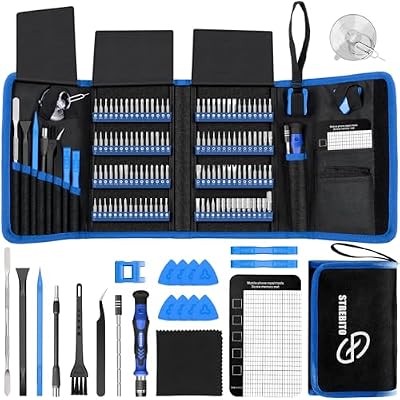 STREBITOSTREBITO Electronics Precision Screwdriver Sets 142-Piece with 120 Bits |…$28 \xc2\xb7 95/100








