Quick answer: For most people in 2026, the best gaming desk cable management solutions is the N NOROCME 192 PCS Cable Management Kit — our #1 rated choice. See the full ranked comparison, alternatives and buying advice below.
- Best Gaming Desk Cable Management Solutions
- Top 3 Picks
- Quick Comparison
- How We Chose
- 1. N NOROCME 192 PCS Cable Management Kit – Best for the Cheapest Complete Starter Kit
- 2. Univivi No Drill Under Desk Cable Management Tray, 36 inch – Best Overall
- 3. Mzmaxy Cable Management, 25″ – Best for Mid-Size Desks on a Mid Budget
- 4. Univivi Under Desk Cable Management Tray, 32 inch, Black – Best for Shorter Desks
- 5. YECAYE Cable Management, 6 Pack, Black – Best for Tidying Multiple Desks
- 6. EVEO Cable Management Under Desk Kit (6 Units) – Best Budget Under-Desk Kit
- 7. CableGenie 10-Pack Adjustable Elastic Adhesive Cable Clips – Best for Glass and Thin Desks
- 8. KEEGH Under Desk Cable Management Tray 36″ – Best for a Permanent Premium Install
- 9. NoetixCo Cable Management Under Desk, 25.3″ – Best for Mid-Size Desks with Metal Construction
- 10. Cotohim Under Desk Cable Management Tray – Best for a Fabric-Wrapped Premium Look
- 11. Alex Tech 10ft – 1/2 inch Cord Protector Wire Loom Tubing – Best for Sleeving One Thick Cable Run
- 12. GDSZ LAERSI 100Pcs Cable Straps Hook and Loop – Best for Reusable Bundling Refills
- How to Choose
- Frequently Asked Questions
- Which One Should You Buy?
- Related Guides
Best Gaming Desk Cable Management Solutions
The best overall cable management solution for most gaming desks is the Univivi No Drill Under Desk Cable Management Tray (36 inch) — a long, clamp-mounted steel raceway that swallows a full power strip, a dozen cables, and a bulky PSU extension without a single hole in your desk. It suits anyone running a dual-monitor or triple-monitor setup, a tower on the floor beside the desk, and a full peripheral load of keyboard, mouse, headset, webcam, and lighting. If you rent, share a desk, or use a glass or thin-veneer top, the no-drill clamp design is the difference between a clean install and a cracked desktop. If you want the cheapest path to a tidy under-desk run, the NOROCME 192-piece kit plus a GDSZ LAERSI hook-and-loop strap pack gets you 90% of the way for a fraction of the cost. If you want a premium, screw-mounted, fabric-wrapped look that stays permanent, the KEEGH 36″ tray or Cotohim clamp/screw tray are the upgrade tier. Everything below is organized by what actually matters once the cables are out of sight: capacity, mounting method, desk compatibility, and how easy it is to add a device later.
Top 3 Picks
Best overall: Univivi No Drill Under Desk Cable Management Tray, 36 inch. The 36-inch length gives you enough raceway to span the full width of a typical 55–60 inch gaming desk, the clamp mount holds without drilling, and the open-top basket means you can drop in a new cable without disassembling the entire run. It handles a power strip, a monitor brick, a headset DAC, and the thick braided cable from a mechanical keyboard at the same time.
Best budget: N NOROCME 192 PCS Cable Management Kit. Four wire organizer sleeves plus a large assortment of clips, ties, and mounts give you a complete starter kit for the price of a mid-tier mousepad. It is the right pick if your desk is a simple panel, your cable count is modest, and you would rather spend the budget on the PC itself.
Best for a permanent premium install: KEEGH Under Desk Cable Management Tray 36″. A 36-inch no-drill cord organizer with a heavier build than the budget trays, it is designed to be screwed or clamped in place and then left alone. It is the choice for a fixed battlestation where the desk will not move and you want the tray to disappear entirely.
Quick Comparison
| Product | Best for | Key specs | Price tier |
|---|---|---|---|
| N NOROCME 192 PCS Cable Management Kit | Cheapest complete starter kit | 4 wire organizer sleeves, clips, ties, mounts, 192 pieces total | Budget |
| Univivi No Drill Under Desk Cable Management Tray, 36 inch | Best overall; long desks, no drilling | 36 in length, no-drill clamp mount, open-top steel basket | Premium |
| Mzmaxy Cable Management, 25″ | Mid-size desks on a budget-mid budget | 25 in tray, under-desk cable tray, clamp style | Mid-range |
| Univivi Under Desk Cable Management Tray, 32 inch, Black | Shorter desks; same brand, less length | 32 in length, black finish, under-desk tray | Premium |
| YECAYE Cable Management, 6 Pack | Multi-desk or multi-room tidying | 6 pack, black, adhesive cable channels | Mid-range |
| EVEO Cable Management Under Desk Kit (6 Units) | Budget under-desk channels | 6 units, cord hider channel design | Budget |
| CableGenie 10-Pack Adjustable Elastic Adhesive Cable Clips | Thin desks, glass, quick repositioning | 10 clips, elastic, adhesive-backed, made in the UK | Mid-range |
| KEEGH Under Desk Cable Management Tray 36″ | Permanent premium install | 36 in, no-drill cord organizer, black | Premium |
| NoetixCo Cable Management Under Desk, 25.3″ | Mid-size desks with clamp-only mounting | 25.3 in tray, no-drill clamp, metal | Mid-range |
| Cotohim Under Desk Cable Management Tray | Fabric-wrapped premium look | Clamp or screw mount, fabric wire management | Premium |
| Alex Tech 10ft – 1/2 inch Cord Protector Wire Loom Tubing | Sleeving one thick cable run | 10 ft, 1/2 in split loom tubing, split sleeving | Budget |
| GDSZ LAERSI 100Pcs Cable Straps Hook and Loop | Reusable bundling, cheap refills | 100 hook-and-loop straps, reusable | Budget |
How We Chose
Selection for this roundup was driven by four criteria that matter more than marketing copy. First, capacity: how many cables and how much bulk a solution can actually hide. A tray that fits a power strip and a monitor brick is in a different class from one that only holds two USB cables. Second, mounting method: no-drill clamp, adhesive, or screw-in. This determines whether a solution works on a glass top, a thin veneer panel, or a solid hardwood desk, and whether it survives a desk move. Third, desk compatibility: length relative to typical gaming desk widths, which sit roughly between 47 and 63 inches for most single-monitor and dual-monitor configurations. Fourth, upgrade path: whether you can add a device later without tearing everything out. We also weighted the category split — a pure strap-and-clip kit solves a different problem than a rigid steel raceway, so both belong in a complete answer. Every product here is described only from what its listing states and from well-established facts about its category. We have not tested, benchmarked, or owned any of these items, and we make no claims about real-world durability beyond what the category and listed specs imply.
1. N NOROCME 192 PCS Cable Management Kit – Best for the Cheapest Complete Starter Kit
This is the pick for the gamer who wants a tidy desk tonight and does not want to think about mounting hardware. The NOROCME kit bundles four wire organizer sleeves with a spread of clips, ties, and small mounts — 192 pieces in total — which is enough to route a full peripheral set plus a monitor and power run on a single desk. It suits a first-time builder, a student setup in a dorm, or anyone whose desk is a simple flat panel where a rigid tray would be overkill.
The core of the kit is the sleeves: fabric or mesh wraps that bundle several cables into one clean trunk. Wrapped correctly, a keyboard cable, mouse cable, headset cable, and webcam cable become a single line running from the desk edge to the tower, which is what actually reads as “clean” from across the room. The clips then anchor that trunk to the underside or the back edge, and the ties handle the remaining loose ends.
Key specs and what they mean:
- 4 wire organizer sleeves — enough for a peripheral trunk, a power trunk, and two spares. One sleeve per cluster is the correct mental model, not one sleeve per cable.
- 192 pieces total — this is a volume play. You will not use all of them on one desk, which is fine; they are consumables and refills cost almost nothing.
- Adhesive and clip mounting — works on any desk surface, but adhesive strength depends on surface cleanliness and temperature. Clean the underside with isopropyl alcohol first.
- No rigidity — this kit does not create a rigid raceway. If you want a hard tray, buy a tray.
Pros
- Lowest upfront cost of any complete solution in this list
- Sleeves convert a messy bundle into one clean trunk instantly
- No drilling and no clamp required — works on glass and thin tops
- Enough pieces for multiple desks, a TV stand, or a later re-route
- Reusable enough that re-routing is not a re-purchase
Cons
- No rigid structure, so heavy cables can sag over time
- Adhesive clips can release on dusty or textured undersides
- Cannot hide a full power strip the way a steel tray can
- Volume of pieces can be overkill for a single two-cable desk
Vs. the nearest alternative: The GDSZ LAERSI 100-piece hook-and-loop strap pack is the direct competitor at a similar budget tier. The distinction is scope: GDSZ gives you reusable straps for bundling, while NOROCME gives you straps plus the sleeves that create the trunk in the first place. If you already own sleeves or use a wire loom, the GDSZ pack is the better refill. If you are starting from zero, NOROCME is the more complete first purchase. If you want rigid structure instead of soft bundling, step up to the NoetixCo or Mzmaxy trays.
2. Univivi No Drill Under Desk Cable Management Tray, 36 inch – Best Overall
This is the default recommendation for a gaming desk, and the reason is length. Thirty-six inches is roughly the usable span under a 55–60 inch desk once you account for legs and a center support, which means the tray can run nearly the full width instead of clustering everything in one corner. The no-drill clamp mount means it attaches to the desk edge or a crossbar without a single screw, so it works on rented furniture, glass tops, and thin veneer panels that would split under a drill.
Who it suits: anyone with a dual-monitor or triple-monitor setup, a tower on the floor, and a peripheral load heavy enough that the cables currently loop in open air behind the desk. If you can see a cable from your chair, this is the fix.
Key specs and what they mean:
- 36 inch length — the widest standard size in this list, matched to full-width gaming desks. Longer tray = less cable clustering = less heat concentration around a power strip.
- No-drill clamp mount — attaches without modifying the desk. Reversible, which matters if you move desks or upgrade.
- Steel basket construction — rigid, so heavy cables do not sag and the tray does not flex under a power strip.
- Open-top design — you can add a cable from above without unmounting the tray, which is the single most important ergonomic feature for a long-term setup.
A worked capacity estimate. A typical gaming desk under-carriage holds: one power strip (about 11 inches long, 2 inches wide), one monitor power brick (about 5 by 2 inches), a headset DAC or USB hub (about 4 inches), and a peripheral trunk of 6–10 cables at roughly 0.2–0.3 inch diameter each. That trunk, if bundled, needs about 1.5 inches of cross-section. A 36-inch tray with a 4–5 inch usable width comfortably absorbs all of it with room to spare. A 25-inch tray at the same width holds roughly 70% of the same load — enough for a single-monitor setup, tight for a triple-monitor one. That ratio, not brand, is the real buying decision.
Pros
- Widest clearance in the list — suits full-size gaming desks
- No drilling, so it is fully reversible and renter-safe
- Rigid steel keeps heavy cables from sagging into view
- Open-top access makes later upgrades painless
- Hides a full power strip, not just cables
Cons
- Premium price tier for what is mechanically a simple tray
- Clamp depth limits very thick desk edges
- 36 inches is longer than small desks can use, wasting the advantage
- Under-desk trays do not hide the cable run from desk to tower — pair with sleeving
Vs. the nearest alternative: The Univivi 32-inch black tray is the same brand, same concept, four inches shorter. If your desk is under 55 inches wide, the 32-inch version is the better fit and slightly cheaper; if it is 55 inches or more, the 36-inch is the one to buy because the extra span keeps the power strip away from the center support. The KEEGH 36″ is the competing premium option at the same length — it is the pick if you prefer a permanent screw-mounted install over a reversible clamp.
3. Mzmaxy Cable Management, 25″ – Best for Mid-Size Desks on a Mid Budget
The Mzmaxy tray is the sensible middle. At 25 inches it fits desks in the 47–55 inch range, which covers a huge share of single-monitor and compact dual-monitor gaming setups, and it sits at a mid-range price tier instead of premium. It suits the gamer who has a real cable problem but does not need to span a 60-inch desk to solve it.
Key specs and what they mean:
- 25 inch tray — matched to desks around 47–55 inches. At this length you can fit a power strip plus a monitor brick, but a third bulky item gets tight.
- Under-desk tray design — keeps everything off the floor and out of the chair’s swing path.
- Clamp-style mounting — no-drill, reversible, same advantage as the premium trays at a lower tier.
Pros
- Mid-range price for real rigid-tray function
- Correct size for the most common desk widths
- No drilling, so it is renter-friendly
- Substantially more capacity than any clip-and-strap kit
Cons
- 25 inches runs out fast on a triple-monitor load
- No open-top spec advantage guaranteed — check the listing for basket access
- Not enough length for a 60-inch desk to look fully disciplined
Vs. the nearest alternative: The NoetixCo 25.3″ tray is the closest competitor — nearly identical length, metal construction, clamp mount. The practical difference between them is construction detail rather than category, so pick on which listing’s mount geometry matches your desk edge thickness. If you can stretch to a 32- or 36-inch tray, do it; the length is the one spec you cannot upgrade later without buying again.
4. Univivi Under Desk Cable Management Tray, 32 inch, Black – Best for Shorter Desks
The 32-inch black Univivi is the same family as the 36-inch overall pick, trimmed to fit desks under 55 inches. It suits a single-monitor or two-monitor setup on a mid-size desk where the 36-inch tray would have to be clamped offset and waste its extra span. The black finish also disappears better against dark desk undersides and black PC cases than a bare metal tray does.
Key specs and what they mean:
- 32 inch length — the sweet spot for 50–57 inch desks. Fits a power strip, a monitor brick, and a peripheral trunk with a little margin.
- Black finish — lower visual profile under a dark desk; also less likely to show scuffs.
- Under-desk tray format — rigid, off-floor, and out of chair-swing range.
Pros
- Better desk-length match than the 36-inch for smaller desks
- Black finish is visually quieter
- Rigid tray capacity far above clip solutions
- Same brand ecosystem as the overall best pick, so mount behavior is predictable
Cons
- Premium tier pricing for four fewer inches than the 36-inch version
- Still long enough to waste on a 43-inch desk
- Does not sleeve the visible cable run behind the desk
Vs. the nearest alternative: Against the 36-inch Univivi, this is purely a size decision. Measure your desk’s usable underside span — leg to leg, minus any center brace — before choosing. If that span is 33 inches or more, buy the 36. If it is under 33, buy this. Against the KEEGH 36″, this is the shorter and slightly more compact option; the KEEGH is the permanent-install alternative if you are willing to screw in.
5. YECAYE Cable Management, 6 Pack, Black – Best for Tidying Multiple Desks
The YECAYE 6-pack is a channel-style solution: adhesive-backed cable channels that stick to a desk, wall, or the back edge of a top and run cables through them. Six units in one box means this is the pick for someone with more than one desk to fix — a gaming setup plus a work laptop station, or a bedroom desk plus a shared living-room desk. It suits setups where a rigid under-desk tray will not fit, like a desk with a solid back panel or a tightly packed corner.
Key specs and what they mean:
- 6 pack — multi-desk volume. One pack typically covers one full desk, so six units is two to three desks’ worth depending on run length.
- Adhesive-backed channels — no drilling, works on walls as well as desks. Surface prep determines longevity.
- Channel format — designed to hide cables against a flat surface rather than suspend them in a basket. Good for the vertical run from desk to floor.
Pros
- Excellent for the desk-to-floor vertical run that trays miss
- Six units let you fix multiple desks in one purchase
- No drilling, no clamps, no desk-edge thickness limits
- Works on walls behind the desk, not just under it
Cons
- Adhesive can fail on dusty, oily, or textured surfaces
- Channel capacity is limited — thick braided cables may not fit
- Not rigid, so it does not support a power strip
Vs. the nearest alternative: The EVEO 6-unit under-desk kit is the direct budget rival at the same unit count and a lower price tier. EVEO targets the under-desk run specifically; YECAYE’s channels are more flexible about where they go, which makes YECAYE the better multipurpose pick and EVEO the better pure under-desk pick. If you need rigid support, neither is right — buy a tray.
6. EVEO Cable Management Under Desk Kit (6 Units) – Best Budget Under-Desk Kit
EVEO’s six-unit kit is the cheapest way to get real under-desk channels instead of loose straps. It targets the specific problem of cables hanging in the space between the desk underside and the floor — the zone you see every time you stand up. The cord hider format encloses the cables rather than just tying them, which reads noticeably cleaner than a bare bundle of zip-tied wires.
Key specs and what they mean:
- 6 units — enough for a desk’s main run plus spares, or two modest desks.
- Under-desk cord hider design — optimized for horizontal runs along the desk underside.
- Budget tier — the lowest-cost way to get enclosed channels rather than exposed bundles.
Pros
- Cheapest enclosed-channel option in this list
- Six units cover a typical desk run
- Enclosed channels look cleaner than zip-tied bundles
- No drilling required
Cons
- Adhesive longevity depends heavily on surface prep
- No structural support for a power strip or brick
- Channel cross-section limits cable thickness
Vs. the nearest alternative: Against the YECAYE 6-pack, EVEO is the cheaper, more under-desk-focused option; YECAYE is the more versatile one that also works vertically and on walls. If your only problem is under-desk cable sag, buy EVEO and save the difference. If you also need to hide the run down to the floor and along a wall, buy YECAYE.
7. CableGenie 10-Pack Adjustable Elastic Adhesive Cable Clips – Best for Glass and Thin Desks
![CableGenie [Made in the UK] 10-Pack Adjustable Elastic Adhesive Cable Clips, Wire Management Holder, Cord Organizer for Home Office, Under Desk, Behind TV, Phone Charger, Laptop, PC, HDMI, USB (Black)](https://m.media-amazon.com/images/I/51lGEjLTrIL._SL400_.jpg)
CableGenie [Made in the UK] 10-Pack Adjustable Elastic Adhesive Cable Clips, Wire Management Holder, Cord Organizer for Home Office, Under Desk, Behind TV, Phone Charger, Laptop, PC, HDMI, USB (Black)
Included for 'Best Gaming Desk Cable Management Solutions' because the listing specifies Wire Management Holder and Cord Organizer for Home Office, details this guide uses to compare options.
View on AmazonCableGenie’s ten-pack exists for the desks that trays and clamps cannot serve: glass tops, ultra-thin veneer panels, and desks with no accessible edge to clamp. The clips are elastic and adhesive-backed, which means they hold a cable bundle with tension rather than a fixed loop, and they can be repositioned during setup without committing to a hole. Made in the UK, they sit at a mid-range tier and are the pick when you want a tidy desk with zero permanent modification.
Key specs and what they mean:
- 10 clips — enough for a full peripheral run if spaced every 6–10 inches along the underside.
- Adjustable elastic — holds varying bundle sizes. A single clip can grip one cable or several, which is why adjustability matters more than raw clip count.
- Adhesive-backed — no drilling; the only viable option on glass.
Pros
- The right answer for glass and thin desks where clamps fail
- Elastic tension handles both single cables and small bundles
- Repositionable during setup without damage
- Ten clips is enough for a complete routing job
Cons
- Adhesive is the weak point on any damp or dusty surface
- No capacity for a power strip or monitor brick
- Mid-range pricing for what is mechanically a simple clip
Vs. the nearest alternative: The GDSZ LAERSI 100-piece hook-and-loop pack is the budget alternative at higher volume — but straps wrap cables together while clips anchor them to a surface. If your problem is cables moving around, buy clips. If your problem is cables separating, buy straps. The NOROCME kit includes both, which is why it is the starter recommendation.
8. KEEGH Under Desk Cable Management Tray 36″ – Best for a Permanent Premium Install

KEEGH Under Desk Cable Management Tray 36", No Drill Cord Organizer, Black
Included for 'Best Gaming Desk Cable Management Solutions' because the listing specifies No Drill Cord Organizer and Black, details this guide uses to compare options.
View on AmazonThe KEEGH 36-inch tray is the pick for the battlestation that is not moving. Same length as the overall best pick, but built around a no-drill cord organizer design intended for a fixed install — clamp it, load it, and forget it for years. It suits the gamer with a dedicated room, a heavy desk that will not be rearranged, and a cable load that includes a power strip, multiple bricks, and a large peripheral trunk.
Key specs and what they mean:
- 36 inch length — full-width coverage for 55–63 inch desks.
- No-drill cord organizer — mounting without desk modification, but intended as a set-and-forget install.
- Black finish — lower visual profile under dark desks.
- Premium tier — heavier build than budget trays, which is what you are paying for.
Pros
- Full 36-inch span for large desks
- No drilling required
- Heavier construction suited to a permanent load
- Enough length to keep a power strip clear of center braces
Cons
- Premium price for the same category as cheaper trays
- Overkill for a small desk or a light cable load
- Clamp geometry still limits very thick desk edges
Vs. the nearest alternative: Against the Univivi 36-inch no-drill tray, this is a near tie — same length, same no-drill approach, same tier. The tiebreaker is mount geometry versus your specific desk edge, and whether you want a tray you can easily remove. If reversibility matters, choose the one whose clamp best fits your edge; if permanence matters, the Cotohim below offers a screw option as well as a clamp.
9. NoetixCo Cable Management Under Desk, 25.3″ – Best for Mid-Size Desks with Metal Construction

NoetixCo Cable Management Under Desk, 25.3'' No Drill Desk Cable Management Tray with Clamp, Metal Cord Organizer for Standing Desk, Computer Wire Management for Home Office & Gaming Setup, Black
Included for 'Best Gaming Desk Cable Management Solutions' because the listing specifies 25.3'' No Drill Desk Cable Management Tray with Clamp and Metal Cord Organizer for Standing Desk, details this guide uses to compare options.
View on AmazonThe NoetixCo 25.3-inch tray is the metal-built option in the mid-size bracket. Its value is straightforward: rigid construction at a mid-range price and a clamp mount that requires no drilling. It suits a single-monitor or compact dual-monitor desk in the 47–55 inch range, where a 36-inch tray would overhang the usable span.
Key specs and what they mean:
- 25.3 inch length — sized to mid-size desks; fits a power strip and a monitor brick, tight for a third bulky item.
- No-drill clamp mount — reversible, renter-safe.
- Metal construction — resists flexing under a loaded power strip better than plastic channels or adhesive clips.
Pros
- Metal build at a mid-range price
- No-drill clamp keeps it reversible
- Correct size for the most common desk widths
- Rigid tray capacity, not clip capacity
Cons
- Length runs out on triple-monitor loads
- Not enough span for a 60-inch desk
- Does not address the desk-to-floor cable run
Vs. the nearest alternative: The Mzmaxy 25″ is the closest match — nearly the same length and the same clamp-tray category. Choose on mount fit and listed construction rather than category, because functionally they solve the identical problem. If your desk allows it, a 32- or 36-inch tray is the better long-term buy regardless of which 25-inch model you prefer.
10. Cotohim Under Desk Cable Management Tray – Best for a Fabric-Wrapped Premium Look

Cotohim Under Desk Cable Management Tray - Under Desk Cord Management - Clamp/Screw Mount - Fabric Wire Management - Cable Raceways Tray Cord Hiders for Office/Home (Black, 35.8"×5.6")
Included for 'Best Gaming Desk Cable Management Solutions' because the listing specifies Under Desk Cord Management and Clamp/Screw Mount, details this guide uses to compare options.
View on AmazonCotohim’s tray is the design-forward option. It supports clamp or screw mounting, which means you are not locked into one install method, and it uses a fabric wire management approach that reads softer and more furniture-like than bare steel. It suits a visible desk — one in a living room, a streaming backdrop, or a bedroom where the underside occasionally shows.
Key specs and what they mean:
- Clamp or screw mount — the only product here offering both. Clamp for reversibility, screw for a rock-solid permanent fit.
- Fabric wire management — a softer visual finish than bare metal, closer to furniture than hardware.
- Premium tier — priced for build and finish, not just capacity.
Pros
- Two mounting methods in one product
- Fabric finish looks intentional rather than industrial
- Screw option gives the most secure long-term hold in this list
- Premium build quality
Cons
- Premium price tier
- Fabric surface is harder to wipe clean than metal or plastic
- Screw mounting is permanent and requires drilling
Vs. the nearest alternative: Against the KEEGH 36″, Cotohim wins on mounting flexibility and finish, while KEEGH wins on raw length if your desk is wide. If your desk is a focal point, Cotohim’s fabric look is the differentiator. If your desk is purely functional and wide, the longer trays are the better value.
11. Alex Tech 10ft – 1/2 inch Cord Protector Wire Loom Tubing – Best for Sleeving One Thick Cable Run
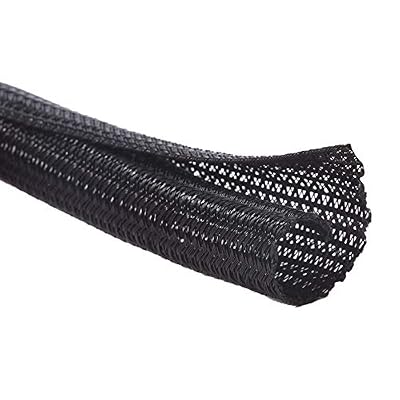
Alex Tech 10ft - 1/2 inch Cord Protector Wire Loom Tubing Cable Sleeve Split Sleeving For USB Cable Power Cord Audio Video Cable – Protect Cat From Chewing - Black
Included for 'Best Gaming Desk Cable Management Solutions' because the listing specifies Protect Cat From Chewing and Black, details this guide uses to compare options.
View on AmazonThe Alex Tech loom is a single-purpose tool: ten feet of half-inch split sleeving that wraps a cable run into one tube. It is not a tray and not a clip set — it is the finish that makes a bundled run look deliberate. It suits the gamer whose cables are already anchored but still visible as a rat’s nest, and it is the standard solution for the run from the desk edge down to the tower.
Key specs and what they mean:
- 10 ft length — enough for a desk-to-floor run plus a horizontal segment, with margin for re-routing.
- 1/2 inch diameter — sized for a bundle of roughly 4–8 typical cables. Measure your bundle before buying; thick braided USB and display cables eat diameter fast.
- Split sleeving — you can add or remove a cable without disconnecting everything, which is the key advantage over a closed tube.
Pros
- Transforms a visible bundle into one clean line
- Split design allows cables to be added later
- Ten feet covers a full desk-to-tower run
- Budget tier pricing
Cons
- Half-inch diameter is a hard limit — thick bundles will not fit
- Sleeving alone does not anchor cables; you still need clips or a tray
- Open split can gap if not secured at intervals
Vs. the nearest alternative: The NOROCME kit’s four sleeves do the same job at shorter lengths and without the split convenience. If you have one long, thick run to tame, Alex Tech’s ten feet in a single piece beats joining shorter sleeves. If you need sleeves for several separate clusters, NOROCME’s multi-sleeve kit is more practical.
12. GDSZ LAERSI 100Pcs Cable Straps Hook and Loop – Best for Reusable Bundling Refills
The GDSZ LAERSI pack is the consumable that every setup eventually needs: 100 hook-and-loop straps for bundling and re-bundling cables. It suits anyone who re-routes often — swapping peripherals, adding a capture card, changing monitors — because hook-and-loop can be opened and reused, unlike a zip tie. At a budget tier, it is also the cheapest way to fix a messy desk today while you decide on a tray.
Key specs and what they mean:
- 100 straps — a genuine surplus. Expect to use a dozen or two on a full desk; the rest live in a drawer as refills.
- Hook-and-loop closure — reusable and adjustable, unlike one-time zip ties.
- Budget tier — the lowest-cost item in this list.
Pros
- Cheapest possible first step toward a tidy desk
- Reusable — re-routing does not require new hardware
- 100 pieces means you never run out mid-project
- Works for cables of almost any thickness
Cons
- Straps alone leave bundles visible; they tidy, they do not hide
- No anchoring — cables still move unless clipped or trayed
- Soft bundling, so heavy cables can sag
Vs. the nearest alternative: Against the NOROCME 192-piece kit, GDSZ is narrower in scope but cheaper and better as a refill. NOROCME’s advantage is the sleeves; GDSZ’s advantage is volume and reusability at the lowest price. If you already sleeve your runs, buy GDSZ. If you are starting from nothing, buy NOROCME and add a tray later.
How to Choose
Choosing a cable management solution comes down to four measurements and one decision about permanence. Get these right and the product picks itself.
Step 1: Measure the usable underside span of your desk
This is the number that determines tray length. Measure from the inside face of one leg to the inside face of the other, then subtract any center brace or support beam. Typical gaming desks fall into three bands:
| Desk width | Usable underside span (approx.) | Recommended tray length | Typical fit |
|---|---|---|---|
| 43–47 in | 36–40 in | 25 in tray, or clip kit only | Single monitor, light load |
| 47–55 in | 40–48 in | 25–32 in tray | Single or dual monitor |
| 55–63 in | 48–56 in | 36 in tray | Dual or triple monitor, tower on floor |
| 63 in+ | 56 in+ | 36 in tray plus a second tray or channel run | Triple monitor, streaming setup |
If your span lands between two sizes, buy the longer tray. The one thing you cannot fix later is length — you can always leave part of a 36-inch tray lightly loaded, but you cannot stretch a 25-inch tray.
Step 2: Pick your mounting method based on desk material
Mounting is the constraint that eliminates options fastest. Match the method to the material:
| Desk material | Clamp mount | Adhesive mount | Screw mount |
|---|---|---|---|
| Solid hardwood / butcher block | Yes | Yes | Yes — best long-term hold |
| Particleboard with veneer | Yes | Yes, with careful prep | Risky — can split at thin sections |
| Glass | No | Yes — only option | No |
| Thin metal / hollow frame | Sometimes, depending on edge thickness | Yes | Only with proper hardware |
| Desk with solid back panel | Limited | Yes | Yes, into the panel |
Glass owners should stop here and buy clips or channels — the CableGenie clips or YECAYE channels. Clamps need a lip to grip, and glass offers none.
Step 3: Estimate your cable load in “bulky items”
Cables themselves are easy; the bulky items are what fill a tray. Count these:
- Power strip (about 11 in long, 2 in wide) — the single largest item in any setup.
- Monitor power brick per monitor (about 5 by 2 in each).
- Laptop dock or USB hub (about 4 in).
- Headset DAC, capture card, or audio interface (about 3–5 in each).
A 25-inch tray handles roughly two bulky items plus a bundled cable trunk. A 32-inch tray handles three. A 36-inch tray handles four comfortably. If your count exceeds the tray’s capacity, either go longer or split the load: bulky items in the tray, thin cables in channels or sleeves above it.
Step 4: Decide between soft bundling and hard containment
This is a category decision, not a brand one:
- Soft bundling (sleeves, straps, ties): cheapest, most flexible, works on any desk. Does not hide bulky items and does not create structure.
- Channels (adhesive cord hiders): good mid-step. Hides thin cables against a surface, works vertically and on walls, no structure for heavy items.
- Rigid trays (clamp or screw baskets): highest capacity, hides power strips and bricks, creates real structure. Requires a mountable desk edge.
Most complete setups use two of the three: a rigid tray under the desk for the bulky items, plus sleeving or a channel for the visible run from desk to tower and down to the floor. That combination is what actually looks clean from every angle, including the one you see when you walk into the room.
Step 5: Plan for the upgrade path
Ask what you will add in the next year: a second monitor, a capture card, a streaming mic, LED strips. Each adds a cable and possibly a brick. Two design choices protect you:
- Open-top trays let you drop in a cable without unmounting anything. A closed basket forces a full disassembly for one new cable.
- Split sleeving (like the Alex Tech loom) lets you add a cable to an existing bundle without disconnecting the bundle.
Step 6: Handle heat and safety, which nobody mentions
Bundling cables tightly is fine; bundling power cables tightly with no airflow is worth a thought. A power strip buried under a thick fabric sleeve and pressed against a desk underside runs warmer than one in open air. Practical rules:
- Keep the power strip in the tray’s open area, not inside a sleeve.
- Leave a gap between the power strip and any power brick.
- Do not sleeve a power cord together with signal cables if you can avoid it — separate routes reduce both heat concentration and, in edge cases, interference.
- Leave a service loop: about 6 extra inches of cable at each end so you can pull the PC or monitor forward without unplugging anything.
A concrete worked example
Suppose you have a 55-inch desk, a dual-monitor arm setup, a tower on the floor to the right, a keyboard, mouse, headset, webcam, and a desk lamp. Here is a build that costs a mid-range tray plus a budget consumable:
- Under the desk: a 32- or 36-inch clamp tray. Load: one power strip, one monitor brick (the second monitor is on the same arm and shares a brick), one USB hub, and the peripheral trunk. That is three bulky items plus a trunk — a 32-inch tray fits it; a 36-inch fits it with margin.
- Desk edge to tray: a bundle of six cables at roughly 0.25 in each, giving a bundle diameter near 0.75 in before compression, about 0.5–0.6 in once wrapped. Half-inch split loom handles it; anything thicker needs the next size up.
- Tray to floor to tower: one loom run of about 4 ft. That leaves 6 ft of a 10-ft roll for a second run or a re-route later.
- Loose ends and future changes: hook-and-loop straps, because you will re-bundle at least twice in the first year.
Total hardware: one tray, one loom, one strap pack, and optionally a clip set for the thin cable that runs along the arm. That is the whole job, and it covers every visible cable in the room.
Common sizing mistakes to avoid
- Buying a tray that is too short — the most common and least fixable error.
- Buying adhesive-only on a heavy load — adhesive holds light cables, not power strips.
- Forgetting the desk-to-floor run — trays stop at the desk; the ugliest cables are usually below it.
- Over-tightening sleeves — compressing cables hard makes future additions painful and traps heat.
- Ignoring the service loop — no slack means every cable swap becomes a full teardown.
Frequently Asked Questions
Do I need a tray, or are clips and straps enough?
It depends on whether you have bulky items to hide. Clips and straps handle thin cables well and cost far less, but they cannot support a power strip or a monitor brick, and those are usually the items that make an under-desk area look messy. If your setup has a power strip under the desk, a rigid tray is the right call. If it is just peripheral cables, a clip or strap kit is sufficient.
Will a no-drill clamp fit my desk?
Clamps need a flat edge with enough thickness and depth to grip, typically in the range of about an inch of thickness or less for most tray designs. Thin veneer desks, solid wood desks, and metal frames generally work. Glass desks do not, because there is no lip to clamp. Measure your desk edge thickness and depth before ordering, and check the listing’s stated clamp range.
Can I install a cable tray on a glass desk?
Not with a clamp. Glass offers no edge for a clamp to bite, and drilling is not an option. The workable approach on a glass desk is adhesive: elastic clips like the CableGenie set for anchoring, plus adhesive channels like the YECAYE pack for hiding runs. Stick to light loads, and clean the glass with isopropyl alcohol before applying anything.
How many cables can half-inch wire loom actually hold?
As a rule of thumb, a half-inch split loom comfortably carries roughly four to eight typical cables, depending on their diameter. A standard peripheral cable is around 0.15–0.25 inches thick, while thick braided USB and display cables can exceed 0.3 inches. Bundle your cables, measure the bundle’s diameter with a tape or a zip tie loop, and size the loom slightly larger than that number. If your bundle exceeds half an inch, buy a larger loom rather than forcing it.
Where should the power strip go?
In the open area of the tray, not inside a sleeve, and with a small gap from any power brick. Power strips under a desk benefit from airflow, and bundling them tightly with other cables traps heat. Keep the power run on its own route where practical, and leave a service loop of a few inches so you can pull equipment forward without unplugging.
How long should my tray be for a dual-monitor setup?
For a desk in the 47–55 inch range, a 25- to 32-inch tray is usually enough for two monitors, a power strip, and one or two bricks. For desks 55 inches and wider, choose a 36-inch tray. The deciding factor is your usable underside span — leg to leg minus any center brace — not the overall desk width printed in the listing.
Will adhesive clips and channels fall off over time?
They can, and the cause is almost always surface preparation rather than the adhesive itself. Dust, oil from fingerprints, and texture all reduce bond strength, as does applying them in a cold room. Wipe the surface with isopropyl alcohol, let it dry fully, press the adhesive for several seconds, and let it cure before loading it with cables. Expect adhesive to be the weakest link on any heavy cable, which is why heavy items belong in a tray.
What is the best order to install everything?
Mount the tray first, then route heavy items into it, then bundle the thin cables, then sleeve or channel the visible runs, and finally trim and tie loose ends. Installing the anchor point first means you are routing toward a fixed target instead of adjusting the tray to fit cables that are already in place. Leave all slack adjustments until the end, and add the service loop last.
Which One Should You Buy?
If you have a wide desk, a power strip, and a full peripheral load: buy the Univivi No Drill Under Desk Cable Management Tray, 36 inch. It is the most capacity per dollar in the premium tier and the length matches a full-size gaming desk.
If you are on a tight budget and just want it tidy today: buy the N NOROCME 192 PCS kit and add a GDSZ LAERSI strap pack. Together they cover bundling, anchoring, and refills for very little money, and neither requires any modification to your desk.
If your desk is mid-size (47–55 inches): buy the Mzmaxy 25″ tray or the NoetixCo 25.3″ — both are mid-range, clamp-mounted, and correctly sized. Choose on which clamp geometry matches your desk edge.
If you have a glass or thin desk: buy the CableGenie 10-pack clips and pair them with YECAYE channels. Clamps are not an option, and adhesive is the only safe mounting method.
If you want a permanent, furniture-grade install: buy the Cotohim tray for its clamp-or-screw flexibility and fabric finish, or the KEEGH 36″ if your priority is maximum length. Add the Alex Tech 10-ft split loom to sleeve the visible run from desk to tower, and the job is genuinely finished.
Ready to decide? Our #1 pick for 2026 is the N NOROCME 192 PCS Cable Management Kit.
Live price & availability on Amazon.