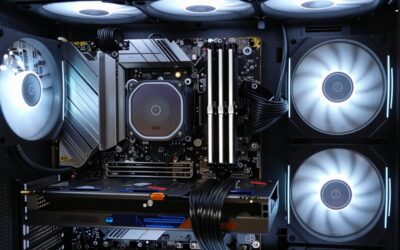
Cable management is often what separates a build that looks professionally assembled from one that looks like a bird’s nest, yet beginners frequently treat it as an afterthought. Good cable routing does more than look tidy, it improves airflow, simplifies future upgrades, and makes troubleshooting far easier. This guide teaches beginners the fundamentals of cable management and the tools that make it simple in 2026.
As an Amazon Associate I earn from qualifying purchases.
As an Amazon Associate we earn from qualifying purchases at no extra cost to you.




![[313Pcs] Cable Management Kit, Reusable Computer Desk Cord Organizer, White](https://m.media-amazon.com/images/I/41KMmg7VGpL._SL160_.jpg)


Beginner cable management relies on a few affordable supplies and a modest amount of planning. The comparison table below summarizes the key cable management products that help new builders achieve a clean, airflow-friendly interior.
| Product | Best For | Standout Feature | Rating |
|---|---|---|---|
| Reusable Cable Ties | Bundling cables | Adjust anytime | 4.8/5 |
| Zip Tie Assortment | Permanent tidy runs | Multiple lengths | 4.6/5 |
| Adhesive Cable Anchors | Guiding wires | Peel-and-stick base | 4.7/5 |
| Cable Comb Set | Clean PSU cables | Straightens wires | 4.6/5 |
| Extension Cable Kit | Sleeved good looks | Braided finish | 4.7/5 |
🛒 Best Price Today on Amazon
Prime members get fast, free shipping on everything above, plus member-only deals. New members get a 30-day free trial — cancel anytime.
Cable Management Basics for Beginners
The core principle of cable management is simple: route cables behind the motherboard tray whenever possible and bundle them into neat groups. Most modern cases include a gap behind the tray and tie-down points specifically for this purpose. Feed your power, data, and front-panel cables through the nearest grommet, run them behind the tray, and bring them out close to their connection point. This keeps the main chamber clean and lets air flow unobstructed over your components.
Planning matters more than perfection. Connect and route one cable group at a time, leaving the final tie-down until everything is plugged in so you can adjust. A choosing a power supply with the right cable lengths helps, and our PSU selection guide covers modular options. For the space outside your case, our under-desk cable guide extends the same tidiness to your whole setup.
Reusable Cable Ties
Reusable hook-and-loop ties are the beginner’s best friend because they let you bundle cables and adjust them repeatedly as you learn. Pros: forgiving, reusable, and gentle on wires. Cons: bulkier than zip ties in very tight spaces. Since your first attempt is rarely your best, being able to redo bundles freely is invaluable, as our first build guide emphasizes.
Zip Tie Assortment
A pack of zip ties in assorted lengths locks cables into permanent, ultra-clean runs once you are happy with the layout. Pros: cheap, secure, and low-profile. Cons: single-use and must be cut to remove. Use them for the final tidy after testing the build, and trim the tails flush for a professional look, as shown in our finishing touches guide.
Adhesive Cable Anchors
Adhesive anchor points give you extra tie-down locations in cases that lack enough built-in loops. Pros: add routing guides exactly where you need them. Cons: adhesive can weaken on dusty surfaces. Clean the mounting spot first for a lasting hold. These are handy for guiding a stray cable across an open area, complementing our airflow optimization tips.
Cable Comb Set
Cable combs straighten and space individual PSU wires for that show-build ribbon look. Pros: transform messy cable bunches into crisp parallel lines. Cons: purely cosmetic and time-consuming. Beginners chasing an aesthetic build love the dramatic difference combs make on visible 24-pin and GPU cables, though they are optional for a functional first build.
Sleeved Extension Cable Kit
Braided extension cables replace the visible stretch of your PSU cables with color-coordinated sleeved versions. Pros: instant premium appearance without a new power supply. Cons: adds length that must be tucked away. For a beginner who wants a striking look through a glass side panel, extensions are an easy upgrade, and our aesthetics guide covers color matching.
Beginner Cable Management Kit
An all-in-one kit bundles reusable ties, zip ties, anchors, and labels so you have every basic supply in one purchase. Pros: convenient and budget-friendly for first-timers. Cons: some included items may go unused. Starting with a complete kit removes the guesswork of buying supplies piecemeal, letting you focus on the build itself, as our beginner tools guide recommends.
Perfecting Your Cable Management Over Time
Do not expect a flawless result on your first attempt, and that is perfectly fine. As you gain experience, you will route cables more efficiently and use fewer ties. Whenever you add or swap a component, take a moment to re-tidy the affected cables rather than letting the mess creep back. With a handful of cheap supplies and a little patience, even a first-time builder can achieve a clean, airflow-friendly interior worth showing off.
Frequently Asked Questions
Why is cable management important in a PC build?
Good cable management improves airflow by keeping wires out of the main chamber, which helps components run cooler. It also makes future upgrades and troubleshooting much easier, since you can access parts without fighting a tangle. As a bonus, tidy cables give your build a clean, professional appearance through the side panel.
What is the easiest way to manage cables for beginners?
The easiest approach is routing cables behind the motherboard tray through the case’s grommets and bundling them with reusable ties. Connect one cable group at a time and leave the final tie-down until everything is plugged in, so you can adjust freely. Reusable ties forgive mistakes as you learn the process.
Do I need a modular power supply for good cable management?
A modular power supply makes cable management easier because you attach only the cables your build needs, avoiding a bundle of unused wires to hide. However, it is not strictly required. Non-modular supplies can still look clean if you route the extra cables neatly behind the motherboard tray and secure them.
Should beginners use zip ties or reusable ties?
Beginners should start with reusable hook-and-loop ties because they allow you to bundle and rebundle cables freely as you learn, forgiving the inevitable first-attempt mistakes. Once you are satisfied with the layout, zip ties can lock everything into a permanent, ultra-clean finish, but the flexibility of reusable ties is ideal early on.