
Choosing between an alienware monitor vs asus gaming display requires looking beyond brand reputation. Dell’s Alienware lineup focuses on gaming hardware, including high-refresh QD-OLED monitors, while ASUS offers a broader selection through ROG, TUF Gaming, and other display families. Both manufacturers produce monitors suitable for competitive esports, demanding 4K gaming, and everyday PC use. However, differences in panel technology, refresh rates, connectivity, screen curvature, and software features can significantly influence which model works better for your setup. This comparison examines specific Alienware and ASUS monitors to help you decide whether one offers a meaningful advantage for your preferred games, graphics card, and desktop environment.
- Quick verdict: Alienware or ASUS gaming monitor?
- Alienware vs ASUS monitor: Quick comparison
- Real model comparison: Alienware AW2725DF vs ASUS PG27AQDP
- Alienware vs ASUS at 4K: AW3225QF versus PG32UCDM
- Gaming performance: Which brand is faster?
- Picture quality: QD-OLED versus WOLED
- Connectivity and usability: Which monitor is more practical?
- OLED burn-in, warranties, and long-term reliability
- Pricing and value: Is Alienware cheaper than ASUS?
- Which monitor should you choose for your setup?
- Common mistakes when comparing Alienware and ASUS
- Frequently asked questions about Alienware and ASUS monitors
- Final verdict: Alienware or ASUS?
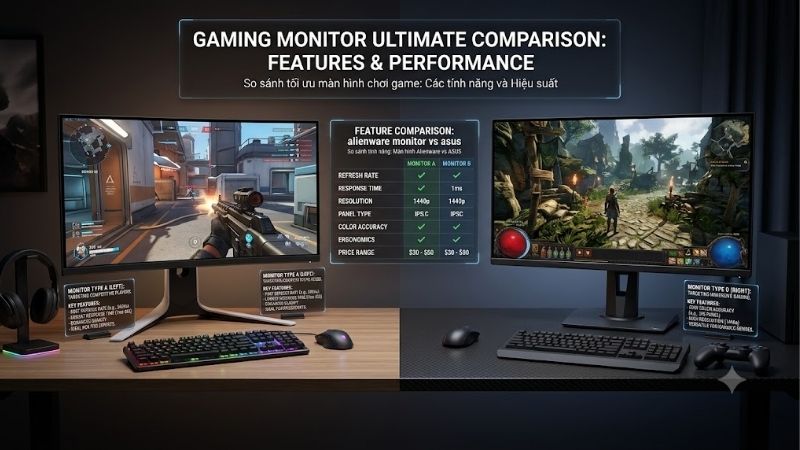
Quick verdict: Alienware or ASUS gaming monitor?
Neither Alienware nor ASUS is universally better for gaming. The winner depends on the exact models being compared.
Alienware is particularly appealing for gamers seeking premium QD-OLED displays with strong contrast, fast pixel transitions, and relatively straightforward gaming-focused designs. The Alienware AW2725DF and AW3225QF illustrate the brand’s strengths in 1440p and 4K OLED gaming.
ASUS offers more varied options, ranging from practical IPS gaming monitors to extremely high-refresh OLED models. The ROG Swift OLED PG27AQDP, for example, supports 1440p at 480Hz, exceeding the AW2725DF’s 360Hz maximum.
At 4K, the comparison is considerably closer. The Alienware AW3225QF and ASUS ROG Swift OLED PG32UCDM both use 240Hz QD-OLED technology.
Independent RTINGS testing identifies different advantages: the Alienware performs particularly well for console gaming, while the ASUS offers additional productivity conveniences and better measured brightness in certain conditions.
Choose Alienware when its particular QD-OLED implementation, design, and features match your preferences. Choose ASUS when you need specialized high-refresh performance, broader panel choices, or specific desktop connectivity features.
Alienware vs ASUS monitor: Quick comparison
| Feature | Dell Alienware | ASUS gaming monitors |
|---|---|---|
| Product families | Primarily Alienware gaming | ROG, TUF Gaming and others |
| Panel technologies | IPS, QD-OLED and model-dependent LCD options | IPS, VA, WOLED, QD-OLED and other variants |
| Common gaming resolutions | 1080p, 1440p, 4K | 1080p, 1440p, 4K and specialized formats |
| High-refresh options | Competitive high-refresh models | Broad high-refresh and esports selection |
| OLED picture quality | Strong QD-OLED offerings | QD-OLED and WOLED choices |
| Curved displays | Available, including AW3225QF | Available on selected models |
| USB-C and KVM | Model-dependent | Model-dependent |
| Gaming software | Alienware-specific display controls | DisplayWidget Center and ROG features |
| Adaptive sync | Depends on exact model | Depends on exact model |
| Desktop productivity | Strong on selected displays | Broad selection of PC-oriented features |
| Main advantage | Focused gaming displays | Greater variety of configurations |
| Main drawback | Some models have unusual input limitations | Features vary substantially across families |
Both brands provide capable products. Brand-level generalizations should never replace comparison of the exact monitor specifications.
Real model comparison: Alienware AW2725DF vs ASUS PG27AQDP
These two 1440p OLED monitors illustrate why the decision is more complicated than choosing one manufacturer’s logo.
| Specification | Alienware AW2725DF | ASUS ROG Swift OLED PG27AQDP |
|---|---|---|
| Viewable size | 26.7 inches | 26.5 inches |
| Native resolution | 2560 × 1440 | 2560 × 1440 |
| Panel technology | QD-OLED | WOLED |
| Maximum refresh rate | 360Hz | 480Hz |
| Advertised response time | 0.03ms GTG | 0.03ms GTG |
| DisplayPort | 2 × DP 1.4 | 1 × DP 1.4 with DSC |
| HDMI | 1 × HDMI 2.1, 144Hz maximum at QHD | 2 × HDMI 2.1 FRL |
| Variable refresh | Adaptive-Sync, FreeSync Premium Pro | FreeSync Premium, G-SYNC Compatible |
| Screen surface | Anti-reflection | Anti-glare |
| Panel-care functions | Dell OLED protection features | ASUS OLED Care+ |
| Primary appeal | 360Hz QD-OLED gaming | 480Hz competitive WOLED gaming |
The ASUS has the higher refresh-rate ceiling, but the Alienware may appeal to buyers who prefer QD-OLED color characteristics.
The difference between 360Hz and 480Hz is also smaller than the difference between mainstream 144Hz and 240Hz displays. Both require very high frame rates to exploit their maximum capabilities.
Alienware vs ASUS at 4K: AW3225QF versus PG32UCDM
For gamers choosing a premium 32-inch-class display, the Alienware AW3225QF and ASUS PG32UCDM are closely matched.
Both feature 3840 × 2160 resolution, 240Hz maximum refresh rates, and QD-OLED panels.
Their main distinctions are physical design, connectivity, and how the manufacturers implement features.
| Specification | Alienware AW3225QF | ASUS ROG Swift OLED PG32UCDM |
|---|---|---|
| Screen class | 32 inches | 32 inches |
| Resolution | 3840 × 2160 | 3840 × 2160 |
| Refresh rate | 240Hz | 240Hz |
| Panel | QD-OLED | QD-OLED |
| Screen shape | Curved, 1700R | Flat |
| DisplayPort | DP 1.4 with DSC | DP 1.4 with DSC |
| HDMI | 2 × HDMI 2.1 | 2 × HDMI 2.1 |
| USB-C video | Not equivalent to full DP Alt Mode upstream | USB-C DisplayPort Alt Mode |
| KVM switch | No comparable integrated KVM | Yes |
| Audio-related feature | HDMI eARC | Headphone output and USB connectivity |
| Best fit | Immersive gaming and consoles | Gaming plus PC productivity |
Independent RTINGS comparisons identify the ASUS as more convenient for productivity, particularly because of its KVM switch and brightness behavior.
The Alienware provides lower measured input lag at 60Hz and 120Hz in the tested configurations, making it attractive for consoles and lower-refresh gaming.
Since both share similar core display technology, choosing between their flat and curved designs may be more important than small specification differences.
Gaming performance: Which brand is faster?
Refresh rates and competitive gaming
Refresh rate determines how many times a monitor can update its image each second.
At 144Hz, the screen refresh interval is approximately 6.94 milliseconds. At 240Hz, it decreases to 4.17 milliseconds.
A 360Hz display reduces that interval to 2.78 milliseconds, while a 480Hz display reaches approximately 2.08 milliseconds.
The ASUS PG27AQDP therefore provides more refresh opportunities than the Alienware AW2725DF.
However, the practical improvement between 360Hz and 480Hz is approximately 0.69 milliseconds per refresh interval.
That does not mean every player gains a measurable competitive advantage.
The connected gaming PC must render frames quickly enough, and real motion clarity also depends on pixel response, frame-time consistency, and processing delay.
For competitive titles such as Counter-Strike 2 and Valorant, a 480Hz monitor can make sense for enthusiasts with sufficiently powerful systems.
For demanding single-player games, 360Hz may already exceed the performance the graphics card can sustain at the desired settings.
Pixel response and motion clarity
Both Alienware and ASUS offer OLED monitors with exceptionally fast advertised pixel response times.
The AW2725DF and PG27AQDP each specify 0.03ms gray-to-gray response.
However, manufacturer response-time figures should not be confused with complete input latency or an independently measured average across every pixel transition.
OLED technology generally provides rapid pixel transitions without the aggressive overdrive behavior that can produce noticeable overshoot on LCD panels.
This makes OLED particularly attractive for tracking movement against detailed backgrounds.
Still, sample-and-hold motion blur remains relevant. A higher refresh rate reduces the length of time each displayed frame persists, assuming the system supplies corresponding new frames.
Independent RTINGS testing describes the Alienware AW2725DF and ASUS PG27AQDP as having similarly strong gaming performance, despite differences in maximum refresh rate.
Input lag and actual responsiveness
Input lag measures the delay between a display receiving a video signal and showing the corresponding image.
It is not equivalent to refresh rate or pixel response time.
Gaming monitors from both manufacturers can achieve low input lag when configured correctly.
The 4K AW3225QF and PG32UCDM provide a useful example of why model-specific testing matters.
RTINGS finds that the Alienware has an advantage at 60Hz and 120Hz, while the ASUS provides additional productivity features.
These results do not establish that every Alienware monitor has lower input lag than every ASUS monitor.
For a meaningful comparison, use independently measured results at the same resolution and refresh rate, with equivalent variable-refresh settings.
Picture quality: QD-OLED versus WOLED
Alienware QD-OLED picture characteristics
QD-OLED combines OLED’s self-emissive pixel behavior with quantum-dot color conversion.
Its principal strengths include deep blacks, wide viewing angles, rapid pixel transitions, and strong color reproduction.
The Alienware AW2725DF uses QD-OLED, making it attractive for colorful games, HDR entertainment, and fast-paced competitive gaming.
However, QD-OLED panels can exhibit raised-looking blacks under certain ambient lighting conditions. This effect is particularly relevant when strong light reaches the panel surface.
Reflections and room lighting should therefore be considered before assuming an OLED monitor will always produce identical black levels.
A controlled lighting environment generally helps preserve the intended contrast experience.
ASUS WOLED and QD-OLED options
ASUS offers both WOLED and QD-OLED gaming monitors.
The PG27AQDP uses WOLED technology, while the PG32UCDM uses QD-OLED.
WOLED and QD-OLED each deliver strong native contrast, but their color-volume behavior, brightness characteristics, subpixel layouts, and reflection handling can differ.
Independent RTINGS testing finds that the AW2725DF delivers more vivid color reproduction, while the WOLED PG27AQDP has advantages associated with its panel brightness implementation and different behavior under ambient lighting.
This makes it inaccurate to describe ASUS as having one consistent picture-quality advantage or disadvantage.
Buyers should compare panel technologies and exact models rather than assume ASUS and Alienware use fundamentally different display categories.
HDR performance and dark-scene detail
OLED is particularly effective at displaying dark scenes with bright highlights because individual pixels can turn off independently.
Both manufacturers offer premium HDR-capable OLED monitors.
However, HDR performance depends on more than a manufacturer’s advertised peak-brightness figure.
Peak brightness may be measured using a small window, while larger bright areas can produce substantially different results.
Tone mapping, color accuracy, brightness limits, and EOTF tracking also influence how HDR content appears.
At 4K, RTINGS identifies brighter HDR performance as one advantage of the ASUS PG32UCDM over the Alienware AW3225QF.
Nevertheless, the Dell remains a capable premium HDR gaming display.
Neither should be considered universally superior without evaluating the intended content, viewing conditions, and display settings.
Connectivity and usability: Which monitor is more practical?
DisplayPort and HDMI differences
Connectivity can determine whether a monitor actually operates at its advertised maximum refresh rate.
The Alienware AW2725DF supports 1440p at 360Hz through DisplayPort, but Dell specifies a maximum of 144Hz at 1440p through its HDMI connection.
This is an important limitation because the presence of an HDMI 2.1 connector does not guarantee every high-bandwidth feature or operating mode.
The ASUS PG27AQDP includes two HDMI 2.1 FRL connections and supports its 480Hz mode through appropriate connections.
At 4K, both the AW3225QF and PG32UCDM support 240Hz operation using their specified high-bandwidth video connections and required display-stream compression where applicable.
Buyers should verify their graphics card’s outputs and use suitable cables.
For console gaming, confirm the exact monitor’s 4K, 120Hz, HDR, and VRR capabilities rather than relying on its maximum PC refresh-rate specification.
USB-C, KVM, and productivity features
ASUS provides useful workstation features on selected premium models.
The PG32UCDM includes USB-C video connectivity and integrated KVM functionality, making it convenient for users switching between computers.
A KVM switch allows compatible connected systems to share a keyboard, mouse, and other supported peripherals.
The Alienware AW3225QF instead emphasizes gaming and entertainment connectivity, including HDMI eARC for compatible audio equipment.
It also includes USB ports, but these should not be mistaken for a complete USB-C video input or an integrated KVM system.
For users alternating between a gaming desktop and work laptop, the ASUS configuration offers a practical advantage.
For users operating a single desktop PC and external audio system, the Alienware’s arrangement may be equally appropriate.
Flat versus curved displays
Screen curvature is a major difference between the AW3225QF and PG32UCDM.
The Alienware uses a 1700R curved panel, while the ASUS has a flat screen.
A curved display can create a more enveloping visual experience when viewed from an appropriate central position.
However, curvature may be less desirable for certain productivity tasks, particularly when evaluating straight lines, interface layouts, or detailed design work.
Neither design is inherently more accurate or responsive.
For mixed gaming and professional work, a flat monitor is generally easier to recommend.
For players who enjoy immersive single-player experiences and prefer curved displays, the Alienware may be more appealing.
OLED burn-in, warranties, and long-term reliability
OLED monitors from both manufacturers require attention to permanent image-retention risk.
Static desktop elements, game HUDs, taskbars, and application menus can contribute to uneven pixel wear over time.
Modern OLED monitors include protective features such as pixel shifting, panel maintenance routines, and automatic adjustments intended to reduce risk.
ASUS provides OLED Care+ functions on supported ROG models. Dell also provides OLED maintenance and protection functions through its Alienware monitors.
These technologies reduce risk but cannot guarantee that burn-in will never occur.
The ASUS PG27AQDP’s US specifications list a three-year warranty including panel burn-in, subject to applicable terms.
Warranty conditions for Alienware products depend on the exact model and coverage documentation.
Buyers should verify current US terms, qualifying usage, exclusions, and service arrangements before purchase.
For users spending many hours each day displaying static spreadsheets or development tools, an IPS LCD alternative may remain the lower-risk choice.
Pricing and value: Is Alienware cheaper than ASUS?
A brand-level value judgment is difficult because both companies offer different monitor categories.
For a meaningful comparison, buyers should start with monitors sharing the same resolution, screen size, panel technology, and refresh-rate class.
For example, the AW2725DF and PG27AQDP both target 1440p OLED gaming, but the ASUS provides a higher maximum refresh rate.
If the Alienware costs substantially less at the time of purchase, it may deliver better practical value for a player who cannot regularly exceed 360 FPS.
If prices are close and maximum esports performance is the priority, the ASUS becomes more compelling.
The AW3225QF and PG32UCDM provide an even closer comparison because both are 4K 240Hz QD-OLED displays.
Here, paying more for ASUS might be justified by the flat panel, KVM switch, and productivity features.
Conversely, the Alienware may represent the preferable purchase for someone who wants its curved design and console-oriented performance.
Always compare verified US offers for the exact model and seller, including taxes, shipping, return policies, and warranty eligibility.
A sale price should not be treated as the normal market price, and a manufacturer’s suggested retail price is not necessarily the amount buyers currently pay.
Which monitor should you choose for your setup?
Competitive esports gaming
For competitive shooters, prioritize low measured input lag, clean motion handling, stable frame delivery, and the refresh rate your computer can realistically use.
The ASUS PG27AQDP has the stronger maximum refresh-rate specification at 480Hz.
The Alienware AW2725DF remains highly capable at 360Hz and may offer a better overall purchasing balance depending on price and panel preferences.
4K single-player gaming
The Alienware AW3225QF and ASUS PG32UCDM both suit visually ambitious games at 4K.
Choose the Alienware if you prefer curved displays and value its console performance.
Choose the ASUS if a flat panel, KVM, and integrated productivity conveniences matter more.
Both require substantial GPU performance to approach their 240Hz refresh-rate ceiling in demanding games.
Gaming and professional productivity
For mixed workloads, a 32-inch 4K monitor provides excellent pixel density and useful screen space.
The ASUS PG32UCDM has advantages in workstation connectivity and display flexibility.
However, OLED’s image-retention considerations remain relevant regardless of brand.
Users who predominantly work with static applications should also consider high-quality IPS alternatives from either manufacturer.
Console gaming
Console buyers should prioritize verified HDMI compatibility and performance at 60Hz and 120Hz.
The Alienware AW3225QF is particularly attractive in its comparison with the ASUS PG32UCDM because of its independently measured lower input lag at those refresh rates.
Nevertheless, other ASUS models may perform differently, so the conclusion should not be extended across the entire brand.
Common mistakes when comparing Alienware and ASUS
Several purchasing mistakes can make an otherwise excellent monitor feel disappointing.
First, buyers sometimes assume that the highest refresh-rate specification guarantees the best gaming experience. A 480Hz display cannot show 480 different game frames each second when the PC produces only 150 FPS.
Second, advertised pixel response is frequently confused with input lag. These are different measurements, and a 0.03ms response-time claim does not guarantee equivalent total system latency.
Third, buyers may overlook connection limitations. The AW2725DF’s HDMI input cannot operate at its advertised 360Hz maximum, despite carrying an HDMI 2.1 designation.
Fourth, OLED technology can be mistaken for identical picture quality across different models. QD-OLED and WOLED differ in color reproduction, brightness behavior, subpixel layout, and reflection handling.
Finally, comparing prices without checking model revisions, retailer condition, warranties, and included accessories can lead to misleading conclusions.
A reliable buying decision starts with a matched specification comparison, followed by independent testing and current pricing.
Frequently asked questions about Alienware and ASUS monitors
Is Alienware better than ASUS for gaming?
Not universally. Both manufacturers produce capable gaming monitors.
Alienware offers strong QD-OLED options, while ASUS provides a broader selection of panel technologies and specialized refresh-rate configurations.
Compare the exact models rather than relying on brand reputation.
Which has better OLED picture quality?
Neither company has an automatic advantage.
The Alienware AW2725DF uses QD-OLED, while the ASUS PG27AQDP uses WOLED. Their brightness, color reproduction, and reflection characteristics differ.
At 4K, the AW3225QF and PG32UCDM use similar QD-OLED technology, narrowing their fundamental picture-quality differences.
Is ASUS better for competitive FPS gaming?
Selected ASUS models offer exceptionally high refresh rates, including the 480Hz PG27AQDP.
However, Alienware’s 360Hz AW2725DF is also suitable for demanding competitive gaming.
Actual performance depends on frame delivery, input lag, motion clarity, and individual preferences.
Does Alienware have better warranties than ASUS?
Warranty coverage depends on the exact product, region, and applicable terms.
Both manufacturers provide OLED protection and warranty arrangements on selected monitors.
Review the current written policy for the specific US model rather than assuming one brand offers universally better coverage.
Which brand is better for console gaming?
Both produce console-compatible monitors.
In the specific comparison between the Alienware AW3225QF and ASUS PG32UCDM, independent testing favors the Alienware for input lag at 60Hz and 120Hz.
Other models require separate evaluation.
Should I buy a 1440p or 4K Alienware or ASUS monitor?
Choose 1440p if maintaining high frame rates is important and you primarily play competitive games.
Choose 4K if image detail, desktop workspace, and visually demanding games are priorities.
The graphics card’s capabilities should influence this decision as much as monitor specifications.
Final verdict: Alienware or ASUS?
Alienware and ASUS both produce excellent gaming monitors, but their strongest options appeal to somewhat different preferences.
The Alienware AW2725DF is a compelling 1440p QD-OLED option for players who want high refresh rates and strong color performance. The ASUS PG27AQDP provides a higher 480Hz ceiling for enthusiasts prioritizing competitive gaming.
At 4K, the Alienware AW3225QF and ASUS PG32UCDM offer closely matched QD-OLED foundations. Their differences in curvature, connectivity, brightness behavior, and measured console input lag are more important than the brand names themselves.
For most buyers, the correct choice is the monitor that matches their actual frame rates, desktop setup, panel preferences, and current purchasing budget.
Avoid paying extra solely for branding. A carefully selected Alienware or ASUS monitor can deliver outstanding gaming performance when its features align with how the computer will actually be used.
Editorial Source Log — Not for publication
Research date: October 12, 2026.
| Model or comparison | Verification source |
|---|---|
| Alienware AW2725DF | Dell US official specifications. Confirms QD-OLED, 1440p at 360Hz through DisplayPort, HDMI refresh limitations, and connectivity. |
| ASUS ROG Swift OLED PG27AQDP | ASUS official specifications. Confirms 1440p WOLED, 480Hz, HDMI 2.1 FRL, and OLED protection details.
|
| Alienware AW3225QF | Dell US official specifications. Confirms 4K QD-OLED, 240Hz, curved design, HDMI eARC, and other inputs. |
| ASUS ROG Swift OLED PG32UCDM | ASUS official product documentation. Referenced for 4K QD-OLED features and connectivity. |
| Alienware AW2725DF vs ASUS PG27AQDP | RTINGS independent comparison, updated in April–May 2026. |
| Alienware AW3225QF vs ASUS PG32UCDM | RTINGS independent comparison, updated July 24, 2026.
|
Verification limitations: No original hands-on benchmarks were conducted. Measured input lag and brightness comparisons are attributed to RTINGS, not independently replicated. Current comparable US prices, Amazon availability, and full region-specific warranty conditions were not established for every model. No universal brand-level performance claims should be inferred from the selected comparisons.
Editorial duplication check: This article targets brand-to-brand comparison intent rather than a product roundup. Its content may overlap with ASUS family comparison articles, but a complete Build-PC-Guide.com sitewide duplication audit was not established.









