
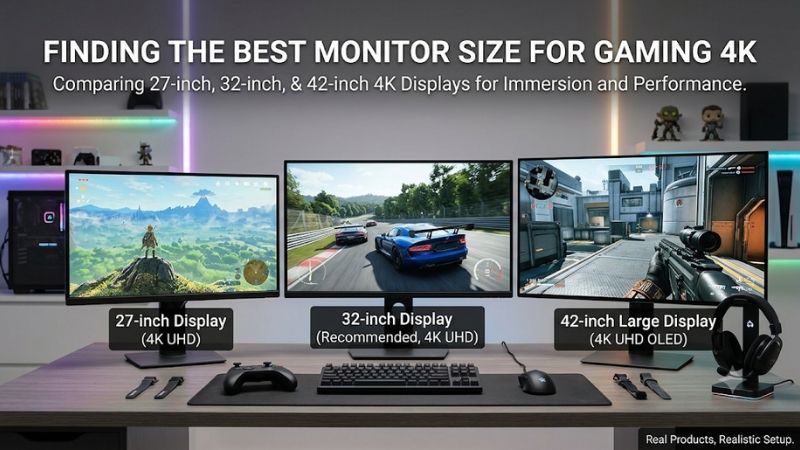
Searching for the best monitor size for gaming 4k? Start with 32 inches for a balanced desktop setup, choose 27 inches for a compact view and higher pixel density, or consider 42 inches when you can sit farther back. The right size depends on viewing distance and game type, not resolution alone.
Best monitor size for gaming 4K: The quick answer
For a typical desk used for several kinds of games, 32 inches is the strongest starting recommendation. It makes fine details easier to appreciate than a smaller display without demanding the placement changes of a 42-inch screen. However, a shallow desk can make 27 inches more comfortable.
Choose 27 inches if you sit close, prefer seeing the whole screen with minimal eye movement, or divide your desk among several devices. Choose 42 inches for a deeper installation, controller-led gaming, or a dedicated setup where you can position the panel comfortably farther away.
These are practical starting points rather than universal distance rules. Your posture, vision, interface preferences, and available mounting positions affect the result. Before ordering, mark the approximate screen outline at the intended position and sit where you normally play; the physical difference is more useful than a diagonal specification alone.
| Size class | Approximate image width | Approximate pixel density at 4K | Starting fit | Main compromise |
|---|---|---|---|---|
| 27 inches | 23.5 inches | 163 pixels per inch | Close seating and compact desks | Small unscaled text and interfaces |
| 32 inches | 27.9 inches | 138 pixels per inch | General desktop and mixed gaming | Requires more width and comfortable viewing space |
| 42 inches | 36.6 inches | 105 pixels per inch | Deep desks and dedicated installations | Large visual footprint at close range |
Figures use idealized 16:9 screens at the stated diagonals. Actual viewable sizes vary: the products below include 26.5-inch, 31.5-inch, and 41.5-inch panels. Widths exclude bezels, stand legs, and mounting clearance, so check the complete product dimensions before deciding what fits.
Six 4K gaming displays to match your preferred size
The shortlist includes compact OLED and IPS options, larger OLED and Mini LED monitors, and two different approaches to a 42-inch installation. Every featured display uses 3840 × 2160 resolution. The LG C5 is explicitly a television alternative, rather than a conventional desktop monitor.
| Model | Actual size or size class | Panel | Refresh capability | Why consider it | Main limitation |
|---|---|---|---|---|---|
| ASUS ROG Swift OLED PG27UCDM | 26.5-inch viewable | QD-OLED | Up to 240Hz | Compact high-refresh 4K | OLED care and small interface elements |
| MSI MPG 274URF QD | 27 inches | Rapid IPS | Up to 160Hz | Compact LCD with USB-C | Limited HDR ambition |
| MSI MPG 322URX QD-OLED | 31.5 inches | QD-OLED | Up to 240Hz | Balanced desktop size and modern inputs | OLED static-content considerations |
| BenQ MOBIUZ EX321UX | 31.5 inches | Mini LED IPS | 144Hz | Larger LCD with local dimming | Zone-based lighting can create artifacts |
| ASUS ROG Swift OLED PG42UQ | 41.5 inches | WOLED | 138Hz overclocked | Large monitor with DisplayPort | Older model and substantial footprint |
| LG C5 OLED42C5PUA | 42-inch class | OLED TV | Up to 144Hz with compatible PC | Gaming and television use | TV installation and connection requirements |
How the shortlist was selected
This guide uses manufacturer specifications and editorial analysis of screen geometry; it does not report original detailed research. The recommendations deliberately cover distinct size and panel choices. No current-price comparison supports a budget award, and advertised response times are not presented as measured input latency.
The main question is which physical size makes sense before selecting a particular model. Accordingly, the products illustrate meaningful alternatives within each size class. A 32-inch OLED and a 32-inch Mini LED LCD may occupy similar space but behave differently in dark scenes, bright rooms, and long desktop sessions.
Maximum refresh also requires a supported signal path. The graphics output, cable, selected input, settings, and sometimes compression support must work together. Neither a 240Hz specification nor an HDMI logo establishes what every computer or console can deliver to the screen.
The product recommendations in detail
Once you have narrowed the size, compare panel behavior, connectivity, and ownership requirements. A physically appropriate monitor can still be the wrong purchase if it lacks the connection you need or introduces a compromise that matters more than the improvement in screen size.
ASUS ROG Swift OLED PG27UCDM: For compact 4K OLED gaming
The PG27UCDM suits players who want a sharp 4K image without moving to a larger desktop footprint. Its 26.5-inch viewable panel keeps the game within a compact area, which can appeal when you sit close or prefer watching the entire scene with limited scanning.
ASUS specifies a 3840 × 2160 QD-OLED panel and up to 240Hz. At this size, high pixel density is the defining advantage. It makes fine edges and textures tightly packed, although how much additional detail you perceive depends on distance, eyesight, game rendering, and the quality of any upscaling.
The small format does not make 4K easier for the graphics card. It still contains the same pixel count as a 32-inch or 42-inch UHD screen. Choose it for physical fit and presentation rather than expecting the frame rates of a lower-resolution competitive monitor.
Buy if you want compact OLED gaming and can support the intended signal mode. Skip if large text, substantial desktop imagery, or a more expansive controller experience matters most. The MPG 274URF QD is the LCD alternative, while the MPG 322URX moves the OLED experience into a larger size class.
MSI MPG 274URF QD: For a compact LCD workspace
The MPG 274URF QD fits a shared gaming and work desk where a 27-inch screen is already the right physical size. It offers a way to choose 4K detail and high refresh while keeping an LCD panel for a workload that includes persistent windows and toolbars.
MSI lists Rapid IPS, 3840 × 2160 resolution, up to 160Hz, FreeSync Premium, and USB-C with 65W power delivery. USB-C can simplify a compatible laptop connection, but 65W should not be assumed sufficient for every performance laptop under a heavy workload.
Its DisplayHDR 400 certification should not be confused with the zone-based lighting of the BenQ or the pixel-level light control of OLED. Buy it for the combination of size, resolution, and connections. Do not make strong HDR contrast the central expectation without evidence supporting that use.
Buy if you want a compact LCD for games and ordinary desktop work. Skip if cinematic contrast is your overriding priority or you regularly lean back far enough that the smaller image feels distant. The PG27UCDM changes the panel technology; the EX321UX offers a larger Mini LED LCD approach.
MSI MPG 322URX QD-OLED: Best monitor size for gaming 4K on a mixed-use desk
The MPG 322URX illustrates why the 32-inch class is a useful default for 4K gaming. Its 31.5-inch panel gives scenery, menus, and desktop content more physical presence than a 27-inch display, while remaining substantially easier to accommodate than a 42-inch installation.
MSI specifies 4K at up to 240Hz, QD-OLED, DisplayPort 2.1a UHBR20, and HDMI 2.1. The connection options are relevant when planning high-refresh PC use, but the monitor cannot create frames that your system does not render. Console modes remain limited by the console and game.
At the same viewing distance, the image appears larger and individual pixels are less tightly packed than on a 27-inch 4K screen. That is a geometry trade-off, not a quality defect. Many buyers will appreciate the easier physical scale more than the extra density of a smaller panel.
Buy if you want a balanced desktop format with high-refresh OLED capability. Skip if your work involves prolonged static content and you prefer an LCD ownership profile. Compare the EX321UX for that reason, or the PG27UCDM if the 32-inch footprint is already too large for your space.
BenQ MOBIUZ EX321UX: For 32-inch Mini LED gaming
The EX321UX suits someone who likes the physical scale of a 32-inch screen but wants an LCD rather than OLED. It keeps the same 4K pixel grid as the MSI while changing how light is produced and controlled, making panel preference the important distinction.
BenQ specifies a 31.5-inch IPS panel, 144Hz refresh, and a Mini LED backlight with 1,152 dimming zones. Local dimming can control different image regions, but each zone still covers many pixels. It cannot reproduce OLED’s independent control of light at every pixel.
Small bright objects against dark backgrounds can reveal the limits of zone-based illumination. How noticeable this is depends on content and implementation; no measured blooming result is claimed here. Evaluate the picture settings you will actually use, especially if dark games occupy much of your time.
Buy if you want a larger desktop LCD with local dimming and useful gaming refresh. Skip if a 240Hz ceiling or pixel-level black control is essential. The MPG 322URX addresses those priorities, while the MPG 274URF QD makes more sense when compact dimensions outweigh the larger image.
ASUS ROG Swift OLED PG42UQ: For a large desktop installation
The PG42UQ is a purpose-built monitor option for buyers who have deliberately planned around a large screen. Its 41.5-inch WOLED panel creates a much bigger physical image than a 32-inch display, so the decision starts with placement and comfort rather than the feature list.
ASUS advertises 4K with up to 138Hz through overclocking, plus DisplayPort 1.4 and HDMI 2.1 connections. Treat 138Hz as the advertised overclocked mode, not an unconditional baseline. ASUS’s manual notes possible flicker with overclocking, so a lower setting may be preferable if stability is affected.
A large panel positioned too close can turn normal HUD checks into repeated eye or head movement. Moving it back may improve the layout, but then the desk, wall clearance, and mounting arrangement become part of the purchase. Check the exact mount pattern and supported weight before buying an arm.
Buy if you have space for a 42-inch-class monitor and specifically want DisplayPort. Skip if the screen must sit at the front of a shallow desk. This is an older model, so check seller availability and support terms; the LG C5 is a television-based alternative rather than an identical replacement.
LG C5 OLED42C5PUA: For a desk and television hybrid
The 42-inch-class C5 is relevant when one display will handle controller gaming, PC use, and television viewing. It is a TV used as a monitor alternative, so its stand, operating system, connection path, and everyday controls should be evaluated as part of that choice.
LG specifies a 4K OLED image and advertises up to 144Hz with a compatible PC. That maximum is not a promise of 144Hz console output. Choose appropriate gaming settings and confirm the desired resolution, refresh, and variable-refresh behavior with the connected hardware before settling into normal use.
For desktop work, a large image can make unscaled interface elements physically easier to read, but OLED subpixel structure and software rendering still influence text appearance. Pixel density alone cannot establish text quality. A TV also needs suitable placement rather than an assumption that any ordinary monitor arm will fit.
Buy if gaming and television use share a deep desk or dedicated installation. Skip if you need conventional monitor connections or easy height adjustment out of the box. The PG42UQ provides the monitor-oriented comparison; a 32-inch option is the more practical fallback when either large display feels overwhelming.
Choosing the best monitor size for gaming 4K
A useful decision comes from connecting physical size with how you actually play. Measure the installation, consider your most demanding games, and account for desktop use. The following checks help distinguish a beneficial increase in image size from a screen that merely dominates the desk.
Use viewing distance instead of desk depth alone
Desk depth is only a rough clue because your eyes may sit behind the desk edge while the panel can sit forward on a stand. Measure from your normal seated eye position to the proposed screen location. Include the space needed for the keyboard and mouse.
For similar apparent image size, distance scales with diagonal. If 27 inches feels comfortable at 24 inches away, a 32-inch screen would occupy roughly the same angle at 28.4 inches, and a 42-inch screen at 37.3 inches. These are geometric examples, not ergonomic requirements or prescribed viewing distances.
Match screen coverage to the games you play
For fast shooters, a compact presentation may make corners, HUD elements, and the center easier to monitor together. That does not establish a universal competitive advantage for 27 inches. A larger screen farther away can occupy a similar portion of your view while retaining its larger physical dimensions.
For exploration, racing, and controller-led games, a larger image may be more appealing. However, increasing a 16:9 screen’s size does not automatically show more of the game world. Game camera settings and aspect ratio determine the rendered view; diagonal size changes how large that view appears.
Separate pixel density from scaling and image quality
A 27-inch 4K screen has higher pixel density than a 32-inch or 42-inch one. That can improve the appearance of fine detail up close, but desktop text may require scaling. Scaling changes interface size; it does not turn the panel’s native resolution into a lower-resolution screen.
Games may manage menus and HUD scaling independently from the operating system. Check those controls if interface elements appear tiny. Panel coating, subpixel layout, antialiasing, and rendering resolution also influence perceived clarity, so a PPI calculation is a useful comparison rather than a complete image-quality score.
Keep GPU demands separate from screen dimensions
All six displays contain 8,294,400 pixels at native 4K. Changing from 27 to 42 inches does not increase that count. With the same game, rendering settings, and refresh target, physical diagonal alone is not a reason to expect a higher graphics workload.
The demanding change is usually resolution or frame-rate target. Driving 4K at 240 frames per second is a different goal from 4K at 120. Upscaling, ray tracing, and CPU limits complicate comparisons further, so assess your game performance rather than matching a graphics card to screen inches.
Frequently asked questions
The final decision often comes down to whether the larger option solves a specific problem. These answers address common concerns about compact 4K screens, competitive play, and controller use without treating any single size as the correct purchase for every desk or player.
Is 27-inch 4K too small to be worthwhile?
A 27-inch 4K display can be worthwhile for close viewing, detailed games, and a compact workspace. Its pixel density is an advantage when you can perceive the detail, while scaling can make desktop applications comfortable. It is less compelling if you sit far away and mainly want a larger image.
Is 32-inch 4K too large for competitive gaming?
Not inherently. Its suitability depends on the angle it occupies in your view and whether you can comfortably monitor the game’s important areas. Move the screen back if your setup permits, then assess visibility before deciding that the size itself is unsuitable. Refresh, response behavior, and stable performance remain separate concerns.
Does console gaming require a bigger screen?
No. A console can work with a compact 4K monitor when you sit at a desk. Larger displays become useful when the seating position moves farther away, rather than because the console requires a particular diagonal. Confirm the exact supported signal modes; a monitor’s maximum PC refresh does not establish the console’s output.
Conclusion
Choose 32 inches as the starting point for balanced 4K desktop gaming, 27 inches for compact close viewing, and 42 inches only when placement supports the larger image. The PG27UCDM and MPG 274URF QD cover compact OLED and LCD needs; the MPG 322URX and EX321UX offer larger desktop alternatives. The PG42UQ and LG C5 suit planned large-screen installations. Settle the viewing distance and physical fit first, then choose panel type and refresh around your games and hardware.









