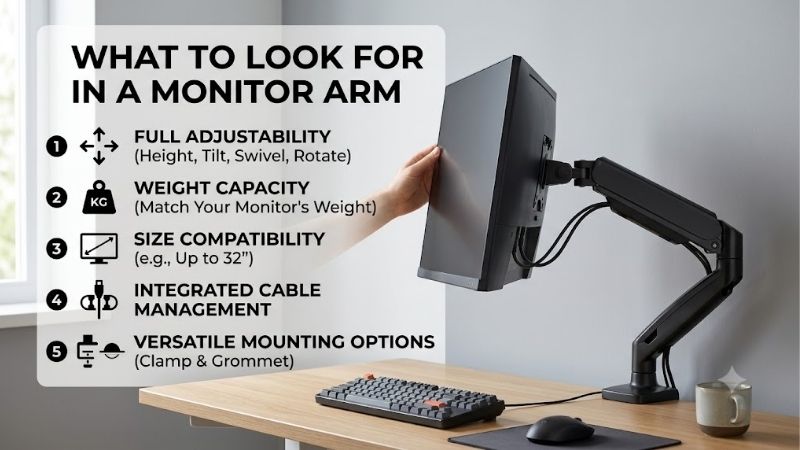
What to look for in a monitor arm matters when a screen sits too high, the stand wastes desk space, or the arm cannot hold its weight. This guide breaks down fit, adjustment range, mounting, and movement so you can match the right arm to your monitor and desk without paying for features you will not use. Start here.
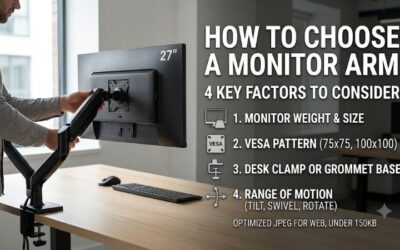
How to Choose a Monitor Arm
Buying an arm is less about adding motion and more about matching the arm to the screen, desk, and daily workstyle. Weight, VESA fit, reach, mounting space, and adjustment behavior decide whether the upgrade feels solid or frustrating, so the smartest choice starts with the constraints of your complete, everyday-setup.
Check Monitor Weight, VESA, And Size
Start with the monitor itself: measure its weight without the original stand, check the VESA hole pattern, and note the screen-size and depth. Size alone is a weak shortcut because two 34-inch displays can place very different demands on the same-arm, especially when one is substantial, deeply curved, or unusually heavy.
Compatibility is the primary filter in what to look for in a monitor arm because an arm that matches the bracket but lacks load-headroom can sag or become difficult to position. LX Pro covers up to 22 pounds, while STAND-V101N handles up to 17.6 pounds; heavier-screens point toward HX or STAND-V101G1, depending on the display.
Judge The Adjustment Range
Next, judge the practical range rather than the number of joints. Lift determines how far the screen can move vertically, extension controls how far it can reach over the desk, and tilt, pan, and rotation affect fine positioning. More range helps when you switch between sitting postures, portrait work, or shared-viewing.
Regarding what to look for in a monitor arm, range matters most when your desk is deeper or your display must reposition frequently. LX Pro provides a 13-inch lift and up to 25.8-inch extension, while STAND-V101N reaches 27.5 inches, making either a reliable selection when reach matters more than a space-saving footprint.
Match The Desk Mount
The desk connection deserves the same attention as the arm. Measure desktop-thickness, check whether the included clamp fits, and decide whether a grommet hole is preferable. A secure attachment spreads the load into the desk instead of forcing you to compensate with tighter joints, but thicker tops can limit your options.
A practical part of what to look for in a monitor arm is the mounting-type you can actually install. STAND-V101N accepts a desk up to 3.25 inches with a C-clamp and 3 inches by grommet, while HX also supports clamp and grommet setups, so both suit desks where installation-flexibility is a high-priority for careful buyers.
Choose The Right Movement Mechanism
The final filter is the movement mechanism and how the arm behaves after installation. Spring or Constant Force systems should counterbalance the monitor rather than require repeated joint tightening, and cable routing should stay clear as the screen moves. Choose the mechanism that matches how often you reposition the display.
Mechanism quality is easy to overlook in what to look for in a monitor arm, yet it separates occasional adjustment from daily-movement. HX uses Constant Force technology for screens from 20 to 42 pounds, while STAND-V101G1 uses a pneumatic arm for light-to-heavy-ultrawides, giving each a distinct role in a different-class of setup.
Top Picks
These four picks cover the useful buying-situations without pretending one arm fits every desk. LX Pro is the balanced premium choice, STAND-V101N is the value option, HX is built for heavy displays, and STAND-V101G1 targets large ultrawides; what to look for in a monitor arm becomes easier when the tradeoffs are visible.
| Product | Best For | Key Spec | Watch Out For |
|---|---|---|---|
| Ergotron LX Pro | Best Overall | 4–22 lb; up to 34″; 13″ lift | Not for heavier displays |
| VIVO STAND-V101N | Best Value | 17.6 lb; 13–32″; 27.5″ extension | Lower weight ceiling |
| Ergotron HX | Best For Heavy Monitors | 20–42 lb; up to 49″ | Overkill for lighter screens |
| VIVO STAND-V101G1 | Best For Ultrawide Monitors | Up to 49″; 33 lb; 23″ extension | Bulkier than basic arms |
Ergotron LX Pro
Ergotron LX Pro is the Best Overall choice for a typical 24- to 34-inch monitor that needs frequent repositioning without a bulky base. It supports 4 to 22 pounds, provides a 13-inch lift, uses VESA 75×75 or 100×100, and can extend 25.8 inches, while Constant Force movement keeps adjustments controlled and predictable.
The LX Pro’s advantage is its broad fit-range without the heavy-duty behavior of a specialist-arm, so it works well for office, creative, and gaming-desks. Its main-drawback is the 22-pound ceiling, which rules it out for heavier-displays; deep or unusually bulky screens may also need a stronger-mount or different arm.
VIVO STAND-V101N
VIVO STAND-V101N is the Best Value pick for an uncomplicated single-monitor desk-setup using a conventional 13- to 32-inch computer display. It carries up to 17.6 pounds, supports VESA 75×75 and 100×100, accommodates desktops up to 3.25 inches thick, and offers 27.5 inches of maximum reach extension for extended reach.
Its key strength is the feature set at the budget end: clamp and grommet-mounting, full-articulation, and integrated cable management are valuable without moving into premium costs. The tradeoff is a smaller weight limit and less refined movement than higher-end arms, so it is better-suited to lighter mainstream-monitors in basic setups.
Ergotron HX
Ergotron HX is the Best For Heavy Monitors because its range starts at 20 pounds and reaches 42 pounds, with support for screens up to 49 inches. It offers 11.5 inches of lift, 180-degree pan, 360-degree rotation at the arm connection, and broader VESA-support that includes 75/100 and 200×200 patterns for larger displays.
HX’s clear advantage is the extra load-capacity and the way Constant Force technology handles large-displays without making every adjustment feel like a struggle. Its drawback is overkill for 24- to 32-inch monitors, and the higher weight class can make the arm less appealing when your screen does not need that strength.
VIVO STAND-V101G1
VIVO STAND-V101G1 is the Best For Ultrawide Monitors, supporting screens up to 49 inches and weights from 2.2 to 33 pounds. Its pneumatic arm provides a 10.5- to 23.5-inch center-height range, up to 23 inches of extension, 180-degree swivel, and VESA 75×75 or 100×100 compatibility for present-day mainstream display panels.
For a wide-curved display, that pneumatic design makes large-screen height changes easier than a fixed-tension arm. The limitation is its 33-pound capacity, which sits below HX for heavy displays, and its larger arm-geometry may be unnecessary on a compact desk; those tradeoffs matter in what to look for in a monitor arm.
Frequently Asked Questions
Most buyers do not need the heaviest arm they can afford; they need one that stays stable at the monitor’s real weight and has enough range for the desk. The questions below address common-compatibility-and-setup-decisions that matter after you know what your monitor-requires, which is central to what to look for in a monitor arm.
Does Monitor Size Matter More Than Weight?
Does monitor size matter more than weight? Weight is the stricter limit, because an arm can be rated for a large diagonal yet struggle with a thick, heavy panel. Check the monitor’s weight without its stand, then compare it with the arm’s supported-range before treating screen-size as the secondary-compatibility check.
A 34-inch display can therefore fit one arm while a heavier 27-inch model may require another. Leave some headroom rather than choosing an arm that operates right at its stated maximum, especially when the screen is curved or deep; HX is designed for that heavier end, while LX Pro suits lighter mainstream-panels in ordinary workstations.
Can A Monitor Arm Damage My Desk?
Can a monitor arm damage my desk? The concern is an unsuitable clamp, weak desktop material, or excessive load at the attachment point. Confirm manufacturer’s desktop-thickness range and use the correct mounting-hardware instead of improvising with loose spacers, weak edges, or a clamp that does not seat on the desktop.
Desk thickness is only part of the check. A particleboard top, hollow-core surface, or damaged edge can need more care than a solid-desktop even when the dimensions look compatible. STAND-V101N’s 3.25-inch clamp range is generous, but the desk itself still needs to provide a firm-anchoring surface for the load and clamp.
Are Gas-Spring And Constant Force Arms The Same?
Are gas-spring and Constant Force monitor arms the same? They solve a similar counterbalance problem but use different mechanisms. A gas-spring design uses internal pneumatic force, while Ergotron’s Constant Force approach is engineered to balance movement across the arm’s range; neither is automatically better for every monitor.
For many buyers, the better test is whether the arm can place the monitor where the desk needs it and then hold that position. STAND-V101N offers wide articulation for little money, while LX Pro gives a more refined premium option; HX is the specialist choice when load support matters more than extra-movement flexibility.
Do I Need Full Rotation And Tilt?
Do I need full rotation and tilt? Only when your workflow uses them. Portrait orientation, shared-viewing, and frequent desk changes make rotation or broad tilt more valuable, while a single fixed viewing position can justify a simpler arm. Full articulation is useful, but paying for every movement axis is not automatically worthwhile.
For many buyers, the better test is whether the arm can place the monitor where the desk needs it and then hold that position. STAND-V101N offers wide articulation for little money, while LX Pro gives a more refined premium option; HX is the specialist choice when load support matters more than extra-movement flexibility.
Final Thoughts
Once you know your monitor’s real-weight, VESA pattern, desk thickness, and required reach, the field narrows quickly. In what to look for in a monitor arm, the answer is the lightest arm that comfortably covers those limits, not the most expensive model; choose LX Pro, STAND-V101N, HX, or STAND-V101G1 by workload.