Best monitor arm 2026 shopping gets confusing when similar mounts advertise different display compatibility. A screen can fit the VESA plate yet overwhelm the tilt joint or damage an unsuitable desktop. Start with precise monitor weight and desk construction, then choose movement and layout suited to your requirements.
How to Choose a Monitor Arm
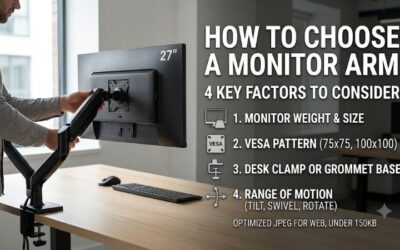
The best monitor arm 2026 for your setup must match your display, desktop, and routine. This guide compares four distinct options through load compatibility, desk mounting, movement, and screen count. Only install an arm within its published limits on a suitable desktop; excess capacity cannot compensate for structural weakness.
Monitor Weight and Curved-Screen Leverage
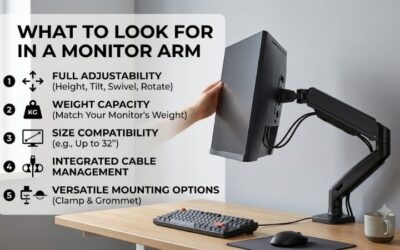
Load capacity means stand-free monitor weight, including any attached accessories. Both minimum and maximum ratings matter on counterbalanced arms. A very light display can resist lowering, while an overloaded screen can drift. Check manufacturer specifications carefully rather than using screen diagonal instead of weight.
For a deeply curved display, the best monitor arm 2026 must accommodate forward leverage on the pivot. Weight alone does not establish compatibility. Ergotron HX Desk Monitor Arm with HD Pivot targets substantial curved screens weighing 28–42 lb, making it appropriate when your monitor meets its specified depth requirements.
Desk Construction and Mounting Options
Desk compatibility includes thickness, material, and mounting-edge shape. An underside frame or beveled lip can prevent secure clamping despite acceptable thickness. Check installation drawings against your mounting location. A reinforcement plate does not automatically make glass or a hollow desktop suitable for an arm.
A clamp avoids drilling but needs an accessible edge with adequate structural support. A grommet mount uses a suitable through-hole, helpful where rear-edge access is restricted. VIVO STAND-V002 includes both mounting methods, making it attractive for compatible desks where mounting flexibility outweighs effortless repositioning.
Movement Range and Repositioning Frequency
Adjustment range should match your actual repositioning frequency. Counterbalanced designs suit regular height changes, while fixed-height articulated mounts suit stable layouts. Check available folded-arm clearance as well as maximum reach. On shallow desks, substantial extension can matter less than positioning near the rear edge.
For regular screen sharing or frequent working position changes, the best monitor arm 2026 should offer practical vertical travel. Ergotron LX Desk Monitor Arm provides 13 inches of lift, accommodating varied viewing heights for compatible displays. Choose the LX when regular repositioning matters more than stand removal alone.
Single-Screen Versus Dual-Screen Layouts
Screen count determines independent positioning versus shared support. Two separate arms allow different mounting positions, but require separate anchoring locations. A shared-pole mount consolidates hardware while linking parts of the height arrangement. Choose according to display widths and working layout instead of automatically choosing dual.
For one display, the best monitor arm 2026 should avoid unnecessary hardware and expense. ARCTIC X1-3D supports one compatible monitor up to 22 lb and uses a gas spring for positioning. Choose this model for adjustable single-screen positioning, rather than paying for a dual configuration or unnecessary heavyweight hardware.
Top Picks
The best monitor arm 2026 shortlist below separates everyday adjustment, single-screen value, heavy curved displays, and stable dual-screen layouts. These recommendations follow published specifications and fit considerations rather than claimed detailed research. Compare complete purchase costs, including required adapters, before ordering.
| Product | Best For | Key Spec | Watch Out For |
|---|---|---|---|
| Ergotron LX Desk Monitor Arm | Best Overall | 7–25 lb capacity; 13-inch lift | Minimum load excludes some lightweight screens |
| ARCTIC X1-3D | Best Value | 22 lb maximum; six-year warranty | ±15-degree tilt; 20–55 mm desktop thickness |
| Ergotron HX Desk Monitor Arm with HD Pivot | Best for Heavy Curved Displays | Specified for 28–42 lb, 6–12-inch-deep displays | Specialized compatibility; unsuitable for many lighter monitors |
| VIVO STAND-V002 | Best for Stable Dual-Screen Setups | Two 13–30-inch screens; 22 lb each | Shared-pole height adjustment |
Ergotron LX Desk Monitor Arm: Best Overall
Ergotron LX Desk Monitor Arm is the best overall recommendation for frequently repositioned compatible single displays. Its published capacity is 7–25 lb, with 13 inches of vertical adjustment. This combination supports everyday shared workstations and switching between focused work and occasional collaborative screen sharing.
Its main limitation is that the counterbalance has a minimum supported load, potentially excluding unusually lightweight displays. This is the original LX, not the newer LX Pro, with different specifications. Choose the LX for its documented movement range, but verify exact model compatibility rather than relying on family branding.
ARCTIC X1-3D: Best Value
ARCTIC X1-3D earns the best value role for single-screen buyers seeking gas-spring adjustment without specialized heavyweight hardware. It supports up to 22 lb, with VESA 75 × 75 mm and 100 × 100 mm patterns. Its six-year manufacturer’s warranty provides an ownership benefit, although value depends on current US pricing.
The main compromises are its limited ±15-degree tilt range and clamp requirement for desktops measuring 20–55 mm thick. These limits exclude thicker surfaces and more extreme viewing angles. Choose it for a compatible ordinary workstation, but confirm desktop thickness and rear-edge access before committing to replacement.
Ergotron HX Desk Monitor Arm with HD Pivot: Best for Heavy Curved Displays
Ergotron HX Desk Monitor Arm with HD Pivot is the specialized choice here for compatible heavy curved displays. The specified application covers stand-free screens weighing 28–42 lb and measuring 6–12 inches deep. Its supplied specialized tilt pivot addresses the forward leverage challenging conventional shallower-panel mounts.
The disadvantage is specialization: its load range excludes many lighter displays, despite matching VESA patterns. It is also a single-screen solution, without dual-screen support. Buy this exact HD Pivot configuration when your monitor meets its requirements; an ordinary HX listing does not automatically include this pivot.
VIVO STAND-V002: Best for Stable Dual-Screen Setups
VIVO STAND-V002 is the best choice for two conventional displays requiring infrequent height adjustment. The standard model supports 13–30-inch displays weighing up to 22 lb each, with a 17-inch pole. Detachable VESA plates simplify attachment, while small plate-level alignment adjustments help align different monitor housings.
The tradeoff is that its shared-pole height arrangement is less convenient for regular height changes than independent counterbalanced arms. Display width also limits practical placement, despite acceptable individual screen weights. Choose the standard STAND-V002 for a stable dual setup, checking the SKU against larger-screen variants.
Frequently Asked Questions
Before ordering the best monitor arm 2026 for your workstation, resolve the compatibility questions beyond product photos. VESA attachment, spring balance, curved-screen leverage, and sitting-to-standing movement all affect the purchase. These answers explain where a promising specification helps and where exact compatibility needs confirmation.
Do Monitor Arms Fit Every Monitor?
No, monitor arms do not fit every display despite apparently acceptable screen dimensions. The monitor needs a compatible mounting pattern, acceptable weight, and adequate clearance around recessed mounts. Read the manufacturer’s monitor manual for stand removal and mounting requirements before purchasing mounting equipment.
When comparing the best monitor arm 2026 options, look for VESA 75 × 75 mm or 100 × 100 mm support matching your display. Some monitors need a manufacturer-specific adapter instead. That adapter adds weight and forward displacement, so include it in your complete compatibility assessment instead of ignoring accessory loading.
Is a Gas-Spring Monitor Arm Better?
No, a gas-spring arm is not automatically the better purchase. It is useful for frequent height or distance adjustment, but a pole-mounted design can suit stationary displays. Your adjustment habits matter more than the mechanism’s name. A straightforward fixed-height arrangement may provide sufficient movement without unnecessary complexity.
Counterbalanced arms require tension adjustment following the instructions with a compatible display attached. Support the screen during setup and make controlled adjustments until properly balanced. If it still rises or sinks, check the supported load range rather than assuming more adjustment will fix incompatible equipment.
Can a Monitor Arm Hold a Curved Ultrawide?
Some monitor arms support curved ultrawides, but compatibility depends on weight, depth, and tilt-joint capability beyond width. A deep curved panel has a forward center of mass. Check the mount manufacturer’s monitor compatibility guidance before purchase, particularly for substantial displays approaching ordinary mount limits.
A nominally higher weight limit cannot guarantee that the tilt joint will hold a deep curved display at the intended angle. Use the monitor’s exact model number for compatibility confirmation. If an upgraded pivot is required, verify that it is included in the selected package instead of assuming accessories pictured are included.
Do Monitor Arms Work on Standing Desks?
Yes, an arm can work on a standing desk with structurally suitable desktop construction and movement clearance. The arm travels with the rising desktop, without necessarily covering the full sitting-to-standing difference. Evaluate your preferred monitor position in both working modes before selecting adjustment range.
Leave sufficient cable slack for both arm movement and the desktop’s full travel, especially for external connections below the desktop. Route cables without trapping them in moving joints, then slowly check full movement. A mount that fits mechanically can strain connectors when cables tighten during desktop movement.
Final Thoughts
The best monitor arm 2026 depends on your display and repositioning frequency. Choose Ergotron LX for regular adjustment, ARCTIC X1-3D for single-screen value, Ergotron HX Desk Monitor Arm with HD Pivot for compatible heavyweight curves, and VIVO STAND-V002 for stable dual screens. Confirm monitor and desktop compatibility before purchasing.