HUANUO Single Monitor Mount for 13-32 Inch Screens,17.6 lbs Capacity | 16 inch height, full-motion adjustment, C-clamp or grommet mounting, cable clips, space saving, VESA 75x75/100x100mm
Included for 'Best Monitor Arm for Beginners: Setup & VESA Mounting' because the listing specifies 17.6 lbs Capacity and 16 inch height, details this guide uses to compare options.
View on AmazonBest monitor arm for beginners should make a first upgrade easier, not create another compatibility problem. New buyers often miss VESA spacing, monitor weight, desk thickness, or how much reach they actually need. This roundup compares four proven arms so you can match the mount to your screen and desk before buying.
How to Choose a Monitor Arm
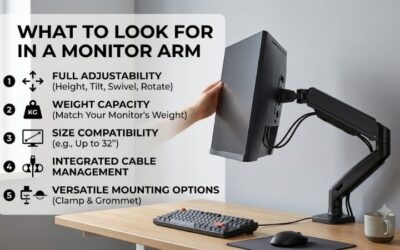
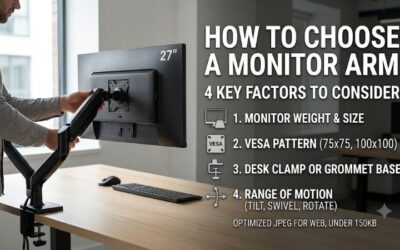
The right best monitor arm for beginners becomes easier to choose when you focus on four practical checks: monitor compatibility, mounting method, adjustment range, and mechanism. These affect whether installation is straightforward and whether the screen stays where you put it. Each criterion below points directly to a recommended model.
Monitor Weight And VESA Fit
Check the monitor’s precise VESA pattern and actual installed weight first. HUANUO HNSS6 supports 13- to 32-inch displays up to 19.8 pounds with 75 x 75 and 100 x 100 mm VESA, making it an accommodating selection for conventional workplace displays. Weight and VESA fit remain more important than display size by itself.
Weight limits should always be treated as a hard ceiling, while VESA spacing confirms the plate will physically mount. VIVO STAND-V001 supports up to 22 pounds and two widely used standard VESA patterns, giving beginners extra capacity for heavier 27- to 32-inch panels. Its larger range also suits some ultrawide screens.
Desk Thickness And Mounting
Desk compatibility is often the hidden compatibility failure point for beginners. Measure the desktop thickness and check the rear edge before ordering. VIVO STAND-V001 accepts desks up to 3.25 inches thick, while HUANUO HNSS6 supports both clamp and grommet mounting. Those choices help first-time buyers work around different desk constructions.
A clamp is usually simplest when the edge is open; a grommet works with an existing cable hole. The main trade-off is mounting flexibility versus drilling or clearance. For a conventional desk, HUANUO HNSS6 is the easier adaptable choice, while VIVO STAND-V001 is useful when a thicker desktop is the primary constraint.
Arm Reach And Extension
Reach directly determines whether the monitor can sit comfortably and ergonomically over a deeper desk or move aside when needed. WALI GSDM001 provides up to 20.3 inches of extension, making it a strong fit for deeper surfaces. North Bayou F80 is space-efficient, which can be easier to control on a normal everyday desk.
More extension also means more leverage on the mounting point, so a long mount is not automatically better. WALI GSDM001 makes practical sense when desktop depth is restrictive, while North Bayou F80 performs better for a conventional layout without unnecessary extension. Match reach to the desk, not the longest holder.
Adjustment Mechanism
Gas-spring arms are especially convenient and useful for users who move the screen frequently during work, but they need proper tension for the monitor weight. HUANUO HNSS6 and WALI GSDM001 use gas-spring designs, which suits users who switch between working positions or occasionally turn the screen for another desk task.
An articulated design can be perfectly reasonable when the monitor mostly stays in one position. VIVO STAND-V001 uses a fixed pole and articulated arm rather than a gas spring, while North Bayou F80 gives a more traditional spring-assisted experience. Choose the mechanism that matches how often you actually reposition the display.
Top Picks
These four best monitor arm for beginners picks cover distinct needs without repeating designs. North Bayou F80 is Best Overall for mainstream 17- to 30-inch displays, VIVO STAND-V001 is Best Value for higher load capacity, WALI GSDM001 is Best For Deep Desks, and HUANUO HNSS6 is Best For First-Time Buyers.
| Product | Best For | Key Spec | Watch Out For |
|---|---|---|---|
| North Bayou F80 | Best Overall | 2-9 kg, 17-30″ | Published range tops out at 30″ |
| VIVO STAND-V001 | Best Value | 22 lb, up to 38″ | Articulated design is less convenient for constant repositioning |
| WALI GSDM001 | Best For Deep Desks | 19.8 lb, 20.3″ extension | Longer reach increases leverage |
| HUANUO HNSS6 | Best For First-Time Buyers | 19.8 lb, 13-32″ | Less reach than the WALI |
North Bayou F80 — Best Overall
North Bayou F80 is the best monitor arm for beginners for a well-balanced, conventional single-screen desktop mount. It supports 17- to 30-inch displays weighing 2 to 9 kg, uses 75 x 75 and 100 x 100 mm VESA, and provides 360-degree rotation. Its substantial capacity suits conventional workplace and gaming monitors.
Its biggest advantage is a generous 9 kg maximum capacity without requiring a premium mount. The limitation is the published 30-inch screen range, so buyers with larger ultrawides should look elsewhere. For a typical 24- or 27-inch monitor, the F80 keeps the feature set easier to understand while providing useful everyday adjustment.
VIVO STAND-V001 — Best Value
The best monitor arm for beginners trades its articulated design for broad compatibility and capacity. VIVO STAND-V001 supports up to 22 pounds, fits standard 13- to 32-inch screens, and can accommodate ultrawides up to 38 inches when the display remains within the weight limit. Its 17-inch pole adds useful height range.
The main trade-off is its articulated design, less convenient for frequent repositioning than a gas-spring arm. Still, +90 to -90 degree tilt, 360-degree swivel, and 360-degree rotation cover everyday desk use well. Its generous capacity makes it useful when the monitor is relatively heavy or larger.
WALI GSDM001 — Best For Deep Desks
WALI GSDM001 is the best monitor arm for beginners with a relatively deep desk because its gas-spring arm extends as far as 20.3 inches forward. It supports 13- to 32-inch monitors up to 19.8 pounds and uses standard 75 x 75 and 100 x 100 mm VESA patterns. That reach gives deeper desks noticeably useful positioning freedom.
That same extended arm reach can increase leverage on the desk, so mounting-point security matters more. The 19.8-pound limit is firm. Buyers who do not need extra extension may find its reach unnecessary, but for a monitor sitting farther back on a deeper desk, it solves a particularly specific positioning problem well.
HUANUO HNSS6 — Best For First-Time Buyers
HUANUO HNSS6 is the best monitor arm for beginners who want the simplest first-time installation process. It supports 13- to 32-inch displays up to 19.8 pounds, handles 75 x 75 and 100 x 100 mm VESA patterns, and uses a gas spring with up to 15.75 inches of vertical height adjustment. It supports clamp or grommet mounting.
The main limitation is available reach: it is less suited to exceptionally deep desks than WALI GSDM001. Its gas spring also needs to be set for the monitor’s actual weight for smooth, controlled movement. For a standard desk with a conventional 24- to 32-inch screen, that is generally manageable rather than a significant drawback.
Frequently Asked Questions
For a best monitor arm for beginners purchase, the most practically useful questions are for beginners: Will it fit the monitor, can the desk support the mount, and will the arm stay stable after adjustment? The answers depend on VESA spacing, mounted weight, desk thickness, and exactly how you use the screen.
Can A Beginner Install A Monitor Arm?
Can a beginner install a monitor arm at home? Yes, most single-monitor desk arms are designed for home installation when the desk is structurally strong and suitable. The important part is checking the hardware against the VESA holes and following the clamp or grommet instructions rather than rushing the final tightening.
The important exception is a desk with a particularly fragile, hollow, damaged, or unusually thin mounting surface. In that situation, even a correctly load-rated arm may not be a good match. A solid conventional desktop surface is the safer starting point, and VIVO STAND-V001 or HUANUO HNSS6 give beginners clear mounting choices.
Do Monitor Arms Work With Any Monitor?
Do monitor arms work with every monitor? No. The display needs compatible VESA attachment holes and must stay within the arm’s weight range. Most picks use widely used 75 x 75 and 100 x 100 mm VESA patterns, but a heavily recessed mounting area can still create a clearance-related problem during first-time installation.
Check the monitor manual or rear panel area before buying, and precisely measure the mounting pattern rather than guessing from screen size. A 32-inch display can be lighter than a 27-inch model, while substantially deeper rear monitor housings can influence screw or plate clearance even when the VESA spacing corresponds.
Is A Gas-Spring Monitor Arm Better For Beginners?
Is a gas-spring monitor arm better for beginners? Usually, yes when you expect to move the screen regularly because the mechanism is designed for controlled adjustable positioning. HUANUO HNSS6 and WALI GSDM001 both use gas springs, but the benefit only appears when the tension is properly matched to the monitor’s weight.
For a screen that stays in one position, a simpler traditional articulated arm can be sufficient for a new first-time user. VIVO STAND-V001 is a good example: its pole-and-joint design provides tilt, swivel, and rotation without relying on a gas spring. That makes it better suited to stable positioning than constant floating adjustment.
Can A Monitor Arm Damage A Desk?
Can a monitor arm damage a desk? It can if the desk surface is too weak for the clamp mounting pressure or the arm’s load. Any clamp concentrates force on the desktop, so budget-priced models are not uniquely dangerous. Measure thickness, inspect the rear edge, and use the supplied mounting hardware exactly as instructed.
A sturdy desk remains the better long-term foundation for every pick here. VIVO STAND-V001 accepts desktops up to 3.25 inches thick, while other models have their own published manufacturer desk-mounting ranges. Staying within those limits matters more than trying to compensate for a questionable surface with extra tightening.
Final Thoughts
The best monitor arm for beginners is the one that fits the monitor and desktop without unnecessary hardware complexity. Choose North Bayou F80 for balanced everyday desktop use at home, VIVO STAND-V001 for higher capacity, WALI GSDM001 for deeper desks, or HUANUO HNSS6 for the simplest all-around first-time installation.