ErGear Single Monitor Arm, Fully Adjustable Monitor Mount for 13–34 Inch Screens, Fast Install Computer Monitor Stand with Tool-Free VESA Mount, Cable Management, Holds 4.84 to 19.8 lbs
Included for 'Monitor Arm Buying Guide 2026: Choose The Best Desk Mount' because the listing specifies Fully Adjustable Monitor Mount for 13 and 34 Inch Screens, details this guide uses to compare options.
View on Amazon
VIVO Single Monitor Desk Mount, Up to 38" Ultrawides, Holds 22 lbs | Articulating, Adjustable Arm, Grommet or C-Clamp Mounting, Computer Monitor Stand for 1 Screen, Black, STAND-V001
Included for 'Monitor Arm Buying Guide 2026: Choose The Best Desk Mount' because the listing specifies Up to 38" Ultrawides and Holds 22 lbs, details this guide uses to compare options.
View on Amazon
HUANUO FlowLift™ Dual Monitor Stand, Fully Adjustable Gaming Monitor Desk Mount for 13–32″ Computer Screens, Full Motion VESA 75x75/100x100 with C-Clamp & Grommet Base, Each Arm Holds 4.4 to 19.8 lbs
Included for 'Monitor Arm Buying Guide 2026: Choose The Best Desk Mount' because the listing specifies Fully Adjustable Gaming Monitor Desk Mount for 13 and 32″ Computer Screens, details this guide uses to compare options.
View on Amazon
Acer Single Monitor Mount, Fully Adjustable Monitor Arm Fits 17-34" Screens | Gas Spring VESA Mount with C-Clamp & Grommet Base, Computer Desk Arm with Tilt Swivel Rotate Supports 4.4-19.8 lbs
Included for 'Monitor Arm Buying Guide 2026: Choose The Best Desk Mount' because the listing specifies Fully Adjustable Monitor Arm Fits 17-34" Screens and Gas Spring VESA Mount with C-Clamp & Grommet Base, details this guide uses to compare options.
View on AmazonMonitor arm buying guide 2026 research often starts with a bulky stand, limited desk space, and uncertainty about mounting hardware. The Ergotron LX Pro Desk Monitor Arm offers a premium alternative, but compatibility determines its value. Choose it only when the display, mounting interface, and desktop satisfy the manufacturer’s requirements.
How to Choose a Monitor Arm
This monitor arm buying guide 2026 reviews the single monitor Ergotron LX Pro through four purchasing criteria: supported weight, mounting compatibility, adjustment range, and complete ownership cost. The verdict draws on manufacturer specifications and configuration analysis rather than claimed hands on testing or measured wobble comparisons.
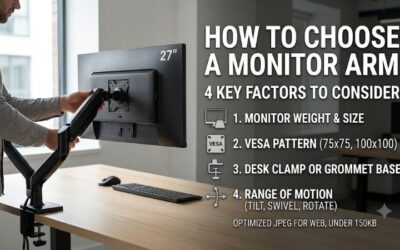
Weight and VESA
Use display weight without the original stand, including attached accessories. Counterbalanced mechanisms have minimum loads as well as maximum capacities, so a lightweight monitor can be unsuitable despite remaining below the upper limit. Confirm the rear mounting interface rather than using diagonal screen size as decisive.
A useful monitor arm buying guide 2026 must distinguish approved attachment from approximate screen compatibility. Recessed mounting areas may require specified hardware even when hole spacing matches. Choose the Ergotron LX Pro Desk Monitor Arm when your display falls within its 4–22 lb range and accepts 75 × 75 or 100 × 100 mm VESA mounting.
Desktop and Mounting
A desktop must provide structural support and contact surfaces, not simply fit between clamp jaws. Rear aprons, drawers, beveled edges, or cable trays can obstruct installation underneath. Check desktop construction and the selected mounting instructions at checkout; unsupported glass or hollow surfaces require a different approved solution.
Ergotron offers different LX Pro mounting configurations, so color alone does not establish the attachment system. Compare the actual package with your desk’s edge or suitable mounting opening. Choose the Ergotron LX Pro Desk Monitor Arm version whose documented clamp or grommet arrangement fits your furniture without improvisation.
Adjustment and Clearance
Vertical travel describes movement between positions, not the absolute screen height above the desk. Your display’s VESA location also changes where its panel sits. Assess the intended viewing position alongside rear clearance, since articulated joints need room to fold without pushing the monitor forward or striking surrounding furniture.
For shared desks, this monitor arm buying guide 2026 favors useful repositioning over unused reach. Frequent height changes make counterbalanced movement more valuable, while a stationary display benefits less. Choose the Ergotron LX Pro Desk Monitor Arm when its 13 inch lift range and articulated placement accommodate your working positions.
Warranty and Cost
Compare the complete configuration, including mounting accessories and any replacement cables, rather than the arm alone. Premium hardware becomes less compelling when your existing stand provides suitable positioning. A longer warranty strengthens ownership support, but its terms and eligibility still matter more than a headline duration.
Think about how frequently you change position or replace displays before paying for installation conveniences. Detachable mounting hardware can simplify future swaps, while optional expansion adds further expenditure. Choose the Ergotron LX Pro Desk Monitor Arm when its removable head and ten year warranty support needs you expect.
Performance
Within this monitor arm buying guide 2026, performance means design capabilities and configuration limits. Published adjustment specifications establish movement capability, but cannot establish desktop vibration. The following assessment separates documented design features from results requiring physical installation.
| Specification | Ergotron LX Pro Desk Monitor Arm |
|---|---|
| Reviewed configuration | Standard single monitor desk arm |
| Supported display weight | 4–22 lb, including attached accessories |
| Typical screen size | Up to 34 inches; compatibility still requires verification |
| VESA interface | 75 × 75 and 100 × 100 mm |
| Vertical lift | 13 inches |
| Tilt | 70° upward, 15° downward |
| Monitor pan | 180° |
| Warranty | 10 years, subject to applicable terms |
| Mounting options | Package specific clamp or grommet configuration |
Positioning
Ergotron’s Constant Force mechanism counterbalances the supported display, allowing repositioning without resetting a collar. That benefits people alternating between different viewing positions. The practical advantage is adjustment access; it does not mean a particular screen automatically reaches your preferred height without planning.
Initial balancing remains necessary. With the monitor supported, follow the installation guide until it maintains the intended position. Lift tension and monitor tilt serve different functions, so tightening unrelated screws cannot correct every problem. This review does not claim measured adjustment force or stability across screens.
Installation and Cables
The detachable head is useful for installation because attaching mounting hardware to the display can be separated from handling the complete assembly. Follow the required fastening sequence before releasing support. The smaller base also leaves more accessible desktop surface than many original monitor stands, although exact savings vary.
Integrated cable management organizes connections, but sufficient slack remains essential throughout articulation. Route cables through the supplied channels without trapping connectors or restricting articulation, then check each position. Removing the original stand changes cable geometry, so previously adequate cables may require replacement.
Pros and Cons
The LX Pro’s strongest case rests on adjustment convenience, installation features, and ownership support. Its drawbacks concern premium expenditure and configuration boundaries rather than decorative extras. Buyers should evaluate those tradeoffs against their actual display and routine instead of treating expensive hardware as superior.
Advantages
The combination of counterbalanced lift, detachable mounting hardware, and a ten year warranty gives the LX Pro a coherent role: a regularly adjusted workstation. These features address movement, installation, and ownership. Buyers who use all three receive more persuasive value than someone seeking only basic elevation.
In this monitor arm buying guide 2026, the premium is easiest to justify when a shared desk requires repeated repositioning. Convenient adjustment can reduce resistance to repositioning, but no physical comfort result is guaranteed. Compare the cost with how often you actually move the display, rather than anticipated improvements.
Limitations
The 4–22 lb operating range excludes some lightweight displays and heavier panels. A compatible mounting pattern cannot override that limit, and screen depth can introduce additional suitability concerns. Before purchasing a substantial curved monitor, verify the configuration rather than interpreting screen diagonal as universal approval.
Expansion is another expense. Ergotron documents conversion accessories, but kits and base requirements determine available upgrades. A single arm does not become a dual monitor setup merely by adding an arbitrary branch. Buyers expecting multiple displays should price the final arrangement before choosing the initial package.
Frequently Asked Questions
The questions behind a monitor arm buying guide 2026 often concern whether premium hardware resolves compatibility or expansion. Those are separate decisions, and no single specification resolves everything. These answers explain what the standard LX Pro offers while identifying circumstances that call for another mounting arrangement.
Is the Premium Worthwhile?
Yes, when frequent adjustment, detachable mounting hardware, and longer warranty coverage have practical value for your workstation. Its appeal weakens for a stationary display when a simpler mount meets compatibility requirements. Spending more should purchase conveniences you use, rather than substitute for checking fit.
In this monitor arm buying guide 2026, keeping your original stand remains reasonable when it provides useful adjustment and sufficient workspace. Conversely, clearing a substantial stand footprint can matter on a shallow desk. Weigh recovered space and necessary accessories alongside movement convenience before committing to the premium.
Does It Support Ultrawides?
It may, provided the exact display satisfies weight, attachment, and configuration requirements. Ergotron lists a typical screen size up to 34 inches, but diagonal size does not describe weight distribution or screen depth. A 34 inch label alone cannot establish that every ultrawide monitor will behave correctly on the same mounting hardware.
Check published standless monitor weight and verify the exact model through Ergotron’s compatibility resources. Account for attached accessories. If compatibility remains uncertain, obtain manufacturer confirmation before purchasing; changing tension settings cannot convert an unsupported display into an approved installation.
Is Grommet Hardware Included?
No, inclusion depends on the package. LX Pro clamp and grommet configurations have different part numbers, so the reviewed standard clamp version should not be assumed to contain both systems. Confirm the selected listing’s included hardware before checkout, particularly when a suitable desk opening is your only practical attachment location.
If you purchase an additional mounting accessory, verify that it is compatible with your LX Pro configuration and furniture. Similar looking hardware from another arm family may not interchange. Choosing the correct package initially can avoid another order and incomplete installation, even when the accessory itself appears inexpensive.
Does It Fit Standing Desks?
Yes, the LX Pro can mount to a compatible standing desk, but the arm’s lift range does not replace the desk’s height adjustment. Desktop construction and attachment clearance remain decisive. Account for the desk’s travel when checking connections, since raising the workstation changes the distance between mounted devices and stationary equipment.
A computer beneath the desk or attached to a separate shelf may require longer connections than one mounted to the desktop. Check the sitting and standing arrangements after installation without stretching cables or trapping them against the frame. The arm can position the display, but cannot compensate for unsuitable workstation cable routing.
Final Thoughts
This monitor arm buying guide 2026 recommends the Ergotron LX Pro for compatible single displays needing regular adjustment. Its removable head and counterbalanced movement add value, while premium cost and mounting package differences demand attention. Buy after verifying the installation, not simply the screen diagonal.