How to choose a monitor arm starts with the monitor and desk you already own. Weight, VESA pattern, desk thickness, reach, and adjustment range determine whether an arm stays stable or becomes frustrating. This guide compares four real models so you can match the hardware to your workspace before buying with fewer fit mistakes.
How to Choose a Monitor Arm
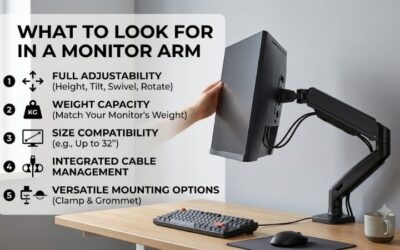
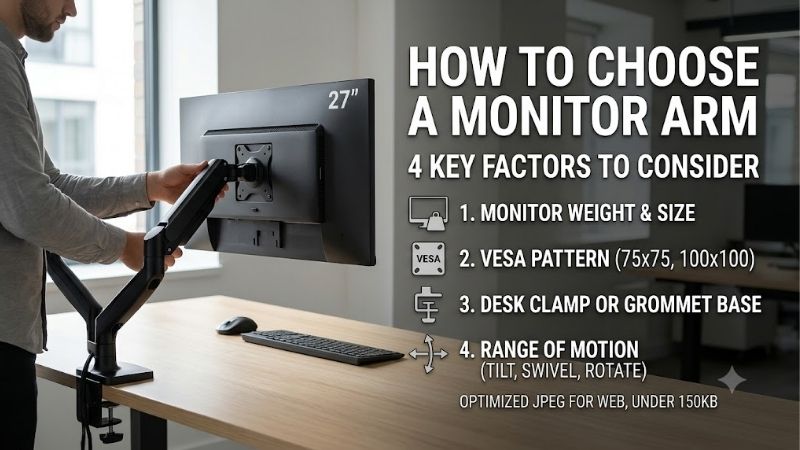
How to choose a monitor arm becomes easier when you treat compatibility as a checklist instead of a style-choice. Start with screen-weight and VESA pattern, then confirm the desk can take clamp pressure. After that, compare reach, height, and adjustment range for your sitting position before judging cosmetic features or extras.
Weight Capacity And Monitor Size
how to choose a monitor arm starts with weight because the arm must keep the screen balanced throughout its working-range. Do not compare diagonal size; a 34-inch display can weigh differently from another 34-inch model. Leave capacity margin rather than choosing an arm at its limit, especially for daily repositioning.
For a typical standard 13-32-inch office display, VIVO STAND-V001 covers a practical weight range, while Ergotron LX Pro gives a 4-22 lb range up to 34 inches. For genuinely heavy ultrawides, HUANUO Titan and Secretlab MAGNUS Heavy Duty provide more useful capacity margin during repeated movement or angle changes daily.
VESA Compatibility And Desk Mounting
how to choose a monitor arm also means verifying VESA compatibility, which tells you whether the mounting plate matches the monitor holes. Most arms here use 75 x 75mm and 100 x 100mm patterns, but mounting method matters too. A clamp requires solid surface and clearance; a grommet needs a suitable hole beneath the desk.
The VIVO STAND-V001 fits desks up to 3.25 inches thick, HUANUO Titan supports roughly 0.8-3.5-inch desks, and Secretlab’s Heavy Duty arm covers 10-50mm tabletops. Ergotron’s LX Pro uses established clamp and grommet mounting options, making it flexible when desk layout matters more than a fixed thickness range.
Height And Arm Reach
how to choose a monitor arm should include reach and height because these decide whether the mount improves posture instead of removing factory stand. Look for enough vertical-travel to place the screen-top near eye-level and enough extension to move it toward/away from you. Tight desks need careful planning and measurement exactly.
Ergotron LX Pro offers about 13 inches of lift and 25.8 inches of extension, while HUANUO Titan reaches 19.6 inches vertically and 24.8 inches forward. VIVO gives a 17-inch pole and 16-inch extension, while Secretlab reaches 265mm of height adjustment and 530mm of reach. For reach, choose HUANUO Titan or Ergotron LX Pro.
Adjustment Quality And Stability
The adjustment quality is more than how many directions an arm can move. Check tilt, swivel, rotation, tension control, and whether the arm is designed for the monitor’s depth and weight. A heavy curved screen needs stronger support than a light office monitor, especially when the display sits far forward from the clamp during normal use.
The Ergotron LX Pro is the general-purpose option, VIVO STAND-V001 favors full-motion positioning, HUANUO Titan targets heavy ultrawides, and Secretlab MAGNUS Heavy Duty uses a reinforced pivot for large screens. Match the arm to the monitor: Ergotron for balance, VIVO for value, HUANUO for weight, or Secretlab for large-screen stability.
Top Picks
How to choose a monitor arm becomes clearer with these four picks because each solves a different problem. Ergotron LX Pro is the balanced premium choice, VIVO STAND-V001 emphasizes value, HUANUO Titan handles heavy ultrawides, and Secretlab MAGNUS Heavy Duty targets large screens and MAGNUS desk integration for dedicated setups.
| Product | Best For | Key Spec | Watch Out For |
|---|---|---|---|
| Ergotron LX Pro Desk Monitor Arm | Best Overall | 4–22 lb; up to 34″; 13″ lift; 25.8″ extension | Premium cost |
| VIVO STAND-V001 | Best Value | Up to 38″; 22 lb; 17″ pole; 16″ extension | Basic construction; 3.25″ desk limit |
| HUANUO Titan HNSS48B | Best For Heavy Ultrawide | 27–49″; up to 40 lb non-RGB; 19.6″ height; 24.8″ extension | More desk space; needs sturdy support |
| Secretlab MAGNUS Monitor Arm Heavy Duty | Best For MAGNUS Desk Setups | 34–57″; 17.6–35.2 lb; 265mm adjustment; 530mm reach | Specialized and expensive |
Ergotron LX Pro Desk Monitor Arm — Best Overall
Ergotron LX Pro Desk Monitor Arm — Best Overall is aimed at buyers who want a mature all-purpose design. It supports monitors up to 34 inches and a 4–22-pound load, with about 13 inches of lift and a 25.8-inch extension. Its advantage is broad adjustment without entering the heavy-duty class, making it a strong long-term choice.
Its drawback is cost, so a light 24- or 27-inch monitor may not justify the LX Pro premium. It makes the most sense when you value smooth positioning and long-term support. For a mixed work-and-gaming desk, it is the safest all-around pick here without the bulk or capacity of a heavy-duty arm for ordinary desktop displays.
VIVO STAND-V001 — Best Value
VIVO STAND-V001 — Best Value suits buyers who want a straightforward single-arm mount without premium pricing. It supports monitors up to 38 inches, including many standard 13-32-inch screens, handles up to 22 pounds, and offers a 17-inch pole plus 16 inches of maximum extension. That range covers many everyday desk setups.
The advantage is broad compatibility for a simple steel-and-aluminum arm, while the downside is less refined construction than the Ergotron. The 3.25-inch desk-thickness limit also needs careful checking. For a normal 24-32-inch display, it delivers core adjustment functions without features most buyers will never use.
HUANUO Titan HNSS48B — Best For Heavy Ultrawide
HUANUO Titan HNSS48B — Best For Heavy Ultrawide buyers who need more than a conventional office arm. The non-RGB Titan supports 27-49-inch monitors up to 40 pounds, with 19.6 inches of height adjustment, 24.8 inches of forward extension, 360-degree rotation, plus broad tilt and swivel movement for demanding large panels.
Its strength is the load range, but that makes it unnecessary for light monitors and more demanding on desk space than a basic arm. HUANUO recommends a solid desk surface for optimal support. For a 38-49-inch ultrawide, the Titan is a more suitable tool than an undersized office mount operating near its limit overall today.
Secretlab MAGNUS Monitor Arm Heavy Duty — Best For MAGNUS Desk Setups
Secretlab MAGNUS Monitor Arm Heavy Duty — Best For MAGNUS Desk Setups is made for 34–57-inch ultrawides and 17.6-35.2 pounds. It uses full-aluminum construction, a heavy-duty pivot, and a 10-50mm C-clamp range, with 265mm of height adjustment and 530mm of reach. It is purpose-built for large screens with substantial chassis weight.
The advantage is large-screen capacity plus clean integration with the MAGNUS cable-tray ecosystem. The limitation is specialization: it is excessive for ordinary displays, and its supported weight starts at 17.6 pounds. Choose it when the monitor is genuinely large or the MAGNUS desk integration is part of your setup.
Frequently Asked Questions
How to choose a monitor arm should also account for mistakes buyers make after checking the headline specifications. Before ordering, weigh the monitor without its stand, confirm VESA holes, measure desk thickness, and compare arm travel with your real viewing position. These checks remove most fit problems before installation.
How Do I Know If A Monitor Arm Will Fit My Monitor?
How do I know if a monitor arm will fit my monitor? Check monitor weight, screen-size range, and VESA pattern first. The published load-rating limit is the hard limit, while VESA 75 x 75mm or 100 x 100mm determines whether the plate attaches directly. Also confirm the monitor does not use an unusually recessed mounting area.
A 32-inch screen can fit an arm rated for 32 inches yet still be unsuitable if it weighs too much or uses a different pattern. For larger displays, check chassis depth because deep panels create more leverage on the arm. This matters most with ultrawides and curved monitors, especially when the arm is extended forward.
Is VESA 75 X 75mm Or 100 X 100mm Enough?
Is VESA 75 x 75mm or 100 x 100mm enough for most monitors? Yes, those patterns cover a substantial share of contemporary office, gaming, and productivity displays. Still, do not assume compatibility from screen size alone. The holes must match, and the arm must support the monitor’s weight and physical depth as listed.
For a recessed VESA mount, check whether the arm includes suitable spacers or longer screws. Ergotron LX Pro, VIVO STAND-V001, HUANUO Titan, and Secretlab MAGNUS Heavy Duty all support 75 x 75mm and 100 x 100mm patterns, but supplied mounting hardware can differ by specific model, monitor depth, panel design, and recess depth.
Can A Monitor Arm Damage A Desk?
Can a monitor arm damage a desk? It can if the surface is too thin, weak, or poorly supported for clamp pressure. A heavy monitor creates leverage, especially when the arm is extended. Solid support matters more than appearance, so check thickness limits and avoid clamping onto fragile edges or unsupported desktop panels.
The safest approach is to stay within the manufacturer’s desk-thickness range and use the supplied hardware correctly. HUANUO recommends solid wood for optimal Titan support, while Secretlab specifies 10-50mm compatibility for the Heavy Duty arm. The same principle applies to lighter mounts even when their loads are lower.
Are Gas-Spring Monitor Arms Better Than Mechanical Arms?
Are gas-spring monitor arms better than mechanical arms? Not automatically. Gas springs usually make frequent adjustments smoother, while mechanical designs can be simpler to tune for fixed screens. The better mechanism is the one that matches how often you move the monitor and how consistently the arm balances its actual load in daily use.
For a sit-stand desk or display you reposition often, smooth counterbalanced movement can be worth prioritizing. For a fixed monitor, a simpler arm may deliver better value. Focus on weight range, adjustment behavior, and desk compatibility first; mechanism type should support those needs rather than become the buying criterion.
Final Thoughts
How to choose a monitor arm comes down to matching weight, VESA pattern, desk thickness, and reach before cosmetic extras. Ergotron LX Pro is the best general pick, VIVO STAND-V001 the value option, HUANUO Titan the heavy-ultrawide choice, and Secretlab MAGNUS Heavy Duty the specialized solution for demanding displays.