
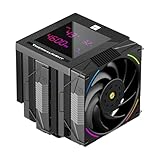
- Top Pick: Thermalright Phantom Spirit 120 Digital EVO CPU Air Cooler,7 Heat Pipes CPU Cooling,Double Tower Cooling,Support for AM4/AM5/Intel lga1700/115X/1200/1851,Magnetic Attraction-Digital Screen Top Cover
- Best Value: Ocypus Iota L24 BK 240mm AIO Liquid CPU Cooler with Temp Digital Display
- Premium Choice: Thermalrlght Trofeo Vision 360 ARGB Black CPU Aio Cooler,CPU Water Cooling System,6.86inch IPS Long Screen with 1280×480 Resolution,for AM4/AM5,LGA1851/1700,Magnetic Screen is not Limited
New builders and seasoned enthusiasts alike frequently ask what is a good CPU temp for their system. The answer matters because temperature affects performance, noise, and stability. This 2026 guide gives you clear target numbers and the tools to keep your processor in that sweet spot.
As an Amazon Associate I earn from qualifying purchases.
As an Amazon Associate we earn from qualifying purchases at no extra cost to you.





A good CPU temp is around 30-45degC when idle, 55-75degC under moderate load, and up to about 85degC during intense gaming or content creation. Since today’s Intel and AMD processors are rated to run safely to 95-100degC before throttling, keeping your peaks below 85degC gives you a healthy, comfortable margin. If your CPU sits below 85degC during demanding tasks and cools quickly afterward, you have nothing to worry about and no changes to make.
🛒 Best Price Today on Amazon
Prime members get fast, free shipping on everything above, plus member-only deals. New members get a 30-day free trial — cancel anytime.
What Is a Good CPU Temp for Everyday Use
For general computing such as browsing, office work, and streaming video, a good CPU temp rarely exceeds 60degC. These tasks barely tax a modern processor, so if your temperatures climb high during light use, something is restricting your cooling. Gaming and creative workloads are a different story, where the mid-70s to low-80s are completely normal and expected. The goal is not to chase the lowest possible number but to keep temperatures stable and well clear of the throttle point.
Best Cooling Gear for a Good CPU Temp
The right cooler is what keeps your CPU temp in the good zone during the heaviest workloads. The five products below cover budget air towers through premium liquid coolers, and each one provides ample headroom for a modern high-wattage processor. Pick based on your case size and how much you value silence versus outright cooling power.
| Product | Best For | Standout Feature | Rating |
|---|---|---|---|
| Thermalright Peerless Assassin 120 SE | Best budget cooler | Six heat pipes at an entry-level price | 4.9/5 |
| Noctua NH-D15 G2 | Top-tier air cooling | Legendary reliability and quiet fans | 4.8/5 |
| Arctic Liquid Freezer III 280 | Compact liquid cooling | Great performance in smaller cases | 4.8/5 |
| Corsair iCUE H150i Elite | RGB enthusiast builds | Polished software and LCD pump | 4.6/5 |
| be quiet! Pure Rock 2 FX | Quiet budget builds | Silent operation with subtle RGB | 4.7/5 |
How to Check If Your CPU Temp Is Good
You cannot know whether your temperature is good without measuring it. Download a free monitoring utility such as Core Temp, HWiNFO64, or HWMonitor and note your idle reading first. Then run a game or a benchmark for ten minutes and record the peak. Compare those numbers to the ranges above. A single quick spike as a program launches is meaningless; it is the sustained temperature that tells the real story. Our CPU monitoring software guide compares the best free tools.
What Affects Whether Your CPU Temp Is Good
Several factors determine where your temperature lands. The capability of your cooler relative to your CPU’s power draw is the biggest one. The quality and age of your thermal paste matters enormously, as does how cleanly your cooler is mounted. Case airflow decides whether hot air escapes or recirculates. Even room temperature shifts your numbers by several degrees. Our airflow setup guide explains how to arrange your fans for the best result.
What to Do If Your CPU Temp Is Not Good
If your readings exceed the good range, work through the fixes from cheapest to most involved. Clean dust from your cooler and fans first. Reapply fresh thermal paste, which alone can shave 5-10degC off your peaks. Confirm your cooler is seated evenly with correct mounting pressure. Improve case airflow by balancing intake and exhaust fans. Finally, set a more aggressive fan curve in BIOS. Our thermal paste guide and fan curve tutorial walk through the two most impactful steps.
Good CPU Temps for Laptops Versus Desktops
Laptops naturally run hotter than desktops because they pack cooling into a thin chassis. A good laptop CPU temp under load can reach 80-90degC and still be perfectly normal, whereas a desktop with the same chip would stay cooler thanks to larger heatsinks and fans. If you use a laptop for gaming, a cooling pad and elevated rear feet help considerably. Our laptop cooling guide covers practical tips for portable systems.
Frequently Asked Questions
What is a good CPU temp while gaming?
A good CPU temp while gaming falls between 60 and 80degC for most systems. Because gaming places a sustained load on your processor, these numbers are entirely normal. You only need to take action if temperatures consistently push past 90degC during play, which suggests your cooler cannot handle the heat your chip produces.
Is 70 degrees a good CPU temp?
Yes, 70degC is a good CPU temp, especially under load. It sits comfortably below the 95-100degC throttle limit of modern processors, leaving plenty of thermal headroom. Seeing 70degC while gaming or rendering indicates your cooling is working well and there is no reason to make any changes to your setup.
What is a good CPU temp at idle?
A good idle CPU temp ranges from 30 to 45degC. Because your processor is doing almost nothing at idle, temperatures should be low. If yours sits above 50degC while the desktop is quiet, look into old thermal paste, a poorly mounted cooler, or restricted case airflow as the likely causes.
Can a CPU temp be too good or too low?
There is no real downside to low CPU temperatures, and you cannot cool a chip too much with conventional air or liquid cooling. Extremely low readings simply mean an overbuilt cooler, which is fine. The only practical concern is condensation, which only becomes a risk with exotic sub-ambient cooling methods that home users rarely use.











