
- Top Pick: AMD RYZEN 7 9800X3D 8-Core, 16-Thread Desktop Processor
- Best Value: ASUS TUF Gaming GeForce RTX™ 5080 16GB GDDR7 OC Edition Graphics Card
- Premium Choice: MSI MAG X870 Tomahawk WiFi Gaming Motherboard (AMD Ryzen 9000/8000/7000 Series Processors, AM5, DDR5, PCIe 5.0, M.2 Gen5, SATA 6Gb/s, USB 40Gbps, HDMI/DP, Wi-Fi 7, Bluetooth 5.4, 5Gbps LAN, ATX)
The Ryzen 7 9800X3D gaming PC build we are putting together here sits in the upper tier of enthusiast builds, targeting roughly $4,200 in 2026. That price point delivers an experience most gamers will never feel limited by: the 9800X3D handles CPU-bound scenarios in competitive and open-world titles without breaking a sweat, while the RTX 5080 pushes frame rates that saturate 144Hz and 240Hz monitors at 1440p and remains comfortable at 4K in most releases. This build prioritizes longevity over flash, pairing high-wattage power delivery with a 64GB RAM kit so you are not forced to revisit the parts list for several years.
Parts List
| Part | Model | Approx. price | Why |
|---|---|---|---|
| CPU | AMD RYZEN 7 9800X3D 8-Core, 16-Thread Desktop Processor | $449 | Best gaming CPU available, 3D V-Cache eliminates most CPU bottlenecks |
| GPU | ASUS TUF Gaming GeForce RTX 5080 16GB GDDR7 OC Edition Graphics Card | Check on Amazon | Handles 1440p high-refresh and 4K gaming with DLSS headroom |
| Motherboard | MSI MAG X870 Tomahawk WiFi Gaming Motherboard | Check on Amazon | PCIe 5.0, Wi-Fi 7, strong VRM without paying flagship premiums |
| RAM | G.SKILL Trident Z5 Neo RGB Series DDR5 64GB (2x32GB) 6000MT/s CL30 | Check on Amazon | DDR5 pricing remains elevated; 64GB future-proofs multitasking |
| Storage | Samsung SSD 990 PRO 2TB, PCIe 4.0 M.2 2280 | Check on Amazon | Proven reliability, near-gen5 speeds for a fraction of the cost |
| PSU | CORSAIR RM1000x ATX 3.1 Fully Modular 1000W | Check on Amazon | Comfortable headroom for transient GPU spikes, native 12V-2×6 cable |
| Case | Lian Li LANCOOL 216 Case-Black | Check on Amazon | Excellent airflow, fits full-length GPUs, clean build experience |
AMD RYZEN 7 9800X3D 8-Core, 16-Thread Desktop Processor

The 9800X3D moved the 3D V-Cache beneath the CCD, solving the thermal ceiling that limited the 7800X3D. That architectural shift means boost clocks stay higher under sustained loads, and you get genuine multi-threaded headroom for streaming or light content work alongside gaming. At $449, it undercuts Intel’s best gaming alternatives while matching or beating them in frame-rate consistency. If you want to save $50 or so and do not stream, the 7800X3D remains a viable swap, though you give up the improved thermal behavior. No platform downgrade is necessary since both use AM5.
As an Amazon Associate we earn from qualifying purchases at no extra cost to you.




ASUS TUF Gaming GeForce RTX 5080 16GB GDDR7 OC Edition Graphics Card
The TUF cooler keeps noise well below GPU-coil territory and handles the 5080’s thermal output without drama. The OC Edition gives a modest factory uplift over reference clocks. Sixteen gigabytes of GDDR7 is adequate for current 4K textures and will remain so for at least a couple of generational cycles. A swap to a Founders Edition would save $100 to $150 if aesthetics matter more than cooling capacity. Moving to an RTX 5070 Ti would trim the budget by roughly $500 but costs you about 20% in 4K rasterization.
MSI MAG X870 Tomahawk WiFi Gaming Motherboard
This board covers every I/O and feature a gamer needs without the ROG Strix tax. The 14+2+1 VRM handles the 9800X3D’s peak draw with substantial thermal margin. You get two M.2 Gen5 slots, rear USB 40Gbps, Wi-Fi 7, and a 2.5G LAN port. If you need more rear USB ports or a slightly better audio codec, the Gigabyte Aorus Elite X870E is a reasonable alternative at a similar price. Stepping down to a B650 board saves about $40 but eliminates PCIe 5.0 for the GPU, which is a trade few should make in a build this tier.
G.SKILL Trident Z5 Neo RGB Series DDR5 64GB (2x32GB) 6000MT/s CL30
At 6000MT/s CL30, this kit sits right on the sweet spot for Ryzen 9000-series infinity fabric stability. AMD’s recommended operating frequency for these cores is DDR5-6000, and this kit runs there natively via EXPO without manual tuning. The around $1,150 price is painful, but DDR5 costs remain high relative to historical norms. Dropping to 32GB (2x16GB) saves roughly $500 and still handles every current game with plenty of room. If you do not need RGB, the G.SKILL Flare X5 in the same timings shaves off another $30 or so.
Samsung SSD 990 PRO 2TB, PCIe 4.0 M.2 2280
The 990 PRO has been the reliability benchmark in its class since launch, and its sustained-write performance matches or beats many newer Gen5 drives in real-world file transfers. You are not bottlenecked at PCIe 4.0 for game loading or general OS use. If you want to add a second drive later, the motherboard supports a Gen5 SSD in the primary slot with no bandwidth penalty to the GPU. Swapping to a Gen5 drive like the Crucial T700 adds $80 to $120 and provides a marginal speed gain that is difficult to notice outside synthetic benchmarks.
CORSAIR RM1000x ATX 3.1 Fully Modular 1000W Power Supply
A thousand watts provides generous headroom for the RTX 5080’s transient power spikes, which can briefly exceed TDP by several hundred milliwatts. The native 12V-2×6 connector eliminates the adapter dongle that plagued earlier ATX 3.0 units. Cybenetics Gold efficiency keeps thermals and fan noise low during typical gaming loads between 300 and 500 watts. A quality 850W unit technically covers this build’s sustained draw, but the price gap between 850W and 1000W in this tier is small, and the extra capacity protects long-term GPU upgrades.
Lian Li LANCOOL 216 Case-Black
The mesh front panel and included 160mm intake fans create a thermally favorable environment without the visual noise of glass-heavy cases. GPU clearance reaches 422mm, so even a triple-fan RTX 5080 fits without modification. The integrated fan and ARGB controller keeps cable management simpler than cases that rely on separate hubs. If you prefer a smaller footprint, the Lancool 207 is a compact alternative at a similar price, though it reduces airflow slightly. A swap to a Fractal Torrent would improve thermal performance marginally but costs $40 to $60 more.
Compatibility Check
Socket and chipset alignment is straightforward: the 9800X3D is AM5, and the X870 Tomahawk supports it out of the box without a BIOS update. Memory must be DDR5 for this platform; the Trident Z5 kit is rated for EXPO at 6000MT/s, matching the board’s validated profiles. The PSU provides 1000W against an estimated system draw of roughly 450 to 520W under combined gaming load, leaving well over 400W of headroom. The RTX 5080 TUF measures approximately 324mm in length, and the LANCOOL 216 supports GPUs up to 422mm, so clearance is not a concern. CPU cooler height fits within the case’s 164mm limit for air coolers, and the included stock cooler or any mid-range tower will work without interference.
Expected Performance
1080p
At 1080p, the CPU governs frame rates in most scenarios, and the 9800X3D is the fastest gaming processor available. Launch reviews from Hardware Unboxed and TechSpot observed competitive titles like Counter-Strike 2 and Valorant exceeding 400 to 600+ fps, while open-world games such as Cyberpunk 2077 and Starfield hovered in the 150 to 250 fps range depending on draw distance and settings. Expect frame rates that fully saturate 240Hz panels across the board.
1440p
This resolution balances CPU and GPU workload. Tom’s Hardware and TechPowerUp launch coverage indicated 120 to 180 fps in demanding titles like Alan Wake 2, Hogwarts Legacy, and Cyberpunk 2077 on Ultra settings without upscaling. Lighter competitive shooters remain well above 300 fps. The 16GB of GDDR7 VRAM on the 5080 prevents any texture-related stutters at this resolution even in unoptimized releases.
4K
At 4K, the RTX 5080 becomes the limiting component. Gamers Nexus and TechPowerUp noted 60 to 100 fps in heavy rasterization scenarios at Ultra without DLSS, with upscaling raising those figures by 30 to 50%. Cyberpunk 2077 with path tracing and DLSS Quality landed in the 70 to 90 fps band per TechPowerUp’s launch testing. Esports titles remain far above 200 fps at this resolution.
Upgrade Path
AM5 platform support extends through at least two more CPU generations based on AMD’s public commitments, so a future 10800X3D or equivalent drops into this board with a BIOS update and no other changes. The 1000W PSU accommodates any current or next-gen GPU you might pair here. If DDR5 prices drop significantly, moving to a higher-capacity kit is a simple swap. The case and motherboard do not limit future storage additions, as multiple M.2 and SATA slots remain available.
FAQ
Is 64GB of RAM necessary for gaming?
No. Thirty-two gigabytes handles every current game comfortably. The 64GB kit here exists to avoid a future purchase if game requirements climb or you run virtual machines and heavy multitasking alongside gaming. Dropping to 32GB cuts roughly $500 from the total.
Does the 9800X3D need a liquid cooler?
No. Its improved thermal behavior over the 7800X3D means a quality dual-tower air cooler or even AMD’s included Wraith cooler keeps temperatures in a reasonable range during gaming. Liquid cooling is a convenience or aesthetics choice, not a performance requirement.
Can I swap to a smaller GPU to save money?
An RTX 5070 Ti saves approximately $500 and still delivers 120+ fps at 1440p in most titles. The trade-off is roughly 20% lower 4K performance and less VRAM headroom for future texture-heavy games.
Is this build suitable for streaming or content creation?
The 8-core 16-thread CPU paired with 64GB of RAM handles streaming with NVENC or x264 at moderate settings without issue. Heavy 4K video editing benefits from the GPU’s CUDA cores but is not the primary target at this GPU tier. The build prioritizes gaming performance first.
Sources and Methodology
Performance ranges in this guide are synthesized from launch and early-adopter coverage by TechPowerUp, Tom’s Hardware, Gamers Nexus, Hardware Unboxed, and TechSpot. Frame rate figures represent approximate bands observed across multiple test scenes and settings rather than single-point measurements. Prices reflect retailer listings at the time of writing and are subject to market fluctuation.
Top picks from this guide
 CorsairCORSAIR RM1000x ATX 3.1 PCIe 5.1 Ready Fully Modular 1000W…$118 \xc2\xb7 98/100
 Lian LiLIAN LI LANCOOL 216 RGB Black ATX Mid-Tower Case, 2x160mm…$100 \xc2\xb7 98/100
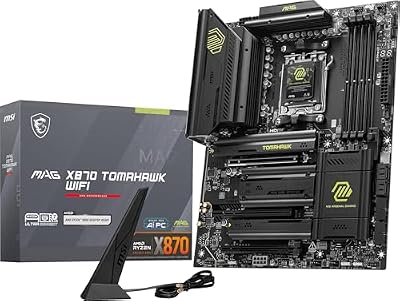 msiMSI MAG X870 Tomahawk WiFi Gaming Motherboard (AMD Ryzen 9000/8000/7000…$253 \xc2\xb7 97/100
 SamsungSamsung SSD 990 PRO 2TB, PCIe 4.0 M.2 2280, Up…$410 \xc2\xb7 97/100








