
- Top Pick: AMD Ryzen™ 5 9600X 6-Core, 12-Thread Unlocked Desktop Processor
- Best Value: ASUS Dual GeForce RTX 5060 Ti 8GB GDDR7 OC Edition Gaming Graphics Card
- Premium Choice: MSI B650 Gaming Plus WiFi Gaming Motherboard (AMD Ryzen 9000/8000/7000 Series Processors, AM5, DDR5, PCIe 4.0, M.2, SATA 6Gb/s, USB 3.2 Gen 2, HDMI/DP, Wi-Fi 6E, Bluetooth 5.3, 2.5Gbps LAN, ATX)
Dota 2 does not need a monster PC, but it does need the right one. Valve’s Source 2 engine is light on the graphics card and heavy on a single CPU thread when ten heroes, dozens of creeps, and a Roshan fight are all on screen, so the classic mistake is overspending on the GPU and pairing it with a slow processor. This build flips that: a fast six-core Zen 5 chip, 32GB of quick memory, and a sensible mid-range graphics card that holds 1440p at high refresh with settings maxed.
Parts List
| Part | Model | Approx. price | Why |
|---|---|---|---|
| CPU | AMD Ryzen 5 9600X | Varies | Fast Zen 5 single-thread for Source 2 |
| GPU | ASUS Dual GeForce RTX 5060 8GB | Varies | Enough for 1440p high refresh in Dota 2 |
| Motherboard | MSI B650 Gaming Plus WiFi | Varies | Solid power delivery, Wi-Fi, AM5 longevity |
| RAM | G.Skill Flare X5 32GB DDR5-6000 CL30 | Varies | The sweet-spot kit for Ryzen |
| SSD | WD Black SN770 1TB | Varies | Fast PCIe 4.0 boot and game drive |
| PSU | Corsair RM650e | Varies | Quiet, efficient, ATX 3.1 with headroom |
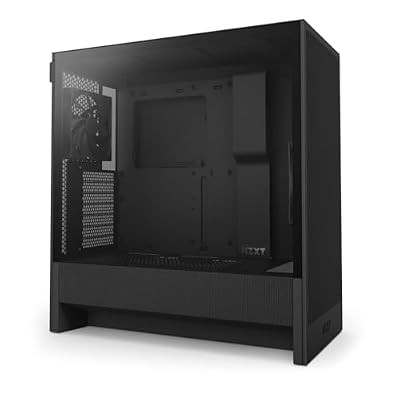
| Case | NZXT H5 Flow | Varies | Clean airflow, easy build, fits everything |
AMD Ryzen 5 9600X

Dota 2 lives on one main thread, and the Ryzen 5 9600X delivers some of the best single-core performance available at its price. In TechPowerUp’s and Tom’s Hardware’s launch reviews it landed within 10-15 percent of the eight-core 9700X in gaming while running cool on a modest cooler. Six cores are plenty for the game plus Discord and a browser. It sits on AM5, so a future jump to a Ryzen 7 9800X3D is a drop-in swap. Note that it does not ship with a cooler, so budget a basic 120mm tower. Swap option: the Ryzen 7 9800X3D if you want the absolute highest team-fight frame rates today.
As an Amazon Associate we earn from qualifying purchases at no extra cost to you.


ASUS Dual GeForce RTX 5060 8GB
Source 2 is forgiving on graphics hardware, and the RTX 5060 has more than enough shader power to hold 1440p at 165Hz with every setting maxed. In TechPowerUp’s launch review it delivered strong 1080p and 1440p results at a low power draw, and NVIDIA Reflex keeps input latency down in lane fights. The compact ASUS Dual cooler is quiet and fits any case. Eight gigabytes of VRAM is ample for Dota 2. Swap option: the Sapphire Pulse Radeon RX 9060 XT 16GB if you also play heavier games and want more memory for a similar price.
MSI B650 Gaming Plus WiFi
The B650 Gaming Plus WiFi is the long-running value pick for AM5. It has a capable VRM that will handle any future X3D processor, four DDR5 slots, a PCIe 4.0 x16 slot, two M.2 slots, 2.5-gigabit Ethernet, and Wi-Fi 6E. You give up PCIe 5.0, which no Dota 2 build needs, and USB4, which few people miss. MSI’s BIOS is straightforward for enabling EXPO memory profiles. Swap option: the MSI MAG B850 Tomahawk WiFi if you want PCIe 5.0 for the graphics slot and newer connectivity for a modest premium.
G.Skill Flare X5 32GB DDR5-6000 CL30
DDR5-6000 CL30 is the sweet spot for Ryzen, matching the memory controller’s optimal ratio, and Source 2 responds well to low latency. The G.Skill Flare X5 kit is a plain, low-profile, EXPO-certified pair of 16GB sticks that clears any air cooler and enables with one BIOS setting. Thirty-two gigabytes leaves plenty of room for Dota 2, a browser full of guides, and a stream. Swap option: a 64GB kit at the same speed if you edit video or run a large number of applications, though Dota 2 alone will never use it.
WD Black SN770 1TB
The SN770 is a fast, DRAM-less PCIe 4.0 drive that loads Dota 2 in seconds and keeps Windows responsive without paying for a flagship SSD. One terabyte holds the operating system, Dota 2, and a healthy library of other games. It runs cool without a heatsink, so it drops straight into the motherboard’s primary M.2 slot. Swap option: the WD Black SN850X 2TB if you want a larger, faster drive with DRAM for a big library, or simply add a second drive later using the board’s spare slot.
Corsair RM650e
This build draws roughly 300W under full gaming load, so the Corsair RM650e leaves ample headroom while running its fan quietly. It is fully modular, ATX 3.1 compliant, 80 Plus Gold rated, and includes the connectors any future mid-range GPU will need. Corsair’s RMe series has a strong track record for reliability and low noise. Swap option: the Corsair RM750e if you plan to upgrade to an RTX 5070 or RX 9070 XT down the line and want the headroom ready.
NZXT H5 Flow
The NZXT H5 Flow is a mid-tower with a mesh front, a clever angled bottom fan that feeds the graphics card, and the cleanest cable management channels in its price class. It supports graphics cards up to roughly 365mm and CPU coolers up to about 165mm, so any part here fits with room to spare. Two fans come pre-installed. Swap option: the Lian Li Lancool 207 if you want more included fans and stronger airflow for a similar price.
Compatibility Check
Socket: the Ryzen 5 9600X is an AM5 processor and the MSI B650 Gaming Plus WiFi is an AM5 board; update the BIOS if the board shipped before Zen 5 support, though most current stock is ready. RAM type: AM5 is DDR5 only, and the G.Skill Flare X5 kit is EXPO-certified for one-click DDR5-6000. PSU headroom: the RTX 5060 is rated around 145W and the 9600X around 88W at peak, so the whole system stays near 300W and the RM650e runs at half load. GPU length: the ASUS Dual RTX 5060 is under 230mm, far inside the H5 Flow’s clearance. Case clearance: a 120mm tower cooler up to 165mm fits, and the SN770 uses the board’s top M.2 slot under the included heatsink.
Expected Performance
1080p
Dota 2 is CPU-bound here: expect roughly 220-280 fps with settings maxed based on the 9600X’s positioning in Hardware Unboxed’s Source 2 testing. Counter-Strike 2 lands in a similar 250-320 fps range. Apex Legends sits near its 300 fps cap on competitive settings. Cyberpunk 2077 at ultra without ray tracing runs around 85-100 fps per TechPowerUp’s RTX 5060 review.
1440p
Dota 2 holds roughly 180-230 fps maxed, still largely CPU-limited. Counter-Strike 2 runs around 200-250 fps. Apex Legends at high settings lands near 150-180 fps. Cyberpunk 2077 ultra without ray tracing drops to roughly 55-65 fps, where DLSS 4 quality mode lifts it back above 80.
4K
Dota 2 is finally GPU-limited at around 110-140 fps maxed, still very playable. Counter-Strike 2 lands near 100-130 fps. Apex Legends at high settings runs roughly 80-100 fps. Cyberpunk 2077 ultra is a 25-30 fps experience natively and needs DLSS performance mode to become playable, which is where the RTX 5060 shows its limits.
Upgrade Path
This build is designed to grow. The first upgrade is the GPU: an RTX 5070 or RX 9070 XT drops straight in, and the RM650e handles the RTX 5070 while the RX 9070 XT would call for the RM750e. The second is the CPU: a Ryzen 7 9800X3D is a drop-in swap on this board and lifts Dota 2 team-fight frame rates by a clear margin. Storage expands through the spare M.2 slot. The 32GB kit and the case will not need replacing for years.
FAQ
Is this PC good enough for 240Hz Dota 2?
Yes at 1080p, where the 9600X holds 220-280 fps. At 1440p you will see 180-230 fps, which suits a 165Hz or 180Hz display well.
Does Dota 2 need more than 8GB of VRAM?
No. Dota 2 uses well under 6GB at 4K with settings maxed. The 8GB RTX 5060 is only limiting in heavier AAA titles.
Why not a cheaper CPU for Dota 2?
Because Dota 2 is CPU-bound. A slower processor caps frame rates in team fights no matter how good the GPU is, and the 9600X is the best value single-thread chip on AM5.
Can I stream Dota 2 on this build?
Yes. The RTX 5060’s NVENC encoder handles streaming with minimal impact on frame rate, and 32GB of RAM leaves plenty of room for OBS and a browser.
Sources and Methodology
The frame-rate ranges in this guide are approximate and reflect the relative positioning of the RTX 5060 and Ryzen 5 9600X in launch reviews published by TechPowerUp, Hardware Unboxed, Tom’s Hardware, Gamers Nexus, and TechSpot, including their Source 2 and Cyberpunk 2077 results. Where Dota 2 was not directly tested, we mapped those rankings onto the game’s known CPU-bound behavior. None of these figures were measured by this site, and results vary with settings, drivers, and match state. Prices are approximate and fluctuate.
Top picks from this guide
 NZXTNZXT H5 Flow - Compact ATX Mid-Tower PC Case -…$70 \xc2\xb7 99/100
 SANDISKWD_Black SN7100 1TB NVMe SSD - Gen4 PCIe, M.2 2280,…$199 \xc2\xb7 99/100
 msiMSI B650 Gaming Plus WiFi Gaming Motherboard (AMD Ryzen 9000/8000/7000…$130 \xc2\xb7 99/100
 CorsairCORSAIR RM650e ATX 3.1 PCIe 5.1 Ready 650W Power Supply…$104 \xc2\xb7 96/100








