How to choose thermal paste starts with more than a conductivity number. Viscosity, package size, application method, and service life can change the better buy for a budget PC. This guide compares four proven compounds and shows which type of builder each one suits, so you can spend less and avoid avoidable installation mistakes.
Quick answer: Our top pick in 2026 is the ARCTIC MX-6 — our #1 rated choice. See the full ranked comparison, alternatives and buying advice below.
How to Choose Thermal Paste
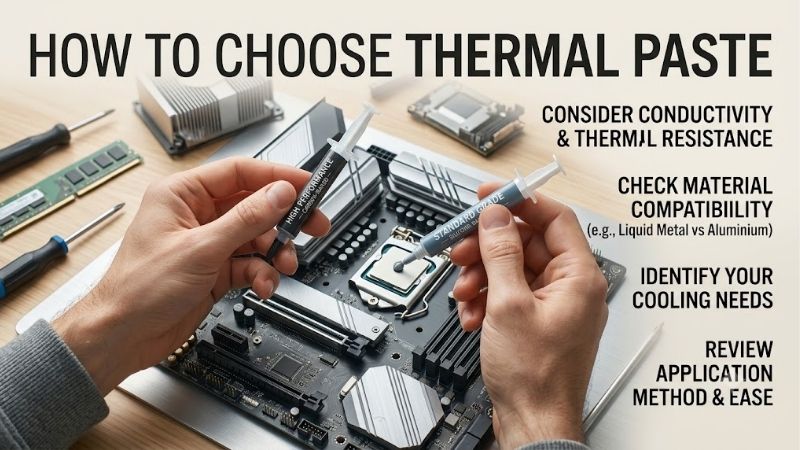
The problem is that buyers often compare only thermal conductivity and ignore viscosity, package size, cleaning needs, or service life. That can make a capable paste awkward to install or waste money on a large syringe. A better answer to how to choose thermal paste starts with the CPU, cooler, workload, and service plans.
Thermal Performance And Real-World Value
Thermal performance describes how well a compound transfers heat across microscopic gaps between the CPU heat spreader and cooler base. Published conductivity helps compare formulas, but mounting pressure, layer thickness, cooler quality, and CPU power can change final temperature more than specification differences. Context matters.
If cooling performance is your priority, ARCTIC MX-6 is the balanced overall option, while Thermalright TF7 gives a published 12.8 W/mK conductivity rating. Both make sense for mainstream CPUs needing a strong interface without specialty. Choose the one that also matches your application and maintenance plans.
Viscosity And Application Feel
Viscosity affects how the compound comes out of the syringe and how easily it forms a consistent interface under the cooler. Very thick paste can require firmer dispensing, while a more cooperative formula may feel easier for a first build. Follow the maker’s pattern instead of assuming every CPU should receive the same amount or shape.
ARCTIC lists MX-6 at 45,000 poise and calls it easy to apply, while Noctua NT-H2 uses small dots and requires no manual spreading before mounting. That makes both useful for predictable builds. TF7 includes a spatula, and GELID GC-Extreme is much thicker, so experienced builders can prefer its deliberate handling.
Package Size And Value
Quantity matters when the paste is for one build versus repeated maintenance. A 2g syringe is enough for a typical CPU installation, while a 3.5g package gives more margin for a later cooler change. Buying a much larger tube makes sense only when you actually expect multiple installations instead of chasing a lower unit cost. That is usually enough for one typical build.
Thermalright offers TF7 in 2g, 4g, and 8g versions, while Noctua NT-H2 is sold in 3.5g and 10g sizes. GELID GC-Extreme is available in 3.5g and smaller formats. For one desktop, TF7 is easy to size closely; for occasional service, NT-H2 or GC-Extreme leaves useful reserve for later work without excess material later on.
Longevity And Compatibility
Longevity is about whether the compound remains stable over years of normal CPU use and storage. Non-conductive formulas are preferable for routine building because they reduce one avoidable concern around nearby electrical contacts. The goal is predictable maintenance, not a promise that paste never needs replacement under normal PC use.
Noctua rates NT-H2 for up to five years on the CPU and up to three years in storage, with an operating range of -50°C to 200°C. GELID describes GC-Extreme as non-conductive and non-corrosive. Those traits favor long-lived systems, while MX-6 and TF7 suit buyers focused on immediate value and easy use.
Top Picks
Four choices below are separated by use case. For how to choose thermal paste, this guide treats ARCTIC MX-6 as Best Overall, Thermalright TF7 as Best Value, Noctua NT-H2 as Best For Beginners, and GELID GC-Extreme as Best For Repeated Builds. Each has a clear role based on a practical buyer priority and maintenance style.
| Product | Best For | Key Spec | Watch Out For |
|---|---|---|---|
| ARCTIC MX-6 | Best Overall | 2g, 4g, 8g; 45,000 poise | Thick consistency |
| Thermalright TF7 | Best Value | 2g; 12.8 W/mK | Limited reserve |
| Noctua NT-H2 3.5g | Best For Beginners | 3.5g; -50°C to 200°C | Premium positioning |
| GELID GC-Extreme 3.5g | Best For Repeated Builds | 3.5g; 8.5 W/mK | Very high viscosity |
ARCTIC MX-6 — Best Overall
ARCTIC MX-6 is Best Overall for a builder who wants a proven mainstream compound without chasing an extreme formulation. For how to choose thermal paste, its 2g, 4g, and 8g sizes add flexibility, while 45,000-poise viscosity gives it a distinct handling profile. The drawback is its thick feel, which may feel unusual for new installers.
MX-6 works well when the whole PC matters more than a single benchmark. ARCTIC specifies a continuous-use range of -50 to 150°C and high electrical volume resistivity. That suits gaming desktops and workstations, although the paste still depends on good cooler contact and correct mounting to deliver useful thermal results.
Thermalright TF7 — Best Value
Thermalright TF7 is Best Value for buyers who want a small 2g package and a strong published conductivity figure. For how to choose thermal paste, its 12.8 W/mK conductivity and non-conductive design are easy to evaluate. The advantage is low material commitment; the drawback is limited reserve for repeated cooler work.
TF7 is practical for a one-PC build where leftover compound is unlikely to be used soon. Thermalright lists thermal impedance below 0.01°C-cm²/W and includes a spatula with the 2g package. Those figures can look impressive, but final temperatures depend on the heatsink, mounting, fan speed, CPU heat output, and case airflow.
Noctua NT-H2 3.5g — Best For Beginners
Noctua NT-H2 is Best For Beginners because the 3.5g pack includes three cleaning wipes and Noctua provides a simple dot-based application method with no manual spreading. For how to choose thermal paste, this makes installation ease a genuine buying factor rather than a minor extra. The tradeoff is its premium positioning.
NT-H2 is attractive for occasional maintenance because Noctua specifies up to five years of use on the CPU and roughly 3 to 20 applications from the 3.5g package, depending on CPU size. It is non-electrically conductive and non-corroding. The main weakness is value per gram compared with cheaper tubes.
GELID GC-Extreme 3.5g — Best For Repeated Builds
GELID GC-Extreme is Best For Repeated Builds because its 3.5g syringe gives useful reserve while targeting performance-focused desktop and GPU work. GELID lists 8.5 W/mK conductivity, 85,000 cP viscosity, and 3.73 g/cm³ density. For how to choose thermal paste around repeated service, that larger working supply is the key benefit.
GC-Extreme makes more sense for experienced builders who are comfortable with a dense compound. Its high viscosity is the drawback compared with easier-handling choices, but the formula is non-conductive and non-corrosive. That combination works well for repeated cooler jobs when you value spare material more than effortless dispensing.
Frequently Asked Questions
For how to choose thermal paste, start with four practical questions: cooling performance, application feel, package size, and service life. This guide answers each one before the FAQ, so the four picks have distinct roles instead of being four similar choices with different labels, making the buying decision easier to follow.
Do You Need Expensive Thermal Paste For A Normal CPU?
Do you need expensive thermal paste for a normal gaming CPU? Usually no. A reputable mainstream compound is enough when the cooler is appropriate and mounted. Temperature differences between good pastes can be smaller than room temperature, fan behavior, power limits, or cooling. Avoid paying for gains your cooler cannot use.
A more premium compound is easier to justify when the processor runs near its thermal ceiling or you frequently remove the cooler. In those situations, application consistency and stability can matter as much as tiny differences. NT-H2 favors convenience, while MX-6 is better when you want strong value without premium pricing.
How Much Thermal Paste Should You Apply?
How much thermal paste should you use? Apply enough to form a thin interface after the cooler is mounted, using the manufacturer’s recommended pattern for your CPU. Do not copy a fixed dot size from a different platform. Heat-spreader shape, mounting hardware, and paste consistency influence how the compound distributes under pressure.
Too little paste can leave uncovered areas, while excessive paste mainly creates more cleanup without fixing poor contact. The goal is complete interface coverage with minimal excess. Noctua’s instructions are particularly clear for first-time builders, while other formulas should follow their own directions rather than one fixed rule.
Can You Reuse Thermal Paste After Removing A Cooler?
Can you reuse thermal paste after removing a cooler? No. Once the cooler is lifted, the old layer may have an uneven pattern or trapped air, so clean both contact surfaces before applying fresh compound. This creates a predictable interface for the next installation and avoids relying on material that has already been compressed.
A clean remount is easier to diagnose later because temperature changes are less likely to come from an inconsistent old layer. Noctua includes cleaning wipes with NT-H2, while other pastes require appropriate lint-free material and cleaning solution. Reusing old compound saves very little and makes the next installation harder to judge.
How Often Should You Replace Thermal Paste?
How often should thermal paste be replaced? There is no universal yearly deadline. Replace it when you remove the cooler, see obvious degradation, or observe higher temperatures without another clear cause. A stable desktop does not need automatic annual repasting merely because twelve months have passed. Guidance helps set realistic expectations.
For example, Noctua specifies up to five years of use for NT-H2 on the CPU, while other compounds may have different service characteristics. The practical rule is to monitor the system and refresh paste when maintenance or condition calls for it. That approach avoids unnecessary work while keeping the thermal interface dependable.
Final Thoughts
The practical answer to how to choose thermal paste is to match the compound to your cooling goal and maintenance. Pick MX-6 for the strongest balance, TF7 for tight value, NT-H2 for beginner-friendly service, or GC-Extreme for repeated builds. A clean mount and suitable cooler still matter more than chasing a small gap.
Ready to decide? Our #1 pick for 2026 is the ARCTIC MX-6.
Live price & availability on Amazon.