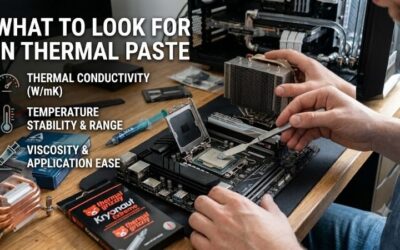
Best thermal paste for a budget build should lower thermal resistance without wasting money on features that do little for a normal CPU and cooler. The smart choice depends on paste consistency, package size, stability, and application method, not just a headline conductivity figure. That keeps the upgrade practical.

Quick answer: For most people in 2026, the best thermal paste for a budget build is the ARCTIC MX-6 — our #1 rated choice. See the full ranked comparison, alternatives and buying advice below.
How to Choose Thermal Paste
For best thermal paste for a budget build decisions, the useful questions are simple: how much performance do you need, how easy is the paste to apply, how much compound do you get, and how well does it hold up? This guide answers those points first, then matches four pastes to distinct budget-building needs. The goal is a sound purchase.
Thermal Performance And Real-World Value
Thermal performance is the first filter, but compare it in context. A paste fills microscopic gaps between the CPU heat-spreader and cooler base, so consistency and bond-line thickness matter alongside a conductivity rating. For most budget systems, avoid paying a large premium for tiny gains the rest of the cooler cannot exploit.
ARCTIC MX-6 is a strong fit when you want performance without specialty-grade pricing, while Thermalright TF7 offers a manufacturer-listed 12.8 W/mK conductivity at a 2g package size. For budget-build priorities, either makes more sense than chasing extreme compounds. Better choice depends on your cooler and workload.
Application Viscosity And Ease
Paste viscosity changes how easily a new builder can dispense and mount it. Very thick compounds can resist spreading, while very thin formulas may feel messy. The safest approach is to follow the maker’s application method and let cooler mounting pressure do the work. That keeps the layer controlled and repeatable during installation.
Noctua NT-H2 is convenient because Noctua specifies direct application without manual spreading, and its 3.5g syringe includes three cleaning wipes. ARCTIC MX-6 is also beginner-friendly despite its high viscosity, but ARCTIC advises against spatula spreading. Both are sensible for first-time builders who want clear instructions.
Package Size And Cost Per Build
A budget paste is not automatically the smallest tube. A 3.5g syringe makes sense for several builds, while a 2g package keeps upfront spending low for one installation. Think about rebuild frequency, GPU service, and actual compound consumption. Buying only needed material limits leftovers and unnecessary repeat purchases.
Thermalright TF7 stands out for a one-off build because its 2g format limits leftover material, while GELID GC-Extreme gives 3.5g with an 8.5 W/mK published conductivity rating. Choose package size around your maintenance schedule and expected reinstallations. Extra paste has value only when you will actually use it later.
Longevity And Safe Compatibility
Long-term stability matters when a budget PC is expected to run for years without frequent maintenance. Look for a compound that resists drying, bleeding, or performance changes and is non-conductive. These traits reduce installation risk and make future cooler removal less troublesome, especially for new builders. Maintenance stays predictable.
Noctua rates NT-H2 for up to five years of use on the CPU and lists it as non-electrically conductive and non-corroding. GELID describes GC-Extreme as non-conductive, non-corrosive, and non-curing. For longevity, those characteristics are more meaningful than flashy labels. Long service life can matter more than tiny benchmark differences.
Top Picks
These four picks cover different budget priorities instead of pretending one paste fits every build. This best thermal paste for a budget build guide names ARCTIC MX-6 Best Overall, Thermalright TF7 Best Value, Noctua NT-H2 Best For Beginners, and GELID GC-Extreme Best For Repeated Builds. Each has a specific reason to spend your money.
| Product | Best For | Key Spec | Watch Out For |
|---|---|---|---|
| ARCTIC MX-6 | Best Overall | 2g/4g/8g; 45,000 poise | Very thick consistency |
| Thermalright TF7 | Best Value | 2g; 12.8 W/mK | Small package |
| Noctua NT-H2 3.5g | Best For Beginners | 3.5g; -50°C to 200°C | Higher cost per gram |
| GELID GC-Extreme 3.5g | Best For Repeated Builds | 3.5g; 8.5 W/mK | High viscosity |
ARCTIC MX-6 — Best Overall
For best thermal paste for a budget build value, ARCTIC MX-6 is the best overall pick for a PC that deserves quality-grade thermal compound. It comes in 2g, 4g, and 8g sizes, is non-conductive, and is designed to resist pump-out. ARCTIC also reports lower thermal resistance than MX-4. That makes it a balanced first choice.
The main drawback is its 45,000-poise viscosity, which is much thicker than many pastes and means ARCTIC does not recommend spatula spreading. Instead, mount the cooler and let contact pressure distribute the compound. That is easy once understood, but beginners used to manual spreading may find it less intuitive at first.
Thermalright TF7 — Best Value
Thermalright TF7 is the value specialist for best thermal paste for a budget build buyers because the 2g syringe combines a small material commitment with a manufacturer-listed 12.8 W/mK conductivity. It is also non-conductive, making it straightforward for a mainstream CPU and cooler. That is why it earns its value role.
Its main limitation is the smaller 2g quantity, which is fine for a single CPU installation but less attractive for builders who routinely change coolers or refresh multiple systems. TF7 emphasizes performance more than convenience accessories, so it is strongest when price and thermal capability come first. That focus suits simple builds.
Noctua NT-H2 3.5g — Best For Beginners
Noctua NT-H2 is best for beginners seeking best thermal paste for a budget build convenience. The 3.5g pack supports roughly 3 to 20 applications depending on chip size, and Noctua includes three cleaning wipes. It is non-conductive, non-corroding, and rated from -50°C to 200°C. That is a useful practical margin for normal systems.
The tradeoff is that NT-H2 is a premium compound, so a strict budget builder may not get the lowest cost per gram. Its advantage is the polished package and long service life rather than bargain pricing. Noctua says no break-in is required, simplifying a first build or cooler replacement. This is a convenience-first pick.
GELID GC-Extreme 3.5g — Best For Repeated Builds
GELID GC-Extreme is the repeated-build choice for best thermal paste for a budget build maintenance because its 3.5g syringe provides more material than many tubes while keeping a performance-focused formula. GELID lists 8.5 W/mK conductivity, 85,000 cP viscosity, and a non-conductive, non-corrosive compound with no curing. That suits repeat work.
The high viscosity can make dispensing feel heavier than a thinner paste, so this is not the pick for someone who wants the lightest application feel. It makes more sense for a builder who keeps spare compound on hand, performs several cooler jobs, or wants one established paste for multiple PC projects. The larger tube supports that use.
Frequently Asked Questions
Buyers usually need to know whether expensive paste is necessary, how much compound to use, whether old paste can be reused, and how often a budget PC needs replacement. This best thermal paste for a budget build guide answers those questions with practical limits so you can avoid spending where it will not help. The goal is useful restraint.
Do I Need Expensive Thermal Paste For A Budget CPU?
No. A budget CPU usually does not require an expensive thermal compound, provided the cooler mounts correctly and the paste is fresh. The difference between sensible mainstream products is often smaller than the effect of cooler quality, fan settings, ambient temperature, or mounting pressure. That is the right baseline for value shopping.
Premium paste becomes easier to justify when the CPU runs near its thermal limits, the cooler is upgraded, or you frequently remove and reinstall heatsinks. For budget decisions, ARCTIC MX-6 or Thermalright TF7 cover value-focused systems without forcing a premium purchase for marginal gains. Spend more only when your workload benefits.
How Much Thermal Paste Should I Apply?
Use enough paste to create a thin, continuous interface after mounting, but do not treat the syringe as frosting. The exact amount depends on the CPU heat spreader and the manufacturer’s method. Following product instructions is more reliable than copying a fixed dot size from another platform or chip. Shapes and mounts vary.
The practical goal is complete contact with minimal excess. Too little compound can leave gaps, while too much mainly creates mess and makes cleanup harder. Noctua’s direct-application guidance is useful for beginners because cooler mounting pressure performs the distribution step rather than requiring manual spreading. Keep the layer controlled.
Can I Reuse Thermal Paste After Removing The Cooler?
No. Once a cooler has been lifted, the existing thermal paste should be removed and replaced rather than reused. The original layer may have uneven coverage or trapped air after separation, so reinstalling over it can reduce contact quality. Fresh compound restores a predictable interface for the next mounting cycle and costs little.
Cleaning is worthwhile when changing coolers or servicing an older system. NT-H2 includes wipes for this purpose, while other pastes can be removed with an appropriate lint-free material and cleaning solution. Spending a little on clean installation is smarter than reusing old compound. The same rule applies after repeated cooler removal.
How Often Should I Replace Thermal Paste?
There is no universal annual replacement date. Replace thermal paste when the cooler is removed, the compound has visibly degraded, or temperatures have changed without another clear cause. A stable system that maintains normal temperatures does not need routine repasting simply because a calendar year has passed. Watch the system first.
Longevity depends on the formula and system conditions. Noctua specifies up to five years on the CPU for NT-H2, while ARCTIC emphasizes non-drying and non-bleeding behavior for MX-6. Monitor temperatures first and repaste when the system gives you a reason. Routine maintenance should follow evidence, not an arbitrary schedule.
Final Thoughts
The smartest approach to best thermal paste for a budget build is to match the compound to how you build and maintain the PC. Choose MX-6 for the strongest all-around balance, TF7 for minimal upfront cost, NT-H2 for easy installation, or GC-Extreme for repeated work, then focus on a clean, even mount. That keeps spending controlled.
Ready to decide? Our #1 pick for 2026 is the ARCTIC MX-6.
Live price & availability on Amazon.