Removing old thermal paste cleanly is a critical step whenever you reseat a cooler or upgrade a CPU, and the right isopropyl alcohol makes the job fast and residue-free. High-purity IPA evaporates quickly, leaves no film, and safely dissolves cured compound without harming your hardware. This roundup covers the best isopropyl alcohol for removing thermal paste in 2026 along with the wipes and tools that make cleanup effortless.
- Why Isopropyl Alcohol Is Best for Removing Thermal Paste
- Best Isopropyl Alcohol and Cleanup Kits for Thermal Paste
- What to Look For in Thermal Paste Cleaning Supplies
- Which Cleaning Format Should You Buy?
- Common Mistakes When Buying Isopropyl Alcohol for PC Cleaning
- Matching the Cleanup to the Surface
- Frequently Asked Questions About Isopropyl Alcohol for Thermal Paste
- Related Articles
- Related Guides
As an Amazon Associate I earn from qualifying purchases.
As an Amazon Associate we earn from qualifying purchases at no extra cost to you.





🛒 Best Price Today on Amazon
Prime members get fast, free shipping on everything above, plus member-only deals. New members get a 30-day free trial — cancel anytime.
Why Isopropyl Alcohol Is Best for Removing Thermal Paste
Isopropyl alcohol is the industry standard for removing thermal paste because it dissolves both silicone and metal-based compounds while evaporating cleanly, leaving no conductive residue behind. For electronics work you want 90% purity or higher, since lower concentrations contain more water that evaporates slowly and can leave streaks. The products below pair high-purity IPA with lint-free applicators so you get a spotless die and cold plate before reapplying fresh paste. A clean surface is essential for good contact, as our thermal paste application guide explains.
Best Isopropyl Alcohol and Cleanup Kits for Thermal Paste
| Product | Best For | Standout Feature | Rating |
|---|---|---|---|
| MG Chemicals 99.9% Isopropyl Alcohol | Professional-grade cleaning | Ultra-high purity, zero residue | |
| ProGrade 99% IPA Spray Bottle | Controlled application | Fine-mist trigger for precise use | |
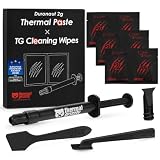
| ArctiClean Thermal Remover Kit | Stubborn cured compound | Two-step purifier system | |
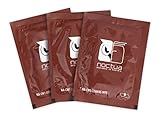
| Chemtronics IPA Wipes | Quick on-the-go cleanup | Pre-saturated lint-free pads | |
| Lint-Free Microfiber Cloth Pack | Streak-free finishing | Non-abrasive, reusable |
Choosing the Right Purity of Isopropyl Alcohol
Purity is the single most important factor when selecting isopropyl alcohol for removing thermal paste. A 99% or 99.9% concentration, like the MG Chemicals product, evaporates almost instantly and leaves your integrated heat spreader perfectly dry and film-free. Drugstore 70% IPA contains far more water, which lingers on the surface and risks streaking or slow drying near sensitive components. Investing in a high-purity bottle means you clean faster, avoid residue, and never worry about trapped moisture affecting your next paste application. Our CPU maintenance checklist recommends keeping a bottle on hand for every build.
Spray Bottles vs Pre-Saturated Wipes
Both formats work well, and the best choice depends on your workflow. A spray bottle such as the ProGrade 99% IPA gives you control over how much liquid you apply, which is ideal for soaking a stubborn, baked-on layer. Pre-saturated wipes like the Chemtronics pads are perfect for quick jobs and travel because there is nothing to spill. Many builders keep both: the spray for deep cleaning and wipes for fast touch-ups between the steps in our liquid cooling setup routine.
Dedicated Remover Kits for Stubborn Paste
Some high-performance and metal-based compounds cling tenaciously to the die. Dedicated kits like ArctiClean use a purifier and remover in two stages to break down cured paste that plain alcohol struggles with. After the remover loosens the compound, a final wipe with high-purity IPA clears any leftover film and preps the surface. If you frequently work with premium pastes or liquid metal-adjacent compounds, a dedicated kit saves time and elbow grease. Pair it with the coolers in our CPU cooler comparison for a flawless remount.
Lint-Free Materials Make the Difference
The alcohol only does half the work; what you wipe with matters just as much. Paper towels shed fibers that stick to wet paste and end up trapped under your cooler, hurting contact. Lint-free microfiber cloths and cleanroom wipes lift residue cleanly without leaving debris behind. Keeping a pack of dedicated lint-free cloths next to your isopropyl alcohol ensures every removal leaves a mirror-clean surface ready for fresh compound. This small detail is easy to overlook but has an outsized effect on your final temperatures, as noted in our temperature monitoring tips.
Safe Handling and Storage of Isopropyl Alcohol
High-purity IPA is flammable and evaporates quickly, so work in a ventilated area away from open flames and let surfaces dry fully before powering on. Store the bottle sealed and upright in a cool spot to preserve concentration, since exposed alcohol slowly absorbs moisture from the air. Using small amounts on a cloth rather than pouring directly onto components reduces the risk of liquid seeping into sockets. Responsible handling keeps both you and your hardware safe throughout the cleaning process.
Step-by-Step Thermal Paste Removal
Start by wiping off the bulk of the old paste with a dry lint-free cloth, then dampen a fresh cloth with 99% isopropyl alcohol and gently clean the remaining film using straight strokes. Repeat until no gray or white residue transfers to the cloth, then let the surface air dry for a minute. Inspect under good light to confirm a spotless finish before applying new compound. Following this method keeps your die and cold plate immaculate and ready for the best possible thermal contact on reassembly, complementing our case airflow recommendations.
What to Look For in Thermal Paste Cleaning Supplies
Water Content and Drying Behavior
Alcohol concentration is really a statement about how much water is in the bottle. A 99 percent product is about one percent water, so it flashes off in seconds and leaves nothing behind. A 70 percent product is roughly 30 percent water, which slows evaporation and can leave damp film on a heatspreader or a socket. Moisture is the last thing you want near exposed contacts, so the drier formula is the safer fit for a bare motherboard.
Additives and Denaturants
Not every bottle labeled as rubbing alcohol is plain isopropanol. Some household versions add fragrance, wintergreen, or other oils, and those leave a faint residue that works against fresh paste. Read the ingredient panel and prefer a label that lists only isopropyl alcohol, with water as the sole other ingredient.
Flammability and Ventilation
Isopropyl alcohol has a flash point of roughly 12 degrees Celsius (about 53 degrees Fahrenheit), which means its vapor can ignite at ordinary room temperature if it meets a spark or flame. Keep the PC unplugged, power supply switch off, and the work area open to fresh air. Store the bottle away from heaters and capped tightly between uses.
Surface Compatibility
Nickel-plated copper cold plates and the metal lid of a processor handle alcohol without trouble. Printed labels, marker ink, and some clear plastics such as acrylic may fog or smear on contact, so keep wet swabs away from stickers and case windows. Liquid-metal compounds are a special case: alcohol will not dissolve them, so bulk residue has to be lifted with a dry lint-free cloth first and the alcohol used only for the final wipe.
Which Cleaning Format Should You Buy?
| If you… | Choose… |
|---|---|
| Clean a processor once every few years | A small bottle of high-purity liquid plus separate lint-free swabs |
| Build or service several PCs regularly | A spray bottle, since it meters out liquid quickly and wastes less |
| Work in cramped spaces or away from a desk | Pre-saturated wipes, which need no pouring and travel well |
| Are scraping off cured, crusty compound | A dedicated remover kit that pairs a solvent with scrapers and cloths |
| Handle bare-die laptop chips | Liquid applied sparingly to a swab, never sprayed directly |
Common Mistakes When Buying Isopropyl Alcohol for PC Cleaning
- Buying by bottle size alone. A large container of 70 percent alcohol holds more liquid per bottle, but the extra water means more wiping and a longer wait before reassembly.
- Ignoring the ingredient list. Scented or medicated rubbing alcohol can leave residue that interferes with new paste.
- Skipping the lint-free cloth. Cotton balls and paper towels shed fibers that stick to a damp heatspreader and end up under the cooler.
- Pouring instead of dampening. Liquid can run into a socket and under components; a damp swab keeps it contained.
- Treating wipes as a universal fix. Pre-saturated wipes are convenient, but many are lower-concentration and may carry additives, so check the label first.
- Forgetting storage. A loosely capped bottle absorbs moisture from the air over time and slowly drifts from its labeled strength.
Matching the Cleanup to the Surface
Processor Heatspreader
Lift the bulk of the old compound with a dry lint-free cloth first, then make one pass with a lightly dampened cloth. Wiping in a single direction carries residue away instead of smearing it across the lid.
Cooler Cold Plate
Copper plates often show fine machining lines. Wipe along them with light pressure and avoid abrasive pads, which scratch the surface and can leave a rougher finish that holds paste unevenly.
Socket and Surrounding Board
Keep liquid away from socket pins and contacts. If compound has crept onto the board, dab it with a barely damp swab and let everything dry fully before installing the processor or powering on.
Bare-Die Chips
Laptop and console chips without a metal lid are fragile. Use a damp swab and gentle, patient strokes rather than pressure.
Frequently Asked Questions About Isopropyl Alcohol for Thermal Paste
What percentage of isopropyl alcohol removes thermal paste best?
A concentration of 90% or higher works best, with 99% or 99.9% being ideal for electronics. Higher purity means less water, so the alcohol evaporates quickly and leaves no residue on your CPU or cold plate. Avoid 70% drugstore alcohol, which dries slowly and can leave streaks.
Can I use isopropyl alcohol directly on the CPU die?
Yes, high-purity isopropyl alcohol is safe on the integrated heat spreader and cold plate. Apply it to a lint-free cloth rather than pouring it directly, wipe gently until clean, and let the surface dry completely before applying fresh paste. Keep liquid away from the socket pins and surrounding components.
How long should isopropyl alcohol dry before applying new paste?
With 99% purity, the surface typically dries within thirty to sixty seconds because there is very little water content. Wait until you see no visible moisture and the metal looks completely dry, then apply your new thermal paste. Rushing before it dries can trap alcohol under the compound and hurt contact.
Do I need special wipes or will paper towels work?
Lint-free wipes or microfiber cloths are strongly recommended because paper towels shed fibers that stick to wet paste and get trapped under the cooler. Trapped lint creates tiny air gaps that raise temperatures. Investing in a small pack of lint-free material ensures a clean, debris-free surface every time.