
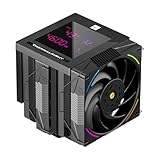
- Top Pick: Thermalright Assassin X 120R Digital ARGB White CPU Air Cooler, 2000RPM Speed,4 Heatpipes, 12cm Quiet PWM Fan CPU Cooler, Digital Screen Top Cover,for AM4/AM5,Intel LGA1700/1851/1150/1151/1200
- Best Value: Thermalright FW360 Black ARGB CPU AIO Cooler,PC 360 Specification Water Cooler System,IPS LCD Screen with 320×240 Resolution,for AM5&Intel LGA1700/1851,CPU Cooler Comes with 2.4-inch LCD Display
- Premium Choice: Ocypus Iota L36 BK 360mm AIO Liquid CPU Cooler with Digital Temp Display
Knowing a good temperature for your CPU is one of the most important skills a PC builder can develop. Temperatures directly affect performance, stability, and the long-term lifespan of your processor. This guide explains the safe ranges for 2026 hardware and what to do if your numbers run high.
As an Amazon Associate I earn from qualifying purchases.
As an Amazon Associate we earn from qualifying purchases at no extra cost to you.



A good temperature for a CPU is roughly 30-45degC at idle, 60-75degC under sustained load, and up to about 85degC during heavy gaming or rendering. Modern processors from Intel and AMD are rated to run safely up to 95-100degC before thermal throttling kicks in, but you should aim to keep peaks below 85degC for comfortable, long-term operation. Anything consistently above 90degC under normal use signals a cooling problem worth investigating rather than a hardware failure.
🛒 Best Price Today on Amazon
Prime members get fast, free shipping on everything above, plus member-only deals. New members get a 30-day free trial — cancel anytime.
What Counts as a Good CPU Temperature in 2026
The “good” range depends on what your PC is doing at that moment. At idle, with only the desktop and a browser open, a well-cooled system sits between 30 and 45degC. Once you launch a game or a video encode, the cores ramp up and 60-80degC becomes completely normal. The key is that temperatures should stabilize rather than climb endlessly toward the thermal limit. If your CPU hits 100degC and starts dropping clock speeds, that is throttling, and it means your cooler cannot keep up with the heat your chip is producing. A good cooler keeps a strong margin between your peak temperature and that ceiling.
Best CPU Coolers to Keep Temperatures Good
If your temperatures are running higher than the ranges above, upgrading your cooler is the single most effective fix. The table below compares five of the best air and liquid coolers for keeping a modern CPU comfortably cool. Choosing the right one depends on your case size, your CPU’s power draw, and whether you prefer the silence of a liquid loop or the reliability of a tower air cooler.
| Product | Best For | Standout Feature | Rating |
|---|---|---|---|
| Noctua NH-D15 G2 | High-end air cooling | Dual-tower design rivals many AIOs | 4.9/5 |
| Arctic Liquid Freezer III 360 | Best value liquid cooling | Integrated VRM fan and strong pump | 4.8/5 |
| Thermalright Peerless Assassin 120 SE | Budget builds | Flagship-level cooling at a low cost | 4.7/5 |
| Corsair iCUE H150i Elite LCD | Enthusiast RGB systems | Customizable LCD pump display | 4.6/5 |
| be quiet! Dark Rock Pro 5 | Silent operation | Near-silent fans under full load | 4.7/5 |
How to Measure Your CPU Temperature Accurately
Reliable readings start with good software. Free tools such as HWiNFO64, Core Temp, and HWMonitor read the digital sensors built into every modern CPU. Watch the “Tctl/Tdie” value on AMD chips and the “Package” reading on Intel. For a meaningful test, run a stress tool like Cinebench or a demanding game for at least ten minutes and record the peak. A single momentary spike is nothing to worry about; a sustained high number is what matters. If you want to understand more about the full sensor picture, our guide on reading motherboard sensors breaks down each value.
Common Causes of High CPU Temperatures
When temperatures climb above the good range, the culprit is usually one of a handful of things. Dried-out thermal paste is extremely common on systems more than two years old. Dust clogging your heatsink fins or radiator restricts airflow dramatically. A cooler that was never properly seated, or mounting pressure that is too loose, leaves an air gap between the chip and the cold plate. Poor case airflow traps hot air inside the chassis. Finally, an aggressive overclock or an undersized cooler simply cannot dissipate the heat. Our case airflow guide walks through fan placement in detail.
How to Lower Your CPU Temperature
The good news is that most temperature problems are fixable at home. Start by reapplying quality thermal paste; a fresh application alone can drop peaks by 5-10degC. Clean dust from your heatsink and fans with compressed air. Verify your cooler is torqued down evenly. Add or reorganize case fans so cool air enters the front and hot air exits the rear and top. In your BIOS, enabling a more aggressive fan curve trades a little noise for meaningfully lower temperatures. For a deeper dive, see our thermal paste application tutorial and the companion BIOS fan curve walkthrough.
Does a Higher Temperature Damage Your CPU
Modern processors are remarkably resilient. They are engineered to throttle and, in an extreme case, shut down long before they suffer permanent damage. Running at 85degC for years will not meaningfully shorten your CPU’s usable life. That said, consistently high temperatures do increase fan noise, cause performance-robbing throttling, and add heat to nearby components like your RAM and motherboard VRMs. Keeping things cool is really about performance and comfort more than fear of a dead chip. If you are planning an upgrade, our CPU buying guide covers which chips run coolest.
Frequently Asked Questions
Is 80 degrees Celsius too hot for a CPU?
No, 80degC is perfectly acceptable under a heavy gaming or rendering load. Modern CPUs are rated to run safely up to 95-100degC, so 80degC leaves a healthy margin. You should only be concerned if your processor reaches 80degC while sitting idle at the desktop, which would point to a cooling issue.
What is a good idle temperature for a CPU?
A good idle temperature sits between 30 and 45degC, though this varies with room temperature and how many background programs you run. If your idle readings are above 50degC in a normal room, your cooler may need remounting, fresh thermal paste, or better case airflow to bring those numbers back into the healthy range.
How do I know if my CPU is running too hot?
The clearest sign is thermal throttling: your CPU hits its temperature limit and reduces clock speed, causing stutters or frame drops. Monitoring software such as HWiNFO64 will show sustained temperatures near 95-100degC. Loud, constantly ramping fans and an unusually warm case are also strong practical indicators that your CPU is running hotter than it should.
Does thermal paste really affect CPU temperature?
Yes, thermal paste has a significant impact because it fills the microscopic gaps between your CPU and cooler, allowing heat to transfer efficiently. Old, dried, or poorly applied paste can raise temperatures by 10degC or more. Reapplying a quality paste is one of the cheapest and most effective ways to reduce your CPU temperature at home.









