
- Top Pick: Thermalright Peerless Assassin 120 SE CPU Cooler, 6 Heat Pipes AGHP Technology, Dual 120mm PWM Fans, 1550RPM Speed, for AMD:AM4 AM5/Intel LGA 1700/1150/1151/1200/1851,PC Cooler
- Best Value: Thermalright Assassin X120 Refined SE CPU Air Cooler, 4 Heat Pipes, TL-C12C PWM Fan, Aluminium Heatsink Cover, AGHP Technology, for AMD AM4/AM5/Intel LGA 1150/1151/1155/1200/1700/1851(AX120 R SE)
- Premium Choice: CORSAIR RS120 ARGB 120mm PWM Fans – Daisy-Chain Connection – Low-Noise – Magnetic Dome Bearing – Triple Pack – Black
🛒 Best Price Today on Amazon
Prime members get fast, free shipping on everything above, plus member-only deals. New members get a 30-day free trial — cancel anytime.
Best CPU Fans in 2026: Top Coolers for Every Build
The best CPU fans and coolers make the difference between a processor that boosts to its full potential and one that throttles under load. A great cooler keeps temperatures in check, runs quietly, and installs without hassle. This roundup ranks the top CPU cooling options of 2026 across air and liquid designs, budgets, and case sizes.
As an Amazon Associate I earn from qualifying purchases.
As an Amazon Associate we earn from qualifying purchases at no extra cost to you.







Best CPU Fans: Our Top Picks
The table below highlights the standout CPU coolers this year, each selected for strong thermal performance, low noise, and dependable build quality.
| Product | Best For | Standout Feature | Rating |
|---|---|---|---|
| Noctua NH-D15 chromax.black | Best overall air cooling | Dual-tower thermals rivaling AIOs | 4.9/5 |
| ARCTIC Liquid Freezer III 360 | Best liquid cooling | Outstanding 360mm radiator | 4.8/5 |
| Thermalright Peerless Assassin 120 SE | Best budget cooler | Flagship performance, low cost | 4.7/5 |
| be quiet! Dark Rock Pro 5 | Quietest operation | Silent under heavy load | 4.8/5 |
| DeepCool AK620 Digital | Monitoring enthusiasts | Built-in temperature display | 4.6/5 |
How to Choose the Best CPU Fans
Choosing the best CPU fans starts with matching cooling capacity to your processor’s heat output. High-core-count or overclocked chips need a large dual-tower air cooler or a 240mm-plus liquid cooler, while mainstream CPUs are happy with a single-tower design. Check clearance against your case and RAM height, confirm socket compatibility, and prioritize a quiet fan with a good static pressure rating. A capable cooler keeps you in the healthy CPU temperature range and complements a quality gaming power supply.
Best Air CPU Fans
For most builders, the best CPU fans come in air-cooler form. The Noctua NH-D15 chromax.black remains the benchmark, using two towers and dual fans to rival many liquid coolers while avoiding pump noise and leak risk. Its enormous surface area keeps even hot chips comfortably cool, and it pairs perfectly with a balanced case airflow setup for a rock-solid, low-maintenance system.
Best Liquid CPU Cooling
When you need maximum cooling for a hot or overclocked chip, the best CPU fans sit on a radiator. The ARCTIC Liquid Freezer III 360 leads the pack with an efficient cold plate, thick radiator, and an integrated VRM fan. It excels at taming high-wattage processors, making it ideal if you plan to overclock your CPU and want to keep the average CPU temp low under sustained load.
Best Budget CPU Fans
Value seekers get remarkable results from the Thermalright Peerless Assassin 120 SE, the best CPU fans for the money. This dual-tower cooler delivers thermals close to premium units at a fraction of the price, making it the smart choice for mainstream and budget builds. It proves you do not need to spend big to keep temperatures firmly in the safe zone.
Best Quiet CPU Fans
For silence-focused builds, the be quiet! Dark Rock Pro 5 is the best CPU fans option. Its Silent Wings fans and decoupled mounting keep noise to a whisper even under heavy load, while still delivering flagship-tier cooling. Pairing it with a quiet power supply and low-RPM case fans produces a near-silent system that still handles demanding workloads with ease.
Getting the Most From Your Best CPU Fans
Even the best CPU fans need proper setup to shine. Apply a fresh pea-sized dot of quality thermal paste, mount the cooler with even pressure, and configure a fan curve that ramps up before the chip heats. Balanced case airflow with adequate intake and exhaust maximizes any cooler’s potential. Keep the fins clean of dust, and your cooler will hold temperatures in the normal CPU temp range for years.
Frequently Asked Questions
Are air or liquid the best CPU fans for gaming?
Both work excellently for gaming. A high-end air cooler like the Noctua NH-D15 matches most 240mm and 280mm liquid coolers while avoiding pump noise and leak risk. Liquid cooling pulls ahead mainly for hot, overclocked chips or when you want a cleaner look and unobstructed RAM clearance.
How many CPU fans do I need?
Most tower air coolers use one or two fans, which is sufficient for the vast majority of processors. Adding a second fan to a single-tower cooler can lower temperatures a few degrees. What matters more is overall case airflow, so balance your CPU cooler with adequate intake and exhaust fans.
Do the best CPU fans require thermal paste?
Yes, every CPU cooler needs thermal paste to transfer heat efficiently from the processor to the heatsink. Many coolers ship with paste pre-applied or included in the box. For best results, use a quality paste and apply a pea-sized amount in the center before mounting.
Will better CPU fans let me overclock?
Better cooling is essential for overclocking because higher clocks and voltages generate significantly more heat. A strong dual-tower air cooler or a 360mm liquid cooler provides the thermal headroom to push clocks while keeping temperatures below the throttle point, making a quality cooler the foundation of any stable overclock.
Top picks from this guide
 CorsairCORSAIR Nautilus 360 RS ARGB Low-Noise Liquid CPU Cooler –…$95 \xc2\xb7 99/100
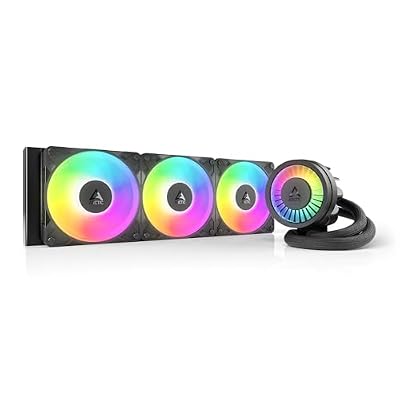 ARCTICARCTIC Liquid Freezer III Pro 360 A-RGB - AIO CPU…$77 \xc2\xb7 99/100
 CorsairCORSAIR RS120 ARGB 120mm PWM Fans – Daisy-Chain Connection –…$49 \xc2\xb7 99/100
 ThermalrightThermalright Assassin X120 Refined SE CPU Air Cooler, 4 Heat…$18 \xc2\xb7 96/100








