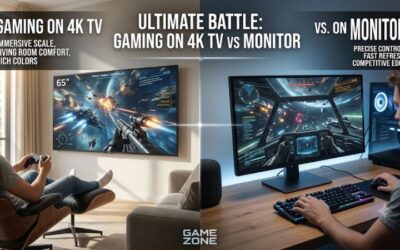
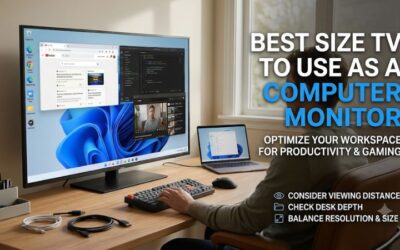
Choosing the best size tv monitor for gaming depends on how far you sit from the screen, how much of your vision you want the display to occupy, and whether you play at a desk or from a couch. A 42-inch TV can be excellent for a close PC gaming setup, while a 55-inch model suits many medium-sized rooms. Larger 65- and 75-inch screens make more sense when you sit several feet away. This roundup compares six TV options across practical screen sizes, with particular attention to gaming performance, viewing comfort, resolution, and room requirements.
- Quick verdict: What is the best size TV monitor for gaming?
- Quick comparison: Six gaming TVs by screen size
- How we selected the best TV sizes for gaming
- Best 42-inch TV for gaming: LG OLED42C6PUA
- Best 48-inch TV for gaming: LG OLED48C6PUA
- Best 55-inch budget gaming TV: TCL 55QM6K
- Best premium 55-inch TV for gaming: Samsung QN55S95HAFXZA
- Best 65-inch TV for gaming: Hisense 65U7SG
- Best 75-inch TV for gaming: Hisense 75U7SG
- Choosing the best size TV monitor for gaming by viewing distance
- How to choose the right TV size for gaming
- Common mistakes when choosing a gaming TV size
- Useful gaming TV settings after installation
- Frequently asked questions
- Final verdict: Which TV size should you buy for gaming?
Quick verdict: What is the best size TV monitor for gaming?
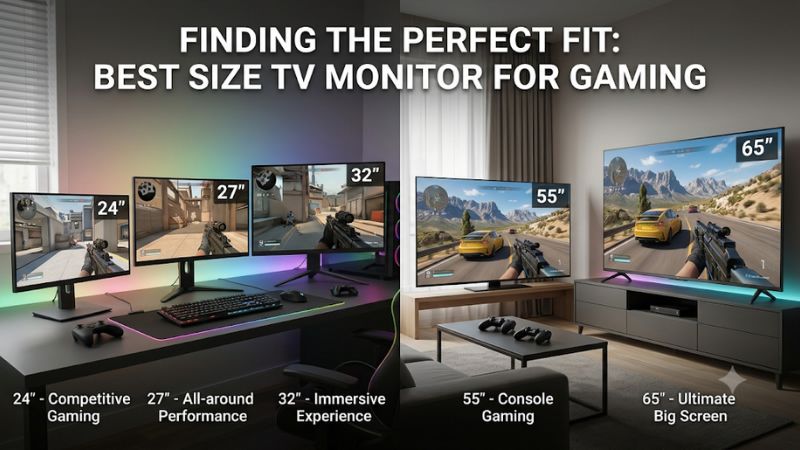
For most gaming setups, 42–55 inches is the most practical range to consider. A 42-inch TV works well when you want a large display for a desk or compact gaming room, particularly if you can position it farther back than a conventional monitor. A 48-inch screen offers more immersive visuals without immediately becoming overwhelming.
A 55-inch TV is a strong choice for mixed console and PC gaming when you have enough room to sit approximately 5–7.5 feet away. If your gaming area is a living room, a 65-inch TV can provide a more cinematic experience. A 75-inch screen is worth considering when you have a large room and sit farther back.
The following recommendations use exact 2026 and 2025 US-market models where available. They are selected to illustrate the practical differences between screen sizes, not to suggest that a larger TV automatically performs better.
Viewing distances are starting points, not universal requirements. Actual comfort depends on eyesight, game type, seating position, and personal preference.
Quick comparison: Six gaming TVs by screen size
| TV and exact variant | Size | Best suited for | Main gaming advantage | Main drawback |
|---|---|---|---|---|
| LG OLED42C6PUA | 42″ | Desk gaming | Compact OLED with 165Hz | Premium purchase |
| LG OLED48C6PUA | 48″ | Large desk or small room | 4K OLED and 165Hz | Needs more desk depth |
| TCL 55QM6K | 55″ | Budget-conscious living room | 4K 144Hz and VRR | Weaker HDR impact |
| Samsung QN55S95HAFXZA | 55″ | Premium gaming room | QD-OLED and 165Hz | Expensive |
| Hisense 65U7SG | 65″ | Bright living room | Mini-LED and 165Hz | Motion transition limitations |
| Hisense 75U7SG | 75″ | Large gaming room | Large-screen Mini-LED | Requires substantial space |
These selections are based on manufacturer specifications and independent testing where available. They do not represent detailed research by Build-PC-Guide. The LG C6 and Samsung S95H are premium OLED choices, while the TCL QM6K and Hisense U7SG provide LCD alternatives with different brightness, motion, and pricing trade-offs.
How we selected the best TV sizes for gaming
Screen size alone does not determine whether a television is suitable for gaming. A large 60Hz TV can be less satisfying for fast PC games than a smaller display with a native 120Hz or higher refresh rate. Similarly, an expensive OLED television may deliver excellent contrast but still be uncomfortable if you sit too close.
Our selection process considers several practical factors.
-
Screen size and viewing distance: Each recommendation needs a realistic use case based on how far the player sits from the television.
-
Resolution: All six selections support 4K resolution, providing a useful pixel density for modern consoles and gaming PCs.
-
Refresh rate: Native refresh rates matter when playing compatible games at higher frame rates. Advertised motion-processing numbers are not equivalent to native refresh rates.
-
Variable refresh rate: VRR helps synchronize the display with the GPU or console output, reducing tearing and stuttering within supported operating ranges.
-
Input responsiveness: Low input lag is important for competitive games, although it must be distinguished from pixel response time.
-
Panel technology: OLED and Mini-LED LCD displays have different strengths in contrast, brightness, motion handling, and long-term usage.
-
Connectivity: HDMI 2.1 bandwidth, supported resolutions, and the number of suitable ports affect how many devices can use the TV’s advanced gaming features.
We also considered manufacturer documentation and independent reviews from RTINGS. Its 2026 gaming TV testing provides useful evidence about input lag, motion clarity, refresh-rate support, and gaming features. However, results from one tested screen size should not automatically be treated as identical measurements for every size in a product family.
Best 42-inch TV for gaming: LG OLED42C6PUA
The LG OLED42C6PUA is a compelling choice for someone who wants a television-sized gaming display without moving into the larger dimensions of a conventional living-room TV. Its 42-inch screen is large enough for immersive single-player games while remaining more manageable on a deep desk or dedicated gaming table.
The 2026 LG C6 uses OLED technology, with individually illuminated pixels that can switch off to produce deep blacks. This is particularly useful in dark games, where bright interface elements, stars, headlights, and other highlights appear against dark backgrounds. Unlike a conventional LCD television, the OLED panel does not rely on a backlight divided into local dimming zones.
LG lists 4K resolution, a 165Hz refresh rate, NVIDIA G-SYNC compatibility, AMD FreeSync Premium, and a 0.1ms response-time specification for the C6 gaming lineup. The higher refresh rate is particularly relevant to PC gamers with compatible graphics cards. Consoles such as the PlayStation 5 and Xbox Series X generally target up to 120Hz rather than 165Hz.
Why 42 inches makes sense for a gaming desk
A 42-inch television measures approximately 36.6 inches wide and 20.6 inches tall before accounting for its bezel and stand. That is substantially wider than a typical 27-inch gaming monitor, so desk depth and viewing distance matter.
At close range, the screen can occupy a large portion of your peripheral vision. This can make racing games, open-world adventures, and cinematic titles feel more engaging. However, competitive shooters with extensive interface elements may become less comfortable if you need to scan the screen constantly.
The LG C6 also supports PC-oriented chroma 4:4:4 handling according to independent testing, which is useful for keeping text and fine interface details clear. Its nearly instantaneous OLED pixel transitions help preserve motion clarity, although OLED’s fast response can also make low-frame-rate camera movement appear stuttery.
The main disadvantage is price. This is not a sensible purchase if you simply want a large display for occasional console gaming. A less expensive LCD television may be a better investment if you do not need OLED contrast or high-refresh-rate PC gaming.
Buy if you want a premium 42-inch OLED for PC and console gaming, particularly in a dedicated gaming room.
Skip if your desk is shallow, you mostly play competitive esports, or you want a budget television without OLED-specific considerations.
Best 48-inch TV for gaming: LG OLED48C6PUA
The LG OLED48C6PUA offers a useful middle ground between a conventional gaming monitor and a living-room television. It provides more screen area than the 42-inch model while retaining the same general C6 OLED gaming platform.
Its exact US model number is OLED48C6PUA. LG lists 4K resolution, a 165Hz refresh rate, G-SYNC, FreeSync Premium, and OLED display technology for the C6 family. The additional screen area is attractive for PC players who enjoy simulation games, expansive role-playing titles, and cinematic experiences.
When the extra six inches are worth it
Moving from 42 to 48 inches increases the screen’s diagonal measurement by approximately 14%. The actual viewing experience also depends on how much farther away you sit. If you maintain exactly the same seating position, the 48-inch screen occupies more of your field of vision.
That is not necessarily a disadvantage. A player sitting approximately 4–5 feet away may find a 48-inch television comfortable, depending on personal preference. It can also be a better shared display when another person occasionally watches gameplay from beside the main player.
The C6’s OLED panel provides excellent black levels, and its fast response is useful for action games. The 4K resolution also provides a detailed image for modern gaming PCs. However, running demanding games at 4K and high refresh rates requires a capable GPU. Buying a 165Hz television does not mean every game will automatically run at 165 frames per second.
There are also practical installation considerations. A 48-inch TV can dominate a desk intended for smaller displays. Measure the width of your furniture, the distance to the wall, and the available space for a keyboard, speakers, and other accessories before purchasing.
Buy if you want a larger-than-monitor display for immersive gaming and have enough room to sit farther away.
Skip if you sit very close to your screen or need a compact setup with minimal head and eye movement.
Best 55-inch budget gaming TV: TCL 55QM6K
The TCL 55QM6K is a 55-inch QD-Mini LED television aimed at buyers who want a relatively large 4K gaming display without automatically paying flagship OLED prices. Its native 144Hz panel, VRR support, and Game Accelerator features make it particularly interesting for PC players.
TCL’s official specifications identify the 55QM6K as a 4K QD-Mini LED television with a native 144Hz refresh rate. The model also supports AMD FreeSync Premium Pro and advertises Game Accelerator functionality. Its HDMI connectivity includes four inputs, with one serving as eARC.
Why this size works in a medium-sized room
A 55-inch screen is approximately 47.9 inches wide and 27 inches tall, excluding the bezel. It is significantly larger than the 42- and 48-inch options, making it better suited to a TV stand or wall-mounted installation than a typical desktop.
For a player sitting around 6–7 feet away, the 55-inch format provides a useful balance between immersion and visibility. It can display detailed environments without requiring the viewer to sit extremely close to the screen.
The QM6K’s Mini-LED backlight and local dimming improve contrast compared with basic edge-lit LCD televisions. However, local dimming cannot completely eliminate blooming around bright objects on dark backgrounds. This matters in games with bright HUD elements, subtitles, or small light sources.
Independent RTINGS testing identifies low input lag, 4K 144Hz support, and VRR as strengths. It also notes that HDR brightness is not particularly impressive and that some haloing remains visible around bright highlights.
This makes the TCL a sensible choice for buyers who prioritize responsive gameplay and screen size over premium HDR performance. It is not an OLED replacement, but that is not necessarily its purpose.
Buy if you want a 55-inch 4K gaming TV with high refresh-rate support and a more accessible product category than flagship OLED.
Skip if you primarily play dark HDR games and expect the perfect black levels and pixel-level lighting control of OLED.
Best premium 55-inch TV for gaming: Samsung QN55S95HAFXZA
The Samsung QN55S95HAFXZA is a strong alternative for players who want a 55-inch screen but do not want to compromise on premium display technology. It belongs to Samsung’s 2026 S95H OLED family and uses a QD-OLED panel to combine OLED contrast with vibrant color reproduction.
Samsung specifies a 4K resolution of 3840 × 2160 pixels and a 165Hz refresh rate with VRR support. The television also features Samsung’s Glare Free screen technology, which is particularly useful in gaming rooms where windows or overhead lights might otherwise create distracting reflections.
What makes this 55-inch TV attractive
The 55-inch size is a practical choice for gamers who use a couch rather than a desk. It provides enough screen area for immersive adventures without requiring the room dimensions associated with a 75-inch television.
QD-OLED technology is especially appealing for HDR gaming. Each OLED pixel controls its own light output, helping the display produce deep blacks and strong contrast. Quantum-dot color technology also helps deliver vibrant colors, making colorful environments and bright visual effects stand out.
Samsung’s 165Hz capability is useful for compatible gaming PCs. The television also supports NVIDIA G-SYNC compatibility and AMD FreeSync Premium Pro across the relevant 2026 S95H lineup. These technologies help synchronize display refresh behavior with compatible graphics hardware. They do not guarantee that every game will run without tearing or stuttering under every configuration.
One important limitation is Dolby Vision. Samsung does not include Dolby Vision support on the S95H, so buyers who specifically want that HDR format for compatible Xbox games should compare LG alternatives before deciding.
The S95H is also a premium product, so its price may be difficult to justify if your gaming system cannot take advantage of its high refresh rate. Console players who mainly play at 60Hz or 120Hz may find a cheaper 55-inch television sufficient.
Buy if you want a premium 55-inch OLED for gaming, streaming, and general entertainment in a moderately sized room.
Skip if you specifically require Dolby Vision or want a high-refresh-rate television at a lower purchase price.
Best 65-inch TV for gaming: Hisense 65U7SG
The Hisense 65U7SG is a strong option for players who want a large gaming screen without immediately moving into the most expensive OLED category. Its 65-inch display is suitable for living-room gaming, where the player generally sits several feet away rather than directly in front of a desk.
Hisense’s U7SG uses Mini-LED local dimming and a 4K LCD panel. RTINGS tested the 65-inch version and reports support for HDMI 2.1 bandwidth across all four inputs, VRR, and refresh rates up to 165Hz at 4K. The television also supports Dolby Vision and HDR10+.
Why 65 inches is a good living-room size
A 65-inch television measures approximately 56.7 inches wide and 31.9 inches tall. It provides considerably more screen area than a 55-inch model, making it a noticeable upgrade for players sitting farther away.
The larger display is particularly attractive for open-world games, sports titles, racing simulators, and cooperative gaming. It makes visual details easier to appreciate when the player is seated across a living room.
The U7SG’s Mini-LED backlight is also useful in brighter environments. RTINGS reports that its high brightness and matte anti-reflective coating help reduce distracting reflections. That is a meaningful advantage if your gaming area has overhead lights or windows.
However, there is an important trade-off. Independent testing found that the U7SG has a sluggish pixel response despite its high refresh rate. This can create motion blur, particularly around dark objects and shadow details. Its image also loses quality when viewed from wider angles.
RTINGS.com
Consequently, the 65U7SG is better suited to players who prioritize screen size, brightness, and gaming features over the fastest possible pixel transitions. A competitive FPS player may prefer a smaller OLED or dedicated gaming monitor.
Buy if you want a bright 65-inch Mini-LED TV for console gaming and general entertainment.
Skip if you are highly sensitive to motion blur or regularly have several people watching from wide seating positions.
Best 75-inch TV for gaming: Hisense 75U7SG
The Hisense 75U7SG takes the same general U7SG platform into a much larger screen format. It is designed for buyers who want gaming to feel like a home-theater experience rather than a traditional desktop activity.
Its 75-inch display is considerably larger than the 65-inch version, but the important distinction is not simply the extra ten inches. The additional screen area makes the most sense when the seating position is also farther away.
The U7SG family includes 75-inch models, and RTINGS identifies the 75U7SG as part of the same 2026 series. Its testing of the 65-inch version provides a useful reference for the family, but measurements should not be treated as exact 75-inch test results. Hisense changes certain specifications between sizes, including local dimming zone counts and advertised brightness.
When a 75-inch gaming screen becomes practical
A 75-inch screen measures approximately 65.4 inches wide and 36.8 inches tall. That is a substantial physical display, so furniture dimensions, wall strength, mounting compatibility, and seating position need to be considered before buying.
This size works particularly well for games with expansive environments. Racing games, flight simulators, sports titles, and cinematic adventures can benefit from a display that fills more of the player’s field of view.
The Mini-LED backlight also provides a useful combination of brightness and local dimming. Players who game during the day may appreciate the matte screen finish, while the 4K resolution helps preserve detail across the large panel.
Nevertheless, a 75-inch television is not automatically better for competitive gaming. You may need to move your eyes or head farther to follow action across the screen. The U7SG’s independently measured motion limitations also remain relevant when considering this model family.
Another practical consideration is GPU performance. Rendering games at 4K on a 75-inch television still requires the same number of pixels as rendering them at 4K on a 42-inch television. The larger physical size does not increase the graphics workload, but it makes visual imperfections and low-resolution content easier to notice at close range.
Buy if you have a spacious room and want a large 4K display for immersive console and PC gaming.
Skip if your seating position is close to the screen or your furniture cannot safely accommodate a television of this size.
Choosing the best size TV monitor for gaming by viewing distance
Viewing distance is one of the most important factors when choosing a television. A 65-inch screen can look excellent from a couch but uncomfortable when positioned directly in front of a shallow desk.
RTINGS provides a useful mixed-use viewing-distance guideline based on approximately a 30-degree field of vision. Its recommendations offer a practical starting point for balancing immersion and comfort.
| Screen size | Suggested mixed-use distance | Typical setup |
|---|---|---|
| 32 inches | 4 ft 4 in | Compact desk |
| 42 inches | Around 5 ft 8 in | Large desk |
| 43 inches | 5 ft 10 in | Compact room |
| 48 inches | 6 ft 6 in | Large desk or small room |
| 50 inches | 6 ft 9 in | Small living room |
| 55 inches | 7 ft 5 in | Medium living room |
| 65 inches | 8 ft 10 in | Large living room |
| 75 inches | Around 10 ft | Spacious living room |
These are not minimum distances or strict seating requirements. They describe one approach to a comfortable viewing angle. Players who prefer a more immersive cinematic experience can sit closer, while people who prefer a less demanding viewing angle can sit farther away.
Gaming at a desk
For a desktop setup, 42 inches is generally a more manageable starting point than 55 or 65 inches. A conventional monitor sits relatively close to the user, so moving to a television requires reconsidering desk depth and viewing posture.
A 42-inch OLED can work well if you have sufficient space to position the screen farther back. A 48-inch TV requires even more planning, particularly if you also use a keyboard, mouse, microphone, and speakers.
Before buying, measure the distance between your eyes and the proposed screen position. Do not rely exclusively on the size printed on the product box.
Gaming from a couch
A couch-based gaming setup gives you more flexibility. You can position the television several feet away and choose a larger screen without having to rearrange your entire desk.
A 55-inch television is a practical starting point for many medium-sized rooms. A 65-inch model is more appropriate when the couch is farther from the screen, while a 75-inch model makes sense when you have enough room to maintain a comfortable viewing angle.
Competitive gaming versus cinematic gaming
Competitive games often benefit from a screen that allows players to monitor the entire interface without excessive eye movement. This is one reason smaller gaming monitors remain popular for esports.
Cinematic games have different priorities. Large environments, detailed scenery, and immersive visual effects can benefit from a larger screen. A 55- or 65-inch TV can be more enjoyable for these titles when paired with an appropriate seating distance.
There is no universal screen size that improves reaction time or automatically makes someone a better player. Comfort, input latency, refresh rate, and individual preferences remain important.
How to choose the right TV size for gaming
The right screen size is a combination of viewing distance, resolution, room layout, and gaming preferences. Buying the largest television within your budget is not necessarily the best decision. A display that is too large for your seating position can make fast-paced games uncomfortable, while a small television positioned too far away may reduce immersion.
Consider your gaming room dimensions
Start by measuring the available space rather than choosing a TV based on screen size alone. Measure the distance from your intended seating position to the wall or TV stand, then consider the television’s actual width and height.
A 55-inch television is approximately 48 inches wide, while a 65-inch model is approximately 57 inches wide. A 75-inch television can exceed 65 inches in width. These measurements matter when selecting a TV stand, wall mount, or entertainment center.
You should also consider the height of the television. The center of the display should generally be near your natural seated eye level. Mounting a large television too high can make long gaming sessions less comfortable.
Match the screen size to your resolution
Resolution determines how many pixels the television displays, while screen size determines how physically large those pixels appear from a given distance.
A 4K television has 3840 × 2160 pixels regardless of whether it measures 42, 55, or 75 inches. Therefore, the same resolution is spread across a larger physical area as screen size increases.
At a normal living-room distance, 4K is a practical choice for all the featured sizes. It provides considerably more detail than 1080p, particularly when displaying detailed environments, small interface elements, and fine textures.
A larger 4K television does not automatically look blurry. However, sitting very close can make individual pixels and image-processing imperfections more noticeable. This is especially relevant when displaying lower-resolution console games or streaming content.
Check the native refresh rate
Refresh rate describes how many times a display can update its image each second. A 60Hz television can refresh up to 60 times per second, while a 120Hz television can refresh up to 120 times per second.
For modern gaming, 120Hz is a useful target. The PlayStation 5 and Xbox Series X support compatible games at up to 120 frames per second, although actual frame rates depend on the game and graphics settings.
PC gamers may benefit from 144Hz or 165Hz televisions when their graphics hardware and games support those output modes. The LG C6 and Samsung S95H are particularly interesting for this audience.
Do not confuse native refresh rate with motion interpolation or marketing terms such as Motion Rate. A television advertised with a very high motion number may still have a considerably lower native panel refresh rate.
Look for HDMI 2.1 and VRR
HDMI 2.1 features are important when connecting modern gaming consoles and high-performance PCs. The interface supports the bandwidth needed for demanding combinations of 4K resolution, high refresh rates, and compatible gaming features.
VRR is another useful feature. It allows the display to adjust its refresh timing to match the output of a compatible graphics source. This can reduce screen tearing when frame rates fluctuate.
ALLM, or Auto Low Latency Mode, can automatically switch a compatible television into a low-latency gaming mode. This helps reduce the need to change picture settings manually whenever you start a game.
Before purchasing, check the number of HDMI inputs that support the required bandwidth. Some televisions have multiple HDMI ports but reserve certain advanced features for specific connections. You should also check whether the TV supports the VRR format used by your graphics card or console.
Choose between OLED and Mini-LED
OLED and Mini-LED are two popular display technologies for gaming televisions, but they serve slightly different preferences.
OLED displays control individual pixels, producing excellent black levels and extremely fast pixel transitions. This makes OLED attractive for dark games, cinematic titles, and players who prioritize motion clarity.
Mini-LED televisions use a backlight divided into multiple dimming zones. They can produce high brightness and are often more suitable for bright rooms. However, the backlight cannot control every pixel independently, so some blooming may appear around bright objects against dark backgrounds.
The LG C6 and Samsung S95H represent the OLED options in this roundup. The Hisense U7SG and TCL QM6K demonstrate the advantages and limitations of Mini-LED LCD technology.
Neither technology is automatically the right choice for every room. Consider your lighting conditions, gaming habits, budget, and willingness to manage OLED image-retention precautions.
Common mistakes when choosing a gaming TV size
A good gaming television should fit the entire setup rather than just look impressive in a product listing. Several purchasing mistakes can result in an unnecessarily expensive or uncomfortable display.
Buying the biggest screen available
A 75-inch television can look spectacular in a showroom, but that does not mean it will fit your room. If you sit only a few feet away, the screen may occupy too much of your field of vision.
Before upgrading from 55 to 65 or 75 inches, consider whether your seating position can move farther away. If it cannot, a smaller television may provide a more comfortable experience.
Ignoring the television’s actual dimensions
Manufacturers advertise television sizes using the diagonal measurement. That number does not tell you the exact width, height, depth, or stand footprint.
A 65-inch TV may not fit an entertainment center designed for a 55-inch model. Similarly, a television’s feet can be positioned near the edges, requiring more furniture width than expected.
Check the official dimensions both with and without the stand. If you plan to wall-mount the television, verify its VESA mounting pattern and the wall mount’s supported weight and dimensions.
Assuming every 4K television is equally good for gaming
Two televisions can both support 4K resolution but deliver very different gaming experiences.
One may have a 60Hz panel, while another supports 120Hz, 144Hz, or 165Hz. Their input lag, pixel response, VRR compatibility, HDR brightness, and connectivity can also differ considerably.
Resolution is only one part of the buying decision. Always compare the actual gaming specifications before purchasing.
Ignoring GPU performance
A 4K 165Hz television does not guarantee that your PC can render games at 165 FPS. The graphics card, processor, game engine, and graphics settings all affect performance.
If your PC struggles to maintain 60 FPS at 4K, buying a more expensive high-refresh-rate television may not provide much practical benefit.
You can still enjoy a high-quality 4K television at lower frame rates. However, it is worth deciding whether your money would be better spent on a stronger GPU, a more affordable TV, or both.
Forgetting about OLED image retention
OLED televisions are attractive for gaming because of their contrast and pixel response. However, buyers who regularly leave static elements on screen for extended periods should understand image-retention and burn-in considerations.
Games with persistent HUDs, health bars, maps, and other fixed interface elements can create additional concerns over prolonged use. Modern OLED televisions include protective features, but those features do not make the technology completely immune to permanent image retention.
If you primarily play one game for many hours every day and prefer not to manage these considerations, a Mini-LED LCD model may be a more comfortable purchase.
Useful gaming TV settings after installation
Choosing the correct screen size is only part of building a good gaming setup. Once the television is installed, configure its picture and connectivity settings to make sure your console or PC can use the available features.
-
Enable Game Mode or the manufacturer’s equivalent low-latency picture mode.
-
Activate VRR on both the television and compatible console or PC.
-
Select the correct HDMI input and confirm its enhanced bandwidth setting if required.
-
Enable 4K resolution and the highest refresh rate supported by both devices.
-
Check HDR calibration rather than assuming automatic settings are always optimal.
-
Disable unnecessary motion interpolation when prioritizing responsive gameplay.
-
Use an appropriate certified HDMI cable for the resolution, refresh rate, and bandwidth required by your setup.
For PC gaming, check that Windows and your graphics driver recognize the television’s highest supported refresh rate. Some televisions require specific input labels or picture settings for reliable chroma 4:4:4 output.
Also remember that HDMI bandwidth is shared with other features. A television may support 4K at 165Hz on a compatible PC input, but the graphics card, cable, and display configuration must all support the same output mode.
Frequently asked questions
Is 55 inches too big for a gaming TV?
No. A 55-inch television can be an excellent gaming display if you sit far enough away. It is generally more appropriate for couch gaming than a conventional desktop setup. At approximately 6–7.5 feet, many players can enjoy a comfortable viewing experience, depending on their preferred field of vision.
Is a 43-inch or 55-inch TV better for gaming?
A 43-inch TV is generally easier to accommodate in a compact gaming room, while a 55-inch TV offers a more immersive experience from a couch. If you sit close to the screen, the smaller option may be more comfortable. If you sit several feet away, 55 inches can be the better choice.
Is a 65-inch TV too big for PS5 gaming?
No. A 65-inch television can work very well with a PS5, particularly in a living room. The console supports compatible games at up to 4K and 120Hz, so prioritize a TV with suitable HDMI connectivity, VRR support, and low input lag rather than choosing based on size alone.
Is 4K worth it on a 42-inch gaming TV?
Yes. A 42-inch 4K television provides a detailed image and can work well for PC gaming. Its relatively compact size also makes it easier to accommodate than larger living-room televisions. The LG OLED42C6PUA is an example of a 42-inch model combining 4K resolution with high-refresh-rate gaming features.
Should I buy an OLED or Mini-LED TV for gaming?
Choose OLED if you prioritize deep blacks, excellent contrast, and very fast pixel transitions. Choose Mini-LED if you prefer high brightness and want to avoid OLED-specific burn-in considerations. Room lighting and your gaming habits should influence the decision as much as screen size.
Does a bigger TV improve gaming performance?
No. A larger television does not increase FPS, reduce input lag, or improve GPU performance. Those characteristics depend on the television’s specifications, graphics hardware, and game settings. A bigger screen can improve immersion, but it does not automatically provide a competitive advantage.
What is the best TV size for competitive FPS games?
A 42-inch TV is a more practical starting point than a 65- or 75-inch model when you want a large screen for close-range PC gaming. However, dedicated 24- to 27-inch gaming monitors remain more suitable for many competitive players because they require less eye movement and are easier to position on a desk.
What size TV is best for gaming from 10 feet away?
A 75-inch television is worth considering at approximately 10 feet. A 65-inch model is another reasonable option if you prefer a smaller field of vision. The best choice depends on how immersive you want the experience to feel and whether your room can accommodate the larger screen.
Final verdict: Which TV size should you buy for gaming?
The best choice depends on your room, seating position, and gaming preferences rather than a universal screen-size recommendation.
For desktop gaming, the LG OLED42C6PUA is an excellent starting point if you have enough desk depth and want a premium OLED experience. The LG OLED48C6PUA is worth considering when you want a larger display and have additional space.
For medium-sized living rooms, the TCL 55QM6K offers a compelling combination of 4K resolution, native 144Hz refresh, and VRR. Buyers who want a more premium OLED experience should consider the Samsung QN55S95HAFXZA.
For larger rooms, the Hisense 65U7SG provides a bright Mini-LED display with extensive gaming features. The 75-inch version makes more sense when you have a spacious living room and want a more cinematic experience.
Ultimately, 42–55 inches is the most practical range for many gaming setups, while 65–75 inches is better suited to larger viewing areas. Measure your seating distance first, compare native refresh rates and connectivity, and choose the largest screen that remains comfortable for your actual gaming environment.