Building a multi-monitor setup is one of the most impactful upgrades you can make to a workspace, whether for gaming, trading, productivity, or content creation. The trick is choosing monitors designed to sit side by side: thin bezels for a seamless panorama, consistent color and refresh rates between panels, and mounting flexibility so the array lines up cleanly. Buying matched pairs or trios up front saves the headache of mismatched displays down the road.
We gathered the best options for a multi-monitor rig, focusing on matched sets and setups that make expansion easy. Below is how to choose, followed by our five recommended picks for a clean, cohesive multi-screen workspace.



As an Amazon Associate we earn from qualifying purchases at no extra cost to you.


🎮 Get More From Your Setup — Free
Prime Gaming gives you free PC games every month, in-game loot, and a free Twitch channel sub — plus fast free shipping on all the gear above. New members get a 30-day free trial.
Watch: Best Monitors For Multi Monitor Setup — Video Review
How to Choose Monitors for a Multi-Monitor Setup
- Matched panels: Buying identical monitors or a bundled pair ensures consistent color, brightness, and refresh rate across your whole array.
- Thin bezels: Slim borders minimize the gap between screens for a more seamless panoramic view.
- VESA mounting: VESA-compatible monitors let you use arms and stands to align screens precisely and reclaim desk space.
- Resolution and refresh: Match resolution and refresh rate across panels so windows and motion look uniform as you move between them.
- Curvature: Curved panels can wrap a multi-monitor setup around you for immersion, while flat panels suit precise alignment work.
The Best Multi-Monitor Options Reviewed
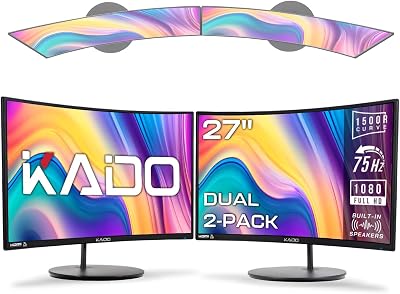
Kado Dual 27″ Curved 2-Pack
This bundled pair of 27-inch curved 1500R FHD panels is purpose-built for a dual setup, arriving matched for color and refresh. The gentle curve adds immersion while keeping the array cohesive.
Kado Triple 27″ 3-Pack
For an instant three-screen workspace, this Kado trio of 27-inch FHD panels takes the guesswork out of matching. It is an easy way to build a wide, uniform productivity or sim-racing array.
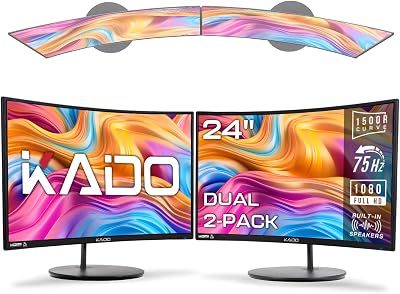
Kado Dual 24″ Curved 2-Pack
The 24-inch version of Kado’s curved dual bundle suits smaller desks while still delivering a matched, immersive two-panel setup at an accessible price.
screenbuddy Magnetic 2-Pack
This clever magnetic-connection set is designed to join to your existing screens, making it a flexible way to expand a setup without a full monitor arm rig.
Vixtan 14″ Triple Laptop Extender
For a portable multi-screen setup, the Vixtan lightweight triple extender clips to a laptop, adding two FHD panels for multitasking on the move rather than at a fixed desk.
Related Guides
- Best Crt Gaming Monitor (2026)
- Best 4K Gaming Monitor For Xbox Series X (2026)
- Best Monitors For Multi Monitor Setup (2026)
- Notebook Second Monitor (2026)
- Black Friday 4K Monitor (2026)
Frequently Asked Questions
Should I buy matched monitors for a multi-monitor setup?
Yes, whenever possible. Matched panels or bundled sets like the Kado pairs ensure consistent color, brightness, and refresh rate, which makes moving windows between screens look seamless.
Do I need VESA mounts for multiple monitors?
Not strictly, but VESA-compatible monitors let you use arms to align screens precisely, angle them toward you, and free up desk space, which greatly improves a multi-monitor setup.
Are curved monitors good for multi-monitor setups?
Curved panels can wrap around you for an immersive array, as with the Kado curved bundles. For work requiring precise alignment across screens, some users prefer flat panels, so it comes down to your use case.
Can I build a multi-monitor setup with a laptop?
Yes. Portable triple extenders like the Vixtan clip to your laptop and add two screens, giving you a multi-monitor workspace anywhere without needing a desk full of standalone monitors.
Final Thoughts
For most people building a fixed workspace, a matched bundle like the Kado Dual 27″ Curved 2-Pack or the Kado Triple 27″ 3-Pack is the easiest path to a cohesive, immersive array. If you want to expand an existing setup flexibly, the screenbuddy magnetic set is worth a look, while the Vixtan triple extender is the pick for a portable, laptop-based multi-monitor solution.