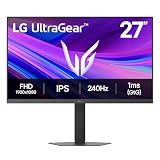
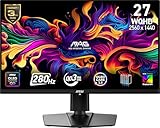
- Top Pick: msi, MAG 272QP QD-OLED X50, 27-Inch, WQHD, 2560×1440, Gaming Monitor, Quantum Dot OLED Panel, 500Hz, 0.03ms, DisplayHDR True Black 500, HDMI 2.1, DP 1.4a, USB C (15WPD), Tilt/Height Adjustable, Black
- Best Value: msi MPG 321URX QD-OLED, 32" 4K UHD Quantum Dot OLED Gaming Monitor, 3840 x 2160, 0.03ms, 240Hz, True Black HDR 400, 90W USB Type C, HDMI, DP Port
- Premium Choice: INNOCN 27" QD-OLED 1440P 500Hz Gaming Monitor, G-SYNC Compatible, GA27M1Q
MSI has become one of the most aggressive players in the QD-OLED gaming monitor space, and its latest 500Hz panels represent the bleeding edge of what a display can do. By marrying Samsung’s Quantum Dot OLED technology to blistering refresh rates, these monitors deliver the holy grail combination competitive players crave: gorgeous color, perfect blacks, and motion so smooth it feels unfair.
This review examines MSI’s QD-OLED gaming lineup, anchored by the 500Hz MAG 272QP QD-OLED X50 and spanning 4K, 360Hz, and 280Hz siblings. We will explain what a 500Hz refresh rate genuinely delivers and help you find the MSI panel that matches your GPU, resolution, and gaming style.
As an Amazon Associate we earn from qualifying purchases at no extra cost to you. Product prices and availability are accurate as of the date shown and are subject to change.






🎮 Get More From Your Setup — Free
Prime Gaming gives you free PC games every month, in-game loot, and a free Twitch channel sub — plus fast free shipping on all the gear above. New members get a 30-day free trial.
Watch: Msi Qd-oled Gaming Monitors 500hz: Review & Buyer’s Guide — Video Review
Design & Build
MSI’s QD-OLED monitors share a sleek, gamer-focused aesthetic with slim bezels, height-adjustable stands, and thoughtful connectivity. The flagship MAG 272QP QD-OLED X50 is a 27-inch WQHD panel running at 500Hz, with HDMI 2.1, DisplayPort 1.4a, and USB-C with 15W power delivery. Its siblings, the MPG 271QRX at 360Hz and the MAG 271QP X28 at 280Hz, share the same 27-inch QHD form factor and clean industrial design, while the larger MPG 321URX jumps to a 32-inch 4K panel. All feature the tilt and height adjustment serious players expect, plus USB Type-C convenience that reduces cable clutter on a busy desk.
Performance
The defining trait across this lineup is QD-OLED’s combination of true-black HDR, 0.03ms response times, and rich color, but refresh rate sets the tiers apart. The MAG 272QP X50 at 500Hz is the motion-clarity champion, rendering fast-paced shooters with a fluidity that only the fastest panels achieve. The MPG 271QRX and MAG 271QPX at 360Hz strike a superb balance of speed and drivability for high-end competitive play, while the MAG 271QP X28 at 280Hz offers excellent value for players who want QD-OLED without needing the absolute peak. For creators and immersive gamers, the MPG 321URX 4K at 240Hz trades ultimate refresh for stunning resolution. The INNOCN GA27M1Q also appears as a 500Hz alternative worth noting.
Pros & Cons
- Exceptional motion clarity up to 500Hz on the MAG 272QP X50.
- QD-OLED color and contrast with true-black HDR across the range.
- 0.03ms response time that eliminates smearing entirely.
- Versatile connectivity including HDMI 2.1 and USB-C power delivery.
- Very high GPU demands to reach 500Hz at QHD.
- Premium pricing typical of cutting-edge QD-OLED panels.
Alternatives to Consider
If your system cannot feed 500Hz, the 360Hz MPG 271QRX or MAG 271QPX deliver nearly all the QD-OLED magic with a more attainable frame-rate target, and the 280Hz MAG 271QP X28 offers the best value entry. Players who prioritize resolution and immersive single-player experiences should look at the 32-inch 4K MPG 321URX instead. The INNOCN GA27M1Q is a compelling non-MSI option if you want 500Hz at a potentially lower price.
Frequently Asked Questions
Do I need a 500Hz monitor?
Only dedicated competitive players will fully exploit 500Hz. For most gamers, the 280Hz or 360Hz MSI QD-OLED models already feel extraordinarily smooth and are easier to drive.
What GPU do I need for the 500Hz MAG 272QP?
Reaching 500Hz at QHD demands a very powerful graphics card, particularly in demanding titles. Esports games at optimized settings are much easier to push to those frame rates.
Is QD-OLED prone to burn-in?
MSI includes OLED care features that make burn-in unlikely with normal mixed usage. Varying content and using built-in panel maintenance routines further protects longevity.
Should I choose the 4K MPG 321URX or a 500Hz QHD model?
Choose the 4K 321URX for resolution and immersive visuals, or a 500Hz QHD panel like the MAG 272QP X50 for maximum competitive motion clarity. It comes down to your priorities.
Verdict
For competitive players chasing the fastest QD-OLED experience, the MSI MAG 272QP QD-OLED X50 at 500Hz is the crown jewel of this lineup. Most gamers, however, will be delighted with the 360Hz MPG 271QRX or the value-focused 280Hz MAG 271QP X28. And if resolution matters more than raw speed, the 4K MPG 321URX is superb. Match the panel to your GPU, and MSI’s QD-OLED range rarely disappoints.