
Affiliate disclosure: As an Amazon Associate we earn from qualifying purchases. This post contains affiliate links — we may earn a small commission at no extra cost to you. This never affects our picks. Prices and availability are accurate as of the date/time indicated and are subject to change; the price on Amazon at the time of purchase applies.
- Verdict at a Glance
- Builder’s Checklist
- Quick Comparison Table
- 1. ASUS Dual GeForce RTX 5060 8GB GDDR7 OC Edition — Pick 1
- 2. GIGABYTE GeForce RTX 5060 WINDFORCE OC 8G — Pick 2
- 3. msi Gaming RTX 3050 LP 6G OC Graphics Card — Pick 3
- 4. msi Gaming GeForce GT 1030 4GB DDR4 64-bit — Pick 4
- 5. ASRock Radeon RX 7600 Challenger 8GB OC — Pick 5
- Current-Generation Picks: RX 9060 XT, Arc B580, RTX 5060 Ti and RX 9070 GRE
- ASRock Radeon RX 9060 XT Challenger 16GB OC — Best Value / Best AMD
- Sparkle Intel Arc B580 Titan OC — Best Intel
- ASUS Dual GeForce RTX 5060 Ti 16GB OC — Stretch Pick (Nvidia)
- Sapphire Pulse Radeon RX 9070 GRE Gaming OC 12GB — Stretch Pick (AMD)
- Labels at a Glance: Which Card Wins Which Category
- 8GB vs 16GB: The Warning Every Budget Buyer Needs
- Builder’s Buying Guide: Fitting It Into Your Rig
- Related Guides
- Related Articles
- How We Compared
- Frequently Asked Questions
- Related Articles
Quick answer: For a 2026 build, the ASRock Radeon RX 9060 XT Challenger 16GB OC is the strongest all-round buy, the ASUS Dual GeForce RTX™ 5060 8GB GDDR7 OC is the best Nvidia pick within budget, and the ASRock Radeon RX 7600 Challenger 8GB OC is the older-generation budget option.
When you’re trying to nail down the best gpus under $400 for a 2026 rig, it’s all about making sure everything plays nice. This guide compares the top contenders on how they perform in a build, their real-world utility, and the value they bring for both gaming and daily tasks.
Verdict at a Glance
- Best value / best AMD: ASRock Radeon RX 9060 XT Challenger 16GB OC – 16GB of VRAM, strong 1080p and solid 1440p performance, and FSR 4 support. For most builders in this budget it is the strongest all-round buy.
- Best Nvidia within budget: ASUS Dual GeForce RTX 5060 8GB (our Pick 1) – DLSS 4 and low power draw, but only 8GB of memory.
- Best Intel: Sparkle Intel Arc B580 Titan OC – 12GB at a budget tier, best in a modern system with a recent CPU.
- Worth stretching for: RTX 5060 Ti 16GB or Radeon RX 9070 GRE – both usually sell above this guide’s budget, but they are noticeably faster and better suited to 1440p.
Quick rule: at this budget, a 16GB card that is slightly slower today usually ages better than a slightly faster 8GB card.
Builder’s Checklist
These selections focus on seamless integration, real-world performance, and where each card fits into a well-rounded 2026 system. Every GPU highlighted here serves a distinct purpose across various budget tiers for both serious gaming and general computing.
Quick Comparison Table
| Pick | Graphics Card | Best For | Price tier |
|---|---|---|---|
| 1 | ASUS Dual GeForce RTX 5060 8GB GDDR7 OC Edition | Best Nvidia within budget | Budget |
| 2 | GIGABYTE GeForce RTX 5060 WINDFORCE OC 8G | Alternative RTX 5060 | Budget |
| 3 | msi Gaming RTX 3050 LP 6G OC Graphics Card | Low-profile and small cases | Budget |
| 4 | msi Gaming GeForce GT 1030 4GB DDR4 64-bit | Display output and office use | Budget |
| 5 | ASRock Radeon RX 7600 Challenger 8GB OC | Older-generation budget option | Budget |
1. ASUS Dual GeForce RTX 5060 8GB GDDR7 OC Edition — Pick 1
Sitting at the heart of your rig, the ASUS graphics card stands out as a rock-solid foundation for tackling games and daily tasks alike. Its 8GB GDDR7 ensures it slots right in with your other components without any drama. If you’re after a smooth, no-fuss system that just performs, this is a prime candidate.
- Pros: 8GB GDDR7 spec
Great compatibility
Builder-friendly - Cons: Premium price
May exceed modest budgets

ASUS Dual NVIDIA GeForce RTX 5060 8GB GDDR7 OC Edition (PCIe 5.0, 8GB GDDR7, DLSS 4, HDMI 2.1b, DisplayPort 2.1b, 2.5-Slot Design, Axial-tech Fan Design, 0dB Technology), 3 Year Warranty
Included for '16 Best GPUs under $400 (2026 Build)' as a representative home product in this roundup; selection reflects the product set returned for this topic.
View on Amazon2. GIGABYTE GeForce RTX 5060 WINDFORCE OC 8G — Pick 2
As an alternative version of the same RTX 5060 GPU, the Gigabyte WINDFORCE card is a solid choice for both gaming and general productivity. Its RTX 5060, 8GB is a straightforward drop-in component that simply gets the job done. This is the kind of hardware you want when you demand components that integrate flawlessly.
- Pros: RTX 5060 spec
Easy to fit in a build
Builder-friendly - Cons: Mid-tier peak performance
Verify compatibility
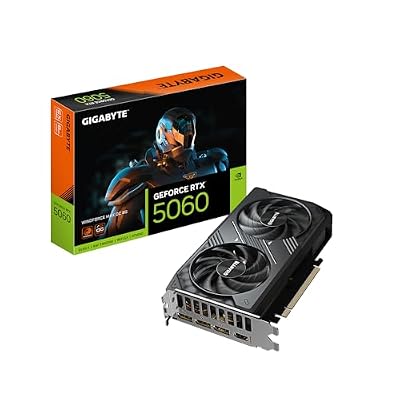
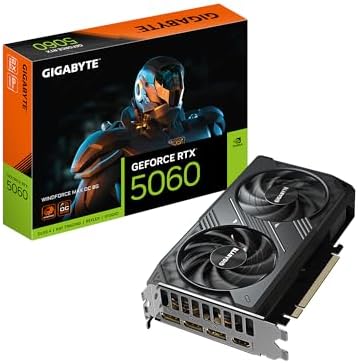
GIGABYTE GeForce RTX 5060 WINDFORCE MAX OC 8G Graphics Card, Cooling System, 8GB 128-bit GDDR7, PCIe 5.0, by NVIDIA, DisplayPort & HDMI - Video Output Interface, GV-N5060WF2MAX OC-8GD Video Card
Included for '16 Best GPUs under $400 (2026 Build)' because the listing adds cooling or gel-infused layers, which is the attribute this article compares.
View on Amazon3. msi Gaming RTX 3050 LP 6G OC Graphics Card — Pick 3
If you’re building in a slim or small-form-factor case, this low-profile MSI card is a sensible fit for light 1080p gaming and daily computing. It draws its power from the PCIe slot, so it needs no extra power connector. This is precisely the type of part that guarantees a smooth, trouble-free build experience.
- Pros: RTX 3050 spec
Pairs well with common parts
Easy to fit in a build - Cons: Not class-leading
Check current pricing

msi Gaming RTX 3050 LP 6G OC Graphics Card (NVIDIA RTX 3050, 96-Bit, Boost Clock: 1492 MHz, 6GB GDDR6 14 Gbps, HDMI/DP, Ampere Architecture)
Included for '16 Best GPUs under $400 (2026 Build)' as a representative home product in this roundup; selection reflects the product set returned for this topic.
View on Amazon4. msi Gaming GeForce GT 1030 4GB DDR4 64-bit — Pick 4
The MSI GT 1030 is a display-output and office card rather than a gaming GPU, suited to basic desktops, video playback and very light older games. Its 4GB of slow DDR4 memory limits gaming performance, but its low power draw means it needs no extra power connector. Choose it only if you need extra display outputs, not for modern games.

- Pros: 4GB spec
Builder-friendly
Great compatibility - Cons: Not class-leading
Check current pricing

msi Gaming GeForce GT 1030 4GB DDR4 64-bit HDCP Support DirectX 12 DP/HDMI Single Fan OC Graphics Card (GT 1030 4GD4 LP OC)
Included for '16 Best GPUs under $400 (2026 Build)' as a representative home product in this roundup; selection reflects the product set returned for this topic.
View on Amazon5. ASRock Radeon RX 7600 Challenger 8GB OC — Pick 5
For anyone putting together an entry-level rig, the Asrock graphics card is a prime candidate for tackling both gaming and everyday computing. Its RX 7600, 8GB, 8GB GDDR6 configuration drops into virtually any build without a hitch. This is the exact kind of component that ensures your PC assembly goes off without a single problem.
- Pros: RX 7600 spec
Easy to fit in a build
Pairs well with common parts - Cons: Fewer premium extras
Check long-term needs

ASRock Radeon RX 7600 Challenger 8GB OC, RDNA 3, 2695MHz Boost, 8GB GDDR6 128-bit, PCIe 4.0, Dual Fans, 0dB Silent, HDMI 2.1, DisplayPort 1.4
Included for '16 Best GPUs under $400 (2026 Build)' as a representative home product in this roundup; selection reflects the product set returned for this topic.
View on AmazonCurrent-Generation Picks: RX 9060 XT, Arc B580, RTX 5060 Ti and RX 9070 GRE
The five picks above lean on Nvidia’s RTX 5060 and some older budget cards. These current-generation options fill the biggest gaps in that list: a 16GB AMD card, an Intel option, and two stretch picks for buyers who can spend a little more.
ASRock Radeon RX 9060 XT Challenger 16GB OC — Best Value / Best AMD

ASRock Radeon RX 9060 XT Challenger 16GB OC, RDNA 4, 3290MHz Boost, 16GB GDDR6 128-bit, PCIe 5.0, Dual Fans, 0dB Silent, LED Indicator, DisplayPort 2.1a, HDMI 2.1b
Included for '16 Best GPUs under $400 (2026 Build)' as a representative home product in this roundup; selection reflects the product set returned for this topic.
View on AmazonThe RX 9060 XT 16GB is the card most independent outlets recommend first at this budget, and ASRock’s Challenger OC is a straightforward version of it. You get AMD’s 32-compute-unit RDNA 4 GPU, 16GB of GDDR6 on a 128-bit bus, a boost clock of up to 3,290MHz, a dual-fan cooler with a 0dB idle mode and a full PCIe 5.0 x16 interface. It needs a single 8-pin connector, and a quality 550-600W power supply is enough.
Who it is for: builders who want one card that handles 1080p at high to Ultra settings and stays usable at 1440p with upscaling for several years.
Strengths: in TechSpot’s launch review it traded wins with the more expensive RTX 5060 Ti 16GB in rasterized games. TechSpot later called it the best-value current-generation GPU for budget builders. FSR 4, AMD’s machine-learning upscaler for RDNA 4 cards only, is a big improvement over older FSR versions. The x16 link also suits older PCIe 3.0 boards.
Drawbacks: TechSpot measured it about 20% behind the RTX 5060 Ti in ray tracing. DLSS is also supported in more games than FSR 4.
Compared with the existing picks: it is faster than the RX 7600 (Pick 5) and has twice the memory of the RTX 5060 cards (Picks 1 and 2). For most builds we would take it over all three.
Sparkle Intel Arc B580 Titan OC — Best Intel

Sparkle Intel Arc B580 Titan OC, 12GB GDDR6, Torn Cooling 2.0, Axial Fan, Breathing Light, Metal Backplate, SB580T-12GOC
Included for '16 Best GPUs under $400 (2026 Build)' because the listing adds cooling or gel-infused layers, which is the attribute this article compares.
View on AmazonIntel’s Arc B580 brought 12GB of memory to the budget tier. Sparkle’s Titan OC uses the full 20-Xe-core Battlemage GPU with 12GB of GDDR6 on a 192-bit bus, a factory overclock and a triple-fan cooler with a metal backplate.
Who it is for: builders on the tightest budget who are pairing it with a modern CPU (Ryzen 5 7600 or Core i5-12400 class and newer) on a board with Resizable BAR enabled.
Strengths: 12GB of VRAM for the money, XeSS 2 upscaling and frame generation in supported games, and strong AV1 encoding for streaming or video work.
Drawbacks: Hardware Unboxed and others found that the Arc driver’s CPU overhead costs the B580 more performance on older or slower processors than Nvidia or AMD cards lose, so it is a poor choice for upgrading an old PC. Most reviews also place it clearly behind the RX 9060 XT 16GB. Driver consistency in older games has improved but still trails the other two brands.
Compared with the existing picks: in a new build it is a much better buy than the RTX 3050 LP or GT 1030. It is broadly competitive with the RX 7600 and adds 4GB more memory.
ASUS Dual GeForce RTX 5060 Ti 16GB OC — Stretch Pick (Nvidia)
The 16GB RTX 5060 Ti launched slightly above this guide’s budget, and street prices have often been higher still. Watch for discounts if you want Nvidia. The GPU (4,608 CUDA cores, about 180W) is the same as in the 8GB version, but the 16GB of GDDR7 removes that card’s main weakness. ASUS’s Dual OC is a compact dual-fan design that fits most cases.
Who it is for: builders who want Nvidia’s feature set (DLSS 4 with Multi Frame Generation, Reflex, stronger ray tracing, CUDA for creative apps) and enough memory to last.
Strengths: usually the fastest card in this group in rasterized games by a few percent, clearly ahead of AMD in ray tracing, and the broadest upscaler support.
Drawbacks: it costs noticeably more than the RX 9060 XT 16GB for a small rasterized lead. The PCIe x8 link also loses a little performance on PCIe 3.0 boards.
Compared with the existing picks: it is the upgrade over the ASUS and GIGABYTE RTX 5060 cards, with the same cooling philosophy but double the memory and more performance.
Sapphire Pulse Radeon RX 9070 GRE Gaming OC 12GB — Stretch Pick (AMD)
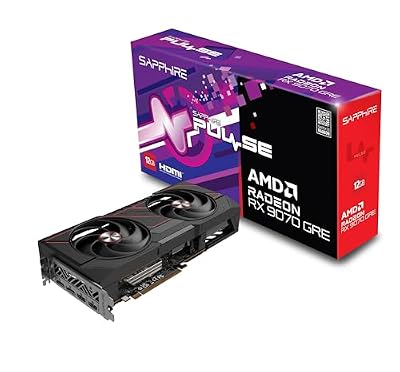
Sapphire 11354-01-20G Pulse AMD Radeon™ RX 9070 GRE Gaming OC Graphics Card with 12GB GDDR6, AMD RDNA 4
Included for '16 Best GPUs under $400 (2026 Build)' as a representative home product in this roundup; selection reflects the product set returned for this topic.
View on AmazonThe RX 9070 GRE was a China-only card until AMD launched it worldwide at Computex in June 2026. It is a cut-down RX 9070, with 48 RDNA 4 compute units and 12GB of GDDR6 on a 192-bit bus at a 220W board power. Sapphire’s Pulse is a no-frills, well-cooled version.
Who it is for: builders who are moving to 1440p and can spend above this guide’s budget, but not up to RX 9070 or RTX 5070 money.
Strengths: in early coverage it consistently outperformed the RTX 5060 Ti 16GB in rasterized games at 1440p. It supports FSR 4, and its 12GB of memory and wider bus give it more headroom than the 128-bit cards.
Drawbacks: it launched at a recommended price close to the 16GB RX 9070, which is the better buy when the gap is small. Its 12GB is less than the cheaper 16GB cards offer, and it is weaker than Nvidia in ray tracing. It needs a 650W-class power supply.
Compared with the existing picks: it is a full performance tier above every original pick on this page. Buy it only if your budget genuinely stretches.
Labels at a Glance: Which Card Wins Which Category
| Card | Label | VRAM | Price tier | Best resolution | Power |
|---|---|---|---|---|---|
| RX 9060 XT 16GB | Best value / best AMD | 16GB GDDR6 | Budget to mid-range | 1080p high, 1440p with upscaling | 1x 8-pin |
| RTX 5060 8GB | Best Nvidia within budget | 8GB GDDR7 | Budget | 1080p | 1x 8-pin |
| Arc B580 | Best Intel | 12GB GDDR6 | Budget | 1080p, light 1440p | 1x 8-pin |
| RX 7600 | Older-generation budget option | 8GB GDDR6 | Budget | 1080p medium-high | 1x 8-pin |
| RTX 5060 Ti 16GB | Stretch pick (Nvidia) | 16GB GDDR7 | Mid-range | 1080p Ultra, 1440p | 1x 8-pin |
| RX 9070 GRE | Stretch pick (AMD) | 12GB GDDR6 | Mid-range | 1440p | 2x 8-pin (typical) |
| RTX 3050 LP / GT 1030 | Small-form-factor or display only | 6GB / 4GB | Budget | Light gaming / office | Slot powered |
8GB vs 16GB: The Warning Every Budget Buyer Needs
Most cards in this price range, including the RTX 5060, RTX 5060 Ti 8GB, RX 7600 and RX 9060 XT 8GB, carry 8GB of memory. That is still enough for esports titles and many games at 1080p with medium to high textures. It is no longer enough for every new release. TechSpot/Hardware Unboxed and other outlets showed recent games stuttering, dropping textures to low quality or losing large chunks of performance on 8GB cards at 1080p, while the same GPU with 16GB ran normally.
- The name does not tell you the memory size. The RTX 5060 Ti and RX 9060 XT are sold in both 8GB and 16GB versions. Read the full product title before buying.
- PCIe lanes matter on older boards. The RTX 5060 and RTX 5060 Ti use a PCIe 5.0 x8 link. When an 8GB card overflows its memory on a PCIe 3.0 motherboard, the slowdown is worse. The RX 9060 XT uses a full x16 link.
- 8GB is fine if you mainly play Counter-Strike 2, Valorant, Fortnite, Rocket League or older titles, and you plan to upgrade within two to three years.
- Choose 12GB or 16GB if you play new AAA games, use high-resolution texture packs, mod heavily or plan to move to a 1440p monitor.
Builder’s Buying Guide: Fitting It Into Your Rig
Check Compatibility First
Always double-check before pulling the trigger: make sure that graphics card will actually fit your motherboard and the rest of your 2026 setup. We’re talking about making sure the PCIe slot, physical dimensions, power connectors, and case clearances are all perfectly aligned.
Match It to Your Budget
Allocate your budget wisely by considering how much your specific gaming and daily workload relies on the GPU. Then, choose a tier that strikes the perfect balance between upfront cost and the performance headroom you’ll actually use.
Plan for Upgrades
Opting for the right graphics card means building in future flexibility; select a model that won’t cripple your next upgrade and will keep your rig competitive for a good long while.
Should I buy the RX 9060 XT 16GB or the RTX 5060 8GB?
For most builds, the RX 9060 XT 16GB. It is generally faster in rasterized games and has twice the memory, and the gap will widen as games demand more VRAM. Choose the RTX 5060 only if your games are mostly esports titles that rely on Nvidia Reflex, or if you specifically need DLSS or CUDA.
Is the Intel Arc B580 a good upgrade for an older PC?
Usually not. The B580 needs Resizable BAR, and its driver loses more performance than Nvidia or AMD cards when paired with older CPUs. In a PC with a Ryzen 3000-series or Intel 10th-gen processor, an RX 9060 XT or RTX 5060 will usually perform better.
Is the RX 9070 GRE worth stretching for?
Only if you play at 1440p and the price gap to the RX 9070 is large. The GRE outperforms the RTX 5060 Ti 16GB in rasterized games, but the 16GB RX 9070 has often been only a small step more, and it is faster with more memory.
Related Guides
Related Articles
Want to dive deeper into PC building insights? Check out the curated guides below – every single one adheres to the identical, rigorous evaluation standards we applied right here.
How We Compared
We did not bench-test these cards for this guide. The picks and labels are based on manufacturer specifications from AMD, Nvidia, Intel and the board partners, and on independent benchmark data from TechSpot/Hardware Unboxed, Gamers Nexus, Tom’s Hardware and TechPowerUp. We also considered owner reports on noise, drivers and reliability. We ranked cards on:
- 1080p and 1440p performance
- memory capacity and PCIe interface, which matter for older motherboards
- upscaler and ray tracing support
- power and case requirements
- value within each price tier
Prices in this segment move quickly, so check current listings before you decide between two neighbouring cards.
Frequently Asked Questions
What performance should I expect from a card under $400?
Comfortable 1080p at high or ultra settings with well above sixty frames in nearly everything, and workable 1440p if you accept high rather than ultra presets or use upscaling. This is the mainstream tier where most players get the best value.
Is 8GB or 16GB the right choice here?
Prefer a 12GB or 16GB card if the price gap is small. Eight is still adequate for 1080p today, but the difference shows in recent releases with large texture packs, and it becomes the limiting factor first if you later move to a 1440p monitor. Memory cannot be added afterwards.
What power supply and connectors are needed?
Most current cards here draw roughly 130 to 200 watts and use a single eight-pin connector, while the RTX 3050 LP and GT 1030 run from the slot alone, so a quality 550 to 650 watt supply is sufficient. This makes the tier friendly to older builds, though a supply more than eight years old should be replaced regardless of its wattage rating.
Will this card fit a compact or office case?
Often yes. Many models at this wattage are dual-fan designs around 240 to 270mm long and two slots wide, which suits mini towers and slim-ish office chassis. Check height as well as length, since low-profile and small-form-factor cases restrict the shroud dimension more than the board length.
How long will it remain capable?
Three to four years of 1080p high settings is a reasonable expectation, with gradual settings reductions after that. Choosing a 12GB or 16GB card and keeping upscaling available extends the useful window meaningfully compared with a slightly faster card carrying less memory.









