
A best $900 gaming PC build sits at the sweet spot where you get genuinely smooth 1080p gameplay with room to push into 1440p on a wide range of titles. At this budget tier, the goal is to pair a modern multi-core processor with a capable discrete GPU, then trim corners on storage and peripherals without bottlenecking frame rates. The challenge is component pricing volatility—street prices on parts like GPUs and RAM can swing well above MSRP, meaning a build that hits $900 in one week may cost noticeably more the next. This guide covers two builds: an Intel Core i5-14400F build on cheaper DDR4 memory that lands closest to $900, and a longer-lasting AM5 platform centered on a Radeon RX 7600 and Ryzen 5 9600X, a pairing with strong CPU headroom for competitive titles and solid GPU throughput for AAA releases at High settings. The AM5 list usually costs more than $900 at 2026 memory prices, so we also note the swaps that bring its total down toward a realistic $900 ceiling.
- Top Picks at a Glance
- Parts List
- Cheaper Swaps That Bring the Build Closer to $900
- The Best $900 Gaming PC Build That Fits the Budget in 2026: Intel DDR4 Version
- What the Best $900 Gaming PC Build Costs: Intel DDR4 Price Ranges
- RX 7600 vs Arc B580 vs RTX 5060 vs RX 9060 XT: Which GPU Fits a $900 Build?
- Best $900 Gaming PC Build by Priority
- Core i5-14400F vs Ryzen 5 9600X: Which CPU Fits a $900 Gaming PC?
- Compatibility Check
- Realistic Budget Breakdown in 2026
- Assembly Order and First-Boot Checklist
- Expected Performance
- Upgrade Path
- Don’t Forget the Extras: Windows, Monitor and Peripherals
- Build It or Buy a Prebuilt at This Price?
- How We Chose These Parts
- FAQ
- Sources and Methodology
Updated October 2026 — Quick answer: The best $900 gaming PC build in October 2026 is an Intel Core i5-14400F on a B760 DDR4 board with 16GB of DDR4-3600, a 1TB Gen4 SSD, a 650W power supply and an 8GB-to-12GB graphics card such as the Radeon RX 7600 or Intel Arc B580.
Top Picks at a Glance
- Best CPU that fits $900: Intel Core i5-14400F — 10 cores and a bundled cooler, on cheaper DDR4 boards.
- Best CPU for upgrades: AMD Ryzen 5 9600X — AM5 platform with future CPU drop-ins.
- Best value GPU: ASRock Radeon RX 7600 Challenger 8GB OC — the same RX 7600 performance with a 0dB fan-stop mode at an entry-level price.
- Best GPU for VRAM: Sparkle Intel Arc B580 Titan OC 12GB.
- Best GPU if you can stretch: GIGABYTE Radeon RX 9060 XT Gaming OC 8G — RDNA 4 with FSR 4.
- Best budget memory: G.SKILL Ripjaws V DDR4-3600 16GB (2x8GB).
- Best case: NZXT H5 Flow.
Put simply, the three parts that make a real $900 build work this year are the Intel Core i5-14400F, the MSI PRO B760M-P DDR4 motherboard and the ASRock Radeon RX 7600 Challenger 8GB OC. Everything else is about keeping memory and storage costs in check.
Parts List
| Part | Model | Approx. Price | Why |
|---|---|---|---|
| CPU | AMD Ryzen 5 9600X 6-Core, 12-Thread Unlocked Desktop Processor | Check price | Modern Zen 5 IPC at an accessible price point |
| GPU | Radeon RX 7600 MECH 2X Classic 8G OC | Varies | Best raw rasterization value on the Radeon RDNA 3 lineup for 1080p |
| Motherboard | MSI PRO B650M-A WiFi V1 Micro-ATX | Check price | AM5 socket with WiFi, 2.5G LAN, and solid VRM for a 65W TDP chip |
| RAM | Kingston FURY Beast White RGB 32GB 6000MT/s CL36 DDR5 EXPO (Single Module) | Volatile; see the budget breakdown below | AMD EXPO certified at 6000 MT/s, matching the B650 sweet spot |
| Storage | WD_Black SN7100 1TB NVMe SSD Gen4 | Check price | Fast sequential speeds for OS and game library |
| PSU | CORSAIR CX650 650W | Check price | 80 Plus Bronze rated, sufficient headroom for this configuration |
AMD Ryzen 5 9600X
The Ryzen 5 9600X is the value anchor of this build. Six Zen 5 cores at up to 5.4 GHz boost deliver excellent single-thread and lightly-threaded performance, which is exactly what games need most. Compared to older Ryzen 5 parts, the IPC uplift is meaningful in titles that stress CPU clocks. It also unlocks the AM5 platform, meaning future drop-in CPU upgrades remain available. If you want to cut cost, the Ryzen 5 7600 provides roughly 90% of the gaming performance for less money, though you lose a small generational edge.

AMD Ryzen™ 5 9600X 6-Core, 12-Thread Unlocked Desktop Processor
Included for 'Best $900 Gaming PC Build in 2026: Full Parts List and Expected FPS' as a representative home product in this roundup; selection reflects the product set returned for this topic.
View on Amazon
Radeon RX 7600 MECH 2X Classic 8G OC
Included for 'Best $900 Gaming PC Build in 2026: Full Parts List and Expected FPS' as a representative home product in this roundup; selection reflects the product set returned for this topic.
View on Amazon
MSI PRO B650M-A WiFi V1 Motherboard, Micro-ATX - Supports AMD Ryzen 9000/8000 / 7000 Series Processors, AM5 - DDR5 Memory Boost 6000+MHz/OC, 2 x PCIe 4.0 x16, 2 x M.2 Gen4, 2.5G LAN
Included for 'Best $900 Gaming PC Build in 2026: Full Parts List and Expected FPS' as a representative home product in this roundup; selection reflects the product set returned for this topic.
View on Amazon
Kingston FURY Beast White RGB 32GB 6000MT/s CL36 DDR5 EXPO DIMM | Infrared Syncing | FURY CTRL Software | Overclocking | AMD EXPO | Single Module | KF560C36BWEA-32
Included for 'Best $900 Gaming PC Build in 2026: Full Parts List and Expected FPS' as a representative home product in this roundup; selection reflects the product set returned for this topic.
View on Amazon
WD_Black SN7100 1TB NVMe SSD - Gen4 PCIe, M.2 2280, Up to 7,250 MB/s Read Speed, Up to 6,900 MB/s Write Speed, Next Gen TLC 3D NAND, for Laptops, Handheld Gaming Devices - WDS100T4X0E
Included for 'Best $900 Gaming PC Build in 2026: Full Parts List and Expected FPS' as a representative home product in this roundup; selection reflects the product set returned for this topic.
View on Amazon
CORSAIR CX650 Small 650W Power Supply – Black | Low-Noise, Non-Modular, 80 PLUS Bronze, NA
Included for 'Best $900 Gaming PC Build in 2026: Full Parts List and Expected FPS' as a representative home product in this roundup; selection reflects the product set returned for this topic.
View on AmazonRadeon RX 7600 MECH 2X Classic 8G OC
This is the component that defines whether the build actually hits the $900 target or blows past it. Prices move, so check the current price before buying, and consider the ASRock option covered below if you want a fan-stop mode. The RX 7600 itself is a competent 1080p card with 8 GB of VRAM, hardware ray tracing, and FSR 3 frame generation support. The MECH 2X Classic OC variant runs quiet with a dual-fan cooler and fits in compact cases. Staying in the RX 7600 price tier, rather than stepping up to a pricier card, is the fastest route toward a realistic $900 total.
MSI PRO B650M-A WiFi V1
Micro-ATX boards in this range have improved dramatically. The PRO B650M-A offers a Duet Rail VRM that is more than enough for a 65W Ryzen 5 9600X, onboard Wi-Fi 6E, a 2.5G Ethernet port, and two M.2 Gen4 slots for future storage expansion. The rear I/O covers USB-C and multiple USB-A ports. If you want additional PCIe lanes or a larger form factor for multi-GPU or capture card use, step up to a B650 ATX board like the MSI B650 Gaming Plus WiFi. For this build, however, the micro-ATX footprint keeps case costs lower and the WiFi eliminates a networking purchase.
Kingston FURY Beast White RGB 32GB 6000MT/s DDR5 EXPO
This listing is a single 32 GB module at an inflated street price. For a $900-class build, we recommend swapping to a matched 2×16 GB kit at 6000 MT/s CL36 from the same Kingston line or G.Skill Flare X5; the budget breakdown below shows the 2026 price range. Dual-channel operation is important on AM5 and a single stick halves your memory bandwidth. If you prefer to keep the RGB aesthetic, a 2×16 GB FURY Beast RGB kit in black is more typical. The 6000 MT/s speed is the documented sweet spot for Ryzen 9000, giving a small but measurable FPS gain over 5200 MT/s modules.
WD_Black SN7100 1TB NVMe
Sequential reads up to 7,250 MB/s and writes up to 6,900 MB/s put this drive among the faster Gen4 consumer SSDs. In practice, game load times benefit most from random 4K read performance, and the SN7100 scores well there. One terabyte is enough for a handful of large titles alongside your operating system. For pure gaming, the speed gap between top-tier Gen4 and budget Gen4 drives is narrow.
CORSAIR CX650 650W PSU
A 650W unit provides comfortable headroom for this configuration, which draws roughly 350–400W under combined gaming load. The CX series is 80 Plus Bronze certified with non-modular cabling. It is not a premium platform, but for a mid-range build it is adequate. If you plan a future GPU upgrade to something like an RX 7900 GRE, consider a 750W 80 Plus Gold unit for cleaner power delivery and modularity.
NZXT H5 Flow Case — Best for Airflow and Easy Cable Routing
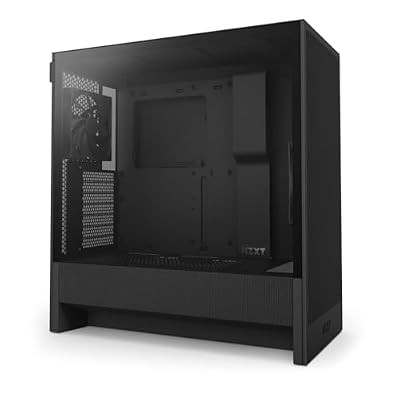
NZXT H5 Flow - Compact ATX Mid-Tower PC Case - Black | Compact mid-tower with 2 included 120mm fans, 360mm front radiator support, and tempered glass. A great first airflow build.
Included for 'Best $900 Gaming PC Build in 2026: Full Parts List and Expected FPS' as a representative home product in this roundup; selection reflects the product set returned for this topic.
View on AmazonThe parts list above covers the core components, but every build still needs a case and, ideally, a better CPU cooler. The NZXT H5 Flow is a compact ATX mid-tower that happily takes the micro-ATX MSI PRO B650M-A, and its perforated front panel feeds cool air straight to the GPU, which matters more for frame-rate consistency than any other case feature at this budget. The interior is roomy enough for a dual-fan card like the MECH 2X with space to spare, and NZXT’s cable channels behind the motherboard tray make a clean first build much easier for beginners.
If every dollar counts, a basic micro-ATX case such as the Cooler Master Q300L costs far less and still works, but expect warmer temperatures and fewer cable-management conveniences.
- Pro: Mesh front panel prioritizes GPU and CPU airflow
- Pro: Tidy cable routing and a tool-light layout suit first-time builders
- Pro: Leaves room for a much longer graphics card on a future upgrade
- Con: Larger than a true micro-ATX tower, so it takes more desk space
- Con: Costs more than bare-bones budget cases that would keep the total lower
Thermalright Assassin X120 Refined SE — Best for Quiet Budget Cooling

Thermalright Assassin X120 Refined SE CPU Air Cooler, 4 Heat Pipes, TL-C12C PWM Fan, Aluminium Heatsink Cover, AGHP Technology, for AMD AM4/AM5/Intel LGA 1150/1151/1155/1200/1700/1851(AX120 R SE)
Included for 'Best $900 Gaming PC Build in 2026: Full Parts List and Expected FPS' as a representative home product in this roundup; selection reflects the product set returned for this topic.
View on AmazonRetail Ryzen 9000 X-series processors are generally sold without a bundled cooler, so check the box contents of the exact listing you order before assuming one is included. Even where a stock cooler is available, a small tower heatsink is the cheapest upgrade in this build that you will actually hear. The Assassin X120 Refined SE is a single-tower design with four heat pipes and one 120 mm PWM fan, which is comfortably enough for a 65W-class chip like the 9600X.
The main thing to confirm is height: single-tower coolers of this size fit almost every mid-tower, including the H5 Flow, but very slim cases may need a low-profile cooler instead.
- Pro: Keeps the 9600X cool under gaming loads without a loud fan curve
- Pro: One of the lowest-cost ways to make the whole PC noticeably quieter
- Con: Not the right choice if you later move to a 12- or 16-core Ryzen 9
- Con: Plain styling with no RGB lighting
Cheaper Swaps That Bring the Build Closer to $900
The biggest item pushing the AM5 parts list well past $900 is the single 32 GB memory module, and the graphics card is the next lever. The swaps below keep the same platform, the same performance targets and the same upgrade path while making the budget far more realistic. All prices in 2026 are volatile, especially for memory and graphics cards, so compare current listings before ordering.
| Part in the list | Suggested swap | What changes |
|---|---|---|
| Radeon RX 7600 MECH 2X Classic | ASRock RX 7600 Challenger 8GB OC | Same GPU and performance, plus a 0dB fan-stop mode, at a similar price |
| Radeon RX 7600 MECH 2X Classic | Intel Arc B580 12GB | More VRAM for similar or slightly higher spend |
| Radeon RX 7600 MECH 2X Classic | GeForce RTX 5060 8GB | Faster, with DLSS 4, at a higher price |
| Kingston FURY Beast 32GB single module | 32GB (2x16GB) DDR5-6000 kit | Dual-channel bandwidth and usually a lower price |
ASRock Radeon RX 7600 Challenger 8GB OC — Best RX 7600 With a 0dB Fan-Stop Mode

ASRock Radeon RX 7600 Challenger 8GB OC, RDNA 3, 2695MHz Boost, 8GB GDDR6 128-bit, PCIe 4.0, Dual Fans, 0dB Silent, HDMI 2.1, DisplayPort 1.4
Included for 'Best $900 Gaming PC Build in 2026: Full Parts List and Expected FPS' as a representative home product in this roundup; selection reflects the product set returned for this topic.
View on AmazonEvery RX 7600 uses the same Navi 33 chip with 8 GB of GDDR6, so the brand of the board partner matters far less than the price you pay. Performance is effectively identical, which means every FPS figure in the Expected Performance section still applies.
Keeping the GPU in this price tier is the simplest way to protect the $900 total. It still needs one 8-pin PCIe connector, and the 650W CX650 covers it with plenty of headroom.
- Pro: Same 1080p performance as the listed RX 7600 at a similar price
- Pro: Fans switch off at idle for a silent desktop
- Con: Still limited to 8 GB of VRAM
- Con: Dual-slot cooler is a little longer than compact single-fan cards
Sparkle Intel Arc B580 Titan OC 12GB — Best for Extra VRAM on a Budget

Sparkle Intel Arc B580 Titan OC, 12GB GDDR6, Torn Cooling 2.0, Axial Fan, Breathing Light, Metal Backplate, SB580T-12GOC
Included for 'Best $900 Gaming PC Build in 2026: Full Parts List and Expected FPS' because the listing adds cooling or gel-infused layers, which is the attribute this article compares.
View on AmazonIntel’s Arc B580 is the main answer to the 8 GB VRAM worry raised in the FAQ below. It carries 12 GB of GDDR6 and generally trades blows with or edges past the RX 7600 at 1080p, with a bigger advantage in texture-heavy games that overflow 8 GB.
Arc cards rely on Resizable BAR, which AMD calls Smart Access Memory. The B650 platform supports it, but you must confirm it is enabled in the BIOS, otherwise performance drops sharply. The fast Ryzen 5 9600X also helps, because Arc drivers lean more on the CPU than AMD or NVIDIA drivers do.
- Pro: 12 GB of VRAM gives more breathing room at High and Ultra textures
- Pro: Strong value for 1080p and entry-level 1440p
- Pro: Hardware AV1 encoding for streaming and recording
- Con: Resizable BAR must be enabled for good performance
- Con: Driver behavior in older DirectX 11 titles is less consistent than AMD or NVIDIA
GIGABYTE GeForce RTX 5060 Windforce OC 8G — Best for DLSS 4 and NVIDIA Features

GIGABYTE GeForce RTX 5060 WINDFORCE OC 8G Graphics Card, Cooling System, 8GB 128-bit GDDR7, PCIe 5.0, Manufactured by NVIDIA, DisplayPort & HDMI - Video Output Interface, GV-N5060WF2OC-8GD Video Card
Included for 'Best $900 Gaming PC Build in 2026: Full Parts List and Expected FPS' because the listing adds cooling or gel-infused layers, which is the attribute this article compares.
View on AmazonIf you prefer NVIDIA’s feature set, the RTX 5060 is the closest NVIDIA card to this budget. It uses 8 GB of fast GDDR7 and typically lands a step ahead of the RX 7600 in raw 1080p frame rates, with a larger lead in ray-traced games. DLSS 4 upscaling and multi-frame generation are the bigger draw, because they can lift demanding games into high-refresh territory at 1080p and make 1440p far more playable than the RX 7600 manages.
That is a stretch for a $900 build, so it makes the most sense if you are pairing it with a 2×16 GB memory kit and skipping RGB extras elsewhere.
- Pro: Faster than the RX 7600 in most games, especially with ray tracing
- Pro: DLSS 4 support and efficient power draw well within the CX650’s limits
- Con: Same 8 GB VRAM ceiling as the RX 7600
- Con: Costs noticeably more than the other swaps here
Patriot Viper Venom DDR5 32GB (2x16GB) 6000 CL30 — Best Dual-Channel Memory Fix

Patriot Viper Venom DDR5 RAM 32GB (2X16GB) 6000MHz CL30 Desktop Memory | Voltage: 1.35v; Supports Intel XMP and AMD EXPO; Module type: UDIMM.
Included for 'Best $900 Gaming PC Build in 2026: Full Parts List and Expected FPS' as a representative home product in this roundup; selection reflects the product set returned for this topic.
View on AmazonAs covered in the RAM section above, a single 32 GB stick runs in single-channel mode and leaves performance on the table. A matched 2×16 GB kit fixes that. This Patriot Viper Venom kit runs at 6000 MT/s with CL30 timings, which is the widely recommended sweet spot for Ryzen 7000 and 9000, and it supports one-click EXPO and XMP profiles. CL30 is slightly tighter than the CL36 kits mentioned earlier, which can help in CPU-limited games such as competitive shooters.
Memory has been the most unpredictable line item of 2026, with DDR5 kit prices swinging widely from week to week, so compare this kit against any 2×16 GB DDR5-6000 option on the day you buy. If the budget is truly fixed, a 2×8 GB DDR5-6000 kit still delivers dual-channel performance for less, though 16 GB is starting to feel tight in newer AAA games.
- Pro: Dual-channel 32 GB at the AM5 sweet-spot speed
- Pro: One-click EXPO profile makes the 6000 MT/s setting easy to enable
- Con: DDR5 pricing is volatile, so the value changes week to week
- Con: No RGB, if you were set on matching the white Kingston look
The Best $900 Gaming PC Build That Fits the Budget in 2026: Intel DDR4 Version
The Realistic Budget Breakdown below explains why a new AM5 build with DDR5 now costs more than $900. The way around it is the platform that still uses DDR4 memory, which costs a fraction of DDR5 in 2026. You give up a long CPU upgrade path, but you keep the graphics card budget intact, and the graphics card decides frame rates in nearly every game.
| Part | Pick | Key spec | Price tier |
|---|---|---|---|
| CPU | Intel Core i5-14400F | 10 cores (6P + 4E) · 16 threads · up to 4.7GHz · cooler included | Budget |
| Motherboard | MSI PRO B760M-P DDR4 | LGA1700 · micro-ATX · DDR4 · two M.2 slots | Budget |
| Memory | G.SKILL Ripjaws V 16GB (2x8GB) DDR4-3600 CL18 | Dual channel · XMP | Budget |
| GPU | ASRock Radeon RX 7600 Challenger 8GB OC or Sparkle Intel Arc B580 Titan OC 12GB | 8GB or 12GB GDDR6 | Largest single cost |
| Storage | 1TB PCIe Gen4 NVMe (WD_Black SN7100 or a value Gen4 drive) | Gen4 · 1TB | Mid |
| Power supply | CORSAIR CX650 | 650W · 80 Plus Bronze | Budget |
| Case | Any airflow micro-ATX case, or the NZXT H5 Flow if budget allows | Mesh front | Budget to mid |
What to expect at the $900 tier in 2026:
- 1080p at high settings in most current games, with esports titles well above 144fps (estimates based on the GPU class, not measurements).
- 1440p only with upscaling or medium settings in demanding AAA games.
- 16GB of system memory as the realistic starting point; 32GB pushes the build over budget at current prices.
- Roughly two-thirds of the budget going to the CPU, graphics card and memory combined.
Intel Core i5-14400F — Best CPU for a $900 Build in 2026
10 cores (6 P-cores + 4 E-cores) · 16 threads · up to 4.7GHz · LGA1700 · no integrated graphics · boxed cooler included

Intel Core i5-14400F Desktop Processor 10 cores (6 P-cores + 4 E-cores) up to 4.7 GHz
Included for 'Best $900 Gaming PC Build in 2026: Full Parts List and Expected FPS' as a representative home product in this roundup; selection reflects the product set returned for this topic.
View on AmazonThe Core i5-14400F gives gaming performance close to the Ryzen 5 9600X at 1080p with an RX 7600-class card, and it runs on B760 boards that accept DDR4. The boxed cooler is adequate, so the Thermalright cooler in the main list becomes an optional upgrade rather than a requirement. Update the motherboard BIOS to the latest version before installing Windows, since Intel’s 13th and 14th-gen microcode updates improve stability.
- Pros: strong 1080p gaming speed for the money; works with cheap DDR4; cooler in the box
- Cons: LGA1700 gets no new CPU generations; the F model has no integrated graphics for troubleshooting
- Skip it if: you plan a CPU upgrade in two or three years; stay with the AM5 list.
MSI PRO B760M-P DDR4 — Best Budget Motherboard for the Intel Version
LGA1700 · Intel B760 · micro-ATX · four DDR4 slots · two M.2 slots · four SATA ports · no Wi-Fi

MSI PRO B760M-P DDR4 ProSeries Motherboard (Supports 12th/13th/14th Gen Intel Processors, LGA 1700, DDR4, PCIe 4.0, M.2, USB 3.2 Gen2, HDMI/DP, mATX)
Included for 'Best $900 Gaming PC Build in 2026: Full Parts List and Expected FPS' as a representative home product in this roundup; selection reflects the product set returned for this topic.
View on AmazonThis board does exactly what a $900 build needs and nothing more. It supports 12th, 13th and 14th-gen Intel processors, takes DDR4, and has room for a second SSD. There is no built-in Wi-Fi, so run Ethernet or add a USB or PCIe Wi-Fi adapter if the PC sits away from the router.
- Pros: low cost; DDR4 support keeps memory cheap; two M.2 slots
- Cons: no Wi-Fi or Bluetooth; basic power delivery is not meant for unlocked K-series chips
- Skip it if: you need wireless; the B760 Wi-Fi variants cost more.
G.SKILL Ripjaws V 16GB (2x8GB) DDR4-3600 CL18 — Best Memory for the $900 Budget
16GB as two 8GB sticks · DDR4-3600 · CL18-22-22-42 · 1.35V · Intel XMP

G.SKILL RipjawsV Series DDR4 RAM (XMP) 16GB (2x8GB) Up to 3600MT/s* CL18-22-22-42 1.35V Intel AMD Desktop Computer Memory U-DIMM - Black (F4-3600C18D-16GVK)
Included for 'Best $900 Gaming PC Build in 2026: Full Parts List and Expected FPS' as a representative home product in this roundup; selection reflects the product set returned for this topic.
View on AmazonA matched two-stick kit runs in dual channel, which matters more for frame rates than the last few megahertz. At 2026 prices this 16GB DDR4 kit costs far less than a 16GB DDR5 kit, and that difference is what keeps the GPU budget intact. Enable XMP in the BIOS so it runs at 3600MT/s.
- Pros: low cost per gigabyte; dual-channel kit; low-profile heat spreaders clear most coolers
- Cons: 16GB is getting tight in some new AAA games; DDR4 will not move to a future DDR5 platform
- Skip it if: you are building on AM5, which needs DDR5.
What the Best $900 Gaming PC Build Costs: Intel DDR4 Price Ranges
The point of this guide is hitting a budget, so here is the Intel DDR4 version priced as ranges instead of one fragile total. Component prices moved a lot in 2026, so treat each range as a shopping target and compare current listings before you order.
| Part | Pick | Typical range | Where to save |
|---|---|---|---|
| CPU | Intel Core i5-14400F | Check price | Varies |
| Motherboard | MSI PRO B760M-P DDR4 | Check price | Skip Wi-Fi variants and use Ethernet |
| Memory | G.SKILL Ripjaws V 16GB (2x8GB) DDR4-3600 | Check price | Any matched DDR4-3200 or DDR4-3600 kit |
| Graphics card | ASRock Radeon RX 7600 Challenger 8GB OC | Check price | Wait for a sale; this is the biggest lever |
| Storage | 1TB PCIe Gen4 NVMe | Check price | Value Gen4 drives game almost as fast as premium ones |
| Power supply | CORSAIR CX650 | Check price | Do not go below a reputable 650W unit |
| Case | Airflow micro-ATX case or NZXT H5 Flow | Check price | A basic mesh micro-ATX case works fine |
Windows, a monitor and peripherals are not included.
RX 7600 vs Arc B580 vs RTX 5060 vs RX 9060 XT: Which GPU Fits a $900 Build?
For a $900 budget, the ASRock Radeon RX 7600 Challenger 8GB OC is the safest value pick, the Sparkle Intel Arc B580 Titan OC 12GB adds VRAM, and the GIGABYTE GeForce RTX 5060 Windforce OC 8G and GIGABYTE Radeon RX 9060 XT Gaming OC 8G are stretch options that raise the total.
| Graphics card | Spec line | Typical price | Best for |
|---|---|---|---|
| ASRock Radeon RX 7600 Challenger 8GB OC | 8GB GDDR6 · 128-bit · 165W-class · one 8-pin connector · FSR 3 | Check price | Keeping the total near $900 |
| Sparkle Intel Arc B580 Titan OC 12GB | 12GB GDDR6 · 192-bit · XeSS · AV1 encoding · needs Resizable BAR | Check price | Texture-heavy games and entry-level 1440p |
| GIGABYTE GeForce RTX 5060 Windforce OC 8G | 8GB GDDR7 · 128-bit · DLSS 4 with multi-frame generation · PCIe 5.0 | Check price | NVIDIA features and ray tracing |
| GIGABYTE Radeon RX 9060 XT Gaming OC 8G | 8GB GDDR6 · RDNA 4 · FSR 4 · PCIe 5.0 x16 | Above the RX 7600 Challenger | Frame rates, if you can stretch the budget |
Choose the ASRock RX 7600 Challenger when the final total matters most, because every FPS estimate in this guide was written around RX 7600-class performance. Choose the Sparkle Arc B580 if you play newer AAA games with high texture settings, since 12GB of VRAM avoids the stutter that 8GB cards can show, and make sure Resizable BAR is enabled. Choose the GIGABYTE RTX 5060 Windforce OC only if DLSS 4 matters to you, and the GIGABYTE RX 9060 XT Gaming OC only if you saved enough elsewhere, for example with the DDR4 platform, to absorb the higher price.
Best $900 Gaming PC Build by Priority
Best for the lowest total: Intel DDR4 version
Core i5-14400F · B760M DDR4 · 16GB DDR4-3600 · RX 7600 8GB · 1TB Gen4 · 650W
The version above. Swap to a Core i3-14100F and a 1TB Gen3 SSD if you must land under $900 exactly.
Best for upgrades: AM5 version from the main parts list
Ryzen 5 9600X · B650M WiFi · 2x16GB DDR5-6000 · RX 7600 8GB · 1TB Gen4 · 650W
Costs more today, but CPU and memory carry forward to future Ryzen generations.
Best for frame rates if you can stretch: RX 9060 XT
GIGABYTE Radeon RX 9060 XT Gaming OC 8G · RDNA 4 · 8GB GDDR6 · PCIe 5.0 x16 · FSR 4 support · factory overclock

GIGABYTE Radeon RX 9060 XT Gaming OC 8G Graphics Card, PCIe 5.0, 8GB GDDR6, GV-R9060XTGAMING OC-8GD Video Card
Included for 'Best $900 Gaming PC Build in 2026: Full Parts List and Expected FPS' as a representative home product in this roundup; selection reflects the product set returned for this topic.
View on AmazonThe RX 9060 XT is AMD’s newer RDNA 4 card and is generally faster than the RX 7600, with better ray tracing and support for FSR 4 upscaling. It usually costs noticeably more than the RX 7600 Challenger, so it fits only if you save elsewhere, for example with the DDR4 version above.
- Pros: newer architecture with FSR 4; faster than the RX 7600 at 1080p; PCIe 5.0 x16 interface
- Skip it if: you want more VRAM for the money; the Arc B580 has 12GB.
Core i5-14400F vs Ryzen 5 9600X: Which CPU Fits a $900 Gaming PC?
The Intel Core i5-14400F fits a $900 budget better because it runs on cheaper DDR4 boards and includes a cooler, while the AMD Ryzen 5 9600X is the better long-term platform but needs DDR5 and a separate cooler.
| CPU | Spec line | Platform cost | Best for |
|---|---|---|---|
| Intel Core i5-14400F | 10 cores (6P + 4E) · 16 threads · up to 4.7GHz · LGA1700 · boxed cooler | Low: B760 DDR4 board and 16GB DDR4 | Lowest total price |
| AMD Ryzen 5 9600X | 6 cores · 12 threads · up to 5.4GHz · AM5 · 65W TDP · no cooler in the retail box | Varies | Future CPU upgrades |
At 1080p with an RX 7600-class card the GPU limits frame rates in most games, so the cheaper CPU platform gives up very little today. The difference shows up later: LGA1700 will not receive new processor generations, while AM5 can take future Ryzen chips on the same board. If you expect to keep the PC for three or more years and plan a CPU upgrade, the Ryzen 5 9600X is worth the extra cost. If your priority is the best frame rates for roughly $900 right now, the Intel Core i5-14400F build is the stronger buy.
Compatibility Check
Socket and platform: The Ryzen 5 9600X uses AM5 and is listed as supported by the MSI PRO B650M-A WiFi V1, but older board stock may need a BIOS update before it will boot, so check MSI’s CPU support list for the minimum BIOS version. DDR5 only—no DDR4 cross-compatibility exists on AM5.
RAM type and speed: DDR5 at 6000 MT/s falls within the EXPO sweet spot for Zen 5; check MSI’s memory support list for your exact kit. Use two matched sticks for dual-channel; a single 32 GB module will work but will limit bandwidth.
PSU headroom: The RX 7600 draws 165W TBP and requires a single 8-pin PCIe connector. The 9600X pulls up to 88W PPT. Combined with motherboard, drives, and fans, peak system draw stays under 400W, leaving 650W as generous headroom.
GPU length and case clearance: The MECH 2X Classic is 235 mm long and fits any micro-ATX tower or compact ATX case. Confirm your case advertises at least 250 mm of GPU clearance.
Realistic Budget Breakdown in 2026
A $900 build in 2026 looks different from a $900 build two years ago. Memory, storage and graphics card prices all climbed, so the best approach is to set a target range for each category and shop around it rather than chase one exact parts list. The ranges below reflect typical street pricing for the parts and swaps in this guide; individual items can move 10 to 20 percent in either direction from week to week.
| Category | Typical 2026 range | Notes |
|---|---|---|
| CPU (Ryzen 5 9600X) | Check price | One of the more stable prices in the build |
| GPU (RX 7600 class) | Check price | The biggest lever; never pay inflated listing prices for this tier |
| Motherboard (B650M WiFi) | Check price | Onboard WiFi saves a separate adapter purchase |
| Memory (DDR5-6000) | Check price; 2×16 GB kits cost more | The most volatile part of 2026 |
| Storage (1TB Gen4 NVMe) | Check price | Budget Gen4 drives are fine for gaming |
| PSU (650W) | Check price | Do not go below a reputable 650W unit |
| Case and cooler | Varies | Airflow matters more than looks |
There are three realistic ways to close the gap: wait for a sale on the GPU or memory, reuse a case, SSD or power supply from an older PC, or start with a 2×8 GB kit and move to 2×16 GB when memory prices ease, since mixing two separate kits on AM5 often forces lower memory speeds. If memory pricing still blocks the build, the order of compromise that costs the least performance is: drop to a 2×8 GB kit, choose a cheaper Gen4 SSD, use a basic mesh case, and only then consider a slower graphics card. Cutting the GPU first is the most expensive mistake, because it decides frame rates in nearly every game.
Assembly Order and First-Boot Checklist
Building this PC takes most first-timers two to three hours. Following a sensible order avoids the most common problems, such as forgetting the I/O shield or installing the cooler before checking the RAM slots.
- Build the core outside the case first: install the CPU, the M.2 SSD and the memory on the motherboard while it sits on its box. For two sticks, use the slots the manual marks for dual-channel, usually A2 and B2.
- Mount the cooler next, with a thin layer of thermal paste if the cooler does not have it pre-applied.
- Fit the motherboard into the case, then the power supply, then the graphics card in the top full-length PCIe slot.
- Connect the 24-pin motherboard cable, the 8-pin CPU power cable, the 8-pin GPU cable and the front-panel headers last.
- Expect a long first boot. DDR5 systems on AM5 run memory training the first time they power on, and the screen can stay black for a minute or more. Do not power off during this step.
- Update the BIOS from the manufacturer’s support page before installing Windows, even when the CPU is already supported. Newer firmware versions usually improve memory compatibility and stability.
- Enable EXPO in the BIOS so the memory runs at 6000 MT/s instead of a slower default speed, and enable Resizable BAR (Smart Access Memory) for a small free performance gain, or a large one on Intel Arc cards.
- Install Windows, then the AMD chipset driver and the latest graphics driver from AMD, Intel or NVIDIA rather than relying on Windows Update.
- Finally, open Windows display settings and set your monitor to its full refresh rate. A 144 Hz monitor often defaults to 60 Hz on a fresh install.
To confirm dual-channel memory is active, open Task Manager, select Performance and then Memory, and check that two slots are listed as in use with the expected speed.
Expected Performance
The following figures are rough estimates based on the performance class of the RX 7600, not measurements taken for this guide. Actual results vary by driver version, game settings, and system configuration, so check independent benchmark reviews before relying on any single number.
1080p
At 1080p High settings, an RX 7600-class card paired with a fast CPU like the 9600X should manage roughly 60 to 100 FPS in most current games. The most demanding titles, such as Cyberpunk 2077 at the High preset, sit at the low end of that band or just below it. Competitive shooters such as Valorant and CS2 can reach 200 FPS or more, which makes them a good fit for 144 Hz and 240 Hz monitors.
1440p
Stepping to 1440p Medium-High settings, expect roughly 40 to 60 FPS in demanding AAA titles like Hogwarts Legacy and Spider-Man Remastered, and the 8 GB of VRAM can become the limit in the heaviest games. FSR in quality mode can lift these closer to 60 FPS at the cost of some image sharpness. Lightweight competitive titles still hold above 100 FPS comfortably.
4K
The RX 7600 is not designed for 4K native rendering. Expect well under 60 FPS in demanding titles like Cyberpunk 2077 at 4K, even at low settings with FSR enabled. For a true 4K experience, a GPU swap to something like an RX 7900 GRE is necessary.
Upgrade Path
AM5 is AMD’s long-support platform. A Ryzen 9 9900X or 9950X drop-in upgrade is possible on the same B650 board without a socket change. For GPU, the 650W PSU is comfortable for cards up to roughly 200W, such as a mid-range upgrade. Higher-power cards like the RX 7800 XT list a 700W minimum power supply, so plan a PSU swap for those. Adding a second M.2 drive uses the board’s free Gen4 slot. The main cost-reducing swap today is replacing the overpriced single-module RAM with a 2×16 GB kit and choosing a sale-priced RX 7600 to bring the total closer to a genuine $900 build as 2026 market pricing stabilizes.
Don’t Forget the Extras: Windows, Monitor and Peripherals
The parts list covers the tower itself, but a first build often needs a few more purchases that are easy to overlook when setting a budget.
- Operating system: Windows 11 can be installed and used without a product key, with a watermark and locked personalization settings until you activate it. Budget for a license if you want a fully activated system, or reuse a digital license tied to your Microsoft account from an older PC.
- Monitor: This build is at its best on a 1080p monitor running at 144 Hz to 180 Hz, which lets the RX 7600 and the competitive-shooter frame rates above actually show on screen. A 27-inch 1440p monitor is a reasonable choice if you are comfortable using FSR or lowering settings in newer AAA titles.
- Keyboard, mouse and headset: Wired basics are the cheapest way in. Spend more on the mouse than the keyboard if you mostly play shooters.
- Extra case fans: Many cases ship with only one or two fans. A pair of 120 mm intake fans is an inexpensive upgrade that helps the GPU hold its boost clocks.
- A USB stick of 8 GB or larger: You need one to create the Windows installer and to flash a BIOS update.
Build It or Buy a Prebuilt at This Price?
With memory prices high, prebuilt systems around this price have become more competitive, because large system builders buy components in bulk. The trade-offs are still worth weighing before you decide.
| Factor | DIY build (this guide) | Typical prebuilt near $900 |
|---|---|---|
| Component quality | You pick every part, including the PSU and motherboard | Often unbranded PSUs and basic boards |
| Memory | Dual-channel DDR5-6000 when configured as recommended | Frequently 16 GB, sometimes a single stick |
| Upgrade path | AM5 with drop-in CPU upgrades | Varies; some use older platforms |
| Windows license | Extra cost | Usually included |
| Warranty | Per-component warranties | One warranty for the whole system |
| Time and effort | An afternoon to build and set up | Ready out of the box |
If a prebuilt with a comparable GPU, a 650W-class power supply from a known brand and dual-channel memory appears on sale for less than the parts would cost, it is a legitimate choice. Check the exact power supply model and memory configuration before buying, because those are the corners prebuilts cut most often.
What About an Intel Version?
The most common Intel alternative at this budget pairs a Core i5-14400F with a B760 motherboard. Some B760 boards support DDR4, which can lower memory cost depending on current pricing, and gaming performance with an RX 7600-class card is close to the Ryzen 5 9600X at 1080p. The catch is the platform: LGA1700 is not getting new processor generations, so the upgrade path is limited to existing 14th-generation chips. For a PC you plan to upgrade in two or three years, AM5 remains the stronger foundation.
How We Chose These Parts
This build is research-based; we did not benchmark these exact systems ourselves. We compared current build guides at this budget, then checked each part against manufacturer spec sheets for socket, memory type, power draw and case fit. Because 2026 memory pricing changed the math, we priced both an AM5 DDR5 version and an Intel DDR4 version against typical October 2026 street prices and kept both: one for the lowest total, one for upgrades. Picks were weighted toward 1080p gaming performance per dollar first, then platform longevity, noise and ease of building. Performance figures in this guide are aggregated estimates, not measurements.
FAQ
Is 8 GB of VRAM enough on the RX 7600?
For 1080p gaming at High settings, yes. A few titles like The Last of Us Part I and Hogwarts Legacy can push past 8 GB at Ultra textures, where stuttering may appear. Dropping texture quality one notch resolves this without meaningful visual loss.
Do I need a separate motherboard WiFi card?
No. The MSI PRO B650M-A WiFi V1 includes Wi-Fi 6E and Bluetooth onboard. If you prefer a wired connection, the 2.5G Ethernet port is also available for faster local network throughput than most 1G setups.
Will this build bottleneck future GPU upgrades?
The Ryzen 5 9600X is a strong gaming CPU and is unlikely to be the main limit for cards up to the RX 7900 XT or RTX 4080 range at 1080p and 1440p. At 4K, the GPU becomes the limiting factor, making CPU headroom less critical.
What case do you recommend for this build?
Any micro-ATX tower with at least 250 mm of GPU clearance and a front mesh panel works well. The Corsair 4000D Airflow, Fractal Design Pop Mini Air, and NZXT H5 Flow are popular options that balance thermals, cable management space, and price.
Is 16 GB of RAM enough for this build?
For most current games at 1080p, 16 GB in dual-channel still works, and it is a sensible stopgap while DDR5 prices are high. Newer AAA releases increasingly use more than 12 GB of system memory alongside a browser, Discord and launcher apps, so 32 GB is the better long-term target. If you start with 16 GB, buy it as a matched 2×8 GB kit rather than a single stick.
Can this PC stream or record gameplay while gaming?
Yes. The RX 7600, the Arc B580 and the RTX 5060 all include hardware video encoders with AV1 support, so streaming or recording at 1080p uses the graphics card’s dedicated encoder rather than the CPU. The six-core Ryzen 5 9600X has enough headroom to run Discord, a browser and streaming software in the background at the same time.
Is it worth waiting for memory and GPU prices to fall?
Nobody can reliably predict when component prices will ease. If your current PC still runs the games you play, waiting for sales on the GPU and memory is reasonable. If you need a PC now, buy the platform parts (CPU, motherboard, PSU) at normal prices, start with a 2×8 GB kit, and upgrade memory later rather than overpaying across the board.
How long will this build stay relevant?
At 1080p with sensible settings, an RX 7600-class GPU should handle new releases for the next few years, with the 8 GB VRAM limit being the first constraint you notice. Because the CPU, motherboard and power supply all have headroom, the most likely upgrade in three or so years is simply a new graphics card.
Do I need thermal paste or extra tools to build it?
Most tower coolers, including the Thermalright model above, come with thermal paste in the box, and AMD’s stock coolers have it pre-applied. A long Phillips #2 screwdriver handles almost every screw in the build, and a few zip ties or Velcro straps make cable management much tidier.
Sources and Methodology
Performance ranges in this guide are rough estimates based on GPU class, not measurements taken by this site. Hardware specifications (cores, VRAM, power connectors, memory type and card length) were checked against manufacturer spec pages. For hard frame-rate numbers, look at independent benchmark reviews of the RX 7600, Arc B580, RTX 5060 and Ryzen 5 9600X from outlets such as TechPowerUp, Tom’s Hardware, Hardware Unboxed and Gamers Nexus. Results vary across game titles, settings presets and driver revisions, so cross-reference any single benchmark number with at least two outlets before making a purchase decision.









