
- Top Pick: AMD Ryzen™ 9 9900X 12-Core, 24-Thread Unlocked Desktop Processor
- Best Value: ASUS TUF Gaming GeForce RTX™ 5080 16GB GDDR7 OC Edition Graphics Card
- Premium Choice: MSI MAG X870 Tomahawk WiFi Gaming Motherboard (AMD Ryzen 9000/8000/7000 Series Processors, AM5, DDR5, PCIe 5.0, M.2 Gen5, SATA 6Gb/s, USB 40Gbps, HDMI/DP, Wi-Fi 7, Bluetooth 5.4, 5Gbps LAN, ATX)
Streaming while gaming demands a machine that can encode video, run a game engine, and keep your chat responsive without stuttering in any single task. This build centers on that reality: the AMD Ryzen 9 9900X provides twelve cores and twenty-four threads to isolate your encoder from your game loop, while the GeForce RTX 5080 handles both rendering and NVENC-based encoding through dedicated hardware. Sixty-four gigabytes of DDR5 ensures that OBS, your game, Discord, and a browser with three dozen tabs all fit in memory simultaneously. At just under $4,100, this is the best gaming PC build for streaming in 2026 without crossing into workstation territory, and it targets a streamer who plays AAA titles at 1440p or 4K while broadcasting at 1080p60 or above.
Parts List
| Part | Model | Approx. Price | Why |
|---|---|---|---|
| CPU | AMD Ryzen™ 9 9900X 12-Core, 24-Thread Unlocked Desktop Processor | Check on Amazon | Thread headroom for game + encoder + chat simultaneously |
| GPU | ASUS TUF Gaming GeForce RTX™ 5080 16GB GDDR7 OC Edition Graphics Card | $1692.99 | NVENC encoding plus high-refresh rasterization |
| Motherboard | MSI MAG X870 Tomahawk WiFi Gaming Motherboard | Check on Amazon | AM5 platform with USB 40Gbps and Wi-Fi 7 |
| Memory | G.SKILL Trident Z5 Neo RGB Series DDR5 64GB (2x32GB) 6000MT/s CL30 | $1149.99 | EXPO-tuned stability with capacity for multitasking |
| Storage | Samsung SSD 990 PRO 2TB | Check on Amazon | Fast asset loading and recording scratch space |
| Power Supply | CORSAIR RM1000x ATX 3.1 Fully Modular 1000W | Check on Amazon | Headroom and native 12V-2×6 for RTX 5080 |
| Case | Lian Li LANCOOL 216 Case-Black | Check on Amazon | High airflow with GPU clearance for long cards |
Component Choices
AMD Ryzen 9 9900X

Streaming requires you to keep encoding threads separate from game threads. The 9900X delivers twelve cores on Zen 5 architecture, giving you a natural split: assign OBS and your encoder to cores 10-11 with Process Lasso or Windows affinity settings, and your game gets the remaining cores unencumbered. At around $330, it sits below the 9950X’s 16-core ceiling while still exceeding what most streamers actually need for game-plus-encoder workloads. TechSpot noted in their launch coverage that the 9900X trades roughly five to seven percent multicore throughput against the 9950X while consuming noticeably less power. If you run virtual machines or heavy multitasking alongside streaming, the 9950X is the swap. Otherwise, the 9900X represents the sweet spot.
As an Amazon Associate we earn from qualifying purchases at no extra cost to you.




ASUS TUF Gaming GeForce RTX 5080 16GB
NVIDIA’s NVENC encoder has been the industry standard for streaming for years, and the RTX 5080 carries the latest generation with support for AV1 and HEVC at higher bitrates. The TUF variant runs a triple-fan cooler that keeps noise low enough to stay out of your microphone, which matters more than raw clock speed for streamers. Tom’s Hardware’s launch review placed the 5080 approximately fifteen to twenty percent behind the 5090 in rasterization at 4K, but well ahead of the previous generation at 1440p. The sixteen gigabytes of GDDR7 VRAM leaves comfortable headroom for texture-heavy titles. Swap options include the Founders Edition if you prefer a blower-style card or the Aorus Master if your case demands a different cooler height.
MSI MAG X870 Tomahawk WiFi
The X870 chipset provides USB 40Gbps Type-C on the rear I/O, which is directly useful for streamers running external capture cards, audio interfaces, or fast portable drives for VOD storage. MSI’s Tomahawk line has consistently delivered solid VRM thermal performance at mid-range pricing. Gamers Nexus praised the VRM temperatures under sustained load in their review, confirming the board handles the 9900X without throttling. It supports all Ryzen 7000, 8000, and 9000 series processors on AM5, giving you a future upgrade path. If you need more USB ports or 10GbE, the X870E Tomahawk is the step-up option, though it adds roughly $70.
G.SKILL Trident Z5 Neo RGB DDR5 64GB 6000MT/s
Sixty-four gigabytes is the capacity recommendation for streamers who run a game, OBS, a browser for chat, Discord, and possibly a second monitor with a dashboard. The 6000MT/s CL30 specification matches AMD’s recommended sweet spot for Ryzen 9000 series Infinity Fabric synchronization, and the EXPO profile enables one-click overclocking without manual tuning. Hardware Unboxed has repeatedly demonstrated that DDR5-6000 CL30 provides the best price-to-performance ratio on AM5. This kit is expensive at $1149.99 due to market conditions, so a swap to 32GB (2x16GB) would save substantial cost if you keep your browser tab count reasonable and avoid running local recordings alongside your stream.
Samsung SSD 990 PRO 2TB
Your streaming workflow generates and consumes data in bursts: game assets load during transitions, recordings write continuously to disk, and your browser cache grows throughout a session. The 990 PRO’s sequential write speeds exceeding 6,000 MB/s and random 4K performance ensure OBS never stutters while writing a local recording simultaneously with encoding a stream. TechPowerUp’s review confirmed sustained write performance remains well above what the platform interface can saturate. Two terabytes gives you room for several large games plus recording storage. Swap to a second 990 PRO or a 4TB variant if your recording library grows, but avoid mixing slower SATA drives into this build for performance-critical tasks.
CORSAIR RM1000x ATX 3.1 1000W
The RTX 5080’s board power sits around 360W, and the 9900X can draw up to 162W under full load. With drives, fans, and transient spikes from GDDR7 memory subsystems, a 1000W unit provides comfortable headroom without forcing the PSU into its noisiest operating range. The ATX 3.1 standard and native 12V-2×6 connector eliminate the need for adapter cables, which is cleaner and slightly more reliable for a machine that runs long hours during streams. Corsair’s RM series maintains Cybenetics Gold efficiency, keeping heat output modest. If your GPU cooler is exceptionally tall, verify clearance against your case before finalizing.
Lian Li LANCOOL 216
Streaming machines run hot because they never idle. The LANCOOL 216 ships with two 160mm front intake fans and supports up to three, providing the sustained airflow a triple-slot GPU and a 12-core CPU need during multi-hour sessions. Lian Li’s mesh front panel design keeps noise lower than glass-heavy competitors. GPU clearance handles cards up to 380mm, comfortably fitting the ASUS TUF. If you prefer a tempered-glass showcase, the Lancool III is the step-up, but expect slightly higher thermals for the same fan configuration.
Compatibility Check
Socket: AM5. The X870 Tomahawk accepts Ryzen 9000, 8000, and 7000 series processors without a BIOS flash if purchased current stock. RAM: DDR5 U-DIMM at 6000MT/s with EXPO is the validated configuration; do not mix with DDR4 or non-EXPO kits of different timings. PSU headroom: 1000W provides approximately 30 percent headroom over measured system draw, which keeps fan curves quiet. GPU length: the TUF 5080 measures roughly 330mm; the LANCOOL 216 supports up to 380mm with front fans installed. Case clearance: CPU cooler height limit is 170mm; the stock 9900X does not include a cooler, so pair it with a tower no taller than that or a 240mm AIO mounted top or front.
Expected Performance
1080p
At 1080p, the RTX 5080 is severely over-provisioned for gaming. Esports titles like Valorant and CS2 exceed 400 frames per second in TechPowerUp’s published reviews, while AAA titles such as Cyberpunk 2077 at high settings land in the 150-200 FPS range before encoding overhead. With NVENC handling the stream, gaming performance degradation from encoding is negligible, typically under two percent.
1440p
This is the build’s primary target resolution. Hardware Unboxed’s launch coverage placed the 5080 in the 110-150 FPS range for demanding titles like Alan Wake 2 and Starfield at max settings. Less demanding but graphically rich titles like Hogwarts Legacy settle around 130-170 FPS. At this resolution, you will comfortably maintain a 60 FPS stream while the game itself runs well above that.
4K
Tom’s Hardware and TechSpot both reported the 5080 handling 4K at high to ultra settings in the 70-110 FPS range for titles like Black Myth: Wukong and Red Dead Redemption 2. Enabling DLSS Quality pushes most demanding titles into 90-140 FPS. Streaming at 4K60 while encoding is feasible on this GPU, but 1080p60 upload bandwidth remains more practical for most platforms.
Upgrade Path
AM5 has a multi-generation CPU roadmap, so the X870 board will accept future Zen 6 processors with a BIOS update. The 64GB memory ceiling on this board supports up to 192GB if you later populate all four DIMM slots, though running four sticks at 6000MT/s may require timing adjustments. The 1000W PSU accommodates a future 5090-class upgrade without replacement. The case fits GPUs up to 380mm and coolers up to 170mm, so most future hardware drops in without enclosure changes.
FAQ
Do I need NVENC for streaming, or can the CPU handle x264?
x264 at medium preset demands all twelve cores and will degrade your game performance. NVENC offloads encoding entirely to the GPU’s dedicated silicon. For the best gaming PC build for streaming, NVENC is the practical default, and the RTX 5080’s latest encoder produces quality comparable to x264 medium at most bitrates.
Is 64GB RAM overkill for gaming?
For gaming alone, yes. For streaming, the browser plus game plus OBS plus audio processing plus dashboard overlays routinely pushes usage past 32GB. If you notice Windows committing to pagefile during streams, 64GB is your safety margin.
Can I use this build for 4K streaming output?
You can, but platform constraints matter. YouTube accepts 4K uploads but most viewers watch at 1080p or lower. Twitch still caps stream resolution at 1080p60 for most partners. Output 1080p60 from OBS using the GPU’s NVENC, and use the 4K rendering for your own recording and gameplay quality.
Is the 9900X sufficient, or should I buy the 9950X?
If your workflow is strictly game plus stream plus browser, the 9900X provides ample thread separation. The 9950X becomes relevant if you run virtual machines, compile code during streams, or use the machine as a daily driver with heavy background workloads. The price difference is modest, so the 9950X is a reasonable luxury, not a necessity.
Sources and Methodology
Performance ranges cited in this article reflect approximate figures drawn from launch reviews published by TechPowerUp, Tom’s Hardware, Gamers Nexus, Hardware Unboxed, and TechSpot. These outlets test under their own methodologies and hardware configurations; the ranges presented here represent the spread across their published results and should not be interpreted as measurements taken by this site. Prices listed reflect current street pricing at major retailers and are subject to change.
Top picks from this guide
 CorsairCORSAIR RM1000x ATX 3.1 PCIe 5.1 Ready Fully Modular 1000W…$118 \xc2\xb7 98/100
 Lian LiLIAN LI LANCOOL 216 RGB Black ATX Mid-Tower Case, 2x160mm…$100 \xc2\xb7 98/100
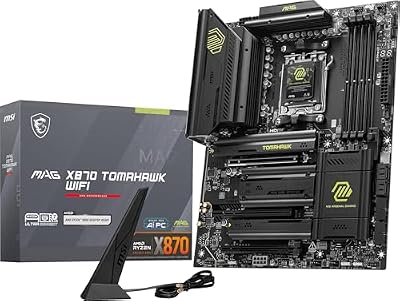 msiMSI MAG X870 Tomahawk WiFi Gaming Motherboard (AMD Ryzen 9000/8000/7000…$253 \xc2\xb7 97/100
 SamsungSamsung SSD 990 PRO 2TB, PCIe 4.0 M.2 2280, Up…$410 \xc2\xb7 97/100








