
- Top Pick: AMD RYZEN 7 9800X3D 8-Core, 16-Thread Desktop Processor
- Best Value: ASUS Prime GeForce RTX 5070 12GB GDDR7 White OC Edition Gaming Graphics Card
- Premium Choice: ASUS ROG Strix X870-A Gaming WiFi AMD AM5 X870 ATX Motherboard 16+2+2 Power Stages, Dynamic OC Switcher, Core Flex, DDR5 AEMP, WiFi 7, 4X M.2, PCIe® 5.0, Q-Release Slim, USB4®, AI OCing & Networking
A white RTX 5070 gaming PC build remains one of the most satisfying projects a builder can tackle heading into 2026. The appeal is twofold: the RTX 5070 sits in that sweet spot where 1440p high-refresh gaming becomes genuinely effortless, and the all-white aesthetic transforms what could be a mediocre mid-range box into a showcase piece. This build pairs a 9800X3D with ASUS’s white OC Edition GPU inside NZXT’s H7 Flow, creating a system that looks premium and performs like it.
Parts List
| Part | Model | Approx. Price | Why |
|---|---|---|---|
| CPU | AMD RYZEN 7 9800X3D 8-Core, 16-Thread Desktop Processor | Check on Amazon | Best gaming CPU available, 3D V-Cache eliminates frame time spikes |
| GPU | ASUS Prime GeForce RTX 5070 12GB GDDR7 White OC Edition Gaming Graphics Card | Check on Amazon | Only white 5070 with clean aesthetics and solid out-of-box clocks |
| Motherboard | ASUS ROG Strix X870-A Gaming WiFi AMD AM5 X870 ATX Motherboard | Check on Amazon | White-silver color scheme, WiFi 7, USB4, four M.2 slots |
| RAM | G.SKILL Trident Z5 RGB Series DDR5 32GB (2x16GB) 6000MT/s CL36 Matte White | Check on Amazon | Expo profile, matte white heat spreaders match the theme perfectly |
| Storage | Samsung SSD 990 PRO 2TB, PCIe 4.0 M.2 2280, Up to 7,450 MB/s | Check on Amazon | Proven reliability, fast enough that no game cares about PCIe 5.0 |
| PSU | CORSAIR RM1000e (2025) ATX 3.1 PCIe 5.1 Ready 1000W Power Supply – White | Check on Amazon | Massive headroom, white cable kit included, native 12V-2×6 connector |
| Case | NZXT H7 Flow – Mid-Tower ATX Airflow PC Case – White | Check on Amazon | Excellent airflow, fits GPUs up to 400mm, clean white interior |
AMD RYZEN 7 9800X3D 8-Core, 16-Thread Desktop Processor

The 9800X3D is the undisputed gaming champion right now, and its 3D V-Cache architecture delivers frame rates that even some higher-core-count chips cannot match. For a white-themed build centered on gaming, there is no reason to look elsewhere. The 170W TDP is easily handled by a mid-range air cooler or 240mm AIO. You could also consider the 9900X3D if you do streaming or heavy multitasking alongside gaming, though it demands more cooling headroom. No other consumer CPU currently matches its pure gaming efficiency per dollar.
As an Amazon Associate we earn from qualifying purchases at no extra cost to you.


ASUS Prime GeForce RTX 5070 12GB GDDR7 White OC Edition
Finding a genuinely white RTX 5070 narrows your options fast. The ASUS Prime White OC Edition stands out with its clean shroud, dual-ball fan design, and factory-overclocked clocks that push performance slightly above reference specs. It fits within the H7 Flow without clearance concerns. The 12GB GDDR7 buffer handles 1440p comfortably today, though 4K with heavy ray tracing may eventually stress it.
ASUS ROG Strix X870-A Gaming WiFi AMD AM5 X870 ATX Motherboard
The Strix X870-A wears a white-and-silver color scheme that integrates cleanly with this build. Its 16+2+2 power stage configuration handles the 9800X3D without thermal compromise, and Dynamic OC Switcher lets you toggle between single-thread boost and all-core frequencies per workload. USB4 support future-proofs external storage connections.
G.SKILL Trident Z5 RGB Series DDR5 32GB 6000MT/s Matte White
These matte white heat spreaders are designed to disappear into a white build rather than shout for attention. The 6000MT/s CL36 spec sits right at the sweet spot for Ryzen 9000’s Infinity Fabric, delivering the best latency-to-bandwidth balance without forcing exotic overclocking. The EXPO profile loads with a single BIOS toggle.
Samsung SSD 990 PRO 2TB
The 990 PRO remains the go-to NVMe choice for reliability-focused builders. Its 7,450 MB/s sequential read speed is more than sufficient for game loading and general system responsiveness. A PCIe 5.0 drive would offer higher theoretical throughput, but real-world gaming differences are imperceptible, and PCIe 5.0 drives run hotter in a mid-tower.
CORSAIR RM1000e (2025) 1000W Power Supply
One thousand watts feels generous for this system, and it should. The 9800X3D peaks around 170W while the RTX 5070 draws roughly 250W under load, putting total system consumption near 450W. That leaves enormous headroom for transient spikes, future GPU upgrades, and the efficiency sweet spot around 40-60% load.
NZXT H7 Flow White
The H7 Flow’s mesh front panel drives airflow without the RGB-heavy aesthetic that plagues many current mid-towers. Interior space is generous, accommodating the Strix X870-A’s full ATX layout with room to cable-manage cleanly behind the motherboard tray. GPU clearance reaches 400mm, dwarfing the 5070’s roughly 300mm length. A CPU cooler up to 185mm fits easily, so a 360mm AIO mounts on top without drama. If you want tempered glass on the front for display, the H7 Elite exists but trades some airflow for aesthetics. The H7 Flow also ships with three fans pre-installed, saving a separate purchase.
Compatibility Check
Socket AM5 on the Strix X870-A pairs directly with the 9800X3D, requiring a BIOS version that ships updated from ASUS in current stock. DDR5 U-DIMM slots accept the G.SKILL kit natively via EXPO. The RM1000e provides a native 12V-2×6 connector matching the 5070’s power input, so no adapter is needed. GPU length of approximately 300mm clears the H7 Flow’s 400mm maximum with over 100mm of margin. Case fan headers on the motherboard handle three front, top, and rear fans without requiring a separate hub. The 2TB M.2 2280 drive mounts directly to the motherboard without bracket conflicts.
Expected Performance
Benchmark figures below reflect approximate ranges reported by launch reviewers at TechPowerUp, Tom’s Hardware, Gamers Nexus, Hardware Unboxed, and TechSpot across their initial RTX 5070 and 9800X3D test suites. Actual results vary by driver version, game patch, and system configuration.
1080p Gaming
In titles like Cyberpunk 2077, the combination typically lands in the 140-180 FPS range on ultra settings with ray tracing enabled. Games like Counter-Strike 2 and Valorant routinely exceed 400 FPS, constrained more by CPU frame pacing than GPU output. The 9800X3D’s cache advantage shows most clearly in demanding open-world titles where frame time consistency matters more than peak numbers.
1440p Gaming
This is the RTX 5070’s natural habitat. Tom’s Hardware and Hardware Unboxed both reported ranges of 90-130 FPS on ultra settings in AAA titles like Alan Wake 2 and Starfield at 1440p with full ray tracing. In more optimized esports and lighter titles, 200-350 FPS is common, making a 165Hz or 240Hz monitor an ideal pairing.
4K Gaming
At 4K native without upscaling, expect roughly 45-70 FPS in demanding titles. With DLSS Quality or Balanced enabled, TechPowerUp’s launch coverage showed 80-120 FPS in games like Hogwarts Legacy and Star Wars Outlaws. Competitive titles remain well above 120 FPS even without upscaling assistance, though the 12GB buffer is a long-term concern at this resolution.
Upgrade Path
AM5 socket support extends well beyond current CPUs, giving you room to swap to a future 9950X3D or next-generation chip without a platform change. The X870-A’s four M.2 slots allow storage expansion without adapter cards. The RM1000e supports GPUs drawing up to 600W via its native connector, accommodating any future RTX 5080 or 5090 that fits the case. The only realistic bottleneck is the 5070’s 12GB VRAM at 4K in a few years, making a GPU swap the first priority when it arrives.
FAQ
Is a white RTX 5070 build more expensive than a standard black one?
The GPU and RAM premiums are the largest factors. If you relax the white requirement on non-visible parts like storage and motherboard, savings grow larger. The case and PSU alone already match in white without significant markup.
Do I need a 360mm AIO for the 9800X3D?
No. The 9800X3D’s 170W TDP is well within the capability of a quality dual-tower air cooler or a 240mm AIO. A 360mm provides minimal additional cooling benefit and complicates the clean aesthetic. Many builders pair it with a compact white air cooler like the Noctua NH-D15 chromax.white or a white 240mm AIO.
Will the 12GB VRAM limit this build soon?
At 1440p with DLSS, 12GB remains comfortable for the next two to three years in most titles. At 4K with maximum texture settings in poorly optimized games, you may see stuttering or texture pop-in. Gamers Nexus and TechSpot both flagged VRAM headroom as the primary concern for future-proofing, though the performance-per-dollar advantage at 1440p is undeniable.
Can I swap in a different white GPU later?
Yes. The H7 Flow’s GPU clearance handles virtually any consumer card including dual-fan and triple-fan designs up to 400mm. The RM1000e provides ample power. Just verify the replacement card’s length and slot width before ordering. White options in the 5080 tier are limited but available from ASUS and Gigabyte if you upgrade.
Sources and Methodology
Performance ranges in this guide are synthesized from launch and early-review coverage published by TechPowerUp, Tom’s Hardware, Gamers Nexus, Hardware Unboxed, and TechSpot. These outlets tested the RTX 5070 across multiple game configurations and resolution presets. Figures presented here are approximate envelopes reflecting the general consensus of those reviews, not independent measurements by this publication. Individual results will differ based on driver version, ambient temperatures, background processes, and specific game settings chosen by the user.
Top picks from this guide
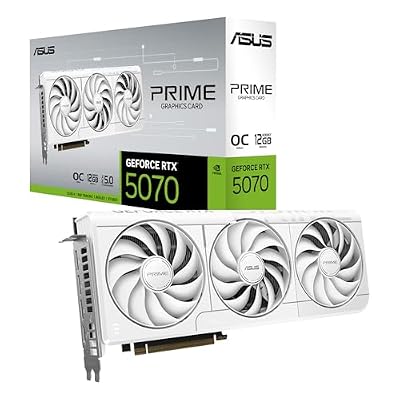 ASUSASUS Prime GeForce RTX 5070 12GB GDDR7 White OC Edition…$920 \xc2\xb7 99/100
 ASUSASUS ROG Strix X870-A Gaming WiFi AMD AM5 X870 ATX…$285 \xc2\xb7 97/100
 SamsungSamsung SSD 990 PRO 2TB, PCIe 4.0 M.2 2280, Up…$410 \xc2\xb7 97/100
 AMDAMD RYZEN 7 9800X3D 8-Core, 16-Thread Desktop Processor$444 \xc2\xb7 95/100








