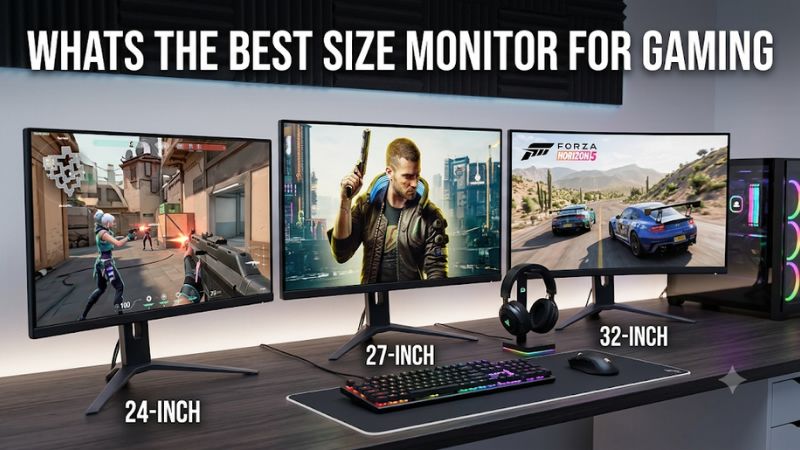
Choosing the right gaming display involves more than deciding whether a bigger screen looks better. The answer to whats the best size monitor for gaming depends on your viewing distance, desk dimensions, favorite games, and graphics card. A 27-inch 1440p monitor is the best all-around choice for most desktop players, while 24-inch screens suit competitive gaming, 32-inch displays work well for 4K, and ultrawide models provide a more immersive experience.
- Quick verdict: Whats the best size monitor for gaming for most players?
- Quick comparison of six gaming monitors by size
- How we selected these gaming monitors
- The six best monitor examples for different gaming setups
- What’s the best size monitor for gaming by genre?
- How to choose the correct screen size for your desk
- Common mistakes when selecting a gaming monitor size
- Frequently asked questions
- Conclusion
Quick verdict: Whats the best size monitor for gaming for most players?
For most PC gamers, a 27-inch monitor with 2560 × 1440 resolution offers the best combination of screen space, sharpness, and performance requirements. It is large enough for immersive gaming without dominating a typical desk, and its pixel density is considerably better than that of a 27-inch Full HD display.
However, other sizes make sense for specific gaming preferences.
A 24-inch display is particularly practical for competitive esports. A 32-inch screen offers a larger viewing area for 4K gaming, while 34-inch ultrawide monitors provide additional horizontal space for supported games. Much larger 45-inch displays are specialized products for players with sufficient desk space and powerful graphics hardware.
| Screen size | Best resolution | Best gaming application | Main advantage |
|---|---|---|---|
| 24–25 inches | 1080p | Competitive shooters | Entire screen stays within a compact viewing area |
| 27 inches | 1440p | General PC gaming | Excellent balance of sharpness and screen space |
| 27 inches | 4K | Premium gaming | High pixel density |
| 32 inches | 4K | Immersive PC and console gaming | Larger detailed image |
| 34 inches | 3440 × 1440 | Racing and simulation | Wider field of view |
| 45 inches | 5120 × 2160 | Large-format immersive gaming | Extremely large ultrawide workspace |
These recommendations reflect different display formats rather than a universal ranking. RTINGS’ September 30, 2026 gaming monitor size guide similarly identifies 27 inches as a versatile choice, 24–25 inches for esports, and larger ultrawide displays for immersive gaming.
Quick comparison of six gaming monitors by size
The following six monitors demonstrate how different screen dimensions and resolutions suit different gaming setups. Each model has a distinct purpose, so the recommendations should not be interpreted as a performance ranking across unrelated categories.
| Monitor | Actual screen size | Native resolution | Maximum refresh rate | Best for |
|---|---|---|---|---|
| Dell SE2426HGS | 23.8″ | 1920 × 1080 | 240Hz | Compact esports gaming |
| ASUS ROG Strix XG27ACS | 27″ | 2560 × 1440 | 180Hz | Everyday PC gaming |
| AOC Q27G3XMN | 27″ | 2560 × 1440 | 180Hz | HDR and high contrast |
| ASUS ROG Swift OLED PG32UCDM Gen3 | 31.5″ | 3840 × 2160 | 240Hz | Premium 4K gaming |
| ASUS ROG Swift OLED PG34WCDN | 34″ | 3440 × 1440 | 360Hz | Ultrawide gaming |
| LG UltraGear 45GX950A-B | 44.5″ | 5120 × 2160 | 165Hz / 330Hz dual mode | Large-format gaming |
How we selected these gaming monitors
The selection prioritizes exact screen dimensions, native resolution, panel technology, refresh rate, and practical suitability for different gaming environments.
Manufacturer documentation establishes the advertised specifications, while independent reviews from RTINGS help evaluate real-world motion handling, input lag, HDR performance, and image quality.
We also considered the relationship between screen size and resolution. A 27-inch monitor at 1440p has a different level of sharpness from a 27-inch monitor at 1080p, even though both occupy approximately the same amount of desk space.
The shortlist includes conventional 16:9 displays and ultrawide monitors. This distinction matters because a 34-inch ultrawide is wider than a 32-inch 16:9 display but is not necessarily taller or larger in total visible area.
No original detailed research or proprietary performance measurements were supplied. Product evaluations are based on manufacturer documentation and attributed independent testing. Temporary retailer discounts and unverified Amazon availability are excluded.
The six best monitor examples for different gaming setups
Dell SE2426HGS: Best 24-inch monitor for competitive gaming
The Dell SE2426HGS demonstrates why a smaller monitor can be more suitable than a large display for competitive gaming.
Its 23.8-inch IPS panel has a native resolution of 1920 × 1080 and a maximum refresh rate of 240Hz. This combination is especially appropriate for games such as Valorant, Counter-Strike 2, and Fortnite, where players often prioritize motion clarity and responsiveness over high-resolution environments.
Dell specifies a 1,000:1 native contrast ratio, 300-nit brightness, and 99% sRGB color coverage. The monitor also supports AMD FreeSync Premium.
An important advantage is its physical size. The entire image remains relatively easy to follow when sitting close to a normal gaming desk. Players can monitor the center, corners, interface, and minimap without needing to move their eyes across a much wider screen.
RTINGS’ independent testing found good motion handling and low input lag. However, it also identified relatively limited picture quality, including gray-looking blacks, narrow HDR color performance, and inverse ghosting at lower refresh rates.
The 1080p resolution is another compromise. It is practical for competitive gaming but less attractive for players who prioritize environmental detail and desktop workspace.
Buy it if you want a compact high-refresh display for competitive PC games and your graphics card performs well at 1080p.
Skip it if you prefer detailed 1440p or 4K visuals, impressive HDR, or a larger screen for immersive games.
The Dell SE2426HGS is a useful example of how a 24-inch screen can prioritize competitive performance without requiring an unusually large desk.
ASUS ROG Strix XG27ACS: Best 27-inch monitor for most gamers
The ASUS ROG Strix XG27ACS is the most balanced recommendation in this roundup because its 27-inch screen works particularly well with 1440p resolution.
It uses a Fast IPS panel with a native resolution of 2560 × 1440 and a maximum refresh rate of 180Hz. The resulting pixel density is approximately 109 PPI, offering a good combination of image sharpness and physical screen size.
ASUS specifies a 1ms gray-to-gray response time, 350-nit typical brightness, HDR10 support, and Adaptive-Sync. It also includes Extreme Low Motion Blur Sync, which combines supported backlight strobing and VRR functionality.
Connectivity includes DisplayPort 1.4, HDMI 2.0, and USB-C with DisplayPort Alt Mode.
One detail worth checking is the input-specific refresh rate. ASUS documents up to 180Hz through DisplayPort, while HDMI supports lower maximum refresh rates. Using the wrong connection can prevent the monitor from operating at its advertised maximum.
RTINGS’ size recommendations identify 27-inch displays as a versatile category for general gaming, while ASUS positions the XG27ACS around 1440p and high-refresh performance.
Republic of Gamers|ROG Global+3
Its main limitation is conventional IPS contrast. Dark scenes may appear less impressive than they do on VA or OLED displays. It also lacks the local dimming hardware required for particularly strong HDR performance.
Buy it if you want one monitor for competitive games, RPGs, racing games, and everyday computing.
Skip it if you specifically want deep blacks, premium HDR, or the larger viewing experience of a 32-inch monitor.
For most mainstream gaming desktops, 27-inch 1440p is a particularly sensible upgrade from an older 24-inch Full HD display.
AOC Q27G3XMN: Best 27-inch monitor for HDR gaming
The AOC Q27G3XMN is another 27-inch option, but it demonstrates why screen size and panel technology should be evaluated separately.
Its 27-inch VA panel uses 2560 × 1440 resolution and supports a maximum refresh rate of 180Hz through DisplayPort. The main attraction is its Mini-LED backlight, which includes 336 local dimming zones.
This allows the display to control different areas of its backlight independently. Compared with conventional LCD displays without local dimming, this can significantly improve HDR contrast and highlight performance.
AOC specifies DisplayHDR 1000 certification and a 4,000:1 native contrast ratio. The monitor also supports variable refresh rate technology.
RTINGS’ October 2026 testing update identifies low input lag, effective local dimming, and good gaming response behavior as important advantages.
However, the VA panel can exhibit some black smearing during dark-scene motion. RTINGS also identifies noticeable VRR flicker when frame rates fluctuate.
Connectivity deserves attention as well. The monitor includes DisplayPort 1.4 and HDMI 2.0 rather than HDMI 2.1. Console players should therefore check its input limitations before buying.
Buy it if you want strong HDR performance and higher native contrast in a 27-inch gaming setup.
Skip it if clean dark-scene motion, extensive HDMI 2.1 functionality, or wide viewing angles are essential.
Its main advantage is that you can keep the practical 27-inch size while choosing a different type of picture quality from a conventional Fast IPS display.
ASUS ROG Swift OLED PG32UCDM Gen3: Best 32-inch gaming monitor
The ASUS ROG Swift OLED PG32UCDM Gen3 is a strong example of when a larger screen makes sense.
Although marketed as a 32-inch monitor, its actual panel diagonal is 31.5 inches. It uses a fourth-generation Tandem QD-OLED panel with 3840 × 2160 native resolution and a 240Hz refresh rate.
The larger viewing area makes it particularly attractive for visually demanding single-player games, cinematic titles, and console gaming.
At this size, 4K resolution provides approximately 138 pixels per inch. This maintains good image sharpness while delivering a significantly larger image than a 27-inch monitor.
ASUS specifies 0.03ms gray-to-gray response time, 99% DCI-P3 coverage, a 1,500,000:1 typical contrast ratio, and a DisplayHDR-compatible HDR feature set.
Connectivity includes DisplayPort 2.1, HDMI 2.1, and USB-C with up to 90W Power Delivery. A KVM switch is also included for users connecting multiple computers.
RTINGS recommends the PG32UCDM Gen3 among its 32-inch gaming monitor selections, highlighting its 4K resolution, 240Hz refresh rate, and QD-OLED image quality.
240Hz BlackShield™ film+2
The biggest limitation is the graphics hardware required to use it effectively. Running modern games at native 4K and consistently approaching 240 FPS is demanding.
It also carries typical OLED ownership considerations, including potential burn-in with prolonged exposure to static content.
Buy it if you have a powerful GPU, want a larger 4K gaming experience, and value OLED contrast.
Skip it if your desk is shallow or your gaming system is better suited to 1440p.
ASUS ROG Swift OLED PG34WCDN: Best 34-inch ultrawide monitor
A 34-inch monitor is not simply a larger version of a traditional 27-inch display. Most models in this category use a 21:9 ultrawide aspect ratio, giving players additional horizontal viewing space.
The ASUS ROG Swift OLED PG34WCDN combines a 34-inch Tandem RGB QD-OLED panel with 3440 × 1440 resolution and a 360Hz maximum refresh rate.
Its 1800R curvature is designed to provide a more comfortable viewing experience across the wider screen.
The additional width is useful in supported racing games, flight simulations, open-world adventures, and immersive role-playing games. Some titles allow you to see more of the environment than on a conventional 16:9 screen.
ASUS also specifies a 0.03ms gray-to-gray response time, 99% DCI-P3 coverage, true 10-bit color, and VESA DisplayHDR True Black 500 certification.
Its connections include DisplayPort 2.1 UHBR20, HDMI 2.1, and USB-C with 90W Power Delivery.
RTINGS identifies the PG34WCDN as its recommended 34-inch gaming display, citing its fast OLED panel, high refresh rate, and strong image quality.
There are several compromises. The ultrawide resolution requires additional GPU performance compared with standard 1440p, and certain games do not support 21:9 correctly.
Console players should also remember that modern gaming consoles generally output conventional 16:9 formats. An ultrawide monitor may consequently show black bars on the sides.
Buy it if you play supported PC games and want a wider, more immersive screen.
Skip it if you primarily use a gaming console or prefer a conventional monitor layout.
LG UltraGear 45GX950A-B: Best large-format gaming monitor
The LG UltraGear 45GX950A-B is aimed at gamers who want substantially more screen space than a conventional desktop monitor provides.
Although marketed as a 45-inch-class display, its actual panel diagonal is 44.5 inches. It uses a curved OLED panel with an 800R curvature, a 21:9 aspect ratio, and 5120 × 2160 native resolution.
The monitor supports a native refresh rate of 165Hz at 5K2K resolution. Its dual-mode feature also supports 330Hz at 2560 × 1080 resolution.
This is an important distinction because the 330Hz mode does not maintain the native 5K2K resolution.
LG specifies 125 PPI, 98.5% DCI-P3 coverage, a 1,300-nit peak HDR brightness rating under its stated test conditions, and a 0.03ms gray-to-gray response time.
Its connectivity includes DisplayPort 2.1, HDMI 2.1, and USB-C with 90W Power Delivery. FreeSync Premium Pro and G-SYNC compatibility are also supported.
RTINGS’ testing found excellent motion handling, low input lag, and strong OLED contrast. It also identified VRR flicker at changing frame rates, limitations with bright HDR colors, and potential burn-in as considerations.
The most significant drawback is physical size. This monitor needs a wide, deep desk and a suitable viewing distance. Its aggressive curvature may also require an adjustment period.
Buy it if you want an extremely immersive ultrawide display for PC gaming and have sufficient desk space.
Skip it if you mainly play console games, have a small workstation, or want a more conventional desktop experience.
What’s the best size monitor for gaming by genre?
The games you play should influence your screen-size choice. A display that works well for competitive shooters may not provide the most enjoyable experience for racing simulations or cinematic adventures.
Competitive shooters and esports
For Counter-Strike 2, Valorant, and other competitive shooters, 24–25 inches is a particularly practical choice.
The smaller display keeps the entire image within a relatively compact viewing area. This can make it easier to monitor the crosshair, minimap, player positions, and interface elements without excessive eye movement.
A 240Hz or faster refresh rate is worth considering if your computer consistently produces high frame rates.
However, a smaller display does not automatically make someone a better player. Refresh behavior, input latency, viewing position, and practice remain important.
RPGs and open-world adventures
For games such as Cyberpunk 2077, Baldur’s Gate 3, and expansive adventure titles, 27–32 inches is generally more appealing.
These games benefit from larger environments, detailed textures, and immersive visual presentation.
A 27-inch 1440p display works well for mainstream gaming systems, while a 32-inch 4K OLED monitor is attractive for powerful PCs that prioritize image quality.
An ultrawide display can provide additional horizontal space when the game supports its aspect ratio.
Racing and flight simulation
A 34-inch or larger ultrawide monitor is particularly appealing for racing and simulation games.
The wider viewing area can provide additional environmental visibility and make a cockpit or vehicle interior feel more immersive.
A 45-inch ultrawide provides an even larger viewing experience, although it needs more desk space and a graphics card capable of driving its demanding resolution.
For serious simulation enthusiasts, multiple monitors or a dedicated curved display arrangement may also be worth considering.
Console gaming
A 27–32-inch 16:9 monitor is generally a safer choice for console gaming.
The PS5 and Xbox Series X|S are designed around conventional display formats, and many games do not support ultrawide output.
A 32-inch 4K display can provide a larger viewing area and the resolution needed to take advantage of compatible console graphics modes.
How to choose the correct screen size for your desk
Check pixel density before choosing a larger display
Pixel density determines how tightly the display’s pixels are packed together.
A larger monitor with the same resolution has lower pixel density because the same number of pixels must cover more physical area.
| Screen size and format | Resolution | Approximate PPI |
|---|---|---|
| 24-inch 16:9 | 1080p | 92 |
| 27-inch 16:9 | 1080p | 82 |
| 27-inch 16:9 | 1440p | 109 |
| 27-inch 16:9 | 4K | 163 |
| 32-inch 16:9 | 1440p | 92 |
| 32-inch 16:9 | 4K | 138 |
| 34-inch 21:9 | 3440 × 1440 | 110 |
| 44.5-inch 21:9 | 5120 × 2160 | 125 |
These figures are approximate calculations based on diagonal screen dimensions and native pixel resolution.
For example, a 27-inch 1440p monitor and a 34-inch 3440 × 1440 ultrawide display have similar pixel density, even though the ultrawide provides additional horizontal workspace.
Measure viewing distance
Viewing distance determines how much of your field of vision the monitor occupies.
A screen that is too close can feel overwhelming, while a screen that is too far away may make interface elements difficult to read.
The following ranges are reasonable starting points for a desktop setup:
| Monitor size | Suggested viewing distance |
|---|---|
| 24 inches | 20–30 inches |
| 27 inches | 24–36 inches |
| 32 inches | 28–42 inches |
| 34-inch ultrawide | 28–38 inches |
| 45-inch ultrawide | 36–48 inches |
These are general guidelines rather than strict ergonomic requirements. Individual eyesight, resolution, screen curvature, and personal preference all matter. RTINGS provides similar size and viewing-distance guidance in its monitor sizing research.
Before purchasing a large display, try sitting at your normal gaming position and estimate whether you can view the corners without repeatedly moving your head.
Measure the actual desk footprint
A monitor’s diagonal measurement does not describe how much desk space it occupies.
A conventional 27-inch 16:9 screen has an active display area approximately 23.5 inches wide and 13.2 inches tall.
A 32-inch 16:9 screen is approximately 27.9 inches wide and 15.7 inches tall.
A 34-inch 21:9 ultrawide is approximately 31.4 inches wide and 13.1 inches tall.
This explains why a 34-inch ultrawide is much wider than a 32-inch conventional monitor but has a similar screen height.
Remember to account for the stand, which can extend considerably farther backward than the display panel itself.
Also consider your speakers, keyboard, mousepad, and other accessories. A larger monitor should not force you into an uncomfortable desk arrangement.
Consider the graphics card workload
Screen size itself does not increase the number of pixels the GPU renders when resolution remains identical.
For example, a 27-inch 1440p display and a 32-inch 1440p display both contain 3,686,400 pixels.
The graphics workload changes when you increase the resolution, not simply because you increase the panel’s physical dimensions.
Moving from 1440p to 4K increases the pixel count from approximately 3.69 million to 8.29 million per frame. This creates a substantially greater rendering workload.
A midrange graphics card may therefore be better paired with a 27-inch 1440p monitor than an expensive 4K display with a high refresh rate.
If you own a high-performance GPU, a 32-inch 4K or 34-inch ultrawide display becomes more attractive.
Common mistakes when selecting a gaming monitor size
One mistake is assuming that the largest display automatically provides the best gaming experience. A 45-inch screen can be impressive, but it may be uncomfortable on a shallow desk or during competitive games that require constant attention to the center and edges.
Another mistake is purchasing a large 1080p monitor without considering pixel density. A 32-inch Full HD display has considerably less pixel density than a 24-inch Full HD monitor, which can make text and fine details appear less sharp.
Buyers also sometimes confuse screen size and resolution. A 34-inch ultrawide is not simply a 34-inch 16:9 monitor. The extra width changes the aspect ratio and the way games are displayed.
Finally, remember that more expensive displays do not automatically suit every gaming setup. A balanced 27-inch 1440p monitor may deliver more practical value than a premium 4K OLED model if your graphics card cannot take advantage of the additional resolution.
Frequently asked questions
Is 27 inches better than 24 inches for gaming?
For most general PC gaming, 27 inches is more versatile because it provides additional screen space and works particularly well with 1440p resolution.
A 24-inch display remains a good choice for competitive esports, smaller desks, and 1080p gaming.
Is 32 inches too big for gaming?
No. A 32-inch monitor can be very comfortable when you have enough desk depth and sit at a suitable distance.
It is particularly attractive for 4K gaming, console use, and visually demanding single-player games.
What is the best screen size for 1440p gaming?
Twenty-seven inches is the best starting point for 1440p gaming. Its approximately 109 PPI provides a good balance of image sharpness and physical viewing area.
A 32-inch 1440p display can also work, but it has lower pixel density.
Is a 34-inch ultrawide better than a 32-inch gaming monitor?
Neither is universally better.
A 34-inch ultrawide offers additional horizontal workspace and can be more immersive in supported PC games. A 32-inch 16:9 display provides more vertical screen area and is generally more compatible with consoles.
What size monitor do professional esports players use?
Many competitive gaming displays use 24–25-inch panels because they allow players to view the complete screen comfortably from a relatively short distance.
However, preferences vary by game, tournament setup, and player experience. Screen size alone does not determine competitive performance.
What size monitor is best for a small gaming desk?
A 24-inch or 27-inch monitor is generally easier to accommodate on a small desk.
A 24-inch display is particularly suitable when desk depth is limited, while a 27-inch monitor is worth considering if you have enough room to maintain a comfortable viewing distance.
Conclusion
For most desktop PC gamers, 27 inches at 1440p remains the strongest all-around recommendation. It offers a good balance of sharpness, physical screen space, and graphics requirements.
The Dell SE2426HGS demonstrates why 24 inches works well for competitive gaming, while the ASUS ROG Strix XG27ACS and AOC Q27G3XMN provide different 27-inch gaming experiences.
For larger screens, the ASUS PG32UCDM Gen3 offers premium 4K OLED gaming, the ASUS PG34WCDN provides an ultrawide experience, and the LG 45GX950A-B demonstrates what a large-format gaming display can deliver.
Ultimately, the best monitor size is the one that suits your viewing distance, desk dimensions, favorite games, and graphics hardware. Bigger is not always better, and the right resolution matters just as much as the physical size.