
The right gaming monitor size depends on how far you sit from your screen, which games you play, and the resolution your graphics card can handle. For most desktop PC gamers, 27 inches is the best starting point because it balances viewing comfort, image detail, and desk space. However, 24-inch displays make sense for competitive esports, 32-inch screens suit immersive 4K gaming, and 34-inch ultrawide monitors provide a wider field of view. This guide answers what is the best size for a gaming monitor and recommends seven displays for different gaming setups.
- What is the best size for a gaming monitor for most people?
- Quick comparison of the best gaming monitor sizes and models
- How we selected these gaming monitors
- The best gaming monitors by screen size
- What is the best size for a gaming monitor by game type?
- How to choose the correct gaming monitor size
- Common mistakes when choosing a gaming monitor size
- Frequently asked questions
- Conclusion
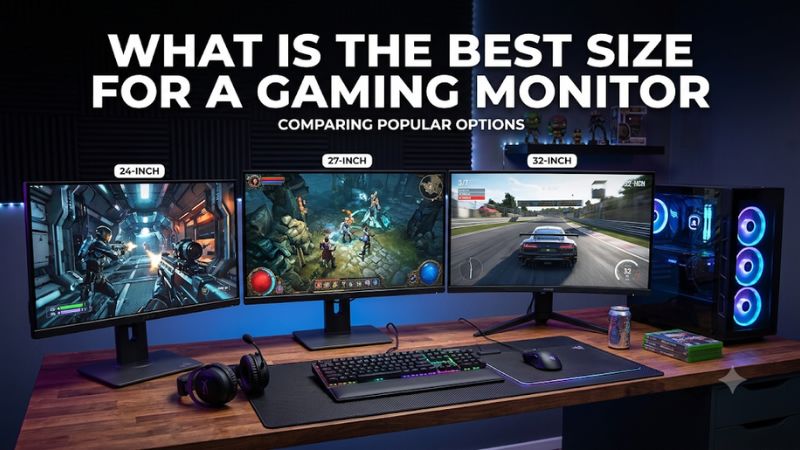
What is the best size for a gaming monitor for most people?
A 27-inch gaming monitor is the safest recommendation for most PC gamers. It offers a noticeably larger viewing area than a 24-inch display without requiring as much desk space or viewing distance as a 32-inch screen.
A 27-inch monitor also provides plenty of resolution choices. You can find affordable 1080p models, balanced 1440p displays, and premium 4K OLED monitors in this size category.
For most people, 27 inches paired with 2560 × 1440 resolution is the most sensible combination. It provides approximately 109 pixels per inch, producing reasonably sharp images while keeping the graphics workload more manageable than native 4K.
However, 27 inches is not automatically the best choice for every player. Competitive esports gamers may prefer a smaller display because they can see the entire screen without moving their eyes as much. Players with powerful GPUs and deeper desks may prefer 32 inches, particularly for 4K gaming.
RTINGS also identifies 27 inches as its general recommendation for most gamers, with 24–25-inch displays better suited to smaller spaces and competitive play, and 32-inch screens offering a larger viewing experience.
The practical recommendations are:
| Monitor size | Recommended resolution | Best use case |
|---|---|---|
| 24–25 inches | 1080p or 1440p | Competitive esports |
| 27 inches | 1440p | General PC gaming |
| 27 inches | 4K | High-resolution compact gaming |
| 32 inches | 4K | Immersive gaming and consoles |
| 34 inches | 3440 × 1440 | Ultrawide gaming |
| 44–45 inches | 5120 × 2160 | Large-format immersive gaming |
These combinations are recommendations rather than fixed requirements. A 27-inch 1080p monitor can still work, and a 32-inch 1440p display can be perfectly usable, but resolution should increase as screen size increases if you want to maintain similar image sharpness.
Quick comparison of the best gaming monitor sizes and models
The following seven monitors illustrate how different screen sizes serve different types of gamers. The recommendations are not ranked solely by performance because a 24-inch esports display and a 45-inch ultrawide screen serve very different purposes.
| Monitor | Screen size | Resolution | Refresh rate | Best for |
|---|---|---|---|---|
| Dell SE2426HGS | 23.8″ | 1080p | 240Hz | Affordable competitive gaming |
| ASUS ROG Strix XG27ACS | 27″ | 1440p | 180Hz | Everyday gaming |
| ASUS ROG Swift OLED PG27UCDM | 27″ | 4K | 240Hz | Compact premium gaming |
| ASUS ROG Swift OLED PG32UCDM Gen3 | 31.5″ | 4K | 240Hz | Premium large-screen gaming |
| LG UltraGear 32GX870B-B | 32″ | 4K | 240Hz / 480Hz | Dual-mode gaming |
| ASUS ROG Swift OLED PG34WCDN | 34″ | 3440 × 1440 | 360Hz | Ultrawide gaming |
| LG UltraGear 45GX950A-B | 44.5″ | 5120 × 2160 | 165Hz / 330Hz | Large immersive gaming |
How we selected these gaming monitors
The selection focuses on screen dimensions, resolution, gaming suitability, and independent performance evidence.
Manufacturer documentation was used to confirm exact model specifications, including panel size, native resolution, refresh rate, connectivity, and supported synchronization features.
Independent reviews from RTINGS were used to evaluate real-world gaming characteristics. These include pixel response behavior, input lag, motion clarity, HDR performance, and relevant limitations.
We also considered how each monitor fits a particular physical setup. A high-end 27-inch 4K monitor may offer excellent image detail, but it is not necessarily the best purchase for somebody sitting farther away who prefers a larger screen.
The recommendations include different price categories without assigning unverified Best Budget or Best Value labels. Actual U.S. retailer pricing and stock can change, so the article does not rely on temporary discounts.
No original detailed research or proprietary benchmark measurements were supplied. Performance observations are attributed to the independent testing sources rather than presented as personal laboratory results.
The best gaming monitors by screen size
Dell SE2426HGS: Best 24-inch monitor for competitive gaming
The Dell SE2426HGS demonstrates why a relatively small gaming monitor can still be an excellent choice. Its 23.8-inch IPS panel provides a compact viewing area, allowing competitive players to see most of the screen without moving their eyes significantly.
Its native resolution is 1920 × 1080, and its maximum refresh rate is 240Hz. This combination is particularly appropriate for games such as Counter-Strike 2, Valorant, and Fortnite, where smooth motion and responsive controls are important.
The IPS technology provides wide viewing angles and consistent colors. Dell also specifies AMD FreeSync Premium Pro support, helping compatible graphics hardware synchronize frame delivery with the display.
RTINGS’ independent testing identifies low input lag and good motion handling as important advantages. Its review also notes that the monitor supports common VRR formats, including compatibility with current gaming consoles.
The smaller screen is particularly practical when sitting close to a desk. At 1080p, a 23.8-inch display provides approximately 93 pixels per inch, which is adequate for competitive gaming at typical desktop distances.
There are some limitations. The monitor does not offer particularly impressive HDR performance, its stand lacks swivel adjustment, and its overall picture quality is more basic than that of premium 1440p and 4K displays.
It is also less attractive for players who prefer large open-world games or extensive multitasking.
Buy it if you prioritize high-refresh competitive gaming, have limited desk space, or use a graphics card that performs well at 1080p.
Skip it if you prefer higher-resolution visuals, immersive cinematic gaming, or a larger desktop workspace.
For competitive players, the main advantage of a 24-inch monitor is not simply its lower price or physical size. It is the ability to keep the entire display comfortably within the central field of vision.
ASUS ROG Strix XG27ACS: Best 27-inch monitor for everyday gaming
The ASUS ROG Strix XG27ACS is an excellent example of why 27 inches is such a versatile gaming monitor size.
It combines a 27-inch Fast IPS panel with 2560 × 1440 resolution and a 180Hz refresh rate. This combination provides more workspace and image detail than a standard 1080p display while retaining a relatively manageable graphics workload.
The 1440p resolution is particularly suitable for this screen size. It produces approximately 109 pixels per inch, which offers a noticeable improvement in sharpness over a 27-inch 1080p monitor.
ASUS specifies a 1ms gray-to-gray response time, Adaptive-Sync, and HDR10 support. The monitor also includes ELMB Sync, which allows compatible backlight strobing and variable refresh rate functionality to operate together.
Connectivity includes DisplayPort 1.4, HDMI 2.0, and USB-C with DisplayPort Alt Mode. This makes the XG27ACS practical for users who switch between a gaming desktop and a compatible laptop.
RTINGS’ testing identifies the model as a budget-friendly 1440p gaming monitor with low input lag and sharp motion handling. Its independent review also highlights its useful gaming features and flexible stand.
The main compromise is contrast. Like many IPS monitors, its native contrast is relatively limited, so blacks can look gray in dark rooms. Its HDR support should not be mistaken for the HDR experience available from OLED or Mini-LED displays.
The 27-inch format also needs more desk width than a 24-inch monitor, although it remains manageable for most standard gaming desks.
Buy it if you want a balanced 1440p gaming display for shooters, RPGs, racing games, and everyday computer use.
Skip it if you want exceptional HDR, OLED contrast, or the larger viewing experience of a 32-inch display.
For many mainstream gaming systems, this is a more balanced purchase than spending significantly more on a 4K OLED display that requires substantially greater GPU performance.
ASUS ROG Swift OLED PG27UCDM: Best 27-inch 4K gaming monitor
Players who prefer a sharper image without moving to a physically larger display should consider the ASUS ROG Swift OLED PG27UCDM.
This monitor combines a 27-inch panel with native 3840 × 2160 resolution and a 240Hz refresh rate. Its fourth-generation QD-OLED technology delivers individually controlled pixels, deep blacks in dark rooms, and excellent contrast.
The higher pixel density is one of its biggest advantages. A 27-inch 4K monitor provides approximately 163 pixels per inch, making fine details, text, and game interfaces appear particularly sharp.
ASUS specifies a 0.03ms gray-to-gray response time, 99% DCI-P3 color coverage, Dolby Vision support, and FreeSync Premium Pro and G-SYNC Compatible functionality.
Connectivity includes DisplayPort 2.1a with 80Gbps bandwidth and HDMI 2.1. These connections give the monitor substantial bandwidth for high-resolution gaming with modern graphics cards.
RTINGS identifies the PG27UCDM as a leading 27-inch gaming monitor, particularly for players who want the combination of 4K resolution, 240Hz refresh, and OLED image quality.
Its limitations are mainly related to the price and the hardware required to use it effectively.
Running demanding games at native 4K and reaching very high frame rates requires a powerful graphics card. You may need to adjust game settings or use supported upscaling technologies to obtain a smoother experience.
There is also the long-term OLED burn-in consideration. ASUS includes OLED Care features, but buyers should still use automatic screen-saving features and avoid leaving static desktop elements displayed continuously.
Buy it if you want outstanding image sharpness on a relatively compact screen and have a high-end gaming PC.
Skip it if your graphics card is better suited to 1440p or you prefer a larger screen over additional pixel density.
ASUS ROG Swift OLED PG32UCDM Gen3: Best 32-inch gaming monitor
The ASUS ROG Swift OLED PG32UCDM Gen3 is an excellent choice for someone who prefers a larger display without sacrificing high resolution or refresh rate.
It uses a 31.5-inch Tandem QD-OLED panel with native 3840 × 2160 resolution and a 240Hz refresh rate.
At this screen size, 4K resolution provides approximately 138 pixels per inch. That is lower than the 27-inch 4K model above, but still produces a sharp image at typical gaming distances.
The larger physical viewing area makes this monitor particularly appealing for visually demanding single-player games, racing titles, and console gaming.
Its fourth-generation Tandem QD-OLED panel provides deep blacks and bright HDR highlights. ASUS also includes a BlackShield coating designed to improve scratch resistance and reduce black-level elevation in brighter environments.
Connectivity is another strength. The display includes DisplayPort 2.1a with UHBR20 bandwidth, HDMI 2.1, and USB-C with up to 90W Power Delivery. A KVM switch allows users to share connected peripherals between multiple computers.
RTINGS’ testing found sharp motion at the maximum refresh rate, low input lag for most supported modes, and strong HDR picture quality. It also identified a limitation worth considering: Blacks can appear gray in brighter rooms because of ambient-light interaction with its QD-OLED panel and coating.
The 32-inch screen also needs more desk depth than a conventional 27-inch monitor. Sitting too close can make it uncomfortable to view the corners without moving your eyes or head excessively.
Buy it if you want a premium 4K gaming monitor with a larger image and excellent OLED performance.
Skip it if your desk is shallow, your graphics card is entry-level, or you want a less expensive 1440p display.
LG UltraGear 32GX870B-B: Best 32-inch dual-mode gaming monitor
The LG UltraGear 32GX870B-B offers a different reason to choose a 32-inch gaming monitor: dual-mode functionality.
Its 32-inch fourth-generation Tandem WOLED panel supports native 3840 × 2160 resolution at 240Hz. Alternatively, players can switch to 1920 × 1080 resolution at 480Hz.
This combination is particularly useful when you regularly switch between visually demanding single-player games and competitive multiplayer titles.
The 4K mode provides detailed images and a large viewing area for cinematic experiences. The Full HD mode sacrifices image detail to provide considerably more refresh-rate headroom for compatible competitive games.
The monitor also features DisplayHDR True Black 500 certification, AMD FreeSync Premium Pro, G-SYNC Compatibility, and a 0.03ms gray-to-gray response-time specification.
Its DisplayPort 2.1 connection and HDMI 2.1 inputs make it suitable for modern gaming hardware. USB-C provides up to 90W Power Delivery, which is useful when connecting a compatible laptop.
RTINGS’ October 2026 review found sharp motion, low input lag, and excellent HDR picture quality. However, it also identified noticeable VRR flicker in dark scenes when frame rates fluctuate.
Another consideration is that the Full HD 480Hz mode is not equivalent to 4K 480Hz. The monitor reduces the resolution to achieve the faster refresh rate, and your graphics card still needs to produce enough frames to benefit from it.
Buy it if you want a large 4K display that can also serve as a high-refresh competitive gaming monitor.
Skip it if you do not need dual-mode operation or prefer a less expensive traditional IPS display.
ASUS ROG Swift OLED PG34WCDN: Best 34-inch ultrawide gaming monitor
The ASUS ROG Swift OLED PG34WCDN is designed for gamers who want more horizontal screen space rather than a larger conventional 16:9 display.
Its 34-inch curved panel uses a 21:9 aspect ratio and a native resolution of 3440 × 1440. The fifth-generation Tandem RGB QD-OLED technology supports a 360Hz refresh rate.
The 1800R curvature helps keep the wider display within a comfortable viewing area, particularly when sitting directly in front of it.
One important advantage is the additional horizontal space in supported games. Racing simulations, flight simulators, role-playing games, and open-world titles can benefit from an ultrawide field of view.
The monitor also offers a near-instantaneous pixel response, OLED contrast, and support for variable refresh rate technology.
ASUS specifies DisplayPort 2.1 with UHBR20 bandwidth, two HDMI 2.1 ports, and USB-C with up to 90W Power Delivery.
RTINGS’ testing identifies the PG34WCDN as a leading ultrawide gaming display. Its RGB Stripe subpixel arrangement also helps with text clarity compared with older QD-OLED subpixel layouts.
world’s 1st 360Hz RGB OLED Monitor+2
There are two important drawbacks. First, not every game supports 21:9 properly. Some titles display black bars or restrict the interface to a conventional 16:9 window.
Second, a 3440 × 1440 resolution requires more graphics processing than standard 2560 × 1440. Your graphics card should be capable of supporting the wider resolution at your target frame rate.
Buy it if immersion, a wide field of view, and multitasking are important to your setup.
Skip it if you primarily play console games or prefer a conventional 16:9 layout.
LG UltraGear 45GX950A-B: Best large-format gaming monitor
For gamers who want something substantially larger than a traditional desktop display, the LG UltraGear 45GX950A-B is an unusual but impressive option.
Its marketed 45-inch class corresponds to a 44.5-inch OLED panel. It features a 21:9 aspect ratio, 5120 × 2160 native resolution, and an aggressive 800R curve.
The native operating mode supports a 165Hz refresh rate. Its dual-mode feature allows players to switch to 2560 × 1080 resolution at 330Hz.
This gives it two distinct purposes. The 5K2K mode provides a large, detailed viewing area for visually demanding games, while the lower-resolution mode prioritizes higher refresh rates.
LG specifies a 0.03ms gray-to-gray response time, 98.5% DCI-P3 color coverage, FreeSync Premium Pro, and G-SYNC Compatibility.
It also includes DisplayPort 2.1, HDMI 2.1, and USB-C with 90W Power Delivery.
RTINGS’ independent testing found excellent motion handling, strong OLED contrast, and effective dual-mode functionality. However, its review also identifies noticeable VRR flicker when frame rates fluctuate and limitations in displaying particularly bright colors.
The physical footprint is the biggest consideration. This display needs a deep and wide desk, appropriate viewing distance, and enough room to position its curved screen comfortably.
The 800R curvature is considerably more aggressive than the 1800R curve on the 34-inch ASUS monitor. Some users may need time to adjust to its appearance.
Another limitation is console compatibility. Many console games do not support the ultrawide aspect ratio, so black bars may appear on both sides.
Buy it if you want a very large ultrawide display for immersive PC gaming and have sufficient desk space.
Skip it if you want a compact setup, primarily use a gaming console, or need a more affordable monitor.
What is the best size for a gaming monitor by game type?
The type of game you play should influence your screen-size decision as much as your available desk space.
Competitive FPS and esports games
For Counter-Strike 2, Valorant, and similar competitive games, a 24–25-inch monitor is a practical choice.
The smaller screen allows players to see the entire battlefield without moving their eyes excessively. This can be helpful when monitoring peripheral information, minimaps, health indicators, and opponent movement.
A 240Hz or 360Hz refresh rate can also be useful for players who consistently produce high frame rates.
However, not every competitive gamer needs the smallest screen. Some prefer 27-inch 1440p monitors because they provide more visual detail while retaining high refresh rates.
Single-player and open-world games
For cinematic adventures, RPGs, and open-world games, 27–32 inches is generally more appealing.
A 27-inch 1440p display is a balanced option for mainstream gaming hardware. Players with more powerful GPUs can consider 27-inch or 32-inch 4K OLED displays.
The larger screen makes environments feel more immersive, while higher resolution helps preserve fine details.
Racing and simulation games
A 34-inch ultrawide monitor is particularly attractive for racing and simulation games.
The extra horizontal space can provide a wider view of the track, cockpit, or surrounding environment in supported titles.
For serious simulation setups, a 45-inch ultrawide display can provide an even more immersive experience, although it requires considerably more desk space.
Console gaming
A 27–32-inch 16:9 display is usually the safer choice for console gaming.
The PS5 and Xbox Series X|S are designed around conventional TV-style aspect ratios. Although an ultrawide monitor can still accept their video signals, many games will display a 16:9 image with black bars.
A 32-inch 4K monitor is therefore an attractive option for console players who want a larger screen and high-resolution gaming.
How to choose the correct gaming monitor size
Screen size alone does not determine the quality of a gaming experience. You should consider several related specifications before spending money.
Match resolution with screen size
Pixel density matters because increasing screen size without increasing resolution spreads the available pixels across a larger area.
The following table illustrates the approximate pixel density of common gaming monitor configurations.
| Configuration | Approximate pixel density |
|---|---|
| 24-inch 1080p | 92 PPI |
| 27-inch 1080p | 82 PPI |
| 27-inch 1440p | 109 PPI |
| 27-inch 4K | 163 PPI |
| 32-inch 1440p | 92 PPI |
| 32-inch 4K | 138 PPI |
| 34-inch 3440 × 1440 | 110 PPI |
| 44.5-inch 5K2K | 125 PPI |
PPI means pixels per inch. A higher number generally produces sharper images and text when comparing displays at similar viewing distances.
This explains why a 27-inch 1440p monitor is such a popular combination. It offers a noticeable improvement over 1080p without demanding the full rendering performance required by 4K.
For 32-inch gaming monitors, 4K is generally preferable when image sharpness is a priority. A 32-inch 1440p screen has approximately the same pixel density as a 24-inch 1080p monitor.
Measure your viewing distance
Your distance from the screen influences how large a monitor feels.
RTINGS provides the following general viewing-distance recommendations:
| Monitor size | Suggested viewing distance |
|---|---|
| 22–25 inches | 20–30 inches |
| 27 inches | 24–36 inches |
| 32 inches | 28–42 inches |
| 34-inch ultrawide | 28–38 inches |
| 39–40-inch ultrawide | 32–48 inches |
| 45-inch ultrawide | 36–48 inches |
These are starting guidelines rather than strict requirements. Personal preference, eyesight, resolution, and desk configuration also influence the ideal position.
OSHA recommends keeping a computer monitor at least 20 inches away and generally identifies 20–40 inches as a preferred viewing range for workstation setups. This is workplace ergonomics guidance rather than a gaming-specific screen-size formula.
Occupational Safety and Health Administration
Measure from your eyes to the front of the display, not from the chair to the back of the monitor.
A 32-inch monitor can work comfortably on a relatively deep desk, but it may feel overwhelming when placed very close to the user.
Consider your desk dimensions
A larger monitor does more than increase the visible image. It also changes how much room the display and stand occupy.
A 27-inch 16:9 screen is approximately 23.5 inches wide and 13.2 inches tall without including its stand or housing.
A 32-inch 16:9 screen is approximately 28 inches wide and 15.7 inches tall.
A 34-inch 21:9 ultrawide screen is approximately 31.3 inches wide but only 13.2 inches tall.
This is why a 34-inch ultrawide monitor feels substantially wider than a traditional 32-inch display without necessarily being taller.
Before purchasing, check the manufacturer’s dimensions with the stand attached. Also consider the position of your speakers, keyboard, desk lamp, and other accessories.
Choose a panel technology that suits your room
Panel technology is another important consideration.
IPS monitors are versatile and offer wide viewing angles. They are practical for gaming and everyday desktop use, although black levels and contrast are generally weaker than OLED.
VA panels usually offer higher native contrast, making them attractive for darker games. However, certain models can exhibit noticeable dark-transition smearing.
OLED displays provide individually controlled pixels, excellent contrast, and fast pixel transitions. Their main long-term limitation is burn-in risk, particularly when static content remains on-screen for extended periods.
Mini-LED LCD monitors use multiple dimming zones to improve HDR performance. They can become very bright, but blooming around small bright objects is possible because each zone controls more than one pixel.
Do not select a monitor based on panel technology alone. Independent response-time measurements and HDR testing are more useful than broad marketing claims.
Match the monitor to your graphics card
The final decision should account for the PC hardware.
A 1080p 240Hz display is easier for a modest graphics card to drive than a 4K 240Hz monitor.
A 1440p 180Hz monitor is often a practical middle ground because it provides more detail without requiring the same graphics performance as 4K.
A high-end 4K display is most appropriate for a powerful GPU and users willing to adjust graphics settings or use supported upscaling when necessary.
Remember that refresh rate and FPS are related but different. A 240Hz screen can refresh up to 240 times per second, but it does not force the game or graphics card to produce 240 frames per second.
Common mistakes when choosing a gaming monitor size
One common mistake is assuming that bigger always means better.
A 32-inch display may look impressive in a store, but it can be uncomfortable when placed too close to the user. A smaller screen can provide a more practical field of view for competitive gaming.
Another mistake is choosing resolution without considering pixel density. A 32-inch 1080p display generally looks less sharp than a 27-inch 1440p display, even though both have the same aspect ratio.
Buyers also sometimes underestimate the extra GPU performance needed for higher resolutions. Moving from 1440p to 4K increases the number of pixels rendered per frame substantially.
Finally, avoid buying an ultrawide monitor without checking game compatibility. Not all titles support 21:9 or 32:9 correctly, particularly older games and certain console releases.
A monitor should fit the entire gaming setup rather than becoming the component that forces you to replace several other parts unnecessarily.
Frequently asked questions
Is 27 inches better than 32 inches for gaming?
For most desktop PC gamers, 27 inches is the more versatile choice. It fits comfortably on many desks and works particularly well with 1440p resolution.
A 32-inch monitor is better when you want a larger viewing area, play at 4K, or sit farther away from the screen.
Is 24 inches too small for gaming?
No. A 24-inch monitor is still an excellent choice for competitive gaming, particularly when you want a compact screen with a high refresh rate.
It can also be easier to accommodate on smaller desks.
Is a 32-inch gaming monitor too big for a desk?
Not necessarily. A 32-inch display can work well when your desk offers sufficient depth and width.
However, check the complete stand dimensions and your viewing distance before purchasing. A shallow desk may make a 32-inch screen feel uncomfortably large.
Is 34 inches good for gaming?
Yes. A 34-inch ultrawide monitor is particularly attractive for racing, simulation, and supported open-world games.
Its 21:9 aspect ratio provides more horizontal viewing space than a conventional 16:9 monitor, although compatibility varies by game.
What size gaming monitor is best for 1440p?
Twenty-seven inches is the most balanced choice for 1440p gaming because it offers approximately 109 PPI.
You can also choose a 32-inch 1440p screen, but the lower pixel density may make the image look less sharp at close viewing distances.
Should I buy a 4K monitor in 27 or 32 inches?
Choose 27 inches if you prioritize pixel density and desktop sharpness. Choose 32 inches if you want a larger image and a more immersive experience.
Both sizes work well with 4K resolution, provided your GPU can support your intended gaming settings.
Conclusion
For most PC gamers, 27 inches is the best overall gaming monitor size, especially when paired with 2560 × 1440 resolution. It provides a comfortable viewing area, good pixel density, and a manageable desk footprint.
A 24-inch display is more appropriate for competitive esports and smaller setups, while 32 inches is an excellent option for 4K gaming and more immersive visuals. Players who enjoy racing, simulation, and cinematic games may prefer a 34-inch ultrawide or even a 45-inch display.
Among the recommendations, the ASUS ROG Strix XG27ACS is a balanced 27-inch choice, while the Dell SE2426HGS is better suited to competitive 1080p gaming. For premium experiences, the ASUS PG32UCDM Gen3, LG 32GX870B-B, and ASUS PG34WCDN offer more advanced options.
Ultimately, choose the screen that matches your viewing distance, desk dimensions, graphics card, and favorite games. A properly matched 27-inch monitor will usually provide a more enjoyable gaming experience than an oversized display that your setup cannot comfortably support.









