
Path of Exile rewards players who can follow fast combat, recognize visual effects, and navigate increasingly complicated encounters without losing sight of important details. Choosing the best monitor for Path of Exile means balancing resolution, refresh rate, contrast, motion clarity, and readable interface elements rather than simply buying the fastest gaming display. This roundup covers six monitors for Path of Exile and Path of Exile 2, including OLED, Mini-LED, IPS, and ultrawide options for different budgets and gaming setups.
- Quick verdict: the best monitor for Path of Exile
- Quick comparison of gaming monitors for Path of Exile
- How we selected the best monitor for Path of Exile
- Best overall: LG UltraGear 27GX700A-B
- Best premium QD-OLED: ASUS ROG Strix OLED XG27ACDNG
- Best more affordable OLED: HyperX OMEN OLED 27q
- Best Mini-LED alternative: MSI MAG 274QPF X30MV
- Best ultrawide for Path of Exile: ASUS ROG Swift OLED PG34WCDN
- Best budget IPS alternative: ASUS ROG Strix XG27ACS
- Choosing the right monitor for Path of Exile
- Frequently asked questions
- Final verdict
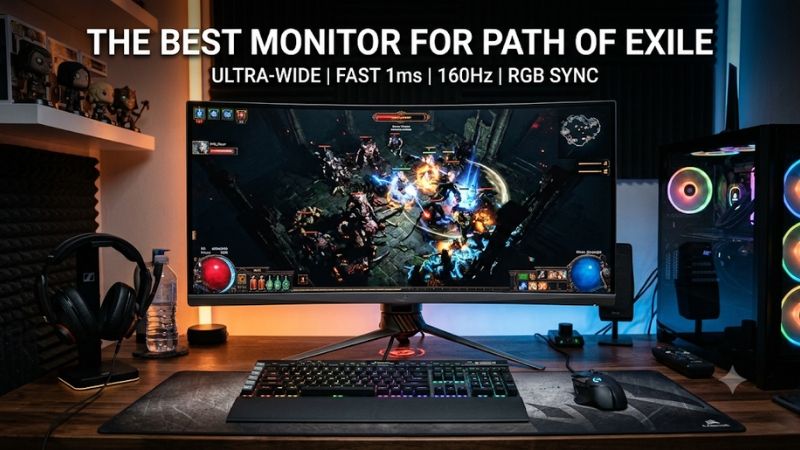
Quick verdict: the best monitor for Path of Exile
The LG UltraGear 27GX700A-B is the best overall recommendation for most players. Its 27-inch QHD Tandem OLED panel combines a 280Hz refresh rate, excellent contrast, and nearly instantaneous pixel response. Its matte coating is also useful for reducing reflections during long gaming sessions.
For players who prioritize more vivid colors and competitive responsiveness, the ASUS ROG Strix OLED XG27ACDNG offers a 360Hz QD-OLED panel. The HyperX OMEN OLED 27q is a more accessible OLED alternative with a still-fast 240Hz refresh rate.
The MSI MAG 274QPF X30MV is the better choice for gamers who prefer bright HDR highlights and want to avoid OLED-specific burn-in concerns. Its Mini-LED backlight has 1,152 dimming zones, and its 300Hz refresh rate is more than sufficient for fast action.
If you want to spend less, consider the ASUS ROG Strix XG27ACS. Its 1440p Fast IPS panel and 180Hz refresh rate deliver a practical gaming experience without the additional cost of OLED.
Finally, the ASUS ROG Swift OLED PG34WCDN is the premium ultrawide option for players who enjoy a wider view of Wraeclast and have enough desk and GPU capacity for a 34-inch display.
One important distinction: Path of Exile does not require a 300Hz or 360Hz monitor to play well. Resolution, readable interface elements, stable variable refresh rate, and consistent motion handling are more meaningful priorities for most action RPG players.
Quick comparison of gaming monitors for Path of Exile
| Monitor | Best for | Resolution | Refresh rate | Panel |
|---|---|---|---|---|
| LG UltraGear 27GX700A-B | Best overall | 2560 × 1440 | 280Hz | Tandem WOLED |
| ASUS ROG Strix OLED XG27ACDNG | Premium responsiveness | 2560 × 1440 | 360Hz | QD-OLED |
| HyperX OMEN OLED 27q | More accessible OLED | 2560 × 1440 | 240Hz | QD-OLED |
| MSI MAG 274QPF X30MV | Bright HDR and long sessions | 2560 × 1440 | 300Hz | Mini-LED VA |
| ASUS ROG Swift OLED PG34WCDN | Ultrawide immersion | 3440 × 1440 | 360Hz | QD-OLED |
| ASUS ROG Strix XG27ACS | Budget-friendly gaming | 2560 × 1440 | 180Hz | Fast IPS |
The recommendations cover different price categories rather than treating every display as a direct competitor. The ASUS XG27ACS is the entry-level option, while the ultrawide ASUS and premium OLED models require considerably more investment.
Prices discussed below are US-market listing snapshots checked November 9, 2026, before tax and excluding shipping where applicable. Promotional prices may change.
How we selected the best monitor for Path of Exile
Path of Exile is an action RPG with combat that can become visually crowded as players progress into more demanding encounters. Skill effects, enemies, loot indicators, environmental lighting, and interface elements can compete for attention.
That makes several monitor characteristics particularly relevant.
First, resolution affects visual clarity. A 27-inch 1440p monitor provides a useful balance between sharp text, readable interface elements, and manageable GPU demands. Moving to 4K increases pixel density, but it also requires more rendering performance.
Second, motion handling matters. Fast character movement, attacks, and enemy animations look clearer on monitors with quick pixel transitions. A high native refresh rate can also make camera movement and character control feel smoother.
Third, variable refresh rate support is useful because frame rates can fluctuate. PoE combat can create changing rendering workloads, especially when multiple visual effects appear simultaneously. FreeSync and G-SYNC Compatible displays can help reduce tearing when the GPU’s frame output varies within the supported VRR range.
Fourth, contrast and brightness influence visibility. OLED provides excellent black levels, while Mini-LED offers stronger backlight control than ordinary LCD displays. Both can make dark environments and colorful skill effects more visually appealing.
Finally, we considered physical screen size, aspect ratio, connectivity, panel longevity, and independent testing.
RTINGS monitor reviews provide the primary evidence for gaming responsiveness, input lag, panel behavior, HDR performance, and image quality. Manufacturer pages establish exact specifications and available connection modes.
No Path of Exile-specific monitor benchmark was available in the reviewed sources. Therefore, this article does not claim that a particular monitor produces higher Path of Exile FPS than another. Display performance and game-rendering performance are separate considerations.
Best overall: LG UltraGear 27GX700A-B
The LG UltraGear 27GX700A-B is the strongest all-around recommendation for players who want an excellent combination of motion clarity, contrast, and visual detail.
Its 26.5-inch-class display uses a fourth-generation RGB Tandem WOLED panel with a native resolution of 2560 × 1440 and a maximum refresh rate of 280Hz. This provides enough pixel density for a typical desktop gaming setup while maintaining a relatively manageable rendering workload compared with 4K.
OLED technology is particularly useful in games with dark environments. Path of Exile frequently places players in caves, ruined environments, and areas filled with shadows and colorful spell effects. Individual OLED pixels can switch off completely to produce black, eliminating the backlight blooming that can occur on conventional LCD displays.
The 280Hz refresh rate is also more than adequate for fast action. LG specifies a 0.03ms gray-to-gray response time, while RTINGS describes its measured response behavior as near-instantaneous. Low input lag and support for variable refresh rates make it a responsive option for PC gaming.
Another benefit is the matte coating. Unlike glossy OLED monitors that can reflect bright objects, the LG’s matte surface reduces mirror-like reflections. This is useful if your gaming desk is near a window or overhead lighting.
Connectivity includes two HDMI 2.1 ports, DisplayPort 1.4, and a USB hub. The monitor supports AMD FreeSync Premium Pro and NVIDIA G-SYNC compatibility. It also has an adjustable stand with height, tilt, swivel, and pivot functionality.
However, the monitor has limitations worth understanding. RTINGS found distracting VRR flicker when frame rates change, along with visible vertical banding in dark content. The high-brightness image settings can also overbrighten certain content. OLED introduces a long-term burn-in risk when static elements remain on screen for extended periods.
The B&H US listing showed $599.99 and in-stock availability during the November 9 research check.
Buy it if you want a versatile 1440p OLED with excellent motion clarity and deep blacks. Skip it if you want to avoid OLED maintenance or need a display that maintains consistent brightness without OLED limitations.
Best premium QD-OLED: ASUS ROG Strix OLED XG27ACDNG
The ASUS ROG Strix OLED XG27ACDNG is the premium choice for players who want exceptional responsiveness and vibrant colors. Its 26.5-inch QD-OLED panel combines 2560 × 1440 resolution with a 360Hz refresh rate.
Compared with a conventional IPS monitor, the QD-OLED panel provides substantially deeper blacks and more vivid colors. This can make Path of Exile’s environments, spell effects, and colorful combat animations look particularly impressive.
ASUS specifies a peak HDR brightness of 1,000 nits, a 0.03ms response time, FreeSync Premium Pro, and G-SYNC compatibility. Its OLED Care+ features and custom heatsink are designed to help reduce the risk of burn-in. The display also supports HDMI 2.1 and DisplayPort 1.4 with DSC.
RTINGS independently researched the exact monitor and found sharp motion, low input lag, deep blacks, and excellent gaming responsiveness. Its review also identified distracting VRR flicker with fluctuating frame rates, particularly in dark scenes.
One important limitation for PoE players is the glossy QD-OLED coating. In bright environments, black levels rise and can take on a purple appearance. The monitor performs best in a controlled lighting environment rather than directly opposite a sunny window.
ASUS also includes USB-C with DisplayPort Alt Mode and up to 90W power delivery, three USB-A downstream ports, and a built-in KVM feature. This is particularly useful if your desk doubles as a gaming and productivity workstation.
The ASUS US Store listed the XG27ACDNG at $699 during the November 9 research check. It is a premium purchase, and its 360Hz capability is more useful for players who also enjoy competitive shooters than for someone who plays only action RPGs.
Buy it if you want premium QD-OLED contrast, excellent motion handling, and extensive connectivity. Skip it if you primarily play Path of Exile, have a midrange GPU, or cannot benefit from the additional refresh-rate headroom.
Best more affordable OLED: HyperX OMEN OLED 27q
The HyperX OMEN OLED 27q is an attractive option if you want OLED image quality without paying for a 360Hz premium monitor.
Its 27.63-inch QD-OLED panel uses a 2560 × 1440 resolution and a 240Hz refresh rate. It also advertises a 0.03ms gray-to-gray response time. Those specifications provide a strong foundation for ARPG gaming, where responsive motion and clear visual effects are more important than extreme competitive refresh rates.
The main advantage is the OLED panel. Deep blacks help dark environments retain contrast, while QD-OLED technology produces a wide range of colors. This is particularly appealing when playing games with visually complex spell effects and bright environmental highlights.
RTINGS found that the monitor offers near-instantaneous pixel response, low input lag, and excellent gaming responsiveness. It also found deep blacks in dark rooms without the halos associated with local-dimming LCDs.
There are several trade-offs. The monitor does not get bright enough to fight intense glare, and its black levels appear purple under strong ambient lighting. RTINGS also noted noticeable VRR flicker when frame rates fluctuate. For a game where performance can vary between quiet exploration and intense combat, that is worth considering.
Connectivity is relatively basic. HyperX provides HDMI 2.1 and DisplayPort connections, but the monitor lacks a USB hub and integrated speakers. This is not necessarily a problem if you connect peripherals directly to your PC and use a gaming headset.
The exact US SKU is CH0R2AA#ABA. HyperX listed it at $399.99, reduced from a displayed $499.99 price, with stock available during the research check. The manufacturer also lists a three-year limited warranty.
Buy it if you want QHD OLED contrast and a 240Hz refresh rate without paying for the most expensive gaming displays. Skip it if your room is very bright or you regularly leave static desktop elements displayed for extended periods.
Best Mini-LED alternative: MSI MAG 274QPF X30MV
The MSI MAG 274QPF X30MV is an excellent alternative for gamers who prefer LCD technology but still want strong HDR performance.
Its 27-inch Rapid VA panel runs at 2560 × 1440 with a native maximum refresh rate of 300Hz. The most interesting feature is its Mini-LED backlight with 1,152 local dimming zones.
Unlike ordinary LCD monitors, which use relatively basic backlighting, Mini-LED can adjust different sections of the screen independently. This improves the visibility of bright highlights against darker backgrounds.
That characteristic is useful for Path of Exile because the game combines dark environments with bright skill animations, visual effects, and environmental lighting. The MSI’s DisplayHDR 1000 certification and high peak brightness specification make it an interesting option for players who prefer brighter displays.
RTINGS tested the exact MAG 274QPF X30MV and found excellent HDR picture quality, low input lag, and a responsive gaming experience. Its Mini-LED local dimming helps produce deeper blacks and brighter highlights, although some blooming remains visible around bright objects against dark backgrounds.
The VA panel also has relatively high native contrast, which helps dark scenes look better than they would on many budget IPS screens.
Its main weakness is motion behavior in dark scenes. RTINGS identified black smearing behind fast-moving objects, along with VRR flicker when frame rates fluctuate. This is particularly relevant if you notice dark trails during fast combat animations.
Connectivity includes two HDMI 2.1 ports and one DisplayPort 1.4 connection. The monitor also supports common VRR formats and has an adjustable stand. However, it lacks a USB hub and is limited to DisplayPort 1.4 bandwidth.
MSI’s US store listed the monitor at $319.99 as a limited-time offer, reduced from $399.99, on November 9, 2026.
Buy it if you want 300Hz gaming, bright HDR, and an alternative to OLED for long desktop sessions. Skip it if black smearing bothers you or you prefer the pixel-level contrast of OLED.
Best ultrawide for Path of Exile: ASUS ROG Swift OLED PG34WCDN
The ASUS ROG Swift OLED PG34WCDN is the premium choice for players who want a wider gaming experience.
Its 34-inch QD-OLED panel has a resolution of 3440 × 1440, a 21:9 aspect ratio, and a 360Hz refresh rate. The 1800R curvature helps create an immersive viewing experience without being as aggressive as some larger curved displays.
The additional horizontal space can make exploration feel more expansive and gives supported games more room across the screen. It is particularly attractive if you alternate between Path of Exile, racing games, open-world adventures, and other PC titles that benefit from ultrawide support.
ASUS uses a fifth-generation QD-OLED panel with an RGB Stripe subpixel layout. This design improves text clarity compared with older triangular QD-OLED subpixel arrangements, which is helpful when reading game interfaces and inventory text.
RTINGS found excellent motion handling, low input lag, deep blacks, and vivid colors. Another advantage is reduced VRR flicker compared with many older QD-OLED models. The BlackShield coating also helps reduce the black-level rise associated with earlier glossy QD-OLED displays.
Connectivity includes DisplayPort 2.1, two HDMI 2.1 ports, USB-C with up to 90W power delivery, three USB-A downstream connections, and KVM functionality. ASUS lists the monitor at $1,299 in its US store during the research period.
There is an important Path of Exile compatibility consideration. Both games should be distinguished from super-ultrawide displays. Community compatibility references describe Path of Exile 2 as supporting 21:9 but limiting the rendered view at 32:9. Path of Exile 1 has also been documented with an approximately 21.6:9 cap, which results in side bars at 32:9. Therefore, the 3440 × 1440 format is a much safer native ultrawide choice than purchasing a 5120 × 1440 monitor specifically for PoE.
Buy it if you want a premium 21:9 QD-OLED for Path of Exile and other ultrawide-compatible PC games. Skip it if your desk is small, your GPU struggles with ultrawide rendering, or you expect a super-ultrawide 32:9 image.
Best budget IPS alternative: ASUS ROG Strix XG27ACS
The ASUS ROG Strix XG27ACS is the practical choice for gamers who want a responsive 1440p monitor without paying for OLED or Mini-LED technology.
Its 27-inch Fast IPS panel provides a 2560 × 1440 resolution and a 180Hz refresh rate. That combination is more than sufficient for most Path of Exile players, particularly those who value clear UI elements and smooth character movement over extreme refresh rates.
IPS technology provides broad viewing angles and consistent image presentation. It is also a sensible option for players who spend long periods using static desktop interfaces, browsing build guides, checking trade websites, or working between gaming sessions.
ASUS advertises a 1ms gray-to-gray response time and support for G-SYNC compatibility and FreeSync. Its ELMB Sync feature combines backlight strobing with variable refresh rate operation, although individual users may prefer to leave strobing disabled if they notice image duplication or brightness reduction.
The display has DisplayPort 1.4, HDMI 2.0, and USB-C with DisplayPort Alt Mode. The USB-C connection is useful for compatible laptops, but it should not be mistaken for a high-power laptop charging solution. The stand also provides height, tilt, swivel, and pivot adjustment.
RTINGS found that the monitor delivers sharp motion and low input lag for ordinary gaming. However, its native contrast is relatively low, so dark areas look gray in a dim room. It also lacks local dimming, making it a weaker HDR option than the Mini-LED alternatives.
ASUS listed the exact monitor at $229 in its US store on November 9, 2026.
Buy it if you want an affordable, responsive 1440p display for Path of Exile and everyday PC use. Skip it if you primarily play in dark rooms and want deeper blacks or more impressive HDR highlights.
Choosing the right monitor for Path of Exile
The six recommendations cover different panel technologies, but there are a few additional considerations worth understanding before purchasing.
Why 1440p is a practical resolution for Path of Exile
For many players, 2560 × 1440 is the best starting point. It provides more detail than 1080p while placing less demand on the graphics card than 4K.
At 27 inches, QHD offers a pixel density of approximately 109 pixels per inch. That is sufficient for readable text and detailed environments at typical desktop viewing distances.
The resolution also allows players with midrange graphics cards to pursue higher frame rates without immediately moving into 4K rendering workloads.
This matters because Path of Exile can become demanding during complicated encounters. Multiple enemies, effects, projectiles, and environmental details may create significant changes in rendering workload.
A higher refresh rate does not improve the game’s rendering performance. Your GPU and CPU still determine how many frames the system produces.
How much refresh rate do you actually need?
A 144Hz or 165Hz monitor is already a worthwhile upgrade from a traditional 60Hz display. Moving to 180Hz or 240Hz can provide a smoother experience when your PC consistently produces enough frames.
Refresh rates above 300Hz are more specialized. They make more sense if you also play competitive shooters or other games where very high frame rates and motion clarity are priorities.
For a Path of Exile-focused setup, I would generally prioritize a good 1440p panel with effective VRR over paying substantially more for 360Hz.
FreeSync and G-SYNC Compatible support can help reduce tearing when the game does not maintain a fixed frame rate. However, VRR cannot eliminate every form of stuttering caused by CPU limitations, shader compilation, or sudden performance drops.
OLED versus Mini-LED versus IPS
OLED provides the strongest native contrast because individual pixels produce their own light. It is particularly attractive for dark environments and colorful skill effects.
However, repeated long gaming sessions can leave static interface elements on screen for extended periods. Inventory panels, HUD elements, and other fixed graphics make OLED burn-in protection worth considering. Enable automatic panel-care features, use screen-off timers, and review the manufacturer’s warranty coverage.
Mini-LED is an alternative for players who want brighter HDR highlights without organic-pixel wear concerns. It still has limitations, especially blooming and panel-specific motion behavior.
IPS remains a practical lower-cost choice. It usually provides broad viewing angles and avoids the same OLED maintenance concerns, but ordinary IPS backlighting cannot reproduce OLED black levels.
For someone playing Path of Exile for many hours while also using the computer for productivity, an IPS or Mini-LED monitor may be easier to maintain over time.
Should you buy an ultrawide monitor?
A 34-inch 21:9 ultrawide is worth considering if you enjoy immersive PC gaming and have enough desk space.
The ASUS PG34WCDN provides a 3440 × 1440 resolution, giving you more horizontal workspace than a standard 27-inch QHD display. It also offers an impressive 360Hz refresh rate.
However, do not confuse 21:9 with 32:9. Path of Exile’s documented aspect-ratio limitations make super-ultrawide displays a less straightforward purchase. Before buying a 49-inch 5120 × 1440 monitor specifically for this game, verify current behavior in the exact PoE client and patch you play.
A standard 16:9 monitor remains the safer choice for players who mostly play Path of Exile and other conventional-format games.
Frequently asked questions
Is 1440p good enough for Path of Exile 2?
Yes. A 2560 × 1440 display provides a good balance between visual detail and GPU workload. It is particularly suitable for 27-inch monitors and can support high refresh rates without the rendering demands associated with 4K.
Is 240Hz worth it for Path of Exile?
It can be useful, but it is not essential. A 240Hz monitor provides additional motion smoothness when the PC can deliver sufficiently high frame rates. For most ARPG players, a good 144Hz to 180Hz display is already a substantial improvement over 60Hz.
Does Path of Exile support ultrawide monitors?
The game supports 21:9 ultrawide resolutions, including 3440 × 1440. However, super-ultrawide 32:9 resolutions have documented aspect-ratio limitations. Check compatibility for the particular game version before purchasing a 49-inch monitor.
Is OLED good for long Path of Exile sessions?
OLED offers excellent contrast and motion clarity, but static interface elements can increase long-term burn-in risk. Use panel protection features and review the exact manufacturer’s warranty before purchasing.
Should I use FreeSync or G-SYNC for Path of Exile?
Variable refresh rate is useful when your FPS fluctuates. It helps synchronize the monitor’s refresh behavior with the GPU’s frame output, reducing tearing. Choose a monitor with VRR support compatible with your graphics card.
Is a 4K monitor better than 1440p for Path of Exile?
4K provides sharper images and additional desktop workspace, but it requires substantially more graphics processing power. For most players, 1440p at 27 inches is a better balance between clarity and performance.
Final verdict
The LG UltraGear 27GX700A-B is the best overall choice for Path of Exile because it combines sharp QHD resolution, a 280Hz Tandem OLED panel, excellent contrast, and responsive gameplay.
The ASUS ROG Strix OLED XG27ACDNG is the premium alternative for players who prioritize 360Hz and vivid QD-OLED colors. The HyperX OMEN OLED 27q offers a more accessible OLED experience, while the MSI MAG 274QPF X30MV is attractive for brighter HDR and players who prefer Mini-LED.
For a wider gaming experience, the ASUS ROG Swift OLED PG34WCDN offers an excellent 21:9 format. Finally, the ASUS ROG Strix XG27ACS is a sensible purchase when you want dependable 1440p gaming without OLED-related concerns. You do not need the most expensive monitor to enjoy Path of Exile. Prioritize readable QHD resolution, effective VRR, good motion handling, and a panel that suits your room and gaming habits.









