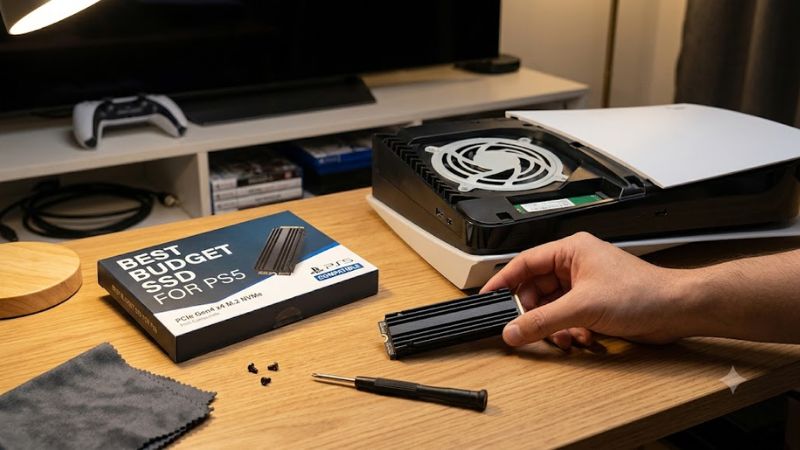
Best budget SSD for PS5 choices should do more than promise high benchmark numbers. The right drive clears Sony’s speed target, fits with its cooling hardware, and gives enough capacity to avoid constant game shuffling. These four picks focus on real value, with clear trade-offs for different budgets and libraries.
Quick answer: For most people in 2026, the best budget ssd for ps5 is the WD_BLACK SN850X 2TB With Heatsink — our #1 rated choice. See the full ranked comparison, alternatives and buying advice below.
How to Choose Budget SSDs for PS5
A PS5 M.2 upgrade is less about chasing peak benchmarks and more about meeting Sony’s interface rules at a sensible cost. The console supports PCIe Gen4x4 NVMe drives from 250GB to 8TB, with a recommended read speed of at least 5,500MB/s and effective heat dissipation required. That is the baseline for the best budget SSD for PS5.
Sequential Read Speed
The PS5 recommends at least 5,500MB/s sequential read, but going far beyond that has diminishing returns for loading. Treat 7,000–7,400MB/s as a useful ceiling for budget shopping, then compare price/capacity/cooling rather than assuming the largest number is automatically better for the console. That keeps spending focused.
For a strong all-round balance, the WD_BLACK SN850X 2TB and Seagate Game Drive 2TB both clear Sony’s threshold, while the Crucial P310 2TB keeps plenty of speed for less money. The first suits buyers who want headroom; the others make more sense when your budget must cover capacity and cooling. It is enough for most games.
Heatsink And Fit
Cooling is not optional on PS5, and the entire SSD-plus-heatsink assembly must stay within 25mm wide, 110mm long, and 11.25mm thick. A built-in cooler removes an installation variable, while a separate cooler can save money but demands careful measurement before you close the expansion cover. That fit check matters every time.
The Crucial P310 2TB includes a PS5-ready heatsink model, the WD_BLACK SN850X 2TB has a compatible heatsink version, and the Seagate Game Drive 2TB arrives purpose-built with one. These are better picks when you want fewer fit decisions and a simpler install with less room for accessory mismatch. That keeps setup predictable.
Capacity Per Dollar
Two terabytes is the practical budget sweet spot for many PS5 buyers because modern installs can consume a large share of a smaller upgrade. A 4TB drive costs more upfront, yet it can reduce the cycle of deleting/redownloading/reinstalling games as your library expands. Capacity matters most when large titles stay installed.
The Lexar NM790 4TB with heatsink is the capacity-first choice, while the Crucial P310 2TB is the value pick. Choose Lexar when you keep a sizable installed library, and the P310 for a smaller rotation when you want to limit upfront cost without dropping below Sony’s speed guidance. That is the clear practical trade-off.
NAND And Endurance
TLC NAND gives a stronger endurance margin than budget QLC designs, although PS5 game use is mostly read-heavy and differs from a workstation’s constant write load. TBW is still worth checking as a warranty/durability signal, especially if you frequently reinstall large games or move sizable data sets. It helps break ties.
The WD_BLACK SN850X 2TB and Lexar NM790 4TB use TLC with high endurance, while the Crucial P310 2TB uses a budget QLC design with 440TBW. The Seagate Game Drive 2TB also uses TLC, so it suits shoppers who want a PS5-specific design and higher-rated endurance over the lowest cost. That makes the trade-off easier to judge.
Top Picks
For buyers searching for the best budget SSD for PS5, the smartest shortlist is not the one with the flashiest benchmark. These four cover four priorities: balanced speed, lower cost, large capacity/easy installation, and every pick clears Sony’s core interface/size/cooling requirements in the correct version where possible.
| Product | Best For | Key Spec | Watch Out For |
|---|---|---|---|
| WD_BLACK SN850X 2TB With Heatsink | Best Overall | 7,300/6,600MB/s, 1,200TBW | Higher price when not discounted |
| Crucial P310 2TB With Heatsink | Best Value | 7,100/6,000MB/s, 440TBW | QLC, DRAM-less design |
| Lexar NM790 4TB With Heatsink | Best For Huge Libraries | 7,400/6,500MB/s, 3,000TBW | Higher upfront cost |
| Seagate Game Drive PS5 NVMe SSD 2TB | Best For Easy Installation | 7,300/6,900MB/s, 2,550TBW | Can cost more than generic Gen4 drives |
Best Overall: WD_BLACK SN850X 2TB With Heatsink
For a shopper seeking the safest all-around bet, the best budget SSD for PS5 can be the WD_BLACK SN850X 2TB with heatsink when its price remains competitive. It reaches 7,300MB/s read, 6,600MB/s write, uses TLC NAND, and carries a 1,200TBW rating with a five-year warranty. For most owners, that balance is hard to beat.
Its advantage is the factory-integrated heatsink, with the PS5 version measuring 23.4mm wide and 8.8mm tall. The drawback is cost; when SSD pricing rises, you may pay for PC-class benchmark performance that changes little in normal console loading, even though its 1,200TBW endurance gives valuable long-term headroom overall.
Best Value: Crucial P310 2TB With Heatsink
For shoppers focused on value, the best budget SSD for PS5 is often the Crucial P310 2TB with heatsink because it clears the console’s speed target without adding a premium controller class. It offers up to 7,100MB/s reads and 6,000MB/s writes, plus a five-year warranty. The 2TB size also avoids a cramped starter upgrade.
The useful advantage is the integrated cooler and 9.65mm total height, which keeps the install straightforward while preserving the budget angle. The compromise is its QLC, DRAM-less design and 440TBW rating, so it is less attractive for very heavy write workloads than TLC alternatives, although game storage itself is usually read-heavy.
Best For Huge Libraries: Lexar NM790 4TB With Heatsink
For players with a sizable game library, the best budget SSD for PS5 can be a 4TB model rather than a cheaper 2TB drive. The Lexar NM790 with heatsink reaches up to 7,400MB/s read and 6,500MB/s write, uses TLC NAND, and the 4TB version is rated for 3,000TBW. That is useful headroom for long-term game storage and updates.
Its biggest advantage is capacity while staying in the Gen4 performance class, and the heatsink model is 24mm wide and 9.7mm tall. The downside is initial purchase cost: even with a good price per terabyte, 4TB is harder to justify for players who keep only a rotating game set installed. The value depends on library size.
Best For Easy Installation: Seagate Game Drive PS5 NVMe SSD 2TB
For first-time upgraders who want minimal guesswork, the best budget SSD for PS5 may be the Seagate Game Drive PS5 NVMe SSD 2TB. It is a PS5-targeted M.2 2280 drive with a pre-installed heatsink, 7,300MB/s sequential read, 6,900MB/s write, 3D TLC NAND, and 2,550TBW endurance. The five-year warranty adds reassurance too.
Its advantage is the purpose-built form factor and cooling, so there is no separate heatsink choice before installation. The trade-off is value: its PS5-specific positioning can cost more than generic Gen4 drives with similar real-world loading behavior during competitor discounts. That matters to value-focused shoppers.
Frequently Asked Questions
The best budget SSD for PS5 is usually a 2TB Gen4 NVMe model with a proper heatsink, not the fastest drive on a PC benchmark chart. The questions below focus on fit, capacity, performance, and the practical product differences that matter after your games are installed, especially for buyers avoiding needless upgrades.
Does Every M.2 SSD Fit A PS5?
No. A compatible drive must be PCIe Gen4x4 NVMe, and the full assembly must meet Sony’s size limits. The recommended sequential read is at least 5,500MB/s, and an effective heat-dissipation structure is required, so a bare drive should not be installed by itself. For PS5, cooling cannot be an afterthought during purchase.
Check the exact heatsink model, not just the SSD family, because dimensions can change between versions. Sony lists support for M.2 lengths including 2280 and allows both single- and double-sided devices, but cooler dimensions still decide whether the cover closes correctly. Measure the complete assembly before installing.
Is 2TB Enough For A PS5?
Yes, 2TB suits most players with a manageable game rotation. It adds substantial room without 4TB’s higher upfront spend, and modern Gen4 drives here comfortably reach the PS5’s sensible speed range. For a mixed game library, that balance is easier to live with every day, especially when you prefer fewer storage chores.
A 4TB option becomes more useful when you keep many large games installed at once or dislike moving titles between storage locations. The Lexar NM790 4TB is the obvious fit here, while the 2TB Crucial P310 keeps the entry cost more controlled. Think about your actual library habits, not just the biggest discount available.
Does A Faster SSD Make PS5 Games Load Faster?
Only to a point. Once an M.2 drive comfortably clears Sony’s 5,500MB/s recommendation, the PS5 does not turn every extra PC benchmark number into a proportional loading-time gain. Game engine behavior, file layout, and the console itself all limit how much the drive can matter. The console is the limiting environment here.
That makes 7,000–7,400MB/s drives sensible targets rather than mandatory numbers. A premium model may still be preferable for endurance, warranty, or PC use, but buying purely for a higher sequential score is a weak way to stretch a PS5 storage budget. Capacity and an included heatsink can deliver more practical value.
Do I Need The Heatsink Version Of The SSD?
Yes, or you need effective active cooling that meets Sony’s specified dimensions. The console’s M.2 slot expects heat dissipation, and Sony explicitly warns against using an M.2 SSD without a heat-dissipation mechanism such as a heatsink/heat-transfer sheet. Do not treat cooling as merely optional. Sony’s rule is explicit.
Using a model with a compatible integrated heatsink is the simpler route because the cooling choice and fit are settled together. The WD_BLACK SN850X, Crucial P310, Lexar NM790, and Seagate Game Drive each offer a heatsink-equipped option suitable for a careful PS5 installation. Still verify the exact model before ordering.
Final Thoughts
For most shoppers, the best budget SSD for PS5 is the WD_BLACK SN850X 2TB with its compatible PS5 heatsink, but the Crucial P310 2TB wins on value, Lexar NM790 4TB wins on capacity, and Seagate Game Drive 2TB wins on install simplicity. Match the trade-off to library size/needs, spending, and installation comfort level.
Ready to decide? Our #1 pick for 2026 is the WD_BLACK SN850X 2TB With Heatsink.
Live price & availability on Amazon.