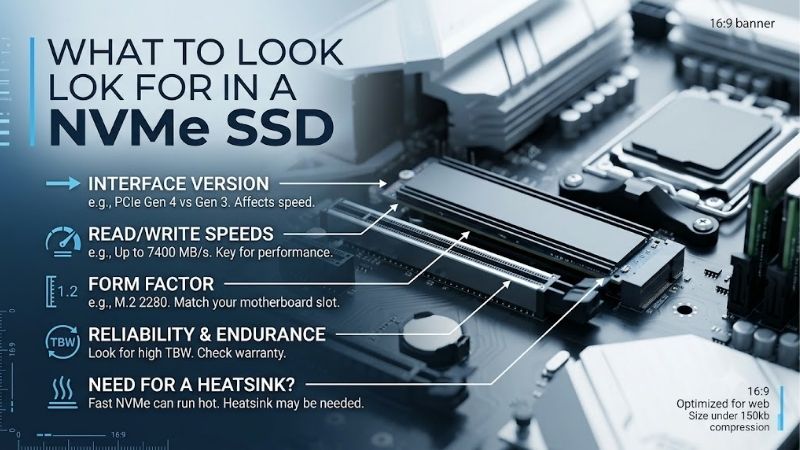
What to look for in a nvme ssd can seem like a list of speed numbers, but the useful checks are simpler: interface, capacity, endurance, NAND, and thermals. This guide shows how those specifications affect gaming, work, storage, and upgrade value so you can avoid paying for performance your system will not use.
Quick answer: Our top pick in 2026 is the WD Blue SN580 — our #1 rated choice. See the full ranked comparison, alternatives and buying advice below.
How to Choose an NVMe SSD
what to look for in a nvme ssd starts with four checks: interface and form factor, capacity and endurance, NAND and sustained performance, and thermal behavior. These factors explain the differences that matter most, while benchmark peaks matter less unless your workload can use them. Start with the motherboard, then match the drive.
Interface And Form Factor
Interface should match the platform instead of marketing label. WD Blue SN580 uses PCIe 4.0 x4, Samsung 990 EVO Plus supports PCIe 4.0 x4 and 5.0 x2, Kingston KC3000 uses PCIe 4.0 x4, and Crucial P3 Plus uses PCIe 4.0. For a new build, prioritize a supported M.2 NVMe slot; WD Blue SN580 is the simplest fit for mainstream PCIe 4.0 systems.
Capacity And Endurance
what to look for in a nvme ssd also means choosing capacity around what you will keep installed. A 1TB drive is a practical baseline for many gaming and desktop systems, while 2TB gives more room for games, media, and projects. Capacity affects convenience, while endurance matters more when the drive sees frequent writes or repeated transfers.
Do not treat TBW as a countdown to failure. It’s a specified endurance measure tied to the warranty, not a promise that the SSD stops working afterward. KC3000 1TB is rated for 800TBW, SN580 1TB for 600TBW, and 990 EVO Plus 1TB for 600TBW, while P3 Plus 1TB is rated for 220TBW. For frequent writes, favor KC3000 or SN580.
NAND And Sustained Performance
what to look for in a nvme ssd includes NAND type because it helps explain sustained behavior after an SSD’s fastest cache is exhausted. TLC generally offers stronger endurance and sustained-write behavior than QLC, while SLC caching can make short transfers look much faster than long ones. Sequential speed is most useful for large files.
For demanding writes, KC3000 uses 3D TLC with DRAM cache and 990 EVO Plus uses Samsung V-NAND TLC. SN580 also uses TLC, while P3 Plus uses QLC. That makes KC3000 and 990 EVO Plus better fits for frequent heavy transfers, while P3 Plus is more compelling when capacity matters. Choose KC3000 for write-heavy work or P3 Plus for storage value.
Thermal Management
what to look for in a nvme ssd includes thermal-behavior because sustained activity can push temperatures toward an SSD’s operating limit. This matters during long file copies, large installs, and content-creation work. A motherboard heatsink may be enough, but slot location and nearby GPU airflow can still change results.
SN580 lists an operating range up to 85°C, while Samsung 990 EVO Plus lists 0°C to 70°C and recommends proper airflow. KC3000 operates up to 70°C and includes a graphene aluminum heat spreader, while P3 Plus uses adaptive thermal protection. For most desktops, use the board’s M.2 heatsink first; KC3000 is the clear heavy-workload option.
Top Picks
what to look for in a nvme ssd becomes clearer when drives are assigned distinct roles. WD Blue SN580 is the strongest overall balance, Samsung 990 EVO Plus is a strong choice for high-speed workloads, Kingston KC3000 is a proven pick for heavy workloads, and Crucial P3 Plus is the strongest value choice for large-capacity builds.
| Product | Best For | Key Spec | Watch Out For |
|---|---|---|---|
| WD Blue SN580 | Best Overall | PCIe 4.0 x4; 4,150/4,150MB/s at 1TB; 600TBW | Lower peak speed than newer high-end Gen4 drives |
| Samsung 990 EVO Plus | Best For High-Speed Workloads | PCIe 4.0 x4 / 5.0 x2; 7,150/6,300MB/s at 1TB; 600TBW | Premium bandwidth has limited gaming benefit |
| Kingston KC3000 | Best For Heavy Workloads | PCIe 4.0 x4; 7,000/6,000MB/s at 1TB; 800TBW; DRAM | Higher power draw under sustained load |
| Crucial P3 Plus | Best Value | PCIe 4.0; 5,000/4,200MB/s at 2TB; 440TBW | Lower endurance than TLC alternatives |
WD Blue SN580 — Best Overall
WD Blue SN580 is easiest all-purpose pick for mainstream desktops because its balance avoids both bargain-bin compromises and flagship pricing. The 1TB model reaches up to 4,150MB/s sequential read and write, uses WDC TLC NAND, carries a 600TBW rating, and comes in a single-sided M.2 2280 design for simple installation.
Its main advantage is balance for Windows, applications, games, and everyday file-work without demanding an expensive platform. The drawback is its lower sequential ceiling than newer high-end Gen4 drives. For ordinary desktop use, that gap is less important than capacity, compatibility, and spending money on components that affect the whole PC.
Samsung 990 EVO Plus — Best For High-Speed Workloads
Samsung 990 EVO Plus is performance-focused for users who regularly move large files or want additional storage-bandwidth. The 1TB model reaches 7,150MB/s read and 6,300MB/s write, uses TLC NAND, supports PCIe 4.0 x4 or 5.0 x2, and carries a 600TBW rating. It suits demanding desktop storage use for frequent large-file work.
Its advantage is excellent sequential throughput plus support for PCIe 5.0 x2 connections. The tradeoff is value: ordinary gaming often doesn’t justify flagship-level storage bandwidth. It also benefits from good airflow, so its strongest case is a workload that repeatedly moves large files rather than light browsing or office-work tasks.
Kingston KC3000 — Best For Heavy Workloads
Kingston KC3000 is stronger for users who expect frequent high-volume transfers, 4K video-editing work, rendering assets, or write-heavy tasks. Its 1TB model reaches 7,000MB/s read and 6,000MB/s write, uses 3D TLC NAND with DRAM cache, and carries an 800TBW rating. That blend favors demanding storage work for creators.
Its advantage is combination of TLC flash, DRAM, high throughput, and strong endurance. The drawback is higher power draw under load than simpler models, with Kingston listing up to 6.3W write power for the 1TB version. Motherboard airflow is useful when the drive is pushed through long-transfers repeatedly in demanding work.
Crucial P3 Plus — Best Value
Crucial P3 Plus is the best-value choice for buyers who prefer adding storage instead of paying for premium write endurance. The 2TB model reaches 5,000MB/s read and 4,200MB/s write, while the series extends to 4TB. It has a five-year warranty, adaptive thermal protection, and mainstream desktop compatibility for large-libraries.
Its advantage is straightforward: large capacities work well for game-libraries, media files, and everyday storage. The limitation is endurance, with the 1TB model rated for 220TBW and the 2TB version for 440TBW. That makes P3 Plus more appropriate for read-heavy storage than constant scratch-disk or workstation-style writing over long periods.
Frequently Asked Questions
what to look for in a nvme ssd is a question because headline specifications can hide buying mistakes. Compatibility, workload, capacity, and thermals deserve priority because an SSD is a system component, not an isolated benchmark result. A faster model can be a worse purchase when the platform cannot use its extra features.
Do I Need PCIe 5.0 For A New PC?
Most buyers don’t need PCIe 5.0 for a new PC. A quality Gen4 drive already handles gaming, office-work, and most creative applications very quickly. Gen5 becomes more useful when the platform supports it and the workload benefits from sustained transfer bandwidth, rather than simply because the newer label sounds faster.
Samsung 990 EVO Plus is unusual because it can operate through PCIe 5.0 x2 while remaining backward compatible with PCIe 4.0 x4 and 3.0 x4 systems. That flexibility can help an upgrade path, but don’t pay extra just for Gen5 support. Put the budget into capacity or stronger core hardware when storage isn’t the bottleneck.
Is TLC Better Than QLC For NVMe?
TLC is generally the safer choice for frequent writes because it stores fewer bits per cell and typically provides stronger endurance and sustained behavior than QLC. That doesn’t make QLC unsuitable. For gaming, documents, and media libraries with lighter writes, QLC can deliver useful capacity while keeping costs controlled.
SN580, 990 EVO Plus, and KC3000 all use TLC, while P3 Plus uses QLC. That difference helps explain why P3 Plus is attractive for large-libraries but less compelling as a constant scratch disk. Match the NAND design to your workload rather than assuming every SSD needs the same endurance or sustained-write profile.
Does More Sequential Speed Mean Faster Gaming?
Usually not by as much as benchmark-charts imply. A drive’s sequential throughput describes large-file transfers, while game-loading also depends on other system factors. Moving from SATA to NVMe can matter, but moving between fast Gen4-class models often brings smaller gains in practice for current-gaming PCs daily.
For example, SN580 reaches 4,150MB/s, while 990 EVO Plus reaches 7,150MB/s reads, yet games do not load proportionally faster. The premium matters more for large-file project transfers or repeated bulk-file movement. Gaming-focused buyers can prioritize capacity, endurance, and price before paying for the highest sequential-speed number on the box.
Should I Buy A Heatsink With My NVMe SSD?
Usually not when the motherboard already includes an M.2 heatsink. Thermal needs rise during long-transfers and sustained writes, especially when the SSD sits under a graphics card. Laptop installations need a separate clearance check because an aftermarket cooler may not fit the enclosure or the original thermal layout.
Use the motherboard heatsink when available and follow its installation guidance. KC3000 includes a graphene aluminum heat spreader, while P3 Plus uses adaptive thermal protection. The goal is stable performance under sustained activity, not the lowest idle temperature, so avoid bulky hardware that complicates installation or blocks parts.
Final Thoughts
what to look for in a nvme ssd is mainly a matter of interface, capacity, endurance, NAND, and thermals rather than a single benchmark number. Choose SN580 for balance, 990 EVO Plus for high-speed work, KC3000 for demanding writes, or P3 Plus for capacity, then spend the remaining budget where it improves the whole system most.
Ready to decide? Our #1 pick for 2026 is the WD Blue SN580.
Live price & availability on Amazon.