What to look for in thermal paste requires separating specifications from persuasive packaging. A high conductivity number cannot tell you whether a syringe suits your CPU, maintenance schedule, or budget. For a conventional desktop build, prioritize electrical properties, clear application guidance, enough usable compound, and realistic value.
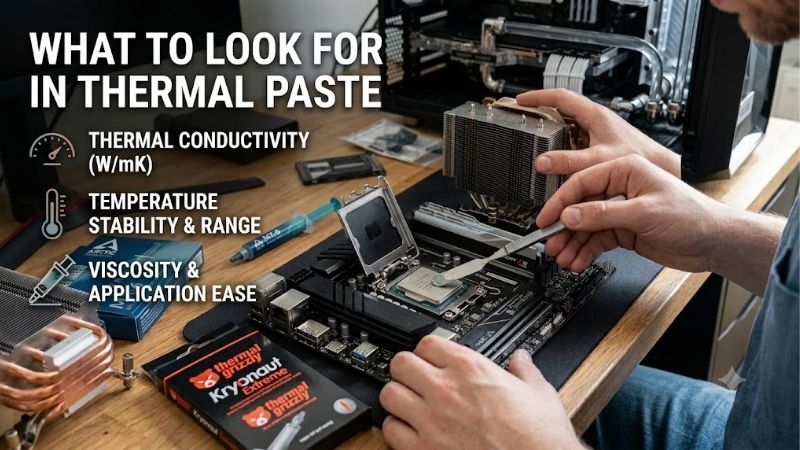
Quick answer: Our top pick in 2026 is the Noctua NT-H2 — our #1 rated choice. See the full ranked comparison, alternatives and buying advice below.
How to Choose Thermal Paste
This guide explains what to look for in thermal paste through four purchasing criteria and four product recommendations. You will see how electrical properties, handling accessories, service guidance, and package sizes affect the choice. Product awards reflect documented features and practical fit, rather than invented temperature comparisons.
Electrical Properties
Electrical conductivity describes whether a compound can carry current, which matters if material reaches exposed contacts or nearby components. Thermal conductivity describes heat transfer and answers a different question. For ordinary desktop CPU installations, an electrically nonconductive paste avoids the added electrical risks of liquid metal.
Nonconductive compounds still require careful installation: keep compound off socket contacts and follow the hardware manufacturer’s instructions. This category includes all four selections, leaving price and handling as differentiators. Choose ARCTIC MX-6 when its nonconductive, non-capacitive formulation meets your needs at a competitive price.
Application Accessories
Application accessories can matter more than headline specifications during a controlled first installation. A supplied spatula supports manual spreading where the product’s instructions call for it, while cleanup supplies address later removal. Neither accessory changes the compound’s performance or substitutes for correct cooler mounting.
When deciding what to look for in thermal paste, match the bundle to the job rather than collecting unnecessary extras. A spreader helps buyers who intend to follow a manual-spreading procedure, but adds little when their instructions specify another method. Choose Thermal Grizzly Kryonaut when its included spatula supports the application.
Service and Storage Guidance
Installed service guidance and syringe storage guidance describe separate conditions. Paste beneath a mounted cooler experiences heat cycles and pressure, while unused compound requires suitable storage. Clear manufacturer recommendations help plan maintenance, although actual longevity still depends on the installation and operating environment.
Look for specific guidance instead of assuming premium paste always outlasts inexpensive alternatives. A defined usage recommendation is useful for systems whose coolers are rarely removed; frequent upgrades make that distinction less important. Choose Noctua NT-H2 when its published storage and installed-use guidance suits your ownership habits.
Package Size and Purchase Value
Package size should reflect foreseeable installations rather than the largest discount on a retail listing. Processor surface area, application method, and cooler removal frequency influence consumption. A large syringe can reduce repeat purchases for workshop use, but a small package can be more sensible when you will assemble only one computer.
Compare delivered cost per gram alongside how much compound you realistically expect to use. Larger packages reduce purchasing frequency without guaranteeing a lower total expense, especially when excess paste remains unused. Choose GELID GC-Extreme 10g for repeated installations when its quantity fits a genuine assembly or maintenance workload.
Top Picks
Knowing what to look for in thermal paste makes these recommendations easier to separate. NT-H2 balances documented service guidance with cleanup supplies, MX-6 targets value, Kryonaut includes a spreading tool, and GC-Extreme offers larger quantities. None is presented as universally coolest; that conclusion would require matched hardware testing.
| Product | Best For | Key Spec | Watch Out For |
|---|---|---|---|
| Noctua NT-H2 | Best Overall | 3.5g; three cleaning wipes; recommended CPU usage up to five years | Limited application count on large CPUs |
| ARCTIC MX-6 | Best Value | 4g option; electrically nonconductive and non-capacitive | Thick consistency; compare exact bundle contents |
| Thermal Grizzly Kryonaut | Manual Application | 1g option with spatula; no curing requirement | Small quantity for repeated installations |
| GELID GC-Extreme | Frequent Assembly | 10g option; electrically nonconductive; non-curing | Excess quantity for occasional builders |
Noctua NT-H2: Best Overall
Noctua NT-H2 earns Best Overall for buyers seeking clear maintenance guidance and a useful cleanup bundle. The 3.5g package includes three NA-CW1 wipes, while Noctua specifies recommended CPU usage up to five years. Its electrically nonconductive formulation suits desktop installations without introducing liquid-metal handling requirements.
The quantity limitation matters for large heat spreaders: Noctua estimates around three large-CPU applications from this package. Regular cooler changes may therefore favor a larger syringe. Choose NT-H2 for its documented guidance and included wipes, understanding that estimated usage and service duration cannot predict every installation.
ARCTIC MX-6: Best Value
ARCTIC MX-6 earns Best Value when the 4g option provides genuine savings against suitable alternatives. ARCTIC describes the compound as electrically nonconductive, non-capacitive, and high viscosity. Those properties make it a practical candidate without pretending that pricing or branding establishes guaranteed thermal superiority.
Its thick consistency is a real handling tradeoff for buyers who prefer effortless dispensing or manual spreading. Also verify whether the exact bundle includes cleaning supplies. Knowing what to look for in thermal paste means comparing equivalent packages; an inexpensive syringe and a cleanup kit are distinct purchases with distinct benefits.
Thermal Grizzly Kryonaut: Best For Manual Application
Thermal Grizzly Kryonaut earns Best For Manual Application through the included spatula in its 1g package. The manufacturer lists no electrical conductivity and no curing requirement. Buyers following the supplied application procedure receive a relevant tool alongside the compound, rather than needing to source a separate spreading accessory.
The small quantity is its drawback for large processors or repeated cooler mounting. The included tool does not make Kryonaut the superior choice for every installation method. When evaluating what to look for in thermal paste, select this package for a specific spreading workflow, rather than assumed thermal superiority from premium branding.
GELID GC-Extreme: Best For Frequent Assembly
GELID GC-Extreme earns Best For Frequent Assembly through its available 10g package. GELID describes an electrically nonconductive, non-curing compound, making it relevant for repeated conventional CPU installations. The larger supply helps builders avoid running through small syringes when swapping coolers or assembling several systems over time.
Its drawback is purchasing more compound than a single build typically requires. A lower price per gram cannot justify unused inventory indefinitely. Buy the 10g version when upcoming projects justify the supply, and follow its storage instructions; occasional builders should compare smaller packages before committing to the larger format.
Frequently Asked Questions
Questions about what to look for in thermal paste often focus on conductivity numbers, included cooler compound, curing, and processor compatibility. These details can influence purchasing without producing a universal product ranking. The answers below explain which claims require context and when buying another syringe is actually worthwhile.
Does Higher Thermal Conductivity Always Mean Better Cooling?
No, thermal conductivity figures alone are not a reliable way to rank different brands by CPU temperature. Measurement methods, mounting conditions, and interface thickness affect real results. Prefer controlled comparisons using equivalent hardware and settings rather than assuming the largest advertised W/mK number identifies the best purchase.
Use specifications as context, then check whether published testing matches your intended application. Desktop CPUs with heat spreaders and exposed GPU dies present different interfaces. Knowing what to look for in thermal paste includes recognizing when a review’s hardware or procedure makes its results a poor predictor for your own installation.
Is Included Cooler Paste Good Enough?
Yes, the paste supplied with a reputable cooler can be sufficient for a normal desktop build. A separate premium syringe is not automatically necessary when the cooler already includes a suitable compound. Check the cooler’s instructions and package contents before purchasing, especially if the cold plate arrives with factory-applied material.
Do not layer another compound over an existing application. If replacing the supplied material or reinstalling a cooler, clean both mating surfaces and apply fresh paste according to the relevant instructions. Allow cleaning fluid to evaporate before mounting, and use the correct mounting hardware and tightening procedure for your processor socket.
Does Thermal Paste Need a Curing Period?
No, these recommendations do not depend on a special curing period before initial use. Thermal Grizzly and GELID explicitly list non-curing formulations, while Noctua and ARCTIC provide immediate-use compounds. That differs from the mistaken assumption that every paste needs several days of operation before the cooling system can function properly.
Temperature checks need comparable conditions: use consistent CPU power settings, fan behavior, ambient temperature, and test duration. Changes between an idle desktop and sustained rendering do not establish curing behavior. Diagnose mounting or cooling problems directly rather than expecting paste to correct an unsuitable installation.
Can You Use the Same Paste for Intel and AMD?
Yes, conventional thermal paste can serve both Intel and AMD desktop CPUs with intact heat spreaders. Compatibility depends on the interface and installation instructions rather than processor branding. Choose a compound, then follow the socket-specific application guidance because heat spreader shapes and dimensions differ across platforms.
Threadripper-sized surfaces can consume more paste than mainstream desktop processors, changing package value and available application counts. Laptop and GPU repasting require separate guidance for exposed dies and other interface materials. A desktop recommendation does not determine thermal-pad thickness or authorize replacing pads with paste.
Final Thoughts
My answer to what to look for in thermal paste prioritizes electrical properties, application, service guidance, and quantity. Choose NT-H2 for the overall bundle, MX-6 for verified savings, Kryonaut for its spreading accessory, or GC-Extreme 10g for repeat assembly. Buy the features you will use, then follow installation instructions.
Ready to decide? Our #1 pick for 2026 is the Noctua NT-H2.
Live price & availability on Amazon.