Best budget monitor arm choices are easy to misunderstand because a low price can hide instability, short reach, or poor desk fit. The useful question is which arm matches your monitor weight, VESA pattern, workspace, and adjustment habits. This roundup compares four affordable options with distinct strengths for common desk setups.
How to Choose a Monitor Arm
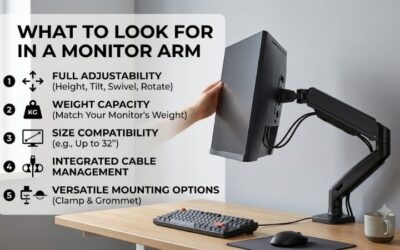
Choosing a best budget monitor arm starts with compatibility rather than brand reputation. Check monitor weight, VESA spacing, height and reach, desk thickness, mounting method, and adjustment behavior. Those specifications determine stability and positioning, and each criterion below connects directly to a recommended model.
Monitor Weight And VESA Fit
Start with the monitor’s actual mounted weight, not its diagonal measurement. Two 27-inch panels can differ substantially, especially after removing the factory stand. The arm must support the final mounted load within its published range, so check the display specification first. That keeps North Bayou F80 and VIVO STAND-V001 in clear roles.
VESA spacing is the second compatibility checkpoint because the mounting plate must align with the display holes. The common 75 x 75 mm and 100 x 100 mm patterns cover many screens, which suits North Bayou F80, HUANUO HNSS6, WALI GSDM001, and VIVO STAND-V001 without specialized adapters for routine matching.
Height And Arm Reach
Consider the screen position you actually need, then compare height travel and horizontal extension. Height determines how far the monitor can rise, while extension controls reach toward or away from the user. Deeper desks generally benefit from longer arms, while compact workspaces need controlled movement that avoids crowding the keyboard area.
WALI GSDM001 leads on reach, with a published 20.3-inch maximum extension and 23.6-inch maximum height. North Bayou F80 and HUANUO HNSS6 suit conventional desk layouts, while VIVO STAND-V001 combines a 16-inch extension with a 17-inch pole for flexible everyday positioning on deeper desktop surfaces.
Desk Thickness And Mounting
The desktop can eliminate an otherwise suitable arm before the monitor does. Check thickness, rear-edge clearance, and whether a clamp or grommet installation is practical. A thick desktop, cable tray, or nearby frame can interfere with mounting hardware, so measure the actual workspace rather than relying on a generic desk description.
VIVO STAND-V001 accepts desktops up to 3.25 inches thick. HUANUO HNSS6 supports clamp and grommet installation, while North Bayou F80 and WALI GSDM001 also provide both options. These configurations cover most conventional desk layouts without forcing one mounting method, which is useful when rear-edge clearance is limited.
Adjustment Mechanism
Gas-spring and jointed arms behave differently during adjustment. Gas springs are convenient when the screen moves frequently, but tension must match the monitor load. Articulated joints can feel more deliberate for displays that stay fixed. Decide how often you reposition the screen before paying for motion that you rarely use.
North Bayou F80, HUANUO HNSS6, and WALI GSDM001 use gas-spring mechanisms, making them useful for regular repositioning. VIVO STAND-V001 uses a traditional articulated design, which suits a mostly fixed setup while still providing broad tilt, swivel, rotation, and height adjustment for normal desk use when movement frequency matters.
Top Picks
These best budget monitor arm picks cover different priorities instead of repeating the same design. North Bayou F80 is the balanced choice, VIVO STAND-V001 emphasizes rated capacity, WALI GSDM001 favors reach, and HUANUO HNSS6 keeps compatibility straightforward for conventional 13- to 32-inch monitors for everyday use.
| Product | Best For | Key Spec | Watch Out For |
|---|---|---|---|
| North Bayou F80 | Best Overall | 2-9 kg, 17-30″ | Published screen range tops out at 30″ |
| VIVO STAND-V001 | Best Value | 22 lb, up to 38″ ultrawide | Articulated rather than gas-spring design |
| WALI GSDM001 | Best For Deep Desks | 19.8 lb, 20.3″ extension | Longer reach increases leverage |
| HUANUO HNSS6 | Best For First-Time Buyers | 19.8 lb, 13-32″ | Less reach than WALI GSDM001 |
North Bayou F80 — Best Overall
North Bayou F80 is the best overall best budget monitor arm for mainstream 17- to 30-inch displays. Its 2-9 kg capacity covers many office and gaming monitors, while the gas spring makes height and angle changes convenient. It supports 75 x 75 and 100 x 100 mm VESA patterns, with 360-degree rotation for orientation changes.
The main limitation is its published 30-inch screen range, so larger ultrawides deserve a different pick. Gas-spring tension also needs correct setup for smooth movement. For a typical 24- or 27-inch display, those constraints are minor compared with its load range, familiar VESA support, and flexible positioning for ordinary desktop use.
VIVO STAND-V001 — Best Value
VIVO STAND-V001 is the best value best budget monitor arm when rated capacity matters. It supports up to 22 pounds, standard 13- to 32-inch displays, and ultrawides up to 38 inches when the monitor remains within that weight limit. Its 17-inch pole, 16-inch extension, 360-degree swivel, and rotation provide broad positioning.
The compromise is an articulated mechanism rather than a gas spring, so frequent height changes take more deliberate adjustment. The clamp also requires a compatible desk edge up to 3.25 inches thick. For a monitor positioned once and mostly left alone, the design keeps cost low without giving up useful movement range.
WALI GSDM001 — Best For Deep Desks
WALI GSDM001 is the best reach-focused best budget monitor arm for deeper desks or users who sit farther from the mounting edge. It supports 13- to 32-inch monitors up to 19.8 pounds, uses 75 x 75 and 100 x 100 mm VESA patterns, and provides 20.3 inches of extension with 23.6 inches of maximum height on larger work surfaces.
The longer reach increases leverage on the desk, so secure mounting and correct gas-spring tension become more important. The 19.8-pound ceiling is also a firm boundary for heavy displays. For normal monitors, the extra extension can make placement easier on deeper desks where shorter arms feel cramped during normal use.
HUANUO HNSS6 — Best For First-Time Buyers
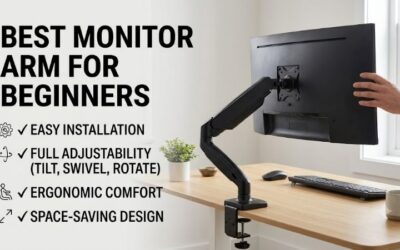
HUANUO HNSS6 is the best straightforward best budget monitor arm for first-time buyers using conventional 13- to 32-inch monitors. Its 19.8-pound capacity, 75 x 75 and 100 x 100 mm VESA support, and 360-degree rotation cover many everyday displays. The gas-spring design also makes routine height repositioning easier without unusual accessories.
Its limitation is a more ordinary reach envelope than WALI GSDM001, which can matter on deeper desks. The gas spring must also be tensioned for the monitor’s actual weight. On a standard desk with a typical 24- to 32-inch screen, those limits are unlikely to matter, making the HNSS6 an easy first installation for most first-time owners.
Frequently Asked Questions
Most best budget monitor arm questions concern compatibility, stability, and movement rather than appearance. Answers depend on actual monitor weight, VESA spacing, desktop construction, and repositioning needs. The following questions address the failure points that matter after installation, not just features printed on a product box.
Can A Budget Monitor Arm Hold A Heavy Monitor?
Can a budget monitor arm hold a heavy monitor? Yes, provided the mounted weight stays within the manufacturer’s published rating. Screen size is not a reliable substitute because monitors of the same diagonal can differ substantially. VIVO STAND-V001 has the highest rating here at 22 pounds, while the other three reach 19.8 pounds.
Remove the factory stand before checking the final mounted weight, then compare that figure with the manufacturer’s published range. Staying below the limit with some margin is preferable to relying on rounded retailer specifications. An unusually deep or awkward monitor can also stress an arm more than its weight alone suggests.
Do Monitor Arms Fit Every Monitor?
Do monitor arms fit every monitor? No. The display needs compatible VESA mounting holes unless an appropriate adapter is used. These four picks support the common 75 x 75 mm and 100 x 100 mm patterns, but recessed mounting areas can still create clearance problems. Both hole spacing and rear-housing depth matter before mounting hardware is installed.
Before buying, measure the VESA spacing and inspect the depth of any rear recess. North Bayou F80, HUANUO HNSS6, WALI GSDM001, and VIVO STAND-V001 all target common patterns, so compatibility usually comes down to whether the supplied plate and screws can reach the monitor securely without bottoming out during initial assembly.
Is A Clamp Or Grommet Mount Better?
Is a clamp or grommet mount better? Neither is universally superior. A clamp is convenient when the rear desk edge is open, while a grommet can place the mounting point farther inboard if the desktop has a suitable hole. The safer choice is whichever method fits the desk construction, thickness, clearance, and hardware.
Desk thickness is the main exception to a simple preference. VIVO STAND-V001 accepts desktops up to 3.25 inches, while HUANUO HNSS6 lists clamp and grommet compatibility across a broad thickness range. Measure the desk and check nearby trays, frames, and cable channels before finalizing the mounting method before tightening the clamp.
Why Does A Monitor Arm Sag?
Why does a monitor arm sag? Common causes include incorrect spring tension, excessive weight, loose hardware, or a desk surface that flexes. Gas-spring models are especially sensitive to tension calibration. If the screen slowly drops, confirm the load rating first, then follow the manufacturer’s adjustment procedure for the monitor weight.
After adjustment, a properly mounted screen should remain positioned without gradual drift. If it still falls, recheck VESA fasteners, the clamp or grommet hardware, and the actual mounted weight. Persistent instability means the arm or desk may be undersized for the setup, rather than needing unlimited tension after the first adjustment.
Final Thoughts
A strong best budget monitor arm should match the monitor’s real weight, VESA pattern, desk construction, and required positioning range. North Bayou F80 is the safest all-around choice, while VIVO STAND-V001, WALI GSDM001, and HUANUO HNSS6 each become more compelling when capacity, reach, or straightforward compatibility matters most.