The Ultimate UK Property Buying Guide for Foreign Buyers: A Guide for International Investors: Buying, Letting, Compliance, Tax Setup, and Exit Planning Across Great Britain
Included for 'Best Monitor Arm for a First Time Buyer: Top Setup Guide!' because the listing specifies Letting and Compliance, details this guide uses to compare options.
View on Amazon
A Practical User Guide for Tesla Model Y: Proven Tips, Step-by-Step Instructions, and Insider Strategies to Set Up, Drive, Charge, and Maintain Your Tesla Model Y Like a Pro (From Setup to Mastery)
Included for 'Best Monitor Arm for a First Time Buyer: Top Setup Guide!' because the listing specifies Step-by-Step Instructions and and Insider Strategies to Set Up, details this guide uses to compare options.
View on Amazon
USB-C Hub & Docking Station Buyer's Guide: The Complete Guide to Choosing Right, Setting Up Fast, and Fixing Every Problem — Covers Travel Hubs, Home Office Docks, Thunderbolt 4 & 5, DisplayLink, Mac
Included for 'Best Monitor Arm for a First Time Buyer: Top Setup Guide!' because the listing specifies Setting Up Fast and and Fixing Every Problem — Covers Travel Hubs, details this guide uses to compare options.
View on AmazonBest monitor arm for a first time buyer choices address a problem: the original stand occupies too much desk space, yet mounting hardware looks confusing. Compare screen weight, mounting pattern, and desk construction before appearance. An arm should support your exact setup without improvised adapters or unsupported mounting surfaces.
How to Choose a Monitor Arm
Finding the best monitor arm for a first time buyer starts with compatibility. This guide separates four options by weight range, adjustment style, mounting requirements, ownership cost, and installation complexity. The recommendations cover a basic fixed height setup, frequent repositioning, premium everyday use, and heavier displays.
Weight and VESA Compatibility
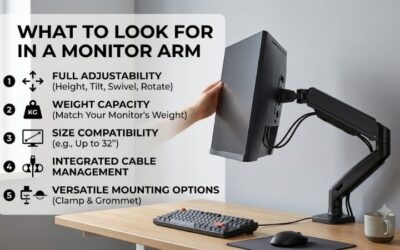
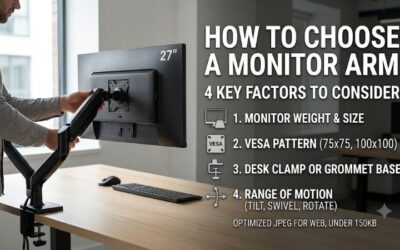
Use your monitor’s weight without its original stand, including attached accessories. Spring supported arms have minimum loads and maximum capacities, so excessive capacity is not automatically better. Check the rear mounting pattern and any recessed mounting area before deciding that screen size guarantees compatibility.
The best monitor arm for a first time buyer should prioritize current compatibility over hypothetical upgrades. Lightweight displays require different counterbalancing than heavy panels. Choose the Ergotron LX Pro Desk Monitor Arm for compatible 4–22 lb screens, or the Ergotron HX Desk Monitor Arm for an approved heavier configuration.
Desk Mounting Requirements
Desk thickness is only part of compatibility. A clamp also needs a sound surface and clearance underneath; rear aprons, cable trays, or beveled edges can prevent secure attachment. Follow the arm and desk manufacturers’ requirements, and reject unsupported glass or hollow constructions instead of treating clamp width as structural support.
A grommet arrangement requires an approved hole and material, whereas an edge clamp avoids that opening. Compare the supplied hardware with your desk before ordering. Choose the VIVO STAND-V001Q when its 0.5–3 inch desktop thickness range and documented mounting options match your desktop construction and underside clearance.
Adjustment and Reach
A pole mounted arm secures height through a collar, while a counterbalanced arm supports easier vertical repositioning. Frequent adjustments justify the mechanism; occasional adjustments may not warrant additional expenditure. Distinguish maximum extension from useful placement, since an arm needs clearance to fold back as well as extend forward.
For shared workspaces, the best monitor arm for a first time buyer should simplify routine repositioning between different users. Maximum extension is useful only if the folded arrangement fits behind your screen. Choose the VIVO STAND-V001Q for frequent height changes, or the VIVO STAND-V001 when your viewing height rarely changes.
Warranty and Total Cost
Ownership cost includes mounting adapters, replacement cables, and any mounting kit omitted from the selected package. Extended warranty coverage matters for prolonged ownership, but it cannot correct incompatibility. Compare equivalent configurations rather than treating a premium brand or a lower checkout price as decisive.
Installation effort also has value: clearer specifications and removable mounting hardware can reduce setup uncertainty. Confirm what the selected version includes rather than assuming identical accessories. Choose the Ergotron LX Pro Desk Monitor Arm when its detachable head and ten year warranty justify the premium for you.
Top Picks
The best monitor arm for a first time buyer depends on compatibility and routine, so these picks address distinct needs. Best Overall balances convenient movement and ownership support, while Best Value favors a simpler mechanism. Selections reflect manufacturer specifications and fit analysis; they do not represent hands on comparison testing.
| Product | Best For | Key Spec | Watch Out For |
|---|---|---|---|
| Ergotron LX Pro Desk Monitor Arm | Best Overall | 4–22 lb; 13 inch lift | Mounting package varies |
| VIVO STAND-V001 | Best Value | Up to 22 lb; 17 inch pole | Manual height changes |
| VIVO STAND-V001Q | Frequent repositioning | 2.2–20 lb; 23.5 inch extension | Requires spring adjustment |
| Ergotron HX Desk Monitor Arm | Heavy displays | 20–42 lb load range | Deep curved screens need compatibility checks |
Ergotron LX Pro Desk Monitor Arm: Best Overall
The Ergotron LX Pro Desk Monitor Arm is my overall recommendation for regular adjustment and extended ownership. Its 4–22 lb load range and 13 inch lift suit many conventional displays. A detachable mounting head simplifies attaching the monitor, while the ten year warranty provides longer ownership protection against covered manufacturing defects.
Its drawback is the premium purchase cost, particularly for a mostly stationary display with limited adjustment needs. Mounting configurations also differ, so verify the exact package rather than assuming identical hardware bundles. Choose it when convenient movement and longer coverage have practical value, rather than paying extra for branding.
VIVO STAND-V001: Best Value
The VIVO STAND-V001 is my value pick for a stationary screen. It supports up to 22 lb and VESA 75 × 75 or 100 × 100 mm mounting patterns, alongside a 17 inch pole and flexible articulated horizontal positioning. The straightforward mechanical arrangement eliminates the stand’s footprint without a minimum counterbalance load.
Its disadvantage is manual height adjustment: collar repositioning complicates frequent vertical changes. That makes it a weaker choice for shared desks requiring different heights. Choose this model when stable placement matters more than frequent movement, and compare its final price with spring alternatives at checkout.
VIVO STAND-V001Q: Best for Frequent Repositioning
The VIVO STAND-V001Q suits regular screen adjustments without the expenditure of premium alternatives. Its pneumatic mechanism supports displays weighing 2.2–20 lb, with maximum extension of 23.5 inches. The advantage over the STAND-V001 is supported vertical movement, helping desks accommodate different tasks or users.
Initial spring adjustment is the tradeoff. Support the monitor and follow the manual’s tension adjustment until the screen maintains position; adjustment screws serve different purposes. When choosing the best monitor arm for a first time buyer, this effort pays off primarily when frequent repositioning matters and the display fits the load range.
Ergotron HX Desk Monitor Arm: Best for Heavy Displays
The Ergotron HX Desk Monitor Arm addresses heavy displays outside ordinary arm capacities. Its standard single monitor configuration supports 20–42 lb and offers 11.5 inches of lift. Counterbalanced movement is its meaningful advantage, letting a compatible heavy screen change position without dependence on a fixed height pole.
Specialized compatibility is its limitation. A monitor below 20 lb falls outside its specified range, and deep curved displays can require a different pivot configuration despite suitable weight. Buyers seeking the best monitor arm for a first time buyer should select the HX only after checking the exact display against Ergotron’s guidance.
Frequently Asked Questions
Questions about the best monitor arm for a first time buyer involve installation, support, and expansion. These concerns outweigh decorative finishes or advertised dimensions. The answers below explain where straightforward purchases work and where additional verification prevents an unsuitable mount from reaching checkout.
Does Every Monitor Fit?
No, monitor arm compatibility requires an approved mounting interface and suitable weight, beyond diagonal size. Many displays provide VESA holes, but others require a specific adapter or cannot accept ordinary hardware. Inspect your exact monitor’s documentation rather than assuming brand consistency guarantees equivalent attachment points.
A recessed interface may require specified spacers or screws, even when its hole pattern matches. Excessively long screws can damage the display, while incorrect hardware may not secure it properly. Use the approved attachment instructions and included hardware when specified; improvised screw lengths are no substitute for verification.
Does Installation Require Drilling?
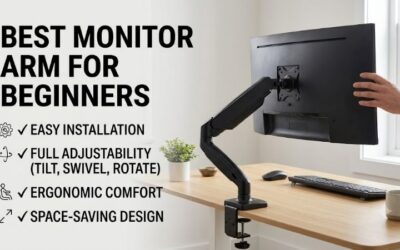
No, an edge clamp can provide installation without drilling when the desk construction and clearance meet mounting requirements. A compatible clamp is the simpler starting point for beginners, but thickness alone does not establish suitability. Inspect the underside before ordering, especially around rear drawers or framing.
If the desk cannot accommodate the clamp, an approved existing grommet opening may offer another arrangement. Do not drill rented furniture or a structurally uncertain desktop to rescue a purchase. Choosing a different mounting solution is preferable to modifying a surface without permission or construction information.
Are Gas Spring Arms Better?
A gas spring arm is better for frequent vertical repositioning, while a pole arm can offer better value for a mostly stationary display. Neither design is universally superior. Your adjustment routine determines whether movement justifies extra cost; a stationary screen may receive little benefit from a more elaborate mechanism.
Counterbalanced designs also require a compatible load, whereas a basic pole arrangement has different compromises. A very lightweight screen can fall below a spring arm’s minimum capacity even though it remains under the maximum. Compare the operating range with your display rather than purchasing the highest capacity product.
Should Beginners Buy Dual Arms?
Choose a dual monitor arm only for two displays with a verified mounting arrangement. Buying a dual model for hypothetical expansion can add expense and positioning complications now. Separate single arms may offer more independent placement, particularly when the displays differ in dimensions, aspect ratio, or preferred orientation.
For expansion, consider how the second screen would affect desk width, rear clearance, and cable routing before replacing your first mount. A single arm remains a straightforward purchase for one display. Select expandable hardware only when the documented upgrade path matches a realistic plan, instead of assuming universal expandability.
Final Thoughts
The best monitor arm for a first time buyer matches the display and desk before adding features. Choose the LX Pro for adjustment and warranty coverage, STAND-V001 for fixed height value, STAND-V001Q for repositioning, or HX for a verified heavy display. Verify compatibility before checkout; capacity cannot compensate for an unsuitable desktop.