- Top Pick: GIGABYTE X670 AORUS Elite AX AMD AM5 ATX Motherboard, Support Ryzen 9000/8000/7000 Series, DDR5, 8+8 Power Phase, 4X M.2, PCIe 5.0, USB-C 3.2 Gen2x2, WIFI6E, 2.5GbE, EZ-Latch, Q-Flash, Smart Fan 6
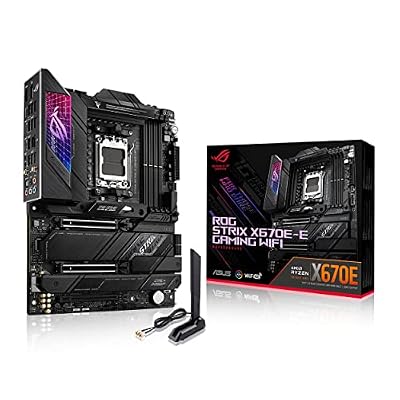
- Best Value: ASUS ROG STRIX X670E-E GAMING WIFI AMD X670 AM5 Ryzen™ Desktop 9000 8000 & 7000 ATX motherboard, 18+2 power stages, DDR5, 4x M.2 slots with heatsink, PCIe® 5.0, USB 3.2 Gen 2×2, WiFi 6E, AI Cooling II
- Premium Choice: ASUS ROG STRIX X670E-A GAMING WIFI AMD X670 AM5 Ryzen™ Desktop 9000 8000 & 7000 ATX motherboard, 16+2 power stages, PCIe® 5.0, DDR5, 4x M.2 slots with heatsink, USB 3.2 Gen 2×2, WiFi 6E, AI Cooling II
The Short Answer
Yes. Every X670 motherboard supports Ryzen 9000 series processors, provided you update the BIOS to a version that includes AMD’s latest AGESA firmware for the 9000 microarchitecture. No hardware modification, no dongle, and no replacement board are necessary. AMD committed to AM5 socket compatibility across multiple processor generations, and X670 boards share that same physical socket and power-delivery infrastructure that Ryzen 9000 chips require.
The only condition worth stressing: some boards shipped with BIOS versions predating Ryzen 9000 support. If you purchased an X670 board before the 9000 series launched and never updated its firmware, the board will POST with older AM5 CPUs but will not recognize a Ryzen 9000 chip until the BIOS is flashed. If you have no older AM5 CPU on hand and your board lacks BIOS Flashback, you will need an RMA or a loaner chip to perform that initial update.
The Numbers
| Processor | TDP / TBP | PPT Limit (Stock) | Transient Peak (Approx.) | Minimum AGESA | Recommended PSU |
|---|---|---|---|---|---|
| Ryzen 9 9950X | 170W | 230W | ~280-300W | 1.1.0.2 or newer | 750W minimum |
| Ryzen 9 9900X | 120W | 162W | ~200-220W | 1.1.0.2 or newer | 650W minimum |
| Ryzen 7 9700X | 65W | 88W | ~120-140W | 1.1.0.2 or newer | 550W minimum |
| Ryzen 5 9600X | 65W | 88W | ~120-140W | 1.1.0.2 or newer | 550W minimum |
Socket: AM5 for all rows. The PPT figures reflect stock BIOS defaults on most X670 boards; some manufacturers ship with slightly different defaults that can be adjusted in the UEFI. Transient peak estimates aggregate observations from TechPowerUp and Hardware Unboxed launch testing, where the 9950X briefly drew more than its rated PPT during sustained AVX-512 workloads before settling. These spikes are well within the delivery capacity of any mid-range X670 VRM design.
When the Answer Changes
The compatibility answer shifts in a few specific scenarios worth knowing about in 2026:
**BIOS version matters more than the chipset name.** An X670 board stuck on AGESA 1.0.0.4 or 1.0.0.6 will refuse to boot a Ryzen 9000 CPU. You must flash to at least AGESA 1.1.0.2, though later revisions (1.1.0.3, 1.2.0.1, and beyond) bring memory compatibility improvements and microcode patches that affect stability rather than basic support.
**Overclocking headroom varies by board tier.** X670 and X670E both officially support CPU overclocking, but budget X670 boards with 8- or 10-phase VRMs will throttle the 9950X under all-core PBO tuning. Hardware Unboxed and Gamers Nexus both documented VRM thermal saturation on entry-level X670 boards when the 9950X was unlocked, while mid-range boards (12+ phases with proper heatsinks) held voltage without concern.
**Memory training tables are a practical concern.** Ryzen 9000 benefits noticeably from DDR5-6000 or faster with tight timings. Older X670 BIOS revisions had less mature memory training, and TechSpot’s testing showed that a BIOS update from early 2024-era firmware to a later AGESA revision could shift stable overclock ceilings on the same DDR5 kit by one full speed grade. This is not a compatibility issue per se, but it affects whether the pairing delivers the expected value.
**No X670 board requires a physical modification.** Unlike the transition from AM3 to AM4, or Intel’s occasional socket changes, the X670-to-Ryzen-9000 path is purely firmware.
How to Check Your Own System
1. Identify your exact motherboard model (print it on the PCB, or check under System Information in Windows if the board is installed).
2. Visit the manufacturer’s support page and look at the CPU compatibility list for your model. Ryzen 9000 SKUs appear under “supported processors” only after the relevant BIOS was released.
3. Check your currently installed BIOS version. On most boards, this appears on the first UEFI screen at POST, or under the “Main” or “Tools” tab.
4. Compare your current version against the minimum listed for Ryzen 9000 support. If yours is older, follow the manufacturer’s update procedure.
5. If your board supports BIOS Flashback (USB-based update without a CPU installed), you can flash directly. If not, you need a compatible AM5 CPU already in the socket to run the update utility.
Safe Options if It Doesn’t Fit
If your X670 board genuinely cannot be updated (defective BIOS chip, no Flashback support, and no loaner CPU available), the realistic options are limited but functional:
– **Request an RMA.** Manufacturers will typically flash the board for you under warranty and return it ready to go.
– **Borrow or purchase a cheap AM5 chip.** A used Ryzen 5 7600 or even a 7500F can be had for modest money and serves solely to run the BIOS update, after which you swap in the Ryzen 9000.
– **Move to an X870 or B850 board.** These ship with Ryzen 9000 support out of the box. In a full system refresh this may be the cleanest path, though it is the most expensive.
– **Use a different CPU.** Ryzen 7000 series chips work on any X670 board without question. If your workload does not specifically require the IPC or efficiency gains of 9000, this avoids the update headache entirely.
FAQ
Will my X670 board’s VRM be strong enough for a Ryzen 9 9950X?
On most mid-range and premium X670 boards, yes. A handful of the cheapest X670 designs (notably some sub-$200 SKUs) showed thermal limitations under sustained all-core loads in reviews from Hardware Unboxed and Gamers Nexus. If your board has a large heatsink over the VRM and at least 10 phases, you are within safe territory.
Do I lose any features by using X670 instead of X670E or X870?
You lose one PCIe 5.0 x16 lane configuration on some non-E X670 boards and lack USB4 on standard X670. These are not compatibility issues with the CPU itself. The processor functions identically on any AM5 board once BIOS support is present.
Is there a risk of instability after the BIOS update?
Early AGESA 1.1.0.2 builds had occasional reports of higher-than-expected voltage behavior. Later revisions addressed this. Tom’s Hardware and TechPowerUp both confirmed stability on updated firmware. If you experience issues, a CMOS clear followed by re-applying your memory and voltage settings resolves most post-flash anomalies.
Can I pair Ryzen 9000 on X670 with DDR4?
No. AM5 is DDR5-only. This applies equally to X670, X670E, X870, B650, and all other AM5 chipsets. DDR4 compatibility ended with AM4.
Sources and Methodology
Power figures and transient estimates in the table above reflect aggregate reporting from TechPowerUp (TDP/PPT measurements during launch reviews), Hardware Unboxed (VRM thermal and power-delivery load testing), Gamers Nexus (platform stability and overclocking headroom), Tom’s Hardware (BIOS behavior across firmware versions), and TechSpot (memory compatibility and power efficiency comparisons). Ranges represent the spread observed across multiple boards and review cycles rather than a single measured value.
As an Amazon Associate we earn from qualifying purchases at no extra cost to you.