The best motherboard for a Core Ultra 7 270K Plus or Core Ultra 7 265K is the MSI MAG Z890 Tomahawk WiFi for most builders, with the MSI MAG B860 Tomahawk WiFi as the smart choice if you will not overclock the CPU. Both chips use the LGA1851 socket and run on any Intel 800-series board, but the 270K Plus needs a recent BIOS, and its official DDR5-7200 CUDIMM support works best on a full-size Z890 board. This guide focuses on pairing these two specific CPUs, rather than ranking every Z890 board on the market.
- Verdict at a glance
- The two CPUs: what changes between the 265K and 270K Plus
- What these CPUs need from a motherboard
- Z890 vs B860 vs H810 for these CPUs
- Best motherboards for the Core Ultra 7 270K Plus and 265K
- Memory pairing: DDR5-6400 vs DDR5-7200 CUDIMM
- Pick by build type
- Upgrading from a 265K to a 270K Plus on the same board
- Setup tips
- Common mistakes
- Products Mentioned in This Guide
- How we compared
- Sources
- Frequently Asked Questions
Quick answer: For most people in 2026, the best motherboard for core ultra 7 270k plus and 265k is the Cores / threads — our #1 rated choice. See the full ranked comparison, alternatives and buying advice below.
Verdict at a glance
- Best overall: MSI MAG Z890 Tomahawk WiFi. Sixteen 90 A power stages, 5 GbE, Wi-Fi 7 and a high memory rating; TechSpot called it the more well-rounded choice than Gigabyte’s Aorus Elite.
- Best value (no CPU overclocking): MSI MAG B860 Tomahawk WiFi. Wi-Fi 7, 5 GbE and two Thunderbolt 4 ports, per Tom’s Hardware.
- Best budget Z890: ASUS Prime Z890-P or ASRock Z890 Pro-A, highlighted by Tom’s Hardware and TechSpot respectively.
- Best for Thunderbolt and storage: Gigabyte Z890 Aorus Elite WiFi7, with Thunderbolt 4 and four M.2 slots.
- Cheapest sensible board: ASUS TUF Gaming B860-Plus WiFi.
The two CPUs: what changes between the 265K and 270K Plus
The Core Ultra 7 265K launched in late 2024 as part of the original Arrow Lake lineup. The Core Ultra 7 270K Plus arrived in March 2026 as part of the Arrow Lake Refresh (Core Ultra 200S Plus). Both use the same LGA1851 socket and the same 800-series chipsets, but the newer chip enables more of the silicon.
| Spec | Core Ultra 7 265K | Core Ultra 7 270K Plus |
|---|---|---|
| Cores / threads | 8 P-cores + 12 E-cores / 20 threads | 8 P-cores + 16 E-cores / 24 threads |
| Max P-core turbo | 5.5 GHz | 5.5 GHz |
| Base / maximum turbo power | 125 W / 250 W | 125 W / 250 W |
| Official memory speed | DDR5-6400 | DDR5-7200 (CUDIMM), up to 8000 via Intel’s 200S Boost |
| Die-to-die clock | 2.1 GHz | 3.0 GHz |
| Socket / chipsets | LGA1851 / Z890, B860, H810 | LGA1851 / Z890, B860, H810 (BIOS update may be needed) |
TechPowerUp’s review describes the 270K Plus as using the full Arrow Lake die with all 8 P-cores and 16 E-cores, and notes the big jump in die-to-die clock from 2.1 to 3.0 GHz, which helps latency-sensitive games. Tom’s Hardware titled its review “Back from the brink,” and TechPowerUp called it Intel’s fastest gaming CPU at launch, helped partly by Intel’s new Binary Optimization Tool. For motherboard choice, the important differences are the higher official memory speed and the need for up-to-date firmware.
What these CPUs need from a motherboard
- Power delivery for 250 W bursts. Both chips have a 250 W maximum turbo power. Gaming loads are far lower, but rendering or compiling can hold high power for long periods, so a solid VRM matters more here than on an 8-core Ryzen X3D chip.
- A current BIOS. Intel confirmed the 200S Plus chips are drop-in compatible with 800-series boards, with some needing UEFI updates. Gigabyte shipped support in its F18 BIOS with microcode 0x11B, ASRock listed newer 0x11D firmware, and ASUS committed to updates across its Z890, B860 and H810 lineups.
- Memory support. The 270K Plus officially supports DDR5-7200 CUDIMMs. Corsair notes that CUDIMMs work best on Z890, where single PLL mode is available. TechSpot found some smaller Z890 boards failed memory stress tests with very fast CUDIMMs.
- Overclocking needs. Z890 allows CPU core, base clock and memory overclocking. B860 allows memory overclocking only, per Puget Systems and Velocity Micro.
Z890 vs B860 vs H810 for these CPUs
| Chipset | CPU overclocking | Memory overclocking | Best for | Verdict |
|---|---|---|---|---|
| Z890 | Yes | Yes, best for fast CUDIMMs | Tuners, DDR5-7200+ builds, max I/O | Best match for the 270K Plus |
| B860 | No | Yes | Gamers running stock CPU settings | Best value for the 265K and many 270K Plus builds |
| H810 | No | Limited | Basic office systems | Avoid for K-series chips |
Intel’s recent chips gain little from manual core overclocking, as comparison guides such as MaxMyBuild point out, so B860 is a reasonable choice if you will run the CPU at stock and use XMP memory. Pick Z890 if you want to run very fast CUDIMM memory, tune the CPU or need the extra lanes and USB.
Best motherboards for the Core Ultra 7 270K Plus and 265K
| Tier | Board | Chipset | Highlights | Best paired with |
|---|---|---|---|---|
| Budget | ASUS TUF Gaming B860-Plus WiFi | B860 | 12+1 power stages, three M.2, 20 Gb/s USB-C with DisplayPort output | 265K at stock |
| Budget | MSI MAG B860 Tomahawk WiFi | B860 | Wi-Fi 7, 5 GbE, three M.2 (one PCIe 5.0), two Thunderbolt 4 | 265K or 270K Plus at stock |
| Budget Z890 | ASUS Prime Z890-P / ASRock Z890 Pro-A | Z890 | Lowest-cost route to Z890 overclocking | Tuners on a budget |
| Mid-range (best overall) | MSI MAG Z890 Tomahawk WiFi | Z890 | 16 x 90 A vcore, 5 GbE, Wi-Fi 7, high memory rating | 270K Plus with fast DDR5 |
| Mid-range alt. | Gigabyte Z890 Aorus Elite WiFi7 | Z890 | 16+1+2 80 A, Thunderbolt 4, four M.2 slots | Storage-heavy builds |
| Premium | ASUS ROG Strix Z890-E / ASRock Z890 Taichi class | Z890 | Top VRMs, more USB4 and M.2, memory tuning tools | Enthusiasts and creators |
MSI MAG Z890 Tomahawk WiFi (best overall)
TechSpot’s large Z890 roundup found the Tomahawk’s sixteen 90 A power stages overkill in the best way, and judged it more well-rounded than the Gigabyte Z890 Aorus Elite. Its rated memory overclock reaches 9,200 MT/s, it uses 5 Gbps networking and Wi-Fi 7, and it offers a strong rear I/O panel. Gaming PC Guru names it the clear pick for value-conscious Z890 builders.
Reasons to pick: handles sustained 250 W loads easily; full-size ATX layout suited to DDR5-7200 CUDIMMs; generous rear USB.
Reasons to skip: if you never overclock and run XMP memory below DDR5-7200, a B860 Tomahawk offers most of the same features for less.
The catch: make sure the BIOS on the box supports the 270K Plus, or update it with an older CPU or Flash BIOS button first.
MSI MAG B860 Tomahawk WiFi (best value)
Tom’s Hardware’s budget pick packs Wi-Fi 7, 5 GbE, three M.2 slots including one PCIe 5.0, and two 40 Gbps Thunderbolt 4 ports. That is more connectivity than many Z890 boards at a similar price. It cannot overclock the CPU cores, but it can still run XMP memory profiles.
Reasons to pick: excellent I/O for the money; strong enough power delivery for stock 265K or 270K Plus operation.
Reasons to skip: no CPU overclocking; fewer tuning options for very fast CUDIMM kits.
The catch: if you buy a 270K Plus specifically for DDR5-7200 memory, a Z890 board is the safer platform.
ASUS TUF Gaming B860-Plus WiFi (cheapest sensible board)
Club386 notes ASUS trimmed power delivery, memory rating and audio to hit a lower price, while keeping each of them good quality. MotherboardCentral highlights its 12+1 power stages and three M.2 slots, and it is rated for very fast DDR5 on paper. It lacks Thunderbolt 4, but its 20 Gb/s USB-C port supports DisplayPort output.
Reasons to pick: low cost; ASUS’s mature BIOS; fine for a stock 265K gaming build.
Reasons to skip: lighter VRM for long all-core rendering; fewer rear ports than the MSI B860 Tomahawk.
The catch: do not confuse it with the micro-ATX TUF B860M-Plus, which PC Gamer criticized for limited rear USB and weak PCIe 5.0 SSD cooling.
ASUS Prime Z890-P and ASRock Z890 Pro-A (budget Z890)
Tom’s Hardware calls the Prime Z890-P a worthwhile budget Z890 board, and TechSpot named the ASRock Z890 Pro-A its best-value Z890 board, followed by the Z890 Pro RS WiFi. These boards unlock CPU overclocking at a modest premium over B860.
Reasons to pick: cheapest path to Z890 features; enough power delivery for these 125 W/250 W chips.
Reasons to skip: fewer premium extras such as 5 GbE, Thunderbolt or many fan headers.
The catch: some budget boards omit Wi-Fi; check the exact model suffix.
Gigabyte Z890 Aorus Elite WiFi7 (storage and Thunderbolt)
PropelRC calls the Aorus Elite the best overall balance, citing 16+1+2 80 A power, four M.2 slots, Thunderbolt 4 and Wi-Fi 7. NSKN’s roundup agrees it covers nearly every modern need. TechSpot’s main criticism was a weaker rear port selection than the MSI Tomahawk, and 2.5 GbE instead of 5 GbE.
Reasons to pick: four M.2 slots; Thunderbolt 4 with display output; frequent BIOS updates (Gigabyte was early with 270K Plus support).
Reasons to skip: fewer rear USB ports; slower networking than the Tomahawk.
The catch: its memory rating is a little lower than the Tomahawk’s, which matters only for extreme DDR5 tuning.
Premium Z890 boards
High-end boards like the ASUS ROG Strix Z890-E and ASRock Z890 Taichi add bigger VRMs, more USB4 or Thunderbolt ports, more M.2 slots and advanced memory tuning. They make sense for creators using the 270K Plus’s 24 threads for long renders, or for overclockers chasing DDR5-8000-plus.
Reasons to pick: maximum stability under sustained 250 W loads; best memory overclocking.
Reasons to skip: no gaming gain over a Tomahawk at stock settings.
The catch: LGA1851 is a dead-end socket. Intel’s next desktop generation, Nova Lake, moves to LGA1954, so a flagship board will not carry over to future CPUs.
Memory pairing: DDR5-6400 vs DDR5-7200 CUDIMM
For the 265K, a DDR5-6400 or 6000 kit with XMP is the practical choice. For the 270K Plus, Intel raised official support to DDR5-7200 with CUDIMM modules, and one guide citing memory-scaling data puts DDR5-8000-plus CUDIMMs at 5 to 7% more gaming performance on Arrow Lake. Arrow Lake scales better with memory speed than AMD’s X3D chips do.
With DDR5 prices very high in late 2026, weigh that gain against cost. A good DDR5-6400 kit is the sensible middle ground. Also check compatibility lists: Newegg noted at least one popular CL30 kit is not compatible with Arrow Lake.
Pick by build type
| If you want… | Pick | Why |
|---|---|---|
| A stock 265K gaming PC at the lowest sensible cost | ASUS TUF Gaming B860-Plus WiFi | Enough VRM for gaming loads, good BIOS, XMP memory support |
| A stock 270K Plus with great connectivity | MSI MAG B860 Tomahawk WiFi | Wi-Fi 7, 5 GbE and two Thunderbolt 4 ports without paying for Z890 |
| DDR5-7200 CUDIMMs and light tuning | MSI MAG Z890 Tomahawk WiFi | Full-size Z890 layout and high memory rating |
| Lots of NVMe drives and a Thunderbolt dock | Gigabyte Z890 Aorus Elite WiFi7 | Four M.2 slots and Thunderbolt 4 with display output |
| Long renders and serious overclocking | ROG Strix Z890-E or Z890 Taichi class | Largest VRMs and best cooling for sustained 250 W loads |
Upgrading from a 265K to a 270K Plus on the same board
If you already own a 265K on a Z890 or B860 board, the 270K Plus is a straight swap after a BIOS update. You gain four extra E-cores, the faster die-to-die and uncore clocks, and the higher official memory speed. Reviewers such as XDA were more measured than Intel’s marketing about the size of the improvement, and for pure gaming the Ryzen 7 9800X3D remains faster in many titles according to TechPowerUp’s charts. So the upgrade makes most sense for people who also do multi-threaded work, where the extra cores help most, or who can resell their 265K at a good price.
Before swapping, update the BIOS while the 265K is still installed, note any custom memory or fan settings, and expect the board to retrain memory on first boot with the new chip. If you keep your existing DDR5-6000 or 6400 UDIMM kit, the 270K Plus will run it fine; CUDIMMs are optional, not required.
Setup tips
- Update the BIOS before installing a 270K Plus, or use the board’s Flash BIOS button with a USB drive.
- Enable Intel’s default power profile. Leave power limits at Intel’s defaults unless you have strong cooling.
- Enable XMP or the CUDIMM profile. On Z890, confirm the board is running CUDIMMs in clock driver mode rather than bypass.
- Install Intel’s Binary Optimization Tool and APO where supported, since TechPowerUp credited part of the 270K Plus’s gaming gains to the new software.
- Use a good cooler. A high-end tower air cooler or 360 mm AIO suits these 250 W chips.
Common mistakes
- Buying an H810 board for a K-series CPU. You lose memory tuning and expansion for little saving.
- Ignoring the BIOS version. An old BIOS may not post with a 270K Plus.
- Using a small Z890 board for very fast CUDIMMs. TechSpot saw some smaller boards fail memory stress tests at top speeds.
- Using a Z790 board. LGA1700 boards are not compatible with LGA1851 CPUs.
- Overspending on a flagship. The socket has no upgrade path beyond Arrow Lake Refresh.
Products Mentioned in This Guide
These are the specific LGA1851 motherboards discussed above for the Core Ultra 7 270K Plus and 265K.
MSI MAG Z890 Tomahawk WiFi

MSI MAG Z890 Tomahawk WiFi Gaming Motherboard (Supports Core Ultra Series 2 Intel Processors, LGA 1851, DDR5, PCIe 5.0, M.2, SATA, 5Gbps LAN, USB Type-C, Wi-Fi 7, Bluetooth 5.4, Thunderbolt 4, ATX)
Included for 'Best Motherboard for Core Ultra 7 270K Plus and 265K' as a representative home product in this roundup; selection reflects the product set returned for this topic.
View on AmazonBest overall: sixteen 90 A power stages, 5 GbE and Wi-Fi 7, with a full-size layout suited to the 270K Plus and fast DDR5.
MSI MAG B860 Tomahawk WiFi

MSI MAG B860 Tomahawk WiFi Motherboard, ATX - Supports Intel Core Ultra Processors (Series 2), LGA 1851 - DDR5 Memory Boost 9200+ MT/s OC, 1 x PCIe 5.0 x16, 1 x M.2 Gen5, 5G LAN, Wi-Fi 7
Included for 'Best Motherboard for Core Ultra 7 270K Plus and 265K' as a representative home product in this roundup; selection reflects the product set returned for this topic.
View on AmazonBest value if you will not overclock the CPU: Wi-Fi 7, 5 GbE, three M.2 slots and two Thunderbolt 4 ports.
ASUS TUF Gaming B860-Plus WiFi
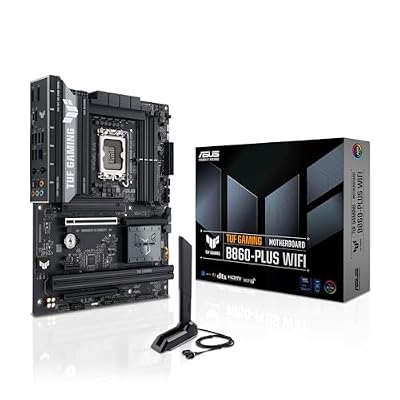
ASUS TUF Gaming B860-PLUS WiFi B860 LGA 1851 ATX Motherboard, Intel® Core™ Ultra Series 2 Ready, Advanced AI PC-Ready, 12+1+2+1 Stages, DDR5,PCIe 5.0, 3X M.2, Wi-Fi 7, 2.5Gb LAN, USB 20Gbps Type-C®
Included for 'Best Motherboard for Core Ultra 7 270K Plus and 265K' as a representative home product in this roundup; selection reflects the product set returned for this topic.
View on AmazonThe cheapest sensible board: 12+1 power stages and three M.2 slots, fine for a stock 265K gaming build.
ASRock Z890 Pro-A

ASRock Z890 Pro-A Motherboard Intel Core Ultra LGA1851 RL-ILM DDR5 8666 MHz 256 GB ATX Motherboard PCIe 5.0
Included for 'Best Motherboard for Core Ultra 7 270K Plus and 265K' as a representative home product in this roundup; selection reflects the product set returned for this topic.
View on AmazonA budget Z890 option that unlocks CPU overclocking at a modest premium over B860.
Gigabyte Z890 Aorus Elite WiFi7

GIGABYTE Z890 AORUS Elite WIFI7 Intel Core Ultra (Series 2) LGA 1851 Motherboard, ATX, DDR5, 4X M.2, PCIe 5.0, Thunderbolt 4, 2.5GbE LAN, EZ-Latch
Included for 'Best Motherboard for Core Ultra 7 270K Plus and 265K' as a representative home product in this roundup; selection reflects the product set returned for this topic.
View on AmazonThe pick for storage-heavy builds, with Thunderbolt 4 and four M.2 slots.
ASUS ROG Strix Z890-E Gaming WiFi

ASUS ROG Strix Z890-E Gaming WiFi Intel® Z890 LGA 1851 ATX Motherboard, Advanced AI PC-Ready, 18+2+1+2 Stages, DDR5, WiFi 7, 7X M.2, Thunderbolt™ 4, USB Type-C®, AI Overclocking, Cooling & Networking
Included for 'Best Motherboard for Core Ultra 7 270K Plus and 265K' because the listing adds cooling or gel-infused layers, which is the attribute this article compares.
View on AmazonThe premium tier: top VRM, more M.2 and memory tuning tools for enthusiasts and creators.
How we compared
We compared these boards using manufacturer specifications, Intel’s published CPU specifications, TechSpot’s large Z890 roundup, Tom’s Hardware’s motherboard guide, reviews from PC Gamer and Club386, chipset guidance from Puget Systems and Corsair, BIOS announcements from Gigabyte, ASRock and ASUS, CPU reviews from TechPowerUp and Tom’s Hardware, and owner reports. We did not bench-test these boards ourselves.
Sources
- TechPowerUp, Intel Core Ultra 7 270K Plus Review and Arrow Lake Refresh launch coverage
- Tom’s Hardware, Intel Core Ultra 7 270K Plus review and Best Motherboards 2026
- TechSpot, Intel Z890 Motherboard Roundup
- PC Gamer, ASUS TUF Gaming B860M-Plus WiFi review
- Club386, ASUS B850 and B860 motherboards explored
- Puget Systems, Z890 vs B860 vs H810
- Corsair Help Center, CUDIMM on chipsets earlier than Z890
- VideoCardz, Gigabyte Z890 motherboards ready for Core Ultra 200K Plus
- Pokde, ASUS Arrow Lake Refresh BIOS announcement
- PropelRC and NSKN, Z890 motherboard guides
- Newegg Insider, DDR5 buying guide 2026
Frequently Asked Questions
Does the Core Ultra 7 270K Plus work on a B860 motherboard?
Yes. Intel says the 200S Plus chips are drop-in compatible with 800-series boards, including B860, though some boards need a BIOS update first. You cannot overclock the CPU cores on B860, but memory overclocking works.
Do I need a BIOS update for the 270K Plus?
Possibly. Gigabyte added support in its F18 Z890 BIOS, and ASUS and ASRock released updates across their 800-series boards. Check your board’s CPU support list and update before installing the chip.
Is Z890 worth it over B860 for the 265K?
Only if you plan to overclock or want more connectivity. For a stock 265K gaming build, a well-equipped B860 board like the MSI B860 Tomahawk WiFi is better value.
Can I use DDR5-7200 CUDIMMs on B860?
Many B860 boards list fast DDR5 support, but Corsair notes CUDIMMs work best on Z890 with single PLL mode. For DDR5-7200 and above, a full-size Z890 board is the safer choice.
Will these motherboards support future Intel CPUs?
Unlikely. Intel’s next generation, Nova Lake, moves to the LGA1954 socket, making LGA1851 a dead end after Arrow Lake Refresh.
Can I put a 265K or 270K Plus in a Z790 board?
No. Z790 uses the LGA1700 socket, which is physically and electrically incompatible with LGA1851 Core Ultra 200S chips.
What VRM do I need for the 270K Plus?
Any mid-range Z890 or quality B860 board handles stock operation. For long all-core renders or overclocking, boards like the MSI Z890 Tomahawk with 16 x 90 A stages offer large headroom.
Do I need Wi-Fi 7 on my motherboard?
Only if you use wireless networking and have, or plan to buy, a Wi-Fi 7 router. Many mid-range B860 and Z890 boards include it as standard, so it rarely costs extra. A wired 2.5 GbE or 5 GbE connection is still the most consistent option for online gaming.
Is mini-ITX a good idea for these CPUs?
It works, but small boards have tighter VRM cooling for 250 W loads, fewer M.2 slots and, per TechSpot, can be less reliable with the fastest CUDIMMs. Pair them with strong cooling and moderate power limits.
Ready to decide? Our #1 pick for 2026 is the Cores / threads.
Live price & availability on Amazon.