What to look for in an am5 motherboard starts with a common purchasing mistake: choosing a chipset before checking your components. CPU compatibility alone cannot guarantee enough storage, suitable connections, or convenient installation. Match the board to your workload and expansion plans before paying for specifications you may never use.
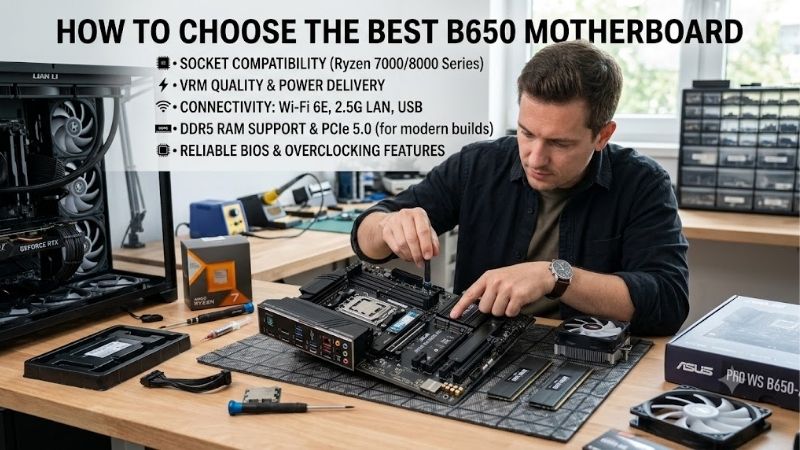
How to Choose AM5 Motherboards
This guide explains what to look for in an am5 motherboard using four practical criteria and four distinct recommendations. Compare processor readiness, memory configuration, storage bandwidth, and physical connectivity. Each recommendation addresses a different build, helping you avoid unnecessary adapters and inconvenient upgrades.
CPU Support, BIOS Access, and Power Delivery
CPU compatibility requires more than matching the AM5 socket. Your exact CPU must appear on the motherboard’s support list alongside the required BIOS version. Older inventory can arrive with outdated firmware, preventing startup. Confirm processor readiness with the retailer before purchasing, particularly with a newer chip.
For sustained rendering, prioritize independent temperature measurements with a comparable CPU rather than phase counts. Heatsink coverage and enclosure ventilation influence power delivery temperatures. Firmware recovery also matters: the ASRock B650M-HDV/M.2 includes BIOS Flashback, making it a budget candidate when older stock requires updating.
DDR5 Capacity and the Number of Memory Slots
AM5 requires DDR5, excluding memory carried over from DDR4 systems. Choose capacity before comparing DIMM counts: two slots accommodate a planned kit, while four provide additional options. When assessing what to look for in an am5 motherboard, prioritize the manufacturer’s tested memory configurations over headline frequency claims.
Four populated slots can require lower speeds than a two-module configuration. Results depend on processor capability, firmware, and memory characteristics, so purchasing a matched kit avoids unnecessary mixing. Choose the MSI MAG B650 TOMAHAWK WIFI for four DIMM slots when future capacity flexibility matters to your build.
SSD Slots, PCIe Generation, and Shared Lanes
Storage planning involves usable bandwidth as well as connector counts. Long slots can have fewer electrical lanes than their appearance suggests, and installed devices may share resources. For what to look for in an am5 motherboard, check whether your GPU, storage, and expansion hardware can operate together without unwanted restrictions.
Gen 5 storage benefits bandwidth-sensitive workloads, while drive count matters for media libraries. The ASUS ProArt X870E-CREATOR WIFI provides four M.2 slots with supported Ryzen 7000 or 9000 processors. Choose this workstation option for multiple internal drives after reviewing the documented bandwidth compromises for your configuration.
Case Size, Rear Ports, and Front Headers
Check enclosure compatibility, then match rear connections and internal headers to your peripherals. USB-C identifies connector shape rather than transfer speed or display capability. Front-panel USB-C also requires a compatible motherboard header. Checking connections prevents inaccessible features and unnecessary adapters during installation.
Compact layouts sacrifice expansion space and can complicate cooler placement, especially near bulky hardware. Accept those compromises when portability matters more than additional cards. Choose the ASUS ROG STRIX B650E-I GAMING WIFI for a Mini-ITX enclosure requiring AM5 compatibility and integrated Wi-Fi without a network adapter.
Top Picks
These picks translate what to look for in an am5 motherboard into purchasing decisions. MSI balances mainstream ATX requirements, ASRock emphasizes essential features, ROG serves compact systems, and ProArt prioritizes workstation connectivity. Selection reflects documented specifications and layouts rather than detailed research.
| Product | Best For | Key Spec | Watch Out For |
|---|---|---|---|
| MSI MAG B650 TOMAHAWK WIFI | Best Overall | Three PCIe 4.0 M.2 slots; Wi-Fi 6E | No PCIe 5.0 storage; lane sharing |
| ASRock B650M-HDV/M.2 | Best Value | Two DIMM slots; one PCIe 5.0 M.2 slot | No included Wi-Fi; limited rear USB speed |
| ASUS ROG STRIX B650E-I GAMING WIFI | Best For Compact Builds | Mini-ITX; PCIe 5.0 GPU slot with supported CPUs | One expansion slot; two M.2 slots |
| ASUS ProArt X870E-CREATOR WIFI | Best For Connected Workstations | Dual 40Gbps USB4; 10Gb Ethernet | Gen 5 M.2 lane sharing with GPU slots |
MSI MAG B650 TOMAHAWK WIFI: Best Overall
The MSI MAG B650 TOMAHAWK WIFI suits ATX gaming and productivity builds requiring several drives and wireless connectivity. Three PCIe 4.0 M.2 slots accompany six SATA connections, accommodating modern boot storage alongside existing drives. Wi-Fi 6E and 2.5Gb Ethernet provide networking flexibility without additional expansion hardware.
Its limitation is the absence of PCIe 5.0 graphics and storage support. The third M.2 position also shares bandwidth with the secondary PCIe slot, affecting configurations that populate both. Choose this balanced layout for a single-GPU computer with substantial storage requirements, rather than a workstation requiring maximum expansion bandwidth.
ASRock B650M-HDV/M.2: Best Value
The ASRock B650M-HDV/M.2 targets wired gaming builds that preserve budget for graphics and processing. Its micro-ATX layout includes two DDR5 slots and two M.2 positions, including PCIe 5.0 x4 storage with an appropriate processor. Integrated 2.5Gb Ethernet adds useful bandwidth for compatible networking equipment and shared storage.
Standard packaging excludes a Wi-Fi module, and rear USB-C bandwidth is limited to 5Gbps. Its two memory slots can necessitate kit replacement when increasing capacity. For what to look for in an am5 motherboard on a budget, prioritize this board when wired networking and modest peripheral requirements match your planned configuration.
ASUS ROG STRIX B650E-I GAMING WIFI: Best For Compact Builds
The ASUS ROG STRIX B650E-I GAMING WIFI serves compact gaming builds where ATX dimensions are impractical. Its Mini-ITX layout integrates Wi-Fi 6E alongside two DDR5 slots and a single graphics expansion slot. Supported Ryzen 7000 or 9000 processors enable PCIe 5.0 x16 graphics connectivity, preserving that interface despite the reduced footprint.
Expansion flexibility is the compromise: installing a graphics card leaves no separate slot for a capture card or network adapter. Two M.2 positions also provide less internal storage expansion than MSI’s three. Check cooler dimensions, cable access, and drive installation order before purchasing; enclosure size must justify those restrictions.
ASUS ProArt X870E-CREATOR WIFI: Best For Connected Workstations
The ASUS ProArt X870E-CREATOR WIFI targets workstations connected to fast external storage and network infrastructure. Two rear 40Gbps USB4 connections accompany 10Gb and 2.5Gb Ethernet, reducing reliance on separate interface cards. Those capabilities benefit compatible drives, cables, and network equipment that can exploit the bandwidth.
Lane sharing complicates expansion planning. With supported Ryzen 7000 or 9000 processors, enabling M.2_2 reduces the first Gen 5 graphics slot to x8 and the second to x4. Review this restriction before installing multiple high-bandwidth devices. Choose ProArt for its specific workstation connections after checking the intended slot arrangement.
Frequently Asked Questions
Understanding what to look for in an am5 motherboard means separating requirements from assumptions about upgrades. A newer chipset does not automatically improve gaming performance, and supported processors do not necessarily expose identical connections. These answers address compatibility, storage, and memory decisions influencing the purchase.
Do I Need X870E for a Gaming PC?
No, X870E is unnecessary for an AM5 gaming computer when a B650 motherboard meets your requirements. Adequate power delivery, connections, and storage matter more than chipset labels. Paying for additional chipset capabilities does not inherently improve frame rates with identical CPUs and graphics hardware operating without restrictions.
Consider X870E when a motherboard supplies connections your workload requires, such as ProArt’s USB4 and high-speed Ethernet. Integrated interfaces can replace separate expansion cards, simplifying the system. Compare motherboard and accessory costs together instead of assuming the higher chipset tier offers better value for gaming.
Will an AM5 Motherboard Support Every Ryzen CPU?
No, AM5 motherboards cannot accommodate every Ryzen processor. The branding includes laptop chips and desktop models requiring different sockets. Even an AM5 processor can require updated firmware. Verify the exact processor designation against the board’s support list rather than treating socket compatibility as proof of startup readiness.
CPU selection can change expansion bandwidth and storage availability. Certain Ryzen 8000-series configurations differ from Ryzen 7000 and 9000 in these respects. Read the manual’s processor-specific tables before planning multiple drives or additional cards; headline specifications may describe capabilities unavailable with your processor.
Do I Need PCIe 5.0 for My SSD?
No, PCIe 5.0 storage is unnecessary for ordinary gaming and office workloads. Gen 4 drives can satisfy those requirements, while faster interfaces suit sustained transfer-intensive tasks. When deciding what to look for in an am5 motherboard, prioritize capacity and usable drive positions before treating maximum interface speed as essential.
Purchase Gen 5 capability for a defined storage workload rather than expecting shorter loads. Controller design, flash, and application behavior influence responsiveness. Confirm heatsink clearance before installation: tall drive coolers can conflict with motherboard covers or nearby graphics hardware, especially in compact systems.
Should I Buy Two or Four RAM Sticks?
Choose two matched modules unless required capacity justifies populating four slots. These recommendations use dual-channel memory; additional modules do not create quad-channel operation. Starting with a matched pair simplifies configuration checks and offers fewer variables when validating capacity, frequency, and processor support.
EXPO applies memory overclocking settings without guaranteeing advertised speeds across CPU and motherboard combinations. Check validated configurations, and restore default settings if unstable. Prioritize capacity for applications before paying for higher frequencies; insufficient memory undermines productivity regardless of transfer speed.
Final Thoughts
Knowing what to look for in an am5 motherboard means matching compatibility, layout, storage, and connections to your build. Choose MSI for versatile ATX storage, ASRock for wired builds, ROG for compact dimensions, or ProArt for workstation interfaces. Check BIOS readiness and bandwidth restrictions before checkout, preserving component budget.