
The MSI MAG X870E Tomahawk bundle is the best overall AM5 motherboard pairing for the Ryzen 7 9800X3D if you want a long upgrade path: it has an X870E chipset, two PCIe 5.0 M.2 slots, USB4 and a strong power-delivery design. Buyers on a tighter plan should look at the ASRock B850 Steel Legend or the MSI B850 Gaming Plus, which keep the key platform features at a lower tier. “AM5 motherboard for the 9800X3D” simply means a board with AMD’s AM5 socket and DDR5 memory support, and every listing here is a bundle that includes the processor.
Quick List
- Gigabyte B850 Gaming bundle – best for buyers who want a Gigabyte B850 board and will confirm the exact model first
- MSI MAG X870E Tomahawk bundle – best for a full-featured X870E build with USB4 and two Gen5 M.2 slots
- MSI PRO X870E-P bundle – best for an X870E platform with a simpler feature set
- Gigabyte B850 Gaming X bundle – best for a straightforward B850 board with three M.2 slots
- MSI B850 Gaming Plus WiFi bundle – best for Wi-Fi 7 and a Gen5 M.2 slot on a mainstream budget
- ASRock B850 Steel Legend bundle – best for Wi-Fi 7, four M.2 slots and strong power delivery at the B850 tier
Which One Is Right for You?
| If you… | Choose |
|---|---|
| want USB4 and the most PCIe 5.0 storage options | MSI MAG X870E Tomahawk bundle |
| want an X870E board but do not need extra M.2 slots | MSI PRO X870E-P bundle |
| need four M.2 slots and an HDMI output on a B850 board | ASRock B850 Steel Legend bundle |
| want a plain, proven B850 layout with three M.2 slots | Gigabyte B850 Gaming X bundle |
| want Wi-Fi 7 and a 5 Gb LAN port without paying X870E prices | MSI B850 Gaming Plus WiFi bundle |
| prefer Gigabyte but the exact model matters to you | Gigabyte B850 Gaming bundle (confirm model) |
The 9800X3D has modest power needs for a flagship gaming chip, so the board choice mainly comes down to I/O: how many fast M.2 drives you want, whether you need USB4 and which wireless standard you prefer. For gaming alone, a B850 board is plenty, and the extra cost of X870E pays off only if you will use the added connectivity.

MICRO CENTER AMD 9800X3D Processor with Gigabyte B850 Gaming Motherboard | CPU Motherboard Combo, AMD Ryzen 7 9800X3D CPU Processor, AM5, DDR5, PCIe 5.0 Support, WiFi 6, BLUETOOTH 5.3
Included for '6 Best AM5 Motherboards for Ryzen 7 9800x3d (October 2026) Complete Guide' because the listing specifies CPU Motherboard Combo and AMD Ryzen 7 9800X3D CPU Processor, details this guide uses to compare options.
View on Amazon
Micro Center AMD 9800X3D Processor with MSI MAG X870E Tomahawk Motherboard | CPU Motherboard Combo, AI Ready, Ryzen 7, AM5, DDR5, PCIe 5.0, M.2 Gen5, USB 40Gbps Type C, Wi-Fi 7, ATX Gaming Motherboard
Included for '6 Best AM5 Motherboards for Ryzen 7 9800x3d (October 2026) Complete Guide' because the listing specifies CPU Motherboard Combo and AI Ready, details this guide uses to compare options.
View on Amazon
Micro Center AMD Ryzen 7 9800X3D Processor with MSI PRO X870E-P Motherboard | CPU Motherboard Combo, AI Ready, AM5, PCIe 5.0, DDR5, M.2 Gen5, USB 40Gbps Type C, Wi-Fi 7, 5G LAN, ATX
Included for '6 Best AM5 Motherboards for Ryzen 7 9800x3d (October 2026) Complete Guide' because the listing specifies CPU Motherboard Combo and AI Ready, details this guide uses to compare options.
View on Amazon
Micro Center AMD 9800X3D Processor with GIGABYTE B850 Gaming X Motherboard | CPU Motherboard Combo, AI Ready, Ryzen 7, AM5, DDR5, 3X M.2, PCIe 5.0, USB4 USB-C, WIFI6E, 2.5GbE LAN
Included for '6 Best AM5 Motherboards for Ryzen 7 9800x3d (October 2026) Complete Guide' because the listing specifies CPU Motherboard Combo and AI Ready, details this guide uses to compare options.
View on Amazon
Micro Center AMD 9800X3D Processor with MSI B850 Gaming Plus WF Motherboard | CPU Motherboard Combo, Ready for AI PC, Ryzen 7, ATX, AM5, DDR5, PCIe 5.0, M.2 Gen5, Wi-Fi 7, 5G LAN
Included for '6 Best AM5 Motherboards for Ryzen 7 9800x3d (October 2026) Complete Guide' because the listing specifies CPU Motherboard Combo and Ready for AI PC, details this guide uses to compare options.
View on Amazon
MICRO CENTER AMD 9800X3D CPU with ASRock B850 Steel Legend Motherboard | CPU Motherboard Combo, Ryzen 7, AM5, DDR5, PCIe 5.0, WiFi 7, DDR5 8000+ (OC), 2.5G LAN, 14+2+1 Power Phase, ATX
Included for '6 Best AM5 Motherboards for Ryzen 7 9800x3d (October 2026) Complete Guide' because the listing specifies CPU Motherboard Combo and Ryzen 7, details this guide uses to compare options.
View on AmazonAll 6 Picks in Detail
1. Gigabyte B850 Gaming bundle – Best for Gigabyte fans who will confirm the model
As an Amazon Associate we earn from qualifying purchases at no extra cost to you.

This listing names a Gigabyte B850 Gaming board but does not state the exact model in the title, so the details below are class-level. B850 Gaming-series boards from Gigabyte generally offer an ATX layout, DDR5 slots, a PCIe 5.0 x16 slot and at least one PCIe 5.0 M.2 slot. Open the product page and confirm the exact model, Wi-Fi standard and number of M.2 slots before you buy.
This is the entry on the list for buyers who have already settled on Gigabyte and who will read the model number on the product page before ordering. The bundle itself is still useful because the processor and board are matched at the 800-series level. Compare the final model name against Gigabyte specification pages, and check the rear I/O and video outputs against your monitor and peripherals.
- Chipset: AMD B850 per the listing, AM5 socket, DDR5
- Includes the Ryzen 7 9800X3D processor in the bundle
- M.2 count, Wi-Fi standard and LAN speed: confirm on listing
- Rear USB and video outputs: confirm on listing
- Form factor: confirm on listing, ATX is typical for this series
Pros
- B850 platform with a PCIe 5.0 graphics slot
- Bundle simplifies compatibility with the CPU
Cons
- Exact model is not stated in the listing name
- Harder to compare with the other boards without that detail
If detail matters to you, the Gigabyte B850 Gaming X below is better documented.
2. MSI MAG X870E Tomahawk bundle – Best for a full-featured X870E build

The Tomahawk is the most capable board in this group. It uses the X870E chipset, which brings PCIe 5.0 to both the graphics slot and storage plus USB4 as a baseline feature. For a 9800X3D owner, the benefit is mostly future-proofing: you can run a next-generation graphics card and a pair of Gen5 SSDs without compromise, and the large power stage will never be the limit on this 120 W-class chip.
- Chipset: AMD X870E, ATX form factor, AM5 socket, DDR5
- Storage: four M.2 slots, two of them PCIe 5.0 x4 per MSI
- USB4 at 40 Gbps on the rear panel; it shares bandwidth with one M.2 slot
- Networking: 5 Gb LAN and Wi-Fi 7 with Bluetooth 5.4 on the WiFi model
- Memory: DDR5, advertised to overclocked speeds above 8,000 MT/s
Pros
- Most storage and I/O of the six boards
- Excellent power delivery with room to spare
Cons
- You pay for features a gaming-only build may never use
- Using USB4 and the second Gen5 slot together reduces lanes on that slot
Next to the PRO X870E-P it adds M.2 slots and a heavier power stage, which is the reason to pay more.
It makes the most sense for someone who keeps platforms for years and expects to add drives, capture cards or a USB4 dock. A strong power stage also leaves room to move to a higher-core AM5 processor later without changing the board. If you only plan a single graphics card and one SSD, the same money is better spent on the graphics card or on a good cooler.
3. MSI PRO X870E-P bundle – Best for X870E without extra complexity
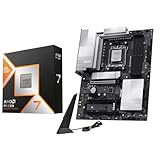
The PRO X870E-P is MSI’s value entry on the X870E platform, with a more conservative VRM and fewer extras than the Tomahawk. You still get PCIe 5.0 for the graphics slot, a PCIe 5.0 M.2 slot, USB4 and Wi-Fi 7. It is a good fit for a first 9800X3D build where you want the premium chipset but do not need much more than one fast SSD and a second drive.
- Chipset: AMD X870E, ATX, AM5, DDR5
- Storage: three M.2 slots, one PCIe 5.0 x4 and two PCIe 4.0 x4
- Slots: one PCIe 5.0 x16 and one PCIe 4.0 x16
- Networking: Wi-Fi 7, 5 Gb LAN, Bluetooth 5.4
- USB4 40 Gbps on the rear panel
Pros
- X870E feature set at a restrained level
- Wi-Fi 7 and 5 Gb LAN included
Cons
- Only one Gen5 M.2 slot
- Less robust power stage than the Tomahawk
It is the sensible step down from the Tomahawk for buyers who still want USB4.
A 9800X3D does not stress the power stage the way a 16-core chip would, so the lighter VRM is not a practical limit for gaming. Treat it as the board for people who value the X870E label and the extra rear connectivity but do not plan a heavy multi-drive setup. Check the rear panel layout against the devices you own, since USB4 only helps if you have a compatible dock or drive.
4. Gigabyte B850 Gaming X bundle – Best for a simple three-slot B850 build

The Gigabyte B850 Gaming X is a no-nonsense ATX board with a 12+2+2 phase power design, three M.2 slots and a PCIe 5.0 x16 slot. The mainstream Gigabyte retail version is documented with Wi-Fi 6E and 2.5 Gb LAN, so wireless is a step behind the MSI and ASRock choices. For a wired gaming desktop, that rarely matters.
- Chipset: AMD B850, ATX, AM5, DDR5
- Storage: three M.2 slots, one PCIe 5.0 and two PCIe 4.0
- Power: 12+2+2 digital phases
- Networking: 2.5 Gb LAN; Wi-Fi 6E on the standard retail model (confirm on the listing)
- All M.2 slots covered by heatsinks per Gigabyte
Pros
- Heatsinks on all three M.2 slots
- Straightforward layout with a tool-free-style latch design
Cons
- Older Wi-Fi standard than the Wi-Fi 7 boards
- Fewer M.2 slots than the ASRock
It is the board to pick if you value the Gigabyte layout and plan to use a wired connection.
The three M.2 slots with heatsinks cover a typical gaming setup: a fast boot drive, a second drive for games and one spare. If you want Wi-Fi 7, look at the MSI or ASRock choices instead. Confirm the Wi-Fi version on the product page, because some retail listings for this model are worded differently from the manufacturer specification.
5. MSI B850 Gaming Plus WiFi bundle – Best for Wi-Fi 7 on a mainstream budget

The B850 Gaming Plus WiFi is the budget-friendly way to get Wi-Fi 7 and a 5 Gb LAN port on a B850 board. It has a PCIe 5.0 x16 slot and a PCIe 5.0 M.2 slot, plus two more M.2 slots at Gen4 speeds. One quirk is the video output: it offers a DisplayPort but no HDMI, so check your monitor cable if you plan to use the integrated graphics at first.
- Chipset: AMD B850, ATX, AM5, DDR5
- Storage: three M.2 slots, one PCIe 5.0 x4, one PCIe 4.0 x4, one PCIe 4.0 x2
- Networking: Wi-Fi 7 and 5 Gb LAN
- Rear USB: 10 Gbps Type-C ports plus Type-A ports
- Single DisplayPort output and no HDMI
Pros
- Wi-Fi 7 and 5 Gb LAN at a mainstream tier
- Gen5 M.2 slot included
Cons
- No HDMI port for the integrated graphics
- Simpler power design than the ASRock and MSI X870E boards
Choose it over the Gigabyte B850 Gaming X if you want the faster wireless and network ports.
It works well for a living-room or desk build where the board does not need to impress, only to run a fast processor reliably. The trade-offs are the single DisplayPort output and the lighter power stage, neither of which affects a discrete-graphics gaming setup. Fill the Gen5 M.2 slot first and use the Gen4 slots for the library drive.
6. ASRock B850 Steel Legend bundle – Best for M.2 count and power delivery at the B850 tier

The Steel Legend leads the B850 boards for storage and power delivery. It has four M.2 slots (one PCIe 5.0 and three PCIe 4.0), Wi-Fi 7, a 14+2+1 phase VRM rated at 80 A per stage and an HDMI output, which is useful for troubleshooting without a graphics card. The listing also mentions DDR5 at 8,000-plus MT/s as an overclock rating, though the 9800X3D itself is happiest around 6,000.
- Chipset: AMD B850, ATX, AM5, DDR5
- Storage: four M.2 slots (one Gen5, three Gen4) and four SATA ports
- Networking: 2.5 Gb LAN and Wi-Fi 7
- Power: 14+2+1 phases with 80 A power stages
- Slots: PCIe 5.0 x16 and a PCIe 4.0 x16
Pros
- Four M.2 slots and strong VRM for a B850 board
- HDMI output on the rear panel
Cons
- 2.5 Gb LAN trails the 5 Gb port on the MSI boards
- No USB4 on this tier
Compared with the MSI B850 Gaming Plus, it offers one more M.2 slot and a stronger VRM.
It also suits builders who like to debug a new system with onboard graphics, because the HDMI output on the rear panel works with the 9800X3D integrated graphics. Remember that the integrated graphics are basic and meant for setup, so plan to install a discrete graphics card. Keep the second PCIe slot in mind when you fill all four M.2 slots, since one M.2 position shares lanes with it.
Specs Compared
| Bundle | Chipset | M.2 slots | Wireless / LAN | GPU slot | Notes |
|---|---|---|---|---|---|
| Gigabyte B850 Gaming | B850 | Confirm on listing | Confirm on listing | Confirm on listing | Exact model not stated |
| MSI MAG X870E Tomahawk | X870E | 4 (2x Gen5) | Wi-Fi 7, 5 Gb LAN | PCIe 5.0 x16 | USB4, ATX |
| MSI PRO X870E-P | X870E | 3 (1x Gen5) | Wi-Fi 7, 5 Gb LAN | PCIe 5.0 x16 | USB4, ATX |
| Gigabyte B850 Gaming X | B850 | 3 (1x Gen5) | Wi-Fi 6E (confirm), 2.5 Gb LAN | PCIe 5.0 x16 | 12+2+2 VRM, ATX |
| MSI B850 Gaming Plus WiFi | B850 | 3 (1x Gen5) | Wi-Fi 7, 5 Gb LAN | PCIe 5.0 x16 | DisplayPort only, ATX |
| ASRock B850 Steel Legend | B850 | 4 (1x Gen5) | Wi-Fi 7, 2.5 Gb LAN | PCIe 5.0 x16 | 14+2+1 VRM, HDMI |
How We Chose These
We worked from the six bundle listings in the current catalog and checked each board against manufacturer specification pages, retailer fields and published reviews. The criteria were chipset tier, M.2 slot count and generation, PCIe 5.0 graphics support, wireless and wired networking, power delivery, rear connectivity and documentation clarity. We did not run any benchmarks, so we make no performance claims for the processor itself beyond AMD’s published specifications. Where a listing did not name the exact model, we describe the class of board and ask you to confirm details on the product page. We also read each product listing name closely, noted anything that looked inconsistent between sources, and kept the wording cautious wherever a specification could not be verified from a manufacturer page.
What to Look For
What the Ryzen 7 9800X3D needs from a board
AMD lists the 9800X3D as an 8-core, 16-thread Zen 5 processor with 96 MB of L3 cache stacked under the compute die, a 120 W default TDP and a boost clock up to 5.2 GHz. It uses the AM5 socket and DDR5 memory only. The chip does not come with a cooler, so budget for one separately. Because its power draw is moderate, any of these boards can feed it comfortably; the board decision is about extras, not whether the chip will run.
Chipset tiers: X870E, X870 and B850
X870E sits at the top of the AM5 range and requires PCIe 5.0 for both the graphics slot and at least one storage slot, plus USB4 at 40 Gbps. B850 sits below it, still offers a PCIe 5.0 graphics slot and Gen5 storage on current boards, and drops USB4 in most designs. For a gaming machine with one graphics card and one or two SSDs, B850 delivers the same gaming experience as X870E, so only step up when you will use the extra ports.
M.2 slots, lane sharing and the second drive
Count the M.2 slots and note their speeds. A Gen5 slot connected to the CPU is the fast one; others often run at Gen4 through the chipset. On boards like the Tomahawk, USB4 and a second Gen5 slot share bandwidth, so using both may reduce speeds. Read the manual’s lane-sharing table before planning a multi-drive layout, and put your fastest drive in the CPU-connected slot.
BIOS support and what a bundle changes
The 9800X3D needs a BIOS that recognizes Zen 5 X3D parts. Boards built on 800-series chipsets are designed for Ryzen 9000, but firmware versions vary by production batch. A bundle often arrives with the board prepared for the processor, yet you should still check the board’s support page after assembly. Update the BIOS before enabling memory profiles, because AMD and board makers regularly release AGESA updates that improve compatibility and stability for X3D chips.
Worked example: matching board to build
Say you plan one 2TB Gen5 SSD now and a second Gen4 drive next year, with a PCIe 5.0 graphics card and a wired connection. A B850 board with three M.2 slots and a Gen5 GPU slot covers every need, and you can skip USB4. If you add a USB4 dock and a second Gen5 drive, the Tomahawk becomes the better match. For a living-room PC with no Ethernet cable, prefer a Wi-Fi 7 board so the wireless link does not hold back your downloads.
Cooling, memory and power supply pairing. A bundle covers only two parts of the build, so plan the rest. The 9800X3D runs warm because the cache sits under the compute die, so pair it with a cooler rated for at least 200 W of heat, such as a good dual-tower air cooler or a 240 mm or 360 mm liquid cooler. For memory, a 32GB DDR5-6000 CL30 kit is the usual target. For the power supply, a quality 750 W unit comfortably covers a gaming build with a high-end graphics card, and a more efficient unit helps keep noise down. Check the graphics card maker for its recommended wattage.
Wi-Fi, LAN and I/O details that matter day to day. Wi-Fi 7 supports wider channels and the 6 GHz band, but it needs a compatible router to show a benefit. A 5 Gb LAN port helps if your router and switch also support speeds above 2.5 Gb, and costs nothing extra if they do not. Count rear USB ports for headsets, controllers and capture devices, and note which ports run at 10 Gbps. Front-panel USB-C needs a motherboard header and a case with a matching connector, so check both before you buy.
Questions
Do I need X870E for the 9800X3D?
No. The processor works on B850 and X870 boards too, and its gaming performance does not depend on the chipset tier. X870E adds extra connectivity such as USB4 and more PCIe 5.0 lanes.
Does the 9800X3D come with a cooler?
No. AMD does not include one with this processor, so you must buy a cooler that supports the AM5 socket. A mid-range tower cooler or a 240 mm AIO is typically sufficient.
Is DDR5-6000 the right memory speed?
For Ryzen on AM5, DDR5-6000 with low CAS latency is a common target. Faster kits are listed for these boards as overclocks but may not give a gaming benefit.
Will my existing DDR4 memory work?
No. AM5 uses DDR5 only, so you need new memory. Buy a matched two-module kit for dual channel.
Do these bundles include memory or storage?
The listings describe a processor and motherboard bundle, not memory, storage or a cooler. Confirm the exact contents on the product page.
Which board is best for a small upgrade path?
The ASRock B850 Steel Legend offers four M.2 slots at a lower tier, and the MSI Tomahawk offers the most expansion overall. Either leaves room to add drives later.
Update History
- October 14, 2026 – Initial publication; product set drawn from current catalog listings.
- Check the product page for current specifications and availability before buying.
Sources
- Manufacturer product and specification pages for MSI, ASRock, Gigabyte and AMD
- Retailer listing titles and specification fields
- Published motherboard reviews for M.2 slot layout and lane sharing
- PCI-SIG interface generation definitions for PCIe 4.0 and 5.0









