
The Ryzen 7 7800X3D remains one of the finest gaming processors you can buy, thanks to its generous 3D V-Cache that boosts frame rates in demanding titles. To get the most from it, you need a motherboard that delivers clean power, solid connectivity, and stable memory support. This guide rounds up the best motherboard choices for the Ryzen 7 7800X3D across every budget and use case.
- Top Motherboard Picks for Ryzen 7 7800X3D
- Chipset Choices for the Ryzen 7 7800X3D
- Power Delivery and Thermals
- Connectivity Worth Checking
- First Boot and BIOS Updates
- Which One Should You Buy?
- Cooling and Case Considerations
- Troubleshooting a Build That Will Not Boot
- Common Mistakes When Choosing a 7800X3D Motherboard
- Frequently Asked Questions
- Related Articles
- Related Guides
As an Amazon Associate I earn from qualifying purchases.
As an Amazon Associate we earn from qualifying purchases at no extra cost to you.


🛒 Best Price Today on Amazon
Prime members get fast, free shipping on everything above, plus member-only deals. New members get a 30-day free trial — cancel anytime.
Top Motherboard Picks for Ryzen 7 7800X3D
| Product | Best For | Standout Feature | Rating |
|---|---|---|---|
| ASUS ROG Strix X670E-E Gaming | High-end gaming builds | Robust VRM and PCIe 5.0 | |
| MSI MAG B650 Tomahawk WiFi | Best overall value | Strong VRM at a fair price | |
| Gigabyte B650E Aorus Elite AX | Future PCIe 5.0 upgrades | PCIe 5.0 graphics and storage | |
| ASRock B650M Pro RS | Compact micro-ATX builds | Affordable small-form-factor design | |
| ASUS TUF Gaming X670E-Plus WiFi | Durable everyday reliability | Military-grade component build |
Best High-End Motherboard for Ryzen 7 7800X3D
If you want a no-compromise platform, the ASUS ROG Strix X670E-E Gaming pairs beautifully with the Ryzen 7 7800X3D. Its heavy-duty power delivery keeps the chip stable, and the X670E chipset provides full PCIe 5.0 for both your graphics card and NVMe storage. You also get abundant USB ports, high-speed networking, and generous heatsinks. While the 7800X3D does not overclock in the traditional sense, this board’s clean power helps it hold peak boost clocks during long gaming sessions. Pair it with a capable CPU cooler and you have a flagship build.
Best Value Motherboard for Ryzen 7 7800X3D
For most builders, a premium X670E board is overkill. The MSI MAG B650 Tomahawk WiFi offers nearly everything the 7800X3D needs at a fraction of the cost. Its VRM is more than strong enough for this efficient chip, and it includes Wi-Fi, solid rear I/O, and multiple M.2 slots. The B650 chipset skips PCIe 5.0 graphics support, which has almost no gaming impact today, making this a smart place to save money for a better graphics card instead. It is our top all-round recommendation.
Best Motherboard for Ryzen 7 7800X3D Future Upgrades
Builders who want longevity should consider the Gigabyte B650E Aorus Elite AX. The B650E chipset adds PCIe 5.0 for the primary graphics slot and a fast NVMe slot, giving you room to adopt next-generation components down the road. AM5 as a platform is supported for years, so a forward-looking board keeps your options open when it is time to drop in a newer processor. Combine it with quality DDR5 memory to unlock the 7800X3D’s full potential.
Best Compact Motherboard for Ryzen 7 7800X3D
Small-form-factor fans can build a potent 7800X3D system with the ASRock B650M Pro RS. This micro-ATX board fits smaller cases while still providing adequate power delivery for the efficient X3D chip, which runs cooler than standard Ryzen parts. You get dual M.2 slots and modern connectivity without paying for features you will not use. A compact build like this pairs well with a mid-tower or smaller PC case and a right-sized power supply.
What to Look for in a Ryzen 7 7800X3D Motherboard
When choosing a motherboard for the Ryzen 7 7800X3D, prioritize a capable VRM, EXPO memory support for easy DDR5 tuning, and at least one fast M.2 slot. Because the chip is locked for overclocking, you do not need the most extreme boards, but stable power still helps maintain boost clocks. Wi-Fi, USB-C, and a quality audio codec round out a comfortable build. Always update to the latest BIOS for the best 7800X3D compatibility, and confirm your chosen power supply matches your components.
BIOS and Memory Tips for Ryzen 7 7800X3D
To get peak performance, enable your memory’s EXPO profile in the BIOS, which sets the correct speed and timings automatically. DDR5-6000 is the sweet spot for Ryzen X3D chips, balancing high bandwidth with stable infinity fabric timing. Keeping your BIOS current also fixes early platform quirks and improves boot times. Good memory tuning, combined with a strong board and effective case airflow, ensures your Ryzen 7 7800X3D delivers the gaming performance it is famous for.
Chipset Choices for the Ryzen 7 7800X3D
The 7800X3D uses the AM5 socket, which means DDR5 memory only and a choice among several chipset tiers. The processor itself is an eight-core, 16-thread chip with 96MB of L3 cache, a 120W TDP, and a 162W package power limit, so even a mid-tier board has plenty of power headroom. What changes between tiers is expansion, not raw gaming speed.
| Chipset | CPU overclocking | PCIe 5.0 | Best suited to |
|---|---|---|---|
| A620 | No, memory tuning only | None | Entry-level builds with simple needs |
| B650 | Yes | Some boards add a PCIe 5.0 M.2 slot | Most gaming builds |
| B650E | Yes | Storage slot required, graphics slot depends on the board | Builds that want a faster GPU slot later |
| X670E | Yes | Up to 24 lanes of PCIe 5.0 overall | Many drives, many USB ports, heavy expansion |
For a gaming-focused chip, the PCIe generation of the GPU slot rarely changes frame rates today, so the extra spend on premium chipsets usually goes to connectivity and board quality rather than performance.
Power Delivery and Thermals
A 162W package limit is modest for a modern platform, and the chip’s maximum junction temperature is listed at 89 degrees Celsius. The practical consequence is that a board with a respectable heatsinked power stage is enough, while extreme VRM designs add expense this processor is unlikely to use.
The 7800X3D does not offer a traditional multiplier overclock. Tuning usually focuses on memory, with the Curve Optimizer undervolting feature available on boards that expose it. A620 boards omit CPU overclocking entirely, so skip that tier if you plan to adjust any CPU settings.
Connectivity Worth Checking
M.2 Slots and Lane Sharing
Boards differ in how many M.2 slots run at full speed. On some models, populating a second or third slot disables a SATA port or drops a slot to a lower speed, and the manual states exactly which combinations apply. Count the drives you plan to install now and later.
Networking and USB
Look for built-in Wi-Fi if the PC is far from the router, and note which USB ports are rear and which are front-panel headers. Cases with USB-C on the front panel need a matching motherboard header, and not every board has one.
Form Factor and Case Fit
ATX boards give the most slots, micro-ATX saves space with fewer expansion options, and mini-ITX suits small cases but usually has a single M.2 slot or two. The compact option in this roundup is the right fit only if the case is rated for that form factor.
First Boot and BIOS Updates
- Check the board’s CPU support list for the minimum BIOS version that recognizes the 7800X3D.
- If the board ships with an older BIOS, use the manufacturer’s BIOS Flashback feature, if present, to update without a working CPU.
- Install the latest stable BIOS, because early versions of AM5 firmware had stability issues that later releases addressed.
- Enable the EXPO memory profile so the DDR5 kit runs at its rated speed. AMD’s official specification covers up to DDR5-5200 with two modules, and EXPO profiles go beyond it.
- Re-check temperatures and memory stability after enabling EXPO.
Which One Should You Buy?
| If you… | Choose… |
|---|---|
| Want many M.2 slots, strong power delivery, and a polished feature set | Best High-End Motherboard for Ryzen 7 7800X3D |
| Want a solid gaming base without paying for extras | Best Value Motherboard for Ryzen 7 7800X3D |
| Plan to swap in a newer GPU or faster storage later | Best Motherboard for Ryzen 7 7800X3D Future Upgrades |
| Are building in a small case | Best Compact Motherboard for Ryzen 7 7800X3D |
Cooling and Case Considerations
AMD kept the AM5 cooler mounting layout compatible with AM4, so many existing coolers fit with the proper bracket. A quality tower or a 240mm liquid cooler is usually enough for a 120W-class processor. Boards with large heatsinks around the CPU socket can restrict clearance for very wide air coolers, so check the cooler’s stated width against the first memory slot.
Troubleshooting a Build That Will Not Boot
- Long first boot: AM5 systems often spend several minutes training memory the first time they start, and a blank screen during this period is commonly reported as normal.
- Debug lights or codes: Many boards show a small indicator for CPU, memory, GPU, or boot device. Reseat the part named by the lit indicator.
- No display output: Plug the monitor into the graphics card, not the motherboard, and confirm the card has its power cables attached.
- Repeated restarts after a BIOS change: Clear the CMOS using the board’s button or jumper, then reapply the memory profile.
Common Mistakes When Choosing a 7800X3D Motherboard
- Buying an A620 board and then wanting CPU tuning options.
- Paying for a premium chipset to chase a gaming gain the CPU cannot deliver.
- Assuming a micro-ATX or mini-ITX board will fit a case without checking supported sizes.
- Pairing it with DDR4. AM5 boards only accept DDR5.
- Leaving the BIOS outdated after install.
- Forgetting that using four memory modules lowers the officially supported speed.
Frequently Asked Questions
Do I need an X670E motherboard for the Ryzen 7 7800X3D?
No, an X670E board is not required for the Ryzen 7 7800X3D. A quality B650 board like the MSI Tomahawk provides all the power and features this efficient chip needs, and it saves money you could spend on a better graphics card or faster memory instead.
Can you overclock the Ryzen 7 7800X3D?
The Ryzen 7 7800X3D has a locked multiplier, so traditional overclocking is not possible, but you can enable Precision Boost Overdrive and Curve Optimizer for modest gains. The bigger performance lever is fast DDR5-6000 memory with an EXPO profile, which any capable AM5 motherboard supports.
What memory speed is best for the Ryzen 7 7800X3D?
DDR5-6000 with tight timings is the recommended sweet spot for the Ryzen 7 7800X3D. It aligns well with the infinity fabric clock for optimal latency, and most quality AM5 motherboards support this speed easily by enabling the EXPO profile in the BIOS.
Does the Ryzen 7 7800X3D need a strong VRM?
The 7800X3D is an efficient, low-power chip, so it does not demand an extreme VRM, but a decent power stage helps it hold boost clocks steadily under load. Mid-range B650 and X670 boards all provide more than enough power delivery for reliable everyday operation.
Top picks from this guide
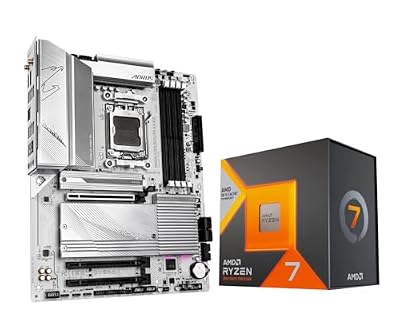 INLANDAMD 7800X3D Processor with GIGABYTE B650 AORUS Elite AX ICE…$570 \xc2\xb7 99/100
 GIGABYTEGIGABYTE B650 AORUS Elite AX AMD AM5 ATX Motherboard, Support…$160 \xc2\xb7 98/100
 GIGABYTEGIGABYTE B850 AORUS Elite WIFI7 AMD AM5 ATX Motherboard, Support…$222 \xc2\xb7 97/100
 Micro CenterMicro Center AMD 7800X3D Processor with ASUS TUF Gaming B850-E…$570 \xc2\xb7 95/100








