
- Top Pick: ZYNEEX Prebuilt Gaming Desktop PC, AMD Ryzen 5 5500, GeForce RTX 3050 6GB,16GB DDR4 3200MHz RAM, 1TB NVMe SSD, ARGB Air Cooling, Wi-Fi,Tower Computer for Gaming, Streaming, Editing
- Best Value: TENLAMP G10 Creator Audio Mixer Bundle with Microphone for Streaming
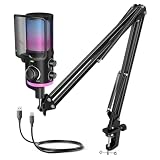
- Premium Choice: FIFINE AM6T Gaming USB Condenser Mic for PC
Putting together a streaming rig in 2026 is a balancing act between gaming performance and encoding muscle — two jobs running at once and fighting over CPU, GPU, and RAM. Modern NVIDIA RTX 50-series cards have basically killed the CPU encoding bottleneck with NVENC AV1 hardware encoding, so you can push clean 1440p/60fps streams with almost no performance cost. This guide covers the whole hardware stack for new and seasoned Twitch/YouTube streamers.
As an Amazon Associate we earn from qualifying purchases at no extra cost to you.







| Component | Product | Price | Streaming Benefit |
|---|---|---|---|
| PC | ZOTAC MEK RTX 5070 Ti | $2,399 | NVENC AV1 + strong gaming FPS |
| Monitor | ASUS ROG Strix 27″ OLED | $549 | Color-accurate OLED for production |
| Keyboard | HyperX Alloy Core RGB | $32 | Reliable, clean on-cam appearance |
| Mouse | Logitech G305 Wireless | $30 | Cable-free desk for clean stream setup |
| Headset | HyperX Cloud II | $41 | Good mic quality for open mic use |
🛒 Best Price Today on Amazon
Prime members get fast, free shipping on everything above, plus member-only deals. New members get a 30-day free trial — cancel anytime.
Start 30-Day Prime Free Trial →See Today’s Amazon DealsWhat Makes a PC Good for Streaming in 2026?
The three pillars of streaming performance: (1) GPU NVENC encoder — RTX 50-series NVENC AV1 puts out near-lossless 1440p/60fps streams at 6000–8000 Kbps while sitting under 2% GPU utilization. That’s a generational jump past the X264 software encoding that used to demand a second streaming PC. (2) RAM capacity and speed — 32GB DDR5 minimum to stream and game together, since OBS Studio + game + browser/overlays eat 14–18GB. (3) CPU multi-thread grunt — for CPU-hungry games that lean on a dedicated streaming thread setup, a 12-16 core CPU is the way to go.
Single-PC vs Dual-PC Streaming in 2026
NVIDIA’s NVENC AV1 encoder on the RTX 50-series has essentially retired the dual-PC streaming setup for most people. AV1 at 8000 Kbps 1440p/60fps draws under 2% GPU utilization on an RTX 5070 Ti or better — leaving the other 98% for the game. A dual-PC rig only adds up if: (a) you’re streaming 4K and want premium encode quality, (b) your viewers are on a 4K platform and expect ultra quality, or (c) you’re running extra streaming services at the same time.
Streaming Setup — Component Breakdown
PC: ZOTAC MEK RTX 5070 Ti 16GB
The ZOTAC MEK RTX 5070 Ti is the streaming gaming PC to beat in 2026. The RTX 5070 Ti puts up strong 1440p gaming while its NVENC AV1 encoder handles high-quality stream encode at the same time. The AMD Ryzen CPU in the MEK has enough multi-core for OBS Studio’s scene work, browser-source rendering, and game capture. With 16GB GDDR7, the RTX 5070 Ti juggles gaming and GPU-accelerated video work without bumping into VRAM limits.

ZOTAC MEK Gaming PC Desktop, Ryzen 7 9700X, NVIDIA GeForce RTX 5070 Ti 16GB | 32GB DDR5, 1TB NVMe SSD, 750W 80+ Gold PSU, WiFi 6E, Bluetooth 5.3, Windows 11 Pro, GDDR7, up to 5.5GHz




As an Amazon Associate we earn from qualifying purchases. Product prices and availability are accurate as of the date/time indicated.
Monitor: ASUS ROG Strix 27″ 1440P OLED (XG27AQDMG)
For streamers who also do content review, thumbnails, and video editing, the ASUS ROG Strix OLED brings a color-accurate panel that pulls double duty nicely. The OLED’s wide color gamut (DCI-P3 coverage) keeps color review honest when you’re cutting stream clips or building YouTube thumbnails. The 1440P resolution at 240Hz means smooth gaming plus great visual fidelity for production work. The OLED’s infinite contrast also makes dark game scenes look a lot better on stream.

ASUS ROG XG27AQDMG 27 Inch 1440p 240Hz Glossy OLED Gaming Monitor | Custom Heatsink, Anti-Flicker, Uniform Brightness, 0.03ms, G-SYNC Compatible, 99% DCI-P3, for PS5 and Xbox


As an Amazon Associate we earn from qualifying purchases. Product prices and availability are accurate as of the date/time indicated.
Audio for Streaming: Upgrade Recommendations
The HyperX Cloud II headset at $41 comes with a detachable mic that’s fine for stream audio when you’re starting out. As the channel grows, stepping up to a dedicated XLR condenser (Blue Yeti, AT2020) or a USB mic noticeably lifts production quality — viewer retention on Twitch and YouTube tracks closely with audio quality. Set aside $80–$150 for a mic upgrade as your first quality investment after the base build.

HyperX Alloy Core RGB – Membrane Gaming Keyboard, Comfortable Quiet Silent Keys with RGB LED Lighting Effects, Spill Resistant, Dedicated Media Keys, Compatible with Windows 10/8.1/8/7 – Black


As an Amazon Associate we earn from qualifying purchases. Product prices and availability are accurate as of the date/time indicated.
OBS Studio Settings for RTX 5070 Ti NVENC AV1
Best OBS Studio settings for NVENC AV1 on the RTX 5070 Ti: Encoder: NVIDIA NVENC AV1 (new). Rate Control: CBR. Bitrate: 6000 Kbps (Twitch max) or 8000 Kbps (YouTube Live). Keyframe Interval: 2. Preset: P5 Slow (Quality). Psycho Visual Tuning: Enabled. Max B-frames: 4. These dial in a 1440p/60fps stream you can’t tell apart from 8,000 Kbps x264 medium, at next to no performance cost.
Frequently Asked Questions
What hardware do I need for a full streaming setup?
Beyond a capable gaming PC with an NVENC-equipped GPU, you need a good microphone, a webcam, proper lighting, and reliable internet. A dedicated mic like a USB condenser dramatically improves audio, while a key light and 1080p webcam make your on-camera presence look professional to viewers.
Should I use one PC or two for streaming?
A single strong PC with NVENC handles gaming and streaming together for most creators and keeps the setup simple. A two-PC configuration offloads encoding entirely for maximum game performance and quality, but it costs more and adds a capture card, so only high-volume streamers usually need it.
What microphone type is best for streaming?
USB condenser or dynamic microphones both work well; dynamic mics reject background noise better for untreated rooms, while condensers capture richer detail in quiet spaces. Pair either with a boom arm and pop filter, since clear audio matters more to viewers than video quality in most streams.
How important is lighting for a stream?
Very. Even a modest key light transforms webcam quality, removing shadows and grain that make cheap cameras look worse than they are. Good, consistent lighting often improves your on-camera appearance more than buying a pricier webcam, so prioritize it early in your streaming setup.
What internet speed do I need to stream reliably?
At least 10Mbps upload supports solid 1080p60 streaming with headroom, and more is better for higher bitrates. Use a wired Ethernet connection rather than Wi-Fi to prevent dropped frames, and check your upload consistency, since stability matters as much as raw speed for a smooth broadcast.
Top picks from this guide
 ZYNEEXZYNEEX Prebuilt Gaming Desktop PC, AMD Ryzen 5 5500, GeForce…$960 \xc2\xb7 99/100
 The Horizon PcsThe Horizon Autherium Dragon RGB I9 RTX Gaming PC ||…$2,900 \xc2\xb7 99/100ZOTACZOTAC MEK Gaming PC Desktop, Ryzen 7 9700X, NVIDIA GeForce…$2,600 \xc2\xb7 98/100
 Abel GamingWebcam Streaming Kit, 1080P Webcam, RGB Mic & LED Light…$80 \xc2\xb7 98/100








